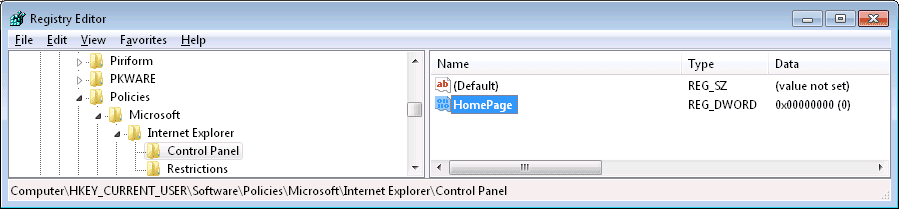
I wanted to reset IE to the default state, so I used FixIT from the friggin' Microsoft site. However, it locked my Internet Options so that I cannot change the home page.
Now, I have change the homepage anyway via the command:
reg add "hkcu\software\microsoft\internet explorer\main" /v "Start Page" /t REG_SZ /d "Google" /f
However, I want to restore my control over the Internet options, which are still greyed out. See the attached graphic (the graphic is prior to my reg add above.) I have tried browsing settings via gpedit to see what MSFIXIT F'xd up but I don't see what controls this.
Now, I have change the homepage anyway via the command:
reg add "hkcu\software\microsoft\internet explorer\main" /v "Start Page" /t REG_SZ /d "Google" /f
However, I want to restore my control over the Internet options, which are still greyed out. See the attached graphic (the graphic is prior to my reg add above.) I have tried browsing settings via gpedit to see what MSFIXIT F'xd up but I don't see what controls this.
Attachments

Last edited:
My Computer
At a glance
Win 7 Pro 64-bitIntel Core i516 GB Dell, 6 GB ToshibaIntel crap on both but Dell also has nVidia G...
- Computer type
- Laptop
- Computer Manufacturer/Model Number
- Dell Insprion 7559 next to a Toshiba Portege
- OS
- Win 7 Pro 64-bit
- CPU
- Intel Core i5
- Motherboard
- Intel
- Memory
- 16 GB Dell, 6 GB Toshiba
- Graphics Card(s)
- Intel crap on both but Dell also has nVidia GeForce GTX960M
- Sound Card
- RealTek
- Monitor(s) Displays
- internal and external ACER KA270H 27"
- Screen Resolution
- 1920x1080
- Hard Drives
- SSD 256 GB plus numerous WD Red or Purple on USB3 docks. Used to buy a lot of Seagate but tossed them the second time I got unrecoverable disc corruption in the midst of use.
- Keyboard
- Garage Mouse SW and some cheap Amazon China made USB device
- Mouse
- Garage Mouse and some cheap Amazon China made USB device
- Internet Speed
- 50 Mbps (allegedly, depends on server)
- Antivirus
- Defender, Malwarebytes Premium and Kaspersky
- Browser
- IE 11, and Chrome something