

Now here is a question: Picasa has hijacked my scanner button. Whenever I press the button on my scanner, it opens Picasa. I would like it to open Irfanview or my scanner's default application. I have tried the autoplay options, I have reset them to defaults. I have uninstalled/reinstalled Picasa. I have checked with Canon and there is nothing in the scanner's software that will allow me to configure it. There used to be a scanners and cameras applet in control panel, but it is no more with Windows 7. The only way to get my scanner's button back is to uninstall Picasa, which I don't want to do.
Any ideas?
Any ideas?
My Computer
- Computer type
- PC/Desktop
- Computer Manufacturer/Model Number
- Alienware Aurora-R4
- OS
- Windows 7 Professional x64
- CPU
- Intel(R) Core(TM) i7-3820 CPU, 4 Cores, 8 Logical Cores
- Motherboard
- Alienware
- Memory
- 32 GB DDR3 1600
- Graphics Card(s)
- ATI Radeon HD 8950 3GB vDDR5 & ATI Radeon HD 7950 3GB vDDR5
- Sound Card
- Realtek 7.1 Audio
- Monitor(s) Displays
- Dell SP2309W 23 inch
- Screen Resolution
- 2048x1152
- Hard Drives
- 7.3 TB in 4 drives (Raid 0), 2TB NAS backup drive.
- PSU
- 875w
- Case
- ALX Chasis with active venting
- Cooling
- Liquid cooled with active venting and fans.
- Keyboard
- Alienware TactX
- Mouse
- Alienware TactX
- Internet Speed
- 15mb Cable
- Antivirus
- Malwarebytes
- Browser
- Pale Moon (Optimized Mozilla Based)
- Other Info
- http://www.y0himba.net

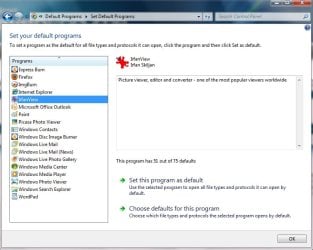
 , the app that came with the scanner (such as it is, I can make it do what I want, albeit with difficulty but less difficulty than using Picasa for this purpose). Well, what do you know? It doesn't take affect, and then if I do a restart, voila! Picasa has grabbed the Start button again. How obnoxious this is! Quoth Google: don't be evil(?!)