MS Office 2013 themes

Victek

New member
Guru
Local time
2:27 PM
Messages
587
A generous friend gave me a copy of Office Pro 2013. After I got it installed though I'm feeling like I wasted my time. I had been using Office 2003 - in particular Outlook 2003 for calendaring - and Outlook 2013 is extremely low contrast, blindingly white. I've changed the theme to Dark Grey which barely makes a difference. Does anyone know if MS plans to offer more color schemes or if there are any third party solutions? If not I will probably remove 2013 and go back to 2003.
 

My Computer

Computer type
PC/Desktop
OS
Windows 7 x64
CPU
Intel Core2 Extreme Q6850 3.00GHz
Motherboard
EVGA 132-CK-NF79
Memory
8 GB
Graphics Card(s)
Radeon R7 260X
Sound Card
Xonar DS
Hard Drives
Hitachi Deskstar 1 tb

My Computer

Computer type
PC/Desktop
Computer Manufacturer/Model Number
Custom assembled by me :}
OS
Win-7-Pro64bit 7-H-Prem-64bit
CPU
i7-5930K 2nd i9-9940x both water blocked VRM's too
Motherboard
ASUS SABERTOOTH X99 2nd ASUS x299 Apex
Memory
Trident-z 3200C14 2nd Trident-z 3600C16
Graphics Card(s)
EVGA 1080ti ftw3 2nd Titan Xp both water blocked
Sound Card
Built-in Realtek
Monitor(s) Displays
1-AOC G2460PG 24"G-Sync 144Hz/ 2nd 1-ASUS VG248QE 24" 144Hz
Screen Resolution
1920 x 1080 144Hz
Hard Drives
2-Samsung M.2 Evo & Evo Plus
2-Samsung 850 EVO 500GB SSD's/ 3-2.5 W.D. Black 1tb-&3-1tb/3-3.5 WD Black 1tb hdd's
PSU
EVGA SuperNOVA 1000-P2 2nd 1200-P2
Case
2-Corsair Obsidian Series 450D Black ATX Mid Tower
Cooling
Custom water loops
Keyboard
Logitech G710+/ 2nd Logitech G910
Mouse
2-RedDragon M901 Perdition 16400 dpi Gaming mouse = wired
Internet Speed
Comcast Ping 19ms 89.31mbps download speed 6.12mbps upload
Antivirus
Malwarebytes Pro/ Superantispyware Pro
Browser
FireFox & Pale moon
Other Info
2nd ASUS X299 Apex/Intel i9-9940x with Custom water loop/7H-Prem-x64/Corsair 450D case/Ram Trident-z 3600C16 4x8gb / Samsung970Evo plus 500gb SSD/Dual ssd EZ swap evo/PSU EVGA SuperNova 1200w-P2 80+Platinum/GPU Titan Xp /8-ML-140 on push-pull on 2-280GTX rads

My Computer

Computer type
PC/Desktop
OS
Windows 7 x64
CPU
Intel Core2 Extreme Q6850 3.00GHz
Motherboard
EVGA 132-CK-NF79
Memory
8 GB
Graphics Card(s)
Radeon R7 260X
Sound Card
Xonar DS
Hard Drives
Hitachi Deskstar 1 tb
many people are saying that office 2013 is very bright. I have it but on my monitor I do not see it because i do not have my monitor on the brightest, but i went to another clients computer who has the same complaint and all we did was lower the brightness in the monitor when he uses office. I know this is a pain but it works
 

My Computer

Computer type
PC/Desktop
Computer Manufacturer/Model Number
Dell Computers
OS
Windows 7 Pro 32/64 bit and Windows 10 Pro 32 Bit/64bit
Memory
4gigs
Graphics Card(s)
AMD Radeon HD and Nvidia
Monitor(s) Displays
Samsung 24". INC 19". Dell 22 ". Dell 17" & 19"
many people are saying that office 2013 is very bright. I have it but on my monitor I do not see it because i do not have my monitor on the brightest, but i went to another clients computer who has the same complaint and all we did was lower the brightness in the monitor when he uses office. I know this is a pain but it works

Yes, that's worth considering, but it may not solve the problem. For one thing the monitor brightness is at a good setting for everything else I do. Also, the problem with Office 2013 apps is not just the "whiteness" but low contrast. The "dark grey" theme adds barely enough contrast to make it tolerable - dimming the monitor may make it worse. Fortunately I don't need to use it much so I may be able to get by. But if necessary I'll remove it and go back to Office 2003. It's pretty sad that 10 year old software actually has better functionality.
 

My Computer

Computer type
PC/Desktop
OS
Windows 7 x64
CPU
Intel Core2 Extreme Q6850 3.00GHz
Motherboard
EVGA 132-CK-NF79
Memory
8 GB
Graphics Card(s)
Radeon R7 260X
Sound Card
Xonar DS
Hard Drives
Hitachi Deskstar 1 tb
Hi there
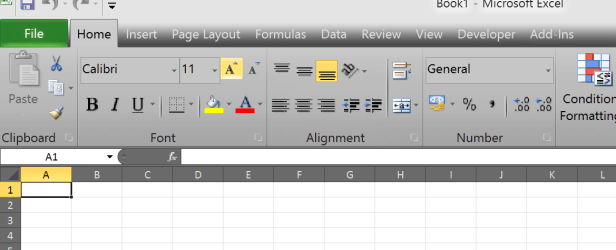
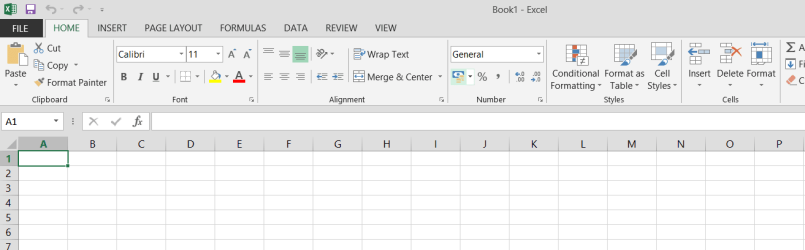
Office 2010 --Much better -- you can also set themes and backgrounds different from that hideous White colour in Office 2013.

For instance I prefer something like this (EXCEL 2010) 1st screenshot - compared with EXCEL 2013 second screenshot

Cheers
jimbo
 

Attachments

  • office2010.png
    office2010.png
    29.4 KB · Views: 10
  • excel1_2103.png
    excel1_2103.png
    13.4 KB · Views: 8

My Computer

Computer type
PC/Desktop
Computer Manufacturer/Model Number
Custom built, several laptops HP/ASUS
OS
Linux CENTOS 7 / various Windows OS'es and servers
CPU
Intel i7 Intel i5
Memory
8GB, 16GB
Graphics Card(s)
On Motherboard
Sound Card
Realtek HD audio
Monitor(s) Displays
Apple Cinema display, Samsung LCD
Screen Resolution
1920 X 1080
Hard Drives
4 X 1TB SATA
Mouse
Toshiba wireless laser
Internet Speed
> 20MB up
Hi there
Office 2010 --Much better -- you can also set themes and backgrounds different from that hideous White colour in Office 2013.

For instance I prefer something like this (EXCEL 2010) 1st screenshot - compared with EXCEL 2013 second screenshot

Cheers
jimbo

Yep, that's exactly my problem. I'd happily downgrade to Office 2010, but it isn't possible as far as I know.
 

My Computer

Computer type
PC/Desktop
OS
Windows 7 x64
CPU
Intel Core2 Extreme Q6850 3.00GHz
Motherboard
EVGA 132-CK-NF79
Memory
8 GB
Graphics Card(s)
Radeon R7 260X
Sound Card
Xonar DS
Hard Drives
Hitachi Deskstar 1 tb
I cannot understand why you do not like the white color, I have it on 3 machines and it does not bother my eyes nor my husbands but we are over 50 yrs of age. Maybe at that age your eyes change so one does see differently. It is interesting cause my son is 40 and he agrees with you guys
 

My Computer

Computer type
PC/Desktop
Computer Manufacturer/Model Number
Dell Computers
OS
Windows 7 Pro 32/64 bit and Windows 10 Pro 32 Bit/64bit
Memory
4gigs
Graphics Card(s)
AMD Radeon HD and Nvidia
Monitor(s) Displays
Samsung 24". INC 19". Dell 22 ". Dell 17" & 19"
I cannot understand why you do not like the white color, I have it on 3 machines and it does not bother my eyes nor my husbands but we are over 50 yrs of age. Maybe at that age your eyes change so one does see differently. It is interesting cause my son is 40 and he agrees with you guys

You are among the fortunate ones. I don't know if there is a correlation with age, but if you google the issue you will see that a great many people are having a problem with the brightness and low contrast of the 2013 UI.
 

My Computer

Computer type
PC/Desktop
OS
Windows 7 x64
CPU
Intel Core2 Extreme Q6850 3.00GHz
Motherboard
EVGA 132-CK-NF79
Memory
8 GB
Graphics Card(s)
Radeon R7 260X
Sound Card
Xonar DS
Hard Drives
Hitachi Deskstar 1 tb
It's similar to looking at a piece of white paper in direct sun light/ Blinding :)
Luckily office 2007 is not bad.
 

My Computer

Computer type
PC/Desktop
Computer Manufacturer/Model Number
Custom assembled by me :}
OS
Win-7-Pro64bit 7-H-Prem-64bit
CPU
i7-5930K 2nd i9-9940x both water blocked VRM's too
Motherboard
ASUS SABERTOOTH X99 2nd ASUS x299 Apex
Memory
Trident-z 3200C14 2nd Trident-z 3600C16
Graphics Card(s)
EVGA 1080ti ftw3 2nd Titan Xp both water blocked
Sound Card
Built-in Realtek
Monitor(s) Displays
1-AOC G2460PG 24"G-Sync 144Hz/ 2nd 1-ASUS VG248QE 24" 144Hz
Screen Resolution
1920 x 1080 144Hz
Hard Drives
2-Samsung M.2 Evo & Evo Plus
2-Samsung 850 EVO 500GB SSD's/ 3-2.5 W.D. Black 1tb-&3-1tb/3-3.5 WD Black 1tb hdd's
PSU
EVGA SuperNOVA 1000-P2 2nd 1200-P2
Case
2-Corsair Obsidian Series 450D Black ATX Mid Tower
Cooling
Custom water loops
Keyboard
Logitech G710+/ 2nd Logitech G910
Mouse
2-RedDragon M901 Perdition 16400 dpi Gaming mouse = wired
Internet Speed
Comcast Ping 19ms 89.31mbps download speed 6.12mbps upload
Antivirus
Malwarebytes Pro/ Superantispyware Pro
Browser
FireFox & Pale moon
Other Info
2nd ASUS X299 Apex/Intel i9-9940x with Custom water loop/7H-Prem-x64/Corsair 450D case/Ram Trident-z 3600C16 4x8gb / Samsung970Evo plus 500gb SSD/Dual ssd EZ swap evo/PSU EVGA SuperNova 1200w-P2 80+Platinum/GPU Titan Xp /8-ML-140 on push-pull on 2-280GTX rads
I cannot understand why you do not like the white color, I have it on 3 machines and it does not bother my eyes nor my husbands but we are over 50 yrs of age. Maybe at that age your eyes change so one does see differently. It is interesting cause my son is 40 and he agrees with you guys

You are among the fortunate ones. I don't know if there is a correlation with age, but if you google the issue you will see that a great many people are having a problem with the brightness and low contrast of the 2013 UI.

Hi there
whether one LIKES it or not IMO is a bit irrelevant. What I think the OP wants to know is why have some of the background UI customisations that were available in previous versions been removed in Office 2013 so there is no choice (the difference between the standard white and grey is almost zero).

I think you'll also see that with the introduction of Office 2013 this has been a CONTANT GRUMBLE and providing the user with a choice of background can't be that difficult.

Also not everybody's eyes work the same -- and as for using Office 2013 OUTDOOR or in bright light -- just forget it.

I get the impression that those guys who designed the UI for office 2013 must have been designing this at the bottom of a deep coalmine with only Miner's lamps for illumination.

Incidentally what are the customisation options for Office 365 like -- any better or worse than Office 2013 or just the same.

Cheers
jimbo
 

My Computer

Computer type
PC/Desktop
Computer Manufacturer/Model Number
Custom built, several laptops HP/ASUS
OS
Linux CENTOS 7 / various Windows OS'es and servers
CPU
Intel i7 Intel i5
Memory
8GB, 16GB
Graphics Card(s)
On Motherboard
Sound Card
Realtek HD audio
Monitor(s) Displays
Apple Cinema display, Samsung LCD
Screen Resolution
1920 X 1080
Hard Drives
4 X 1TB SATA
Mouse
Toshiba wireless laser
Internet Speed
> 20MB up
I cannot understand why you do not like the white color, I have it on 3 machines and it does not bother my eyes nor my husbands but we are over 50 yrs of age. Maybe at that age your eyes change so one does see differently. It is interesting cause my son is 40 and he agrees with you guys

You are among the fortunate ones. I don't know if there is a correlation with age, but if you google the issue you will see that a great many people are having a problem with the brightness and low contrast of the 2013 UI.

Hi there
whether one LIKES it or not IMO is a bit irrelevant. What I think the OP wants to know is why have some of the background UI customisations that were available in previous versions been removed in Office 2013 so there is no choice (the difference between the standard white and grey is almost zero).

I think you'll also see that with the introduction of Office 2013 this has been a CONTANT GRUMBLE and providing the user with a choice of background can't be that difficult.

Also not everybody's eyes work the same -- and as for using Office 2013 OUTDOOR or in bright light -- just forget it.

I get the impression that those guys who designed the UI for office 2013 must have been designing this at the bottom of a deep coalmine with only Miner's lamps for illumination.

Incidentally what are the customisation options for Office 365 like -- any better or worse than Office 2013 or just the same.

Cheers
jimbo

Office 365 is the same as office 2013, the difference are you get more options outside of the office software program, once you pay for office 365 depending on which plan you take ( and understand office 365 is geared toward the business world only) you get the opportunity to download office 2013 and any upgrades from it when you renew each year
 

My Computer

Computer type
PC/Desktop
Computer Manufacturer/Model Number
Dell Computers
OS
Windows 7 Pro 32/64 bit and Windows 10 Pro 32 Bit/64bit
Memory
4gigs
Graphics Card(s)
AMD Radeon HD and Nvidia
Monitor(s) Displays
Samsung 24". INC 19". Dell 22 ". Dell 17" & 19"
I have office 365 but the watered down version where I pay a monthly fee to Microsoft of $6 to put my website and domain on their servers and the usage of their servers for my website email address, amount a few more features, I already have office 2013 so it was not worth it for me to go with the higher plans but I am a reseller for Microsoft to sell office 365 so I am trained in all their plans
 

My Computer

Computer type
PC/Desktop
Computer Manufacturer/Model Number
Dell Computers
OS
Windows 7 Pro 32/64 bit and Windows 10 Pro 32 Bit/64bit
Memory
4gigs
Graphics Card(s)
AMD Radeon HD and Nvidia
Monitor(s) Displays
Samsung 24". INC 19". Dell 22 ". Dell 17" & 19"
I hate to tell you this, but at the same time Windows XP goes off support, it will be the same way with Office 2003
 

My Computer

Computer type
Laptop
Computer Manufacturer/Model Number
Toshiba Satellite C655-S5547
OS
Windows 7 Pro 64bit
CPU
Intel(R) Core(TM) i3-2350M CPU @ 2.30 GHZ
Memory
4.00 GB
Graphics Card(s)
Intel HD Graphiics
Sound Card
Conexant HD Audio
Monitor(s) Displays
Generic PnP Monitor
Screen Resolution
1366 x 768 x 32 bits (4294967296 colors) @ 60 Hz
Hard Drives
TI106321W0B(C:) 450GB
Keyboard
Standard PS/2 Keyboard
Mouse
Synaptics Pointing Device
Internet Speed
51.68 mb/s download and 12.08 mb/s upload as of 6/24/15
Antivirus
Webroot Secure Anywhere
Browser
IE11, Mozilla Firefox 41.1.01, and Google Chrome if I must
I hate to tell you this, but at the same time Windows XP goes off support, it will be the same way with Office 2003

I hat e to tell you but you are absolutely correct, but we were talking about 2013 not 2003:D
 

My Computer

Computer type
PC/Desktop
Computer Manufacturer/Model Number
Dell Computers
OS
Windows 7 Pro 32/64 bit and Windows 10 Pro 32 Bit/64bit
Memory
4gigs
Graphics Card(s)
AMD Radeon HD and Nvidia
Monitor(s) Displays
Samsung 24". INC 19". Dell 22 ". Dell 17" & 19"
Hi there
Anybody using Office 365 -- the thing I wanted to know was "Is the Interface the same horrible one that Office 2013 has" -- not the relative merits or prices of Office 365 vs the rest.

There is a possibility I might have to start using Office 365 at work so I need to "prepare for the worst" !! although Office 2010 is staying on MY machine for as long as possible.

(Supplementary question -- Does Office 365 have all the language packs that Office 2010 for example has).

Cheers
jimbo
 

My Computer

Computer type
PC/Desktop
Computer Manufacturer/Model Number
Custom built, several laptops HP/ASUS
OS
Linux CENTOS 7 / various Windows OS'es and servers
CPU
Intel i7 Intel i5
Memory
8GB, 16GB
Graphics Card(s)
On Motherboard
Sound Card
Realtek HD audio
Monitor(s) Displays
Apple Cinema display, Samsung LCD
Screen Resolution
1920 X 1080
Hard Drives
4 X 1TB SATA
Mouse
Toshiba wireless laser
Internet Speed
> 20MB up
I hate to tell you this, but at the same time Windows XP goes off support, it will be the same way with Office 2003

Why do you think that's important?
 

My Computer

Computer type
PC/Desktop
OS
Windows 7 x64
CPU
Intel Core2 Extreme Q6850 3.00GHz
Motherboard
EVGA 132-CK-NF79
Memory
8 GB
Graphics Card(s)
Radeon R7 260X
Sound Card
Xonar DS
Hard Drives
Hitachi Deskstar 1 tb
Hi there
Anybody using Office 365 -- the thing I wanted to know was "Is the Interface the same horrible one that Office 2013 has" -- not the relative merits or prices of Office 365 vs the rest.

There is a possibility I might have to start using Office 365 at work so I need to "prepare for the worst" !! although Office 2010 is staying on MY machine for as long as possible.

(Supplementary question -- Does Office 365 have all the language packs that Office 2010 for example has).

Cheers
jimbo

I'm an Office 365 University subscriber. Office 365 and Office 2013 are the same software. The difference is in licensing. Office 365 is subscription based aimed at consumers and small businesses while Office 2013 is volume licensed for large corporations and universities. I think universities can also get the "Office 365 Education" subscription instead of the volume license. The good thing about 365 is the integration with other MS acquired products like Skydrive and free 60 minutes of Skype calls per month. In addition, once Office 2016 arrives, people who are subscribed can get the latest Office as long as their subscription hasn't expired yet. "Office 365 doesn't come with language packs like you install with Office 2013" (not 100% sure about the quoted text) since when I want to change the language, I have to go to my Office.com account and download another office setup with a different language, but I have to change my default language on my account to the language I want.

In sum, Office 365 gets the complete "horrible" white blinding UI that Office 2013 has. I'm fine with the light gray theme though.
Regards
 

My Computer

Computer type
Laptop
Computer Manufacturer/Model Number
Dell Optiplex SX270, Lenovo Z470
OS
Windows 7 Professional x64 SP1
CPU
Intel® Pentium® 4 @ 2.26 GHz, Intel Core i7-2670QM @ 2.20 GH
Motherboard
Dell, Lenovo
Memory
512MB Dual channel DDR SDRAM @ 400MHz 2.5-3-3-7, 8 GB DDR3
Graphics Card(s)
Intel 82865G, Nvidia GeForce 520M Graphics
Sound Card
SoundMax Integrated Audio, Integrated HD Audio
Monitor(s) Displays
LG W1952
Screen Resolution
1440x900, 1366 x 768
Hard Drives
40 GB 2.5" IDE 4200 RPM HDD, 500 GB 5400 RPM Sata 1.5 + 32 GB SSD
PSU
Dell 145 Watt, Lenovo 120 Watt Power Adapter
Case
Optiplex SX270 Small Form Factor, Laptop
Cooling
Dell Proprietary Air Cooling, Stock laptop cooling
Keyboard
Dell SK-8125 USB Keyboard
Mouse
Dell PS/2 2 button ball mouse with wheel scroll
Internet Speed
300 Mbit down / 20 Mbps up Time Warner Cable
Antivirus
MSE, Malwarebytes Scanner
Browser
Internet (Aizawa) Explorer 11
Other Info
Running Windows Server 2012 Datacenter on a virtual machine to run Metro Apps.
Hi there
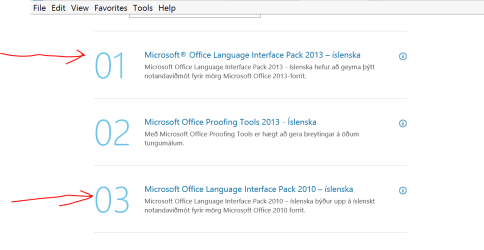
If I can't install the language packs then office 365 is a big NO NO.

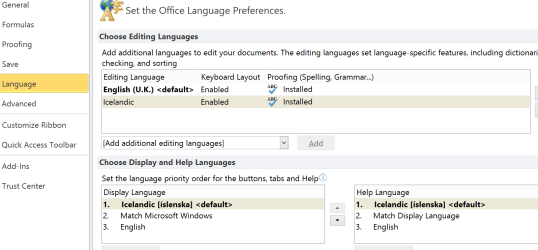
Office 2010 AND 2013 allow installation of the language packs - and in the OPTIONS you can change the display language (note I'm talking here about OFFICE not Windows itself which is another issue).

Change the options in Language when you open any Office component - e.g EXCEL. - A change in any one component changes them in ALL components.

Cheers
jimbo
 

Attachments

  • ice.png
    ice.png
    21.5 KB · Views: 3
  • ice2.png
    ice2.png
    30.7 KB · Views: 3
  • ice3.png
    ice3.png
    38.7 KB · Views: 3

My Computer

Computer type
PC/Desktop
Computer Manufacturer/Model Number
Custom built, several laptops HP/ASUS
OS
Linux CENTOS 7 / various Windows OS'es and servers
CPU
Intel i7 Intel i5
Memory
8GB, 16GB
Graphics Card(s)
On Motherboard
Sound Card
Realtek HD audio
Monitor(s) Displays
Apple Cinema display, Samsung LCD
Screen Resolution
1920 X 1080
Hard Drives
4 X 1TB SATA
Mouse
Toshiba wireless laser
Internet Speed
> 20MB up
Back
Top