MS paint can't save different image format.

unityole

Banned
Local time
1:39 AM
Messages
25
i edit pictures with ms paint and wanted to save it as jpg/png but it says save was interrupted and save was aborted..?

i am using an old version of ms paint on window 7 (vista/xp mspaint) and no i dont wish to go try the new mspaint. i donno if this is related to the database but i remembered clearly with acdsee 5 where it wouldnt let me convert image to jpeg format cause it says database is corrupted or missing, donno if this is why paint cant save to other format.
 

My Computer

Computer Manufacturer/Model Number
ASUS G74SX-BBK7
OS
64bit
CPU
i7 2630QM 2.0 GHz Quad-Core 8 threads
Memory
DDR3 1333 MHZ, 9-9-9-24
Graphics Card(s)
nvidia GTX 560M 2GB DDR5, 128-bit
Screen Resolution
1600x900, 900p
Hard Drives
2x 750 sata drive.
Cooling
DUAL FAN 120 MM

My Computer

Computer type
PC/Desktop
Computer Manufacturer/Model Number
Built 2/11/2011
OS
Windows 7 Pro-x64
CPU
i7-2600 3.4GHz - 3.8GHz Turbo
Motherboard
Intel DH67BL-B3
Memory
8Gb - 2x4GB, Muskin 991770 PC3-1333
Graphics Card(s)
Integrated Intel HD 2000
Sound Card
Integrated Intel 10.1 HD, RealTek ALC892
Monitor(s) Displays
Asus LCD VH222H, Haier HL24XSL2a
Screen Resolution
1920x1080, 1920x1080
Hard Drives
Crucial SSD C300-128Gb,
Western Digital WD5002AALX - 500Gb,
Western Digital WD7501AALS - 750Gb
PSU
Seasonic 650W 80+ Gold Modular
Case
Rosewill Defender
Cooling
Stock CPU, Four 120mm case fans, PCH fan added
Keyboard
Logitech EX100 Y-RBH94 Wireless
Mouse
Logitech EX100 M-RCE95 Wireless
Internet Speed
3.0/1.5 Mbs
Antivirus
Microsoft Security Essentials
Browser
Microsoft Internet Explorer 11
Other Info
Antec Veris Premier-Multimedia IR Station,
Cyber Accoustics-3602 Speakers,
AFT XM-5U Card Reader,
Hauppauge TV-HVR-2250,
Sony LX300 USB Turntable
Older versions of MS Paint are not compatible with Windows 7.

Paint.Net is very similar but with more optons. Give that a try.
You can download it here: Paint.NET - Free Software for Digital Photo Editing

i dont think thats the case

the old ms paint i got was infact from this site which works with window7, and i have used it many times before, just that suddently doesnt save image as any other format other than .bmp
 

My Computer

Computer Manufacturer/Model Number
ASUS G74SX-BBK7
OS
64bit
CPU
i7 2630QM 2.0 GHz Quad-Core 8 threads
Memory
DDR3 1333 MHZ, 9-9-9-24
Graphics Card(s)
nvidia GTX 560M 2GB DDR5, 128-bit
Screen Resolution
1600x900, 900p
Hard Drives
2x 750 sata drive.
Cooling
DUAL FAN 120 MM
I did find several references were folks are using MS Paint from Vista--Not XP. But, there's nearly as many having problems. I'll recant my view of the incompatibility for now but it might be tough getting support for problems.
Did you just load the older version of Paint or did you use the pseudo-install procedure below to include the MUI file?
Also, are you using the 64-bit version or both from Vista?

How to Get the Good Old MS Paint (without Ribbons) Working in Windows 7? - Tweaking with Vishal
 

My Computer

Computer type
PC/Desktop
Computer Manufacturer/Model Number
Built 2/11/2011
OS
Windows 7 Pro-x64
CPU
i7-2600 3.4GHz - 3.8GHz Turbo
Motherboard
Intel DH67BL-B3
Memory
8Gb - 2x4GB, Muskin 991770 PC3-1333
Graphics Card(s)
Integrated Intel HD 2000
Sound Card
Integrated Intel 10.1 HD, RealTek ALC892
Monitor(s) Displays
Asus LCD VH222H, Haier HL24XSL2a
Screen Resolution
1920x1080, 1920x1080
Hard Drives
Crucial SSD C300-128Gb,
Western Digital WD5002AALX - 500Gb,
Western Digital WD7501AALS - 750Gb
PSU
Seasonic 650W 80+ Gold Modular
Case
Rosewill Defender
Cooling
Stock CPU, Four 120mm case fans, PCH fan added
Keyboard
Logitech EX100 Y-RBH94 Wireless
Mouse
Logitech EX100 M-RCE95 Wireless
Internet Speed
3.0/1.5 Mbs
Antivirus
Microsoft Security Essentials
Browser
Microsoft Internet Explorer 11
Other Info
Antec Veris Premier-Multimedia IR Station,
Cyber Accoustics-3602 Speakers,
AFT XM-5U Card Reader,
Hauppauge TV-HVR-2250,
Sony LX300 USB Turntable
You are using an old, unsupported version of a program on a platform it is not supported on and you wonder why it is failing?
 

My Computer

Computer type
PC/Desktop
Computer Manufacturer/Model Number
Alienware Aurora ALX R4
OS
Windows 10 Pro (x64)
CPU
Intel Core i7-3930K (3.2GHz - 4.5GHz)
Motherboard
Alienware Aurora-R4 x79
Memory
4x Samsung 4GB PC3-12800 DDR3 (16GB 1600MHz)
Graphics Card(s)
Nvidia Geforce GTX 690
Sound Card
SteelSeries Siberia Elite
Monitor(s) Displays
Dell UltraSharp U3011
Screen Resolution
2560x1600
Hard Drives
Samsung 850 Pro 256 GB, Seagate 1TB Desktop Hybrid HDD, 2x Western Digital 4TB Green HDD
PSU
875W Some Dell PSU <.<
Case
Alienware Aurora ALX
Cooling
Custom Liquid Cooling (EK CPU & GPU blocks) dual EK 480RAD
Keyboard
Logitech G710+ Mechanical
Mouse
Logitech G700s
Internet Speed
Verizon Fios (50 mbps average)
Other Info
Server: Intel NUC D54250WYK: i5-4250U, 16GB, 256 GB mSATA, Windows Server 2012 R2
You are using an old, unsupported version of a program on a platform it is not supported on and you wonder why it is failing?

no, its not supported but it was working with my vista 32bit, hp window 7 64 bit, and now my asus window 7 64 bit. all worked, and could save images in different format. but just a week ago it wouldnt let me save as any format other than bmp, and around the saem time my ACDSEE 5.0 (i know its old, but it worked) suddenly lost its database, and right after that it can't convert bmp to jpeg format.

and also around that time my imagecut.exe stopped working, i run the exe but nothing loads. probably all related to the database but unsure how to resolve this.

is there anyway i can download the database or save it somewhere or something? seems like i might have delete it by accident cause i remembered ACDSEE said something about corrupted database file and i clicked on permanent delete, and all these happend right after that.
 

My Computer

Computer Manufacturer/Model Number
ASUS G74SX-BBK7
OS
64bit
CPU
i7 2630QM 2.0 GHz Quad-Core 8 threads
Memory
DDR3 1333 MHZ, 9-9-9-24
Graphics Card(s)
nvidia GTX 560M 2GB DDR5, 128-bit
Screen Resolution
1600x900, 900p
Hard Drives
2x 750 sata drive.
Cooling
DUAL FAN 120 MM
Does the ability to not save a file as .JPG/JPEG happen for a JPG/JPEG file you've opened and not changed?
What is the file type of a photo you opened that you can not save as JPG?
Have you recently loaded MS Office? If so, what version?

Forgot: Show the version of MS Paint you're using.
 

My Computer

Computer type
PC/Desktop
Computer Manufacturer/Model Number
Built 2/11/2011
OS
Windows 7 Pro-x64
CPU
i7-2600 3.4GHz - 3.8GHz Turbo
Motherboard
Intel DH67BL-B3
Memory
8Gb - 2x4GB, Muskin 991770 PC3-1333
Graphics Card(s)
Integrated Intel HD 2000
Sound Card
Integrated Intel 10.1 HD, RealTek ALC892
Monitor(s) Displays
Asus LCD VH222H, Haier HL24XSL2a
Screen Resolution
1920x1080, 1920x1080
Hard Drives
Crucial SSD C300-128Gb,
Western Digital WD5002AALX - 500Gb,
Western Digital WD7501AALS - 750Gb
PSU
Seasonic 650W 80+ Gold Modular
Case
Rosewill Defender
Cooling
Stock CPU, Four 120mm case fans, PCH fan added
Keyboard
Logitech EX100 Y-RBH94 Wireless
Mouse
Logitech EX100 M-RCE95 Wireless
Internet Speed
3.0/1.5 Mbs
Antivirus
Microsoft Security Essentials
Browser
Microsoft Internet Explorer 11
Other Info
Antec Veris Premier-Multimedia IR Station,
Cyber Accoustics-3602 Speakers,
AFT XM-5U Card Reader,
Hauppauge TV-HVR-2250,
Sony LX300 USB Turntable
Does the ability to not save a file as .JPG/JPEG happen for a JPG/JPEG file you've opened and not changed?
What is the file type of a photo you opened that you can not save as JPG?
Have you recently loaded MS Office? If so, what version?

Forgot: Show the version of MS Paint you're using.

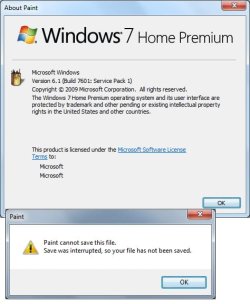
i can open any type of image file that the mspaint could read, read/opening is fine, but when i use save as, or use save then change extension type by selecting allfiles in the drop down menu, it says it wont save. ive screenshoted my version of mspaint i got off from this site, and the error msg i get when i try to save as a format other than .bmp (all of this never happend b4 until the database got corrupted)

i dont have MS office on my computer, i uninstalled it the moment i got my new laptop lol, did not open it, went straight to program and feature and deleted it.
 

Attachments

  • untitled.jpg
    untitled.jpg
    33.9 KB · Views: 15

My Computer

Computer Manufacturer/Model Number
ASUS G74SX-BBK7
OS
64bit
CPU
i7 2630QM 2.0 GHz Quad-Core 8 threads
Memory
DDR3 1333 MHZ, 9-9-9-24
Graphics Card(s)
nvidia GTX 560M 2GB DDR5, 128-bit
Screen Resolution
1600x900, 900p
Hard Drives
2x 750 sata drive.
Cooling
DUAL FAN 120 MM
According to that image, you're using MS Paint from Windows 7. I thought you said you were using an old version. :confused:
Open REGEDIT and go to the key below:
HKEY_LOCAL_MACHINE\SOFTWARE\Wow6432Node\Microsoft\Shared Tools\Graphics Filters\Export\JPEG

Don't change anything--Just report what is listed after the "Path" key.
 

My Computer

Computer type
PC/Desktop
Computer Manufacturer/Model Number
Built 2/11/2011
OS
Windows 7 Pro-x64
CPU
i7-2600 3.4GHz - 3.8GHz Turbo
Motherboard
Intel DH67BL-B3
Memory
8Gb - 2x4GB, Muskin 991770 PC3-1333
Graphics Card(s)
Integrated Intel HD 2000
Sound Card
Integrated Intel 10.1 HD, RealTek ALC892
Monitor(s) Displays
Asus LCD VH222H, Haier HL24XSL2a
Screen Resolution
1920x1080, 1920x1080
Hard Drives
Crucial SSD C300-128Gb,
Western Digital WD5002AALX - 500Gb,
Western Digital WD7501AALS - 750Gb
PSU
Seasonic 650W 80+ Gold Modular
Case
Rosewill Defender
Cooling
Stock CPU, Four 120mm case fans, PCH fan added
Keyboard
Logitech EX100 Y-RBH94 Wireless
Mouse
Logitech EX100 M-RCE95 Wireless
Internet Speed
3.0/1.5 Mbs
Antivirus
Microsoft Security Essentials
Browser
Microsoft Internet Explorer 11
Other Info
Antec Veris Premier-Multimedia IR Station,
Cyber Accoustics-3602 Speakers,
AFT XM-5U Card Reader,
Hauppauge TV-HVR-2250,
Sony LX300 USB Turntable
According to that image, you're using MS Paint from Windows 7. I thought you said you were using an old version. :confused:
Open REGEDIT and go to the key below:
HKEY_LOCAL_MACHINE\SOFTWARE\Wow6432Node\Microsoft\Shared Tools\Graphics Filters\Export\JPEG

Don't change anything--Just report what is listed after the "Path" key.

in my regedit it ends as HKEY_LOCAL_MACHINE\SOFTWARE\Wow6432Node\Microsoft\Shared Tools\

shared tools has 2 folders, msinfo and stationery, no graphics.
should i create one?
 

My Computer

Computer Manufacturer/Model Number
ASUS G74SX-BBK7
OS
64bit
CPU
i7 2630QM 2.0 GHz Quad-Core 8 threads
Memory
DDR3 1333 MHZ, 9-9-9-24
Graphics Card(s)
nvidia GTX 560M 2GB DDR5, 128-bit
Screen Resolution
1600x900, 900p
Hard Drives
2x 750 sata drive.
Cooling
DUAL FAN 120 MM
Ah.... You don't have any Filters for saving the other file types. When you un-installed Office, you removed the filters. These come standard with Office to allow graphic editing. I suspect since you say it was working until ACDSEE died, it must have export filters. I don't use it so you'll probably have to restore ACDSEE back to working order--Possibly an un-install then re-install.
 

My Computer

Computer type
PC/Desktop
Computer Manufacturer/Model Number
Built 2/11/2011
OS
Windows 7 Pro-x64
CPU
i7-2600 3.4GHz - 3.8GHz Turbo
Motherboard
Intel DH67BL-B3
Memory
8Gb - 2x4GB, Muskin 991770 PC3-1333
Graphics Card(s)
Integrated Intel HD 2000
Sound Card
Integrated Intel 10.1 HD, RealTek ALC892
Monitor(s) Displays
Asus LCD VH222H, Haier HL24XSL2a
Screen Resolution
1920x1080, 1920x1080
Hard Drives
Crucial SSD C300-128Gb,
Western Digital WD5002AALX - 500Gb,
Western Digital WD7501AALS - 750Gb
PSU
Seasonic 650W 80+ Gold Modular
Case
Rosewill Defender
Cooling
Stock CPU, Four 120mm case fans, PCH fan added
Keyboard
Logitech EX100 Y-RBH94 Wireless
Mouse
Logitech EX100 M-RCE95 Wireless
Internet Speed
3.0/1.5 Mbs
Antivirus
Microsoft Security Essentials
Browser
Microsoft Internet Explorer 11
Other Info
Antec Veris Premier-Multimedia IR Station,
Cyber Accoustics-3602 Speakers,
AFT XM-5U Card Reader,
Hauppauge TV-HVR-2250,
Sony LX300 USB Turntable
Ah.... You don't have any Filters for saving the other file types. When you un-installed Office, you removed the filters. These come standard with Office to allow graphic editing. I suspect since you say it was working until ACDSEE died, it must have export filters. I don't use it so you'll probably have to restore ACDSEE back to working order--Possibly an un-install then re-install.

i tried that actually. uninstalled acdsee, then reinstalled it but before all these happend, acdsee could convert image format to jpg, unfortunatly after corruption, i reinstalled and it only has few formats to convert to.

any ideas?
 

My Computer

Computer Manufacturer/Model Number
ASUS G74SX-BBK7
OS
64bit
CPU
i7 2630QM 2.0 GHz Quad-Core 8 threads
Memory
DDR3 1333 MHZ, 9-9-9-24
Graphics Card(s)
nvidia GTX 560M 2GB DDR5, 128-bit
Screen Resolution
1600x900, 900p
Hard Drives
2x 750 sata drive.
Cooling
DUAL FAN 120 MM

My Computer

Computer type
PC/Desktop
Computer Manufacturer/Model Number
Built 2/11/2011
OS
Windows 7 Pro-x64
CPU
i7-2600 3.4GHz - 3.8GHz Turbo
Motherboard
Intel DH67BL-B3
Memory
8Gb - 2x4GB, Muskin 991770 PC3-1333
Graphics Card(s)
Integrated Intel HD 2000
Sound Card
Integrated Intel 10.1 HD, RealTek ALC892
Monitor(s) Displays
Asus LCD VH222H, Haier HL24XSL2a
Screen Resolution
1920x1080, 1920x1080
Hard Drives
Crucial SSD C300-128Gb,
Western Digital WD5002AALX - 500Gb,
Western Digital WD7501AALS - 750Gb
PSU
Seasonic 650W 80+ Gold Modular
Case
Rosewill Defender
Cooling
Stock CPU, Four 120mm case fans, PCH fan added
Keyboard
Logitech EX100 Y-RBH94 Wireless
Mouse
Logitech EX100 M-RCE95 Wireless
Internet Speed
3.0/1.5 Mbs
Antivirus
Microsoft Security Essentials
Browser
Microsoft Internet Explorer 11
Other Info
Antec Veris Premier-Multimedia IR Station,
Cyber Accoustics-3602 Speakers,
AFT XM-5U Card Reader,
Hauppauge TV-HVR-2250,
Sony LX300 USB Turntable

My Computer

Computer Manufacturer/Model Number
ASUS G74SX-BBK7
OS
64bit
CPU
i7 2630QM 2.0 GHz Quad-Core 8 threads
Memory
DDR3 1333 MHZ, 9-9-9-24
Graphics Card(s)
nvidia GTX 560M 2GB DDR5, 128-bit
Screen Resolution
1600x900, 900p
Hard Drives
2x 750 sata drive.
Cooling
DUAL FAN 120 MM
ahh sorry for bump but infanview isnt really what im looking for as a solution

i tried using it, it wont let me edit like mspaint can do and cant save image etc..
 

My Computer

Computer Manufacturer/Model Number
ASUS G74SX-BBK7
OS
64bit
CPU
i7 2630QM 2.0 GHz Quad-Core 8 threads
Memory
DDR3 1333 MHZ, 9-9-9-24
Graphics Card(s)
nvidia GTX 560M 2GB DDR5, 128-bit
Screen Resolution
1600x900, 900p
Hard Drives
2x 750 sata drive.
Cooling
DUAL FAN 120 MM
Thanks for the follow up. I know it WILL save images. I use it all the time to resize photos, etc. It wasn't meant to be a replacement for MS Paint. I was hoping that Paint could use the filters from it. Sorry.
 

My Computer

Computer type
PC/Desktop
Computer Manufacturer/Model Number
Built 2/11/2011
OS
Windows 7 Pro-x64
CPU
i7-2600 3.4GHz - 3.8GHz Turbo
Motherboard
Intel DH67BL-B3
Memory
8Gb - 2x4GB, Muskin 991770 PC3-1333
Graphics Card(s)
Integrated Intel HD 2000
Sound Card
Integrated Intel 10.1 HD, RealTek ALC892
Monitor(s) Displays
Asus LCD VH222H, Haier HL24XSL2a
Screen Resolution
1920x1080, 1920x1080
Hard Drives
Crucial SSD C300-128Gb,
Western Digital WD5002AALX - 500Gb,
Western Digital WD7501AALS - 750Gb
PSU
Seasonic 650W 80+ Gold Modular
Case
Rosewill Defender
Cooling
Stock CPU, Four 120mm case fans, PCH fan added
Keyboard
Logitech EX100 Y-RBH94 Wireless
Mouse
Logitech EX100 M-RCE95 Wireless
Internet Speed
3.0/1.5 Mbs
Antivirus
Microsoft Security Essentials
Browser
Microsoft Internet Explorer 11
Other Info
Antec Veris Premier-Multimedia IR Station,
Cyber Accoustics-3602 Speakers,
AFT XM-5U Card Reader,
Hauppauge TV-HVR-2250,
Sony LX300 USB Turntable
If you don't like Paint.NET then you might want to try Gimp. I tried it briefly. I'm not that heavy into graphics editing. The feel of the usage is different than most Windows users are accustomed to. But from what I'm told it can do anything that PhotoShop can do but for free:

GTK+ and GIMP installers for Windows | Free Graphics software downloads at SourceForge.net

Also PhotoFiltre is nice. I've been using it for quite a while. But the free version isn't as powerful as Gimp. If you find an older version of the freebie it still may be able to do layers and that type of stuff.
 

My Computer

Computer Manufacturer/Model Number
HP Media Center
OS
Windows 7 32 bit
CPU
AMD 5200+ dual core
Memory
2 GB
Graphics Card(s)
NVidia GeForce 6150SE 128 MB
Monitor(s) Displays
CRT
Screen Resolution
1280x1024
Hard Drives
500 GB Sata internal :

SIIG USB 3.0 docking stations w/WD Caviar Black 6 Gb/s drives
Keyboard
PS/2
Mouse
PS/2 Wheel Mouse
Other Info
SIIG USB 3.0 PCIexpress card.
Back
Top