Solved MS Paint missing - need to find it

Tharwatime

New member
Member
Local time
6:52 AM
Messages
51
I shut down my computer as normal, everything was working fine, including MS Paint. On booting an hour or so later MS Paint had vanished - not in Accessories, the Taskbar, or in the program folders. Can someone please advise:
1 What might have happened;
2 How I can find the missing program; and
3 Is is possible to download a clean version of MS Paint from a reputable website? If so, which one? TIA
 

My Computer

Computer type
PC/Desktop
Computer Manufacturer/Model Number
Dell Optiplex
OS
Windows 7 Pro 64 bit
CPU
Dual core
Motherboard
n/k
Memory
4 MB
Graphics Card(s)
n/k
Hard Drives
120 MB SSD
USB HDs for data
Antivirus
MSE
Browser
Firefox
Hi Tharwatime, System Restore may be able to restore ms paint from the link below.:D


System Restore
 

My Computer

Computer type
PC/Desktop
Computer Manufacturer/Model Number
ASUS A85XM-A custom build
OS
Windows 10 Pro 64 bit
CPU
AMD A4-5300 APU with Radeon(tm) HD Graphics
Motherboard
ASUSTeK COMPUTER INC. A85XM-A
Memory
8.00 GB
Graphics Card(s)
AMD Radeon HD 7480D
Sound Card
(1) High Definition Audio Device (2) Realtek High Definiti
Monitor(s) Displays
HP W2072a 20 inch Led Backlit Monitor
Screen Resolution
1600 x 900 x 32 bits (4294967296 colors) @ 60 Hz
Hard Drives
TOSHIBA DT01ACA100 SATA Disk Device
Keyboard
Acer
Mouse
Acer
Internet Speed
varies
Antivirus
Windows Defender Antivirus
Browser
Waterfox, Edge

My Computer

Computer type
PC/Desktop
Computer Manufacturer/Model Number
medionl/Aspire 6930G/acer x55a
OS
W7 home premium 32bit/W7HP 64bit/w10 tp insider ring
CPU
E5300 dual core
Motherboard
medion MS7366
Memory
3gb
Graphics Card(s)
Nvidia Geforce 7100 Nforce 630i
Monitor(s) Displays
avixc
Internet Speed
n (isp resticted to 72)
Antivirus
mse/pands
Browser
palemoon
Other Info
Belkin Fd7050 n USB using Railink RT2870 drivers, more upto date
Hi Tharwatime,

what you was doing before shutting down your PC? For the missing Paint, System Restore is the best option, don't download Paint or any MS program in case of disappear. If you have restore point before this happened, use it.
 
Do you have another program that does what Windows 7 Paint does?

If you do it could be set as Default instead of 'Paint'.
Such a program might of removed the link to Windows 7 Paint.

I also agree with Roy. I would verify that the system is NOT infected.
I would do this first. A Restore Point that is infected will not be of help.

Jack
 

My Computer

Computer type
PC/Desktop
Computer Manufacturer/Model Number
Home made Desktop
OS
Windows 10 Pro. 64/ version 1709 Windows 7 Pro/64
CPU
Intel i7-6800K @ 4.3
Motherboard
ASUS X-99 Deluxe II
Memory
Corsair Platinum 16 gig @2400
Graphics Card(s)
EVGA GTX 1070 OC
Monitor(s) Displays
Asus 27" LED LCD/VE278Q
Screen Resolution
1920-1080 or 1280-720 HDMI
Hard Drives
INTEL SSD 730-240 Gb Sata 3.0/
PSU
EVGA Platium 1200W
Case
Phanteks Luxe Tempered Glass 8 fans/ one radiator
Cooling
XSPC/ Water Cooled CPU
Keyboard
Das 4 Professional
Mouse
Logitech M705/MX Anywhere 2-S
Internet Speed
100 mbits
Antivirus
Microsoft Security Essentials/ Malwarebytes Premium 3.0/ SAS
Browser
I.E. 11 default/Firefox/ ISP Time Warner Cable/Spectrum
Other Info
LG BluRay Burner/
Sound system-KLipsch-THX/
Icy Dock ssd Hot Swap bays.
So Win+R>mspaint does not work?
 

My Computer

Computer type
PC/Desktop
Computer Manufacturer/Model Number
Custom Build
OS
Windows 10 Pro x64
CPU
Core2Quad Q9550 @2.83GHz (o/c @3.82GHz)
Motherboard
ASUS P5K Premium WiFi
Memory
8GB (4x2GB DDR2)
Graphics Card(s)
ASUS ROG STRIX GTX1050 Ti O4G Gaming
Sound Card
Creative Soundblaster X-Fi Platinum
Monitor(s) Displays
ACER ED273WIDX 27"
Screen Resolution
1920 x 1080
Hard Drives
SAMSUNG SSD 840 Series 120GB
SAMSUNG 500GB SATA 7200 rpm
2xWD Velociraptor 150GB 10000 rpm
PSU
600W
Case
CoolerMaster Centurion
Cooling
Cooler Master V8
Keyboard
VPRO V700
Mouse
Logitech G602
Antivirus
Norton IS
Browser
Firefox x64
You may have done something without noticing.
Search C: for mspaint.exe. The copy normally used should live in C\windows\system32 but on my PCs there is also a copy in
C:\Windows\winsxs\amd64_microsoft-windows-mspaint_31bf3856ad364e35_6.1.7600.16385_none_ea12784c0842bfc1

If it was me I'd want to know what happened and I'd definitely be checking for malware just in case.
Regardless I'd do a system image restore provided you have made system images. You could try a straight system restore as suggested if you don't have any signs of malware.
 

My Computer

Computer type
PC/Desktop
Computer Manufacturer/Model Number
Own build
OS
Windows 7x64 Home Premium SP1
CPU
Intel i7 2600k
Motherboard
ASUS P8Z68 Deluxe
Memory
G.Skill Ripjaws (DDR3-1600) 2x4GB
Graphics Card(s)
Nvidia GeForce GTS 450; Intel HD Graphics 3000(GT2+)
Monitor(s) Displays
Dell Ultrasharp IPS panel U2311H, Samsung SyncMaster P2350
Screen Resolution
1920x1080
Hard Drives
Samsung 850 Pro SSD 256GB, Samsung SSD 840 120GB, Seagates 1TB Barracuda ST31000528AS x2
PSU
Seasonic M12II 520W
Case
Lian Li Lancool PC-K60
Cooling
Case: 1x120mm, 3x140mm CPU: Hyper 212+
Keyboard
Logitech MK520 (wireless)
Mouse
Logitech MK520
Internet Speed
6-7 Mbps
Antivirus
Norton Security Premium, Malwarebytes on 2 (MSE on 3rd PC)
Browser
FireFox
Other Info
Audio: Logitech Z523 2.1
Thanks for the above advice. I have very high firewall and AV protection, and have run an AV, nothing.

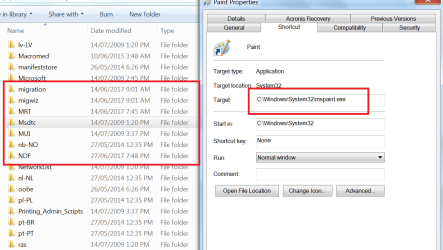
I was looking at images that I had last accessed in MS Paint, and I was amazed to see MS Paint open. I saved the screen shot below in MS Paint. This shows that the program is not where it should be but the property window shows that it is. I cannot understand this!

I have another program, IrfanView, that can be used for images.
 

Attachments

  • Ms Paint missing.png
    Ms Paint missing.png
    114.6 KB · Views: 2

My Computer

Computer type
PC/Desktop
Computer Manufacturer/Model Number
Dell Optiplex
OS
Windows 7 Pro 64 bit
CPU
Dual core
Motherboard
n/k
Memory
4 MB
Graphics Card(s)
n/k
Hard Drives
120 MB SSD
USB HDs for data
Antivirus
MSE
Browser
Firefox
Hi Everybody, In my pc mspaint is located under C:/Windows, SystemWOW64, have to scroll down a fair

way and it just says mspaint.
 

My Computer

Computer type
PC/Desktop
Computer Manufacturer/Model Number
ASUS A85XM-A custom build
OS
Windows 10 Pro 64 bit
CPU
AMD A4-5300 APU with Radeon(tm) HD Graphics
Motherboard
ASUSTeK COMPUTER INC. A85XM-A
Memory
8.00 GB
Graphics Card(s)
AMD Radeon HD 7480D
Sound Card
(1) High Definition Audio Device (2) Realtek High Definiti
Monitor(s) Displays
HP W2072a 20 inch Led Backlit Monitor
Screen Resolution
1600 x 900 x 32 bits (4294967296 colors) @ 60 Hz
Hard Drives
TOSHIBA DT01ACA100 SATA Disk Device
Keyboard
Acer
Mouse
Acer
Internet Speed
varies
Antivirus
Windows Defender Antivirus
Browser
Waterfox, Edge
That right hand side screenshot is showing the properties of the >>shortcut<<
NOT paint in its own right, its distinguished by the shortcut arrow-up

silly question have your searched for mspaint.exe

NOTE
left hand screenshot your looking in the wrong place
mspaint is way down from there and has APPLICATION as its description type, not file folder


Roy
 
Last edited:

My Computer

Computer type
PC/Desktop
Computer Manufacturer/Model Number
medionl/Aspire 6930G/acer x55a
OS
W7 home premium 32bit/W7HP 64bit/w10 tp insider ring
CPU
E5300 dual core
Motherboard
medion MS7366
Memory
3gb
Graphics Card(s)
Nvidia Geforce 7100 Nforce 630i
Monitor(s) Displays
avixc
Internet Speed
n (isp resticted to 72)
Antivirus
mse/pands
Browser
palemoon
Other Info
Belkin Fd7050 n USB using Railink RT2870 drivers, more upto date
Thanks, i'm aware of the aspects of the shortcut. Once I put the shortcut back it worked. I was searching for Paint*.* as in
c:\>dir paint*.* /s
I also searched from the start button. It does not assist that the program is called Paint and the EXE file is mspaint.exe. I was also looking for a Paint folder, and for some reason did not envisage mspaint.exe. No matter, that part is sorted.

I now have the Paint icon on the taskbar and on the desktop. The only step missing is to have Paint in the Accessories folder. Can someone advise how this is done?

It would assist if the default font size was bigger and blacker. Had that been so, or if screens could be zoomed, then I would have seen the \ in the command line on the right side of the screen shot.
 

My Computer

Computer type
PC/Desktop
Computer Manufacturer/Model Number
Dell Optiplex
OS
Windows 7 Pro 64 bit
CPU
Dual core
Motherboard
n/k
Memory
4 MB
Graphics Card(s)
n/k
Hard Drives
120 MB SSD
USB HDs for data
Antivirus
MSE
Browser
Firefox
I was also looking for a Paint folder, and for some reason did not envisage mspaint.exe.
You were told to search for mspaint.exe in post #7.
 

My Computer

Computer type
PC/Desktop
Computer Manufacturer/Model Number
Own build
OS
Windows 7x64 Home Premium SP1
CPU
Intel i7 2600k
Motherboard
ASUS P8Z68 Deluxe
Memory
G.Skill Ripjaws (DDR3-1600) 2x4GB
Graphics Card(s)
Nvidia GeForce GTS 450; Intel HD Graphics 3000(GT2+)
Monitor(s) Displays
Dell Ultrasharp IPS panel U2311H, Samsung SyncMaster P2350
Screen Resolution
1920x1080
Hard Drives
Samsung 850 Pro SSD 256GB, Samsung SSD 840 120GB, Seagates 1TB Barracuda ST31000528AS x2
PSU
Seasonic M12II 520W
Case
Lian Li Lancool PC-K60
Cooling
Case: 1x120mm, 3x140mm CPU: Hyper 212+
Keyboard
Logitech MK520 (wireless)
Mouse
Logitech MK520
Internet Speed
6-7 Mbps
Antivirus
Norton Security Premium, Malwarebytes on 2 (MSE on 3rd PC)
Browser
FireFox
Other Info
Audio: Logitech Z523 2.1
My post 11 advice that I was searching for paint*.* refers to prior to post seven. Paint is back on the accessories list. But it's odd - why should Paint just vanish from three places: taskbar, accessories and desktop?
 

My Computer

Computer type
PC/Desktop
Computer Manufacturer/Model Number
Dell Optiplex
OS
Windows 7 Pro 64 bit
CPU
Dual core
Motherboard
n/k
Memory
4 MB
Graphics Card(s)
n/k
Hard Drives
120 MB SSD
USB HDs for data
Antivirus
MSE
Browser
Firefox
Back
Top