Ms paint

jackidance

New member
Local time
6:39 AM
Messages
3
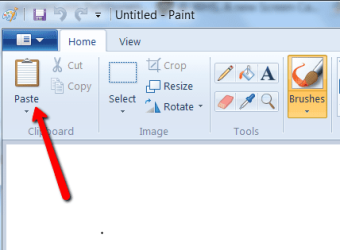
In windows 7 prof. (64 bit) I do not have a place to choose to insert the printscreen.
there are two choices. It allows me to go to a file and get it.
It does not allow me to paste the clipboard.

anyone know how to do this?

I am thinking that perhaps the printscreen key itself needs to be activated? I have a new Pavilion dv8t and you know what it's like to learn EVERYTHING about a new piece of hardware. I have never heard of having to activate a key but what do i know?

So, any suggestions from anyone?

It was one thing that actually worked well all the time in XP prof. was the printscreen into paint! doggone it why can't they just leave well enough alone?

Does anyone know how else to get a printscreen say into an email? or into a file to use as an attachment?

thanks much,

:zip:
 

My Computer

Computer Manufacturer/Model Number
Pavilion dv8t
OS
windows 7 professional x64
CPU
i7
Memory
1 teribytes
Graphics Card(s)
nvidia
As an alternative you can paste the prt screen into a Wordpad or Word document, save that and attach the saved file. And did you try "Paste" in Paint?
 

Attachments

  • 2010-09-27_1306.png
    2010-09-27_1306.png
    15.7 KB · Views: 8

My Computer

Computer Manufacturer/Model Number
HP, Dell, Gateway, Toshiba - 4 laptops and 2 desktops
OS
Vista, Windows7, Mint Mate, Zorin, Windows 8
CPU
from 1.6GHz Duo to i7
Monitor(s) Displays
2x HP w2207
Hard Drives
5x HDD, 7x SSD, 12x Externals
Keyboard
with trackball - no mices
Mouse
Trackball mice
Internet Speed
DSL 6000
I am thinking that perhaps the printscreen key itself needs to be activated?
No.
There is an alternative to PrintScreen: All Programs => Accessories => Snipping Tool. The advantage is that you can select the area to copy to clipboard, instead of dumping the whole screen/window
 

My Computer

OS
Windows 7 Home Premium 32bit
the paste in ms paint is grey

as i explained i am only able to get to the one choice under the paste option. I normally would choose to just paste it as you said. The only option i have is to go get a file...not what i want to do. i want to paste the printscreen. usually for a tech support person that wants to see what i am seeing.

any ideas why it might be greyed out?

thanks, jackie
 

My Computer

Computer Manufacturer/Model Number
Pavilion dv8t
OS
windows 7 professional x64
CPU
i7
Memory
1 teribytes
Graphics Card(s)
nvidia
Silly suggestion: the 'Print Screen' is effectively 'in upper case' (you need to hold Shift and hit the PrtScr/SysRq key). If you don't use Shift the screen is not copied to clipboard, which would explain why Paste is greyed out (as there is nothing to paste).
 

My Computer

OS
Windows 7 Home Premium 32bit
It could be shift, it could also be Fn. Why don't you try Paint again after copying some other way.
 

My Computer

Computer Manufacturer/Model Number
HP, Dell, Gateway, Toshiba - 4 laptops and 2 desktops
OS
Vista, Windows7, Mint Mate, Zorin, Windows 8
CPU
from 1.6GHz Duo to i7
Monitor(s) Displays
2x HP w2207
Hard Drives
5x HDD, 7x SSD, 12x Externals
Keyboard
with trackball - no mices
Mouse
Trackball mice
Internet Speed
DSL 6000
Pressing the Printscreen key should copy the entire screen contents to the clipboard (Alt-Printscreen copies the currently active window) then you should be able to open any graphics capable program and press Ctrl-v to paste the contents of the clipboard.

If Ctrl-v doesn't work or the paste option of a program is greyed out then the clipboard is empty. You need to determine why.

Are you able to highlight text in a document, press Ctrl-c, then go to another doc and press Ctrl-v to paste it there? That will tell you if your clipboard is functioning. If that works then it may just mean that the Printscreen key on your keyboard isn't functioning.

Can you try a different keyboard?
 

My Computer

Computer type
PC/Desktop
Computer Manufacturer/Model Number
Home Built desktop, Dell G15 5511 Gaming laptop,MS Surface Pro 7 tablet
OS
W10 Pro desktop, W11 laptop, W11 Pro tablet (all 64-bit)
CPU
3.7Ghz 8700K i7, i7-11800H, i7-1065G7
Motherboard
ASUS TUF Z370-Pro Gaming in desktop
Memory
16G desktop, 16G laptop, 4G tablet
Graphics Card(s)
AMD Radeon RX580, RTX 3060, Intel Iris Plus
Sound Card
High Definition Audio (Built-in to mobo)
Monitor(s) Displays
Samsung U32J59 32" (2x), 15.6", 12"
Screen Resolution
3840x2160, 3840x2160, 1920x1080, 2160x1440
Hard Drives
500G SSD for OS; 2T, 10T & 15T HDDs for Data on Desktop, 1TB SSD laptop, 128G SSD tablet.
PSU
Corsair CX 750M
Case
Antec 100
Cooling
CM 212+
Keyboard
IBM Model M - used continuously since 1986
Mouse
Microsoft Pro IntelliMouse
Internet Speed
400M down 8M up
Antivirus
Windows Defender
Browser
FireFox
Other Info
Built my first computer (8Mhz 8088cpu, 640K RAM, 20MB HDD, 2 360K floppy drives) in 1985 and have been building them for myself, relatives and friends ever since.
I agree with strollin. Just Press Print Screen, open Paint and press CTRL+V and tadda, your screenshot gets pasted there.

However, if you hold Alt, then Print Screen, then you paste than on Paint using CTRL+V, only the active Window during the time you took the screenshot gets pasted. Snipping tool is a great option too.
 

My Computer

Computer Manufacturer/Model Number
Custom Built
OS
Windows 7 Ultimate 32 Bit, Windows Developer Preview, Linux Mint 9 Gnome 32 Bit
CPU
Intel Pentium Dual CPU E2180@2GHz
Motherboard
Elitegroup 671T-M3
Graphics Card(s)
NVIDIA GeForce 7200 GS
Monitor(s) Displays
AOC TFT1560 15" LCD Monitor
Screen Resolution
1024x768
Keyboard
Logitech USB Keyboard
mspaint and the printscreen key on my new laptop

Thanks all,
I have sent your replies to my techies with my new HP Pavilion laptop. I am hoping they will find the solution that fits this laptop.
YOU ALL are wonderful to send ideas that can be tested.
I will post again if the tech support folks can't help.
I suppose i could try another keyboard but seeing it's a laptop I am not quite sure if my other USB keyboards would work ok and over ride my laptop keyboard or not. It sure is a straight up learning curve with this new windows 7 plus new laptop and all new programs...lots to learn.
thanks again
jackie
 

My Computer

Computer Manufacturer/Model Number
Pavilion dv8t
OS
windows 7 professional x64
CPU
i7
Memory
1 teribytes
Graphics Card(s)
nvidia
Strange

When not logged in on this thread I can see a Google ad for Win 7 Key Codes. When I log in to this thread the Ad disappears.
 

My Computer

OS
windows 7 64 bit
It sure is a straight up learning curve with this new windows 7
Just for the record: PrtSct & Paint have been around since at least Win98, possibly Win95 :shock:
The PrtSc key can be found on the original keyboard of the IBM PC from 1981. Paint has been around since Windows 1.0.
 

My Computer

Computer type
PC/Desktop
Computer Manufacturer/Model Number
Home Built desktop, Dell G15 5511 Gaming laptop,MS Surface Pro 7 tablet
OS
W10 Pro desktop, W11 laptop, W11 Pro tablet (all 64-bit)
CPU
3.7Ghz 8700K i7, i7-11800H, i7-1065G7
Motherboard
ASUS TUF Z370-Pro Gaming in desktop
Memory
16G desktop, 16G laptop, 4G tablet
Graphics Card(s)
AMD Radeon RX580, RTX 3060, Intel Iris Plus
Sound Card
High Definition Audio (Built-in to mobo)
Monitor(s) Displays
Samsung U32J59 32" (2x), 15.6", 12"
Screen Resolution
3840x2160, 3840x2160, 1920x1080, 2160x1440
Hard Drives
500G SSD for OS; 2T, 10T & 15T HDDs for Data on Desktop, 1TB SSD laptop, 128G SSD tablet.
PSU
Corsair CX 750M
Case
Antec 100
Cooling
CM 212+
Keyboard
IBM Model M - used continuously since 1986
Mouse
Microsoft Pro IntelliMouse
Internet Speed
400M down 8M up
Antivirus
Windows Defender
Browser
FireFox
Other Info
Built my first computer (8Mhz 8088cpu, 640K RAM, 20MB HDD, 2 360K floppy drives) in 1985 and have been building them for myself, relatives and friends ever since.
When not logged in on this thread I can see a Google ad for Win 7 Key Codes. When I log in to this thread the Ad disappears.
Ads pay for the site so those who sign up can use it for free.:D
 

My Computer

Computer Manufacturer/Model Number
Hopalong/ Godzilla
OS
Windows7 Pro 64bit SP-1; Windows XP Pro 32bit
CPU
Intel Core i7-870 Lynnfield 2.93GHz LGA 1156 95W Quad-Core
Motherboard
ASUS P7P55D-E PRO
Memory
8GB@1400MHz Crucial Ballistix DDR3-1600 4x2GB
Graphics Card(s)
ASUS ENGTX460 DirectCU/2DI/1GD5 1GB 256-bit GDDR5
Sound Card
VIA Onboard
Monitor(s) Displays
Asus VS248H-P 24"; Samsung SyncMaster 941BW 19"ws
Screen Resolution
1920x1080; 1440x900
Hard Drives
Samsung 830 120GB SSD
Intel 320 120GB SSD
Western Digital Caviar Black WD7501AALS 750GB 7200 RPM SATA 3.0Gb/s
Western Digital Caviar Black WD6401AALS 640GB 7200 RPM SATA 3.0Gb/s
PSU
COOLER MASTER Silent Pro RS850-AMBAJ3-US 850W Modular
Case
COOLER MASTER HAF 932 RC-932-KKN5-GP Black
Cooling
Scythe "Mugen-2 Rev.B" (2 ScytheKaze-Jyuni PWM fans)
Keyboard
Logitech K-320
Mouse
Kensington
Antivirus
Avast Inernet Suite
Browser
IE 9 ; Chrome
When not logged in on this thread I can see a Google ad for Win 7 Key Codes. When I log in to this thread the Ad disappears.
Ads pay for the site so those who sign up can use it for free.:D

Thanks Hopalong, I realise that Google Ads pay the Site, what concerned me was that the Ad referred to a Site selling Windows 7 Keys for £23.99.
 

My Computer

OS
windows 7 64 bit
Back
Top