MS Performance Check recurring multiple start-up programs

ToniB

New member
Local time
1:23 PM
Messages
10
Hi,

Am running a MS performance check on my Win7 x64, it has been slow for a while, getting worse. Potential memory leak, etc

Performance Check found duplicate programs running at startup. I clicked to disable one of them, it said problem wasn't fixed so I reran and found both had disappeared from startup list but another program showed up as duplicate. Same thing happened several times. I now have lost startup on several Intel and Toshiba items.

1) Wondering if this might be a virus or a pending failure as I didn't restart or do anything to change what was on the "start-up" list between running the changing performance check.

2) Although I assume MS wouldn't give me the option to remove them if they were vital, I have no idea what I have removed or if they are features I want/use.

Any help/insight would be much appreciated!
 

My Computer

Computer type
Laptop
Computer Manufacturer/Model Number
Toshiba Satellite A665
OS
Win7 64 bit
Antivirus
Avast Free
Exactly what program are you using to do the performance check?
 

My Computer

Computer type
PC/Desktop
Computer Manufacturer/Model Number
Home made Desktop
OS
Windows 10 Pro. 64/ version 1709 Windows 7 Pro/64
CPU
Intel i7-6800K @ 4.3
Motherboard
ASUS X-99 Deluxe II
Memory
Corsair Platinum 16 gig @2400
Graphics Card(s)
EVGA GTX 1070 OC
Monitor(s) Displays
Asus 27" LED LCD/VE278Q
Screen Resolution
1920-1080 or 1280-720 HDMI
Hard Drives
INTEL SSD 730-240 Gb Sata 3.0/
PSU
EVGA Platium 1200W
Case
Phanteks Luxe Tempered Glass 8 fans/ one radiator
Cooling
XSPC/ Water Cooled CPU
Keyboard
Das 4 Professional
Mouse
Logitech M705/MX Anywhere 2-S
Internet Speed
100 mbits
Antivirus
Microsoft Security Essentials/ Malwarebytes Premium 3.0/ SAS
Browser
I.E. 11 default/Firefox/ ISP Time Warner Cable/Spectrum
Other Info
LG BluRay Burner/
Sound system-KLipsch-THX/
Icy Dock ssd Hot Swap bays.
I was using the Microsoft tool available from the control panel - all control panel options>troubleshooting>system and security>check for performance issues
 

My Computer

Computer type
Laptop
Computer Manufacturer/Model Number
Toshiba Satellite A665
OS
Win7 64 bit
Antivirus
Avast Free

My Computer

Computer type
PC/Desktop
Computer Manufacturer/Model Number
Home made Desktop
OS
Windows 10 Pro. 64/ version 1709 Windows 7 Pro/64
CPU
Intel i7-6800K @ 4.3
Motherboard
ASUS X-99 Deluxe II
Memory
Corsair Platinum 16 gig @2400
Graphics Card(s)
EVGA GTX 1070 OC
Monitor(s) Displays
Asus 27" LED LCD/VE278Q
Screen Resolution
1920-1080 or 1280-720 HDMI
Hard Drives
INTEL SSD 730-240 Gb Sata 3.0/
PSU
EVGA Platium 1200W
Case
Phanteks Luxe Tempered Glass 8 fans/ one radiator
Cooling
XSPC/ Water Cooled CPU
Keyboard
Das 4 Professional
Mouse
Logitech M705/MX Anywhere 2-S
Internet Speed
100 mbits
Antivirus
Microsoft Security Essentials/ Malwarebytes Premium 3.0/ SAS
Browser
I.E. 11 default/Firefox/ ISP Time Warner Cable/Spectrum
Other Info
LG BluRay Burner/
Sound system-KLipsch-THX/
Icy Dock ssd Hot Swap bays.
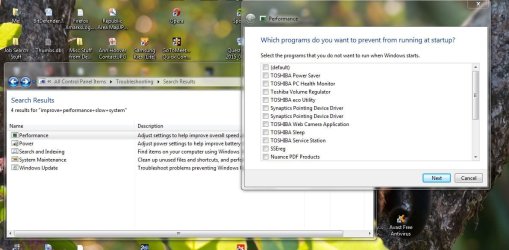
Here are an example run-though's screenshots. The duplicate file in this case is the Synaptics Pointing Device Driver (Snip1) located at C:\Program Files\Synaptics\SynTP\SynTPEnh.exe. Also shown is the control panel search window with the test I ran shown. I clicked on the first Synaptics Pointing Device Driver and ran.

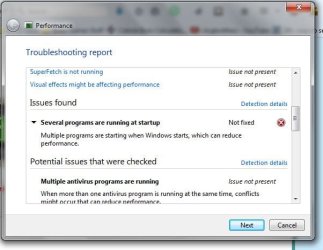
Snip2 shows the notice that the problem wasn't fixed. Snip 3 shows detailed info mentioned in Snip 2.
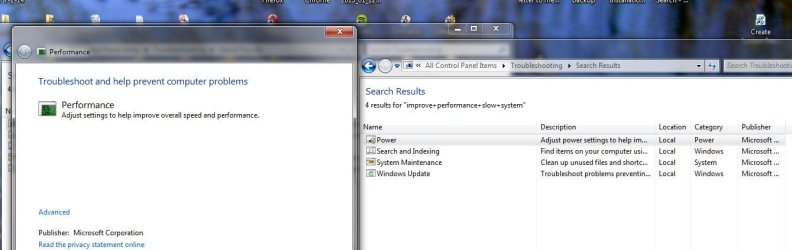
As Snip4 shows, the Performance Check option doesn't show in a current search but was still available from the previously-opened window (shown in Snip1). [This is new on this run-through -- all the other times, the Performance Check option did show. Not sure what caused this.]

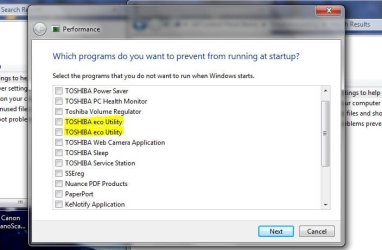
Snip5 shows the new results - BOTH Synaptics are gone but TOSHIBA eco Utility (C:\Program Files\TOSHIBA\TECO\Teco.exe" /r) is now duplicated.

This is what happened about 5 or 6 times now, each time with a different file affected.

PerformanceIssue Snip1.JPG

PerformanceIssue Snip2.JPG

PerformanceIssue Snip3.JPG

PerformanceIssue Snip4.JPG

PerformanceIssue Snip5.JPG
 

My Computer

Computer type
Laptop
Computer Manufacturer/Model Number
Toshiba Satellite A665
OS
Win7 64 bit
Antivirus
Avast Free
Well I have never used your method to find such things.

Try using these.


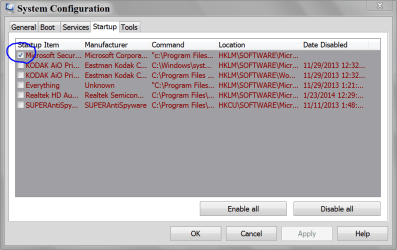
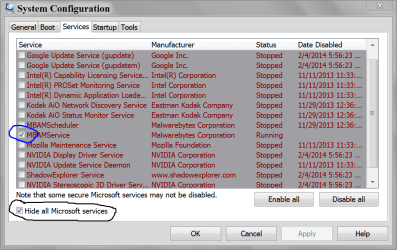
msconfig Startup and NON Microsoft services.


MSCONFIG STARTUP.PNG

MSCONFIG SERVICES.PNG
 

My Computer

Computer type
PC/Desktop
Computer Manufacturer/Model Number
Home made Desktop
OS
Windows 10 Pro. 64/ version 1709 Windows 7 Pro/64
CPU
Intel i7-6800K @ 4.3
Motherboard
ASUS X-99 Deluxe II
Memory
Corsair Platinum 16 gig @2400
Graphics Card(s)
EVGA GTX 1070 OC
Monitor(s) Displays
Asus 27" LED LCD/VE278Q
Screen Resolution
1920-1080 or 1280-720 HDMI
Hard Drives
INTEL SSD 730-240 Gb Sata 3.0/
PSU
EVGA Platium 1200W
Case
Phanteks Luxe Tempered Glass 8 fans/ one radiator
Cooling
XSPC/ Water Cooled CPU
Keyboard
Das 4 Professional
Mouse
Logitech M705/MX Anywhere 2-S
Internet Speed
100 mbits
Antivirus
Microsoft Security Essentials/ Malwarebytes Premium 3.0/ SAS
Browser
I.E. 11 default/Firefox/ ISP Time Warner Cable/Spectrum
Other Info
LG BluRay Burner/
Sound system-KLipsch-THX/
Icy Dock ssd Hot Swap bays.
I see a lot of junk in both of them and many old startup items that have been disabled but still show. No duplicates are obvious though with the exception of lastpass installer which was disabled but is now there again and active.
 

My Computer

Computer type
Laptop
Computer Manufacturer/Model Number
Toshiba Satellite A665
OS
Win7 64 bit
Antivirus
Avast Free
Notice that I have very little with check marks. That means they will not start at boot.
Their is no need for them to. They will only start when I or Windows 7 tells them to.

I would start by unchecking things not need to start at boot. Just keep your security programs checked.
Then reboot.

Next I would run several security scans.
You may or may not have things on your computer that you don't want that are running in the background.

Update your Avast and do a complete scan.

Here are some more security programs I use and recommend. No one security programs does it all. So you can use these programs also. I would try the free versions first.

https://www.malwarebytes.org/mwb-download/


Free Virus Scan | Online Virus Scanner from ESET

SUPERAntiSpyware - AntiAdware. AntiSpyware. AntiMalware.

I only use one scanner at a time. When it's done I start another with another program.
 

My Computer

Computer type
PC/Desktop
Computer Manufacturer/Model Number
Home made Desktop
OS
Windows 10 Pro. 64/ version 1709 Windows 7 Pro/64
CPU
Intel i7-6800K @ 4.3
Motherboard
ASUS X-99 Deluxe II
Memory
Corsair Platinum 16 gig @2400
Graphics Card(s)
EVGA GTX 1070 OC
Monitor(s) Displays
Asus 27" LED LCD/VE278Q
Screen Resolution
1920-1080 or 1280-720 HDMI
Hard Drives
INTEL SSD 730-240 Gb Sata 3.0/
PSU
EVGA Platium 1200W
Case
Phanteks Luxe Tempered Glass 8 fans/ one radiator
Cooling
XSPC/ Water Cooled CPU
Keyboard
Das 4 Professional
Mouse
Logitech M705/MX Anywhere 2-S
Internet Speed
100 mbits
Antivirus
Microsoft Security Essentials/ Malwarebytes Premium 3.0/ SAS
Browser
I.E. 11 default/Firefox/ ISP Time Warner Cable/Spectrum
Other Info
LG BluRay Burner/
Sound system-KLipsch-THX/
Icy Dock ssd Hot Swap bays.
Thanks, will do. Quick question -- the list of unchecked items in my startup folder is very long, (maybe 25 programs), most of which are inactive. Is there a good way to get them out and will that perhaps help clear things up?
 

My Computer

Computer type
Laptop
Computer Manufacturer/Model Number
Toshiba Satellite A665
OS
Win7 64 bit
Antivirus
Avast Free
You can remove any program you don't want.
msconfig Startup just allows you to choose what starts and when. It is not a method for removing programs.


Here is a tutorial by Brink that has many things to help you. Read it carefully.
Some things you will want to do and some you may choose not to do.
It will probably answer a lot of your questions.

http://www.sevenforums.com/tutorials/11728-optimize-windows-7-a.html
 

My Computer

Computer type
PC/Desktop
Computer Manufacturer/Model Number
Home made Desktop
OS
Windows 10 Pro. 64/ version 1709 Windows 7 Pro/64
CPU
Intel i7-6800K @ 4.3
Motherboard
ASUS X-99 Deluxe II
Memory
Corsair Platinum 16 gig @2400
Graphics Card(s)
EVGA GTX 1070 OC
Monitor(s) Displays
Asus 27" LED LCD/VE278Q
Screen Resolution
1920-1080 or 1280-720 HDMI
Hard Drives
INTEL SSD 730-240 Gb Sata 3.0/
PSU
EVGA Platium 1200W
Case
Phanteks Luxe Tempered Glass 8 fans/ one radiator
Cooling
XSPC/ Water Cooled CPU
Keyboard
Das 4 Professional
Mouse
Logitech M705/MX Anywhere 2-S
Internet Speed
100 mbits
Antivirus
Microsoft Security Essentials/ Malwarebytes Premium 3.0/ SAS
Browser
I.E. 11 default/Firefox/ ISP Time Warner Cable/Spectrum
Other Info
LG BluRay Burner/
Sound system-KLipsch-THX/
Icy Dock ssd Hot Swap bays.
Thank you. (I knew it wouldn't remove the programs themselves :-) , I wasn't sure if the long list of "unchecked" things in the msconfig list made things slower somehow.
 

My Computer

Computer type
Laptop
Computer Manufacturer/Model Number
Toshiba Satellite A665
OS
Win7 64 bit
Antivirus
Avast Free
Things in msconfig startup and non Microsoft services that are unchecked will not slow your computer down as far as I know.

Things that don't run don't slow down computers. They will just sit there and do nothing until requested to.
 

My Computer

Computer type
PC/Desktop
Computer Manufacturer/Model Number
Home made Desktop
OS
Windows 10 Pro. 64/ version 1709 Windows 7 Pro/64
CPU
Intel i7-6800K @ 4.3
Motherboard
ASUS X-99 Deluxe II
Memory
Corsair Platinum 16 gig @2400
Graphics Card(s)
EVGA GTX 1070 OC
Monitor(s) Displays
Asus 27" LED LCD/VE278Q
Screen Resolution
1920-1080 or 1280-720 HDMI
Hard Drives
INTEL SSD 730-240 Gb Sata 3.0/
PSU
EVGA Platium 1200W
Case
Phanteks Luxe Tempered Glass 8 fans/ one radiator
Cooling
XSPC/ Water Cooled CPU
Keyboard
Das 4 Professional
Mouse
Logitech M705/MX Anywhere 2-S
Internet Speed
100 mbits
Antivirus
Microsoft Security Essentials/ Malwarebytes Premium 3.0/ SAS
Browser
I.E. 11 default/Firefox/ ISP Time Warner Cable/Spectrum
Other Info
LG BluRay Burner/
Sound system-KLipsch-THX/
Icy Dock ssd Hot Swap bays.
Back
Top