MS Security Essentials NOT Getting MalW OUT?

cyberized

New member
Local time
2:43 AM
Messages
25
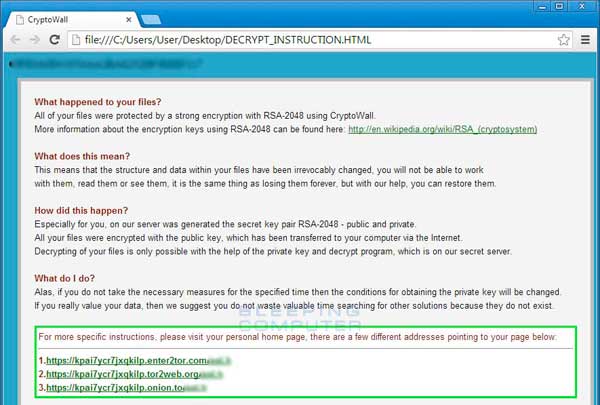
Somehow I have been clobbered by a stubborn piece of Malware - I guess you could call it
DECRYPT, MS SE caught it, that was GOOD, I did a FULL Scan so it could ferret everybit of this
creep OUT for me....after like 3 hrs of scan it reported that it was ready to CLEAN. So I executed
that option naturally. MS SE - now sees Nothing about DECRYPT on my 'puter now.....BUT.......while,
hopefully it may not be functional, when I start my 'puter up the WARNING type "letter" first pops up
and tells me that DECRYPT has "captured/blocked" use of all my files......and to get back to normal
I am to pay a "ransom"......next thing is a Forum/link with code to go to their site and PAY.
The thing is......none of my programs or files appear to be Blocked or Unuseable.....my 'puter thus
appears to be operating as Normal....it is these warnings when I start up [can't find anything in the
list of Startups this time that would tell me.....this is theirs and delete it]........so don't know how they have that hidden.....must have snuck it into something already on my Start Menu???
I past few hrs trying to figure this out.....I have found that they have placed copies of those two items
that appear on startup in probably a lot of my Files. I had some in my Trash....they did not Delete or Recycle when I told it to empty. I manually deleted a couple.

PLEASE advise.............TKS! Michael

PS - HOW can I Turn OFF MS ES temporarily? Some of the programs I have found to install in order to
solve this....all....tell me with m present Security Settings they can't dnld to me.....but weird, can't find a OFF in the MS AV Program?
 

My Computer

Computer Manufacturer/Model Number
DELL
OS
W'7 Home Premium
CPU
Athlon II 2 x 2.9GHz
Motherboard
? DELL ?
Memory
4 GB
Graphics Card(s)
ATI 4200
Sound Card
Integrated
Monitor(s) Displays
Samsung 19"
Hard Drives
640GB
PSU
300 Watt
Case
DELL
Internet Speed
Cable Broadband 10-12 MBs
Hi cyberized,

Can you please follow the instructions below and post the logs?

Please download Farbar Recovery Scan Tool and save it to your desktop.

Note: You need to run the version compatible with your system. If you are not sure which version applies to your system download both of them and try to run them. Only one of them will run on your system, that will be the right version.


  • Right click to run as administrator (XP users click run after receipt of Windows Security Warning - Open File). When the tool opens click Yes to disclaimer.
  • Press Scan button.
  • It will produce a log called FRST.txt in the same directory the tool is run from.
  • Please copy and paste log back here.
  • The first time the tool is run it generates another log (Addition.txt - also located in the same directory as FRST.exe/FRST64.exe). Please also paste that log along with the FRST.txt into your reply.
 

My Computer

Computer type
Laptop
OS
Win7 64-bit, Vista 32-bit, XP 32-bit, W2K 32-bit (VM)
Antivirus
Avast, MSE
Browser
Firefox
Other Info
Multiple systems. Too many specs to name.
THANKS! BUT When I go to download this Utility or any other Utility to try to repair my system I get:
this: "Your present security settings will not allow you to download this."

When I go into IE Settings/Security.....I have the setting there checked to Protect.....IF I uncheck that and restart will that do it or am I in more trouble?

Also - PLEASE tell me, HOW can I shut down MS Security Essentials? Unlike other AV programs I have used there is not an apparent On/OFF?

Since this is a BAD ASH Malware......If I change my PW to my Bank ACCT etc....right now.....won't they have access to that too?

PLEASE, PLEASE......Help me! I spent 4-5 hrs yesterday finding all the places I could 100's where they placed those two "files" DECRYPT......I have broken the LINK one too their PAY site......I am down to maybe 200 more to remove.....did not think....hey were or could do me any more harm, was thinking wrong - I believe now.....that since I m able to use my puter.....all I needed to do was ferret out all these nuisance DECRYPT files things....tinking this was Naïve now!

Is there an AV Prgram I could just purchase that would get this out and give me BEST pprotection ever?

I found out today that I am unable to access any of my BIG Photo Album....and each has those two files in them to - am removing to now avail????
 

My Computer

Computer Manufacturer/Model Number
DELL
OS
W'7 Home Premium
CPU
Athlon II 2 x 2.9GHz
Motherboard
? DELL ?
Memory
4 GB
Graphics Card(s)
ATI 4200
Sound Card
Integrated
Monitor(s) Displays
Samsung 19"
Hard Drives
640GB
PSU
300 Watt
Case
DELL
Internet Speed
Cable Broadband 10-12 MBs

My Computer

Computer type
PC/Desktop
Computer Manufacturer/Model Number
Bruce ... somewhere in his 40's
OS
Windows 7 Ultimate 32bit SP1
CPU
Intel(R) Core(TM)2 Quad CPU @ 2.40GHz, 2400 MHz
Motherboard
INTEL/D975XBX2
Memory
4 GB
Graphics Card(s)
ATI Radeon HD 2600 Pro
Monitor(s) Displays
Samsung SyncMaster 914v
Screen Resolution
1280 x 1024
Hard Drives
2/500GB each ... ST3500630AS ATA Device.
One is not connected
PSU
Rocketfish 700 W
Case
G.Skill Gigabyte Chassis
Keyboard
Standard PS/2 Keyboard
Mouse
Microsoft PS/2 Mouse
Internet Speed
DSL
Antivirus
Avira Internet Security
Browser
IE 11
Other Info
ATI HDMI Audio
THANKS for the LINK....studying it ALL [lots to try and digest - hard to do it too!]

BUT - to repeat: Can someone please help me with this:

THANKS! BUT When I go to download this Utility or any other Utility to try to repair my system I get:
this: "Your present security settings will not allow you to download this."

When I go into IE Settings/Security.....I have the setting there checked to Protect.....IF I uncheck that and restart will that do it or am I in more trouble?

Also - PLEASE tell me, HOW can I shut down MS Security Essentials? Unlike other AV programs I have used there is not an apparent On/OFF?
 

My Computer

Computer Manufacturer/Model Number
DELL
OS
W'7 Home Premium
CPU
Athlon II 2 x 2.9GHz
Motherboard
? DELL ?
Memory
4 GB
Graphics Card(s)
ATI 4200
Sound Card
Integrated
Monitor(s) Displays
Samsung 19"
Hard Drives
640GB
PSU
300 Watt
Case
DELL
Internet Speed
Cable Broadband 10-12 MBs
Type services in the start search box. Click on the 'gear' icon. Now scroll through the services listed. When you find MSE, right click, choose properties, then in the drop down box, set it to disabled. On the left top of screen, click stop.


Make sure you aren't on the Internet when and after you do this! Unplug your Modem.
 

My Computer

Computer type
PC/Desktop
Computer Manufacturer/Model Number
Bruce ... somewhere in his 40's
OS
Windows 7 Ultimate 32bit SP1
CPU
Intel(R) Core(TM)2 Quad CPU @ 2.40GHz, 2400 MHz
Motherboard
INTEL/D975XBX2
Memory
4 GB
Graphics Card(s)
ATI Radeon HD 2600 Pro
Monitor(s) Displays
Samsung SyncMaster 914v
Screen Resolution
1280 x 1024
Hard Drives
2/500GB each ... ST3500630AS ATA Device.
One is not connected
PSU
Rocketfish 700 W
Case
G.Skill Gigabyte Chassis
Keyboard
Standard PS/2 Keyboard
Mouse
Microsoft PS/2 Mouse
Internet Speed
DSL
Antivirus
Avira Internet Security
Browser
IE 11
Other Info
ATI HDMI Audio
Jaycee - TKS for your help. I have now, thank God, been able to download the above recommended software and I ran the scan, found the Files you requested then COPY both, but when I come back here and try to Paste them for you to purvey....the Paste function is not operable....please advise,

TKS michael:confused:
 

My Computer

Computer Manufacturer/Model Number
DELL
OS
W'7 Home Premium
CPU
Athlon II 2 x 2.9GHz
Motherboard
? DELL ?
Memory
4 GB
Graphics Card(s)
ATI 4200
Sound Card
Integrated
Monitor(s) Displays
Samsung 19"
Hard Drives
640GB
PSU
300 Watt
Case
DELL
Internet Speed
Cable Broadband 10-12 MBs
Paste them into a Wordpad and attach the Wordpad with the paper clip. Wordpad is in All Programs > Accessories.
 

My Computer

Computer Manufacturer/Model Number
HP, Dell, Gateway, Toshiba - 4 laptops and 2 desktops
OS
Vista, Windows7, Mint Mate, Zorin, Windows 8
CPU
from 1.6GHz Duo to i7
Monitor(s) Displays
2x HP w2207
Hard Drives
5x HDD, 7x SSD, 12x Externals
Keyboard
with trackball - no mices
Mouse
Trackball mice
Internet Speed
DSL 6000
Paste them into a Wordpad and attach the Wordpad with the paper clip. Wordpad is in All Programs > Accessories.

RATS! Nothing seems to go smoothly!
I found and did as instructed BUT they would not post in WP until I told it to ZIP them.....now they are in WP but will not upload into post hre even when I click on paper clip [nothing happens]....more advice, please...
TKS:confused:
 

My Computer

Computer Manufacturer/Model Number
DELL
OS
W'7 Home Premium
CPU
Athlon II 2 x 2.9GHz
Motherboard
? DELL ?
Memory
4 GB
Graphics Card(s)
ATI 4200
Sound Card
Integrated
Monitor(s) Displays
Samsung 19"
Hard Drives
640GB
PSU
300 Watt
Case
DELL
Internet Speed
Cable Broadband 10-12 MBs
See if you can copy/paste to "notepad" ... name it something and save it (the txt) to your desktop.
Now see if it works. You may have to click on 'advanced Options' button in order to reply.
 

My Computer

Computer type
PC/Desktop
Computer Manufacturer/Model Number
Bruce ... somewhere in his 40's
OS
Windows 7 Ultimate 32bit SP1
CPU
Intel(R) Core(TM)2 Quad CPU @ 2.40GHz, 2400 MHz
Motherboard
INTEL/D975XBX2
Memory
4 GB
Graphics Card(s)
ATI Radeon HD 2600 Pro
Monitor(s) Displays
Samsung SyncMaster 914v
Screen Resolution
1280 x 1024
Hard Drives
2/500GB each ... ST3500630AS ATA Device.
One is not connected
PSU
Rocketfish 700 W
Case
G.Skill Gigabyte Chassis
Keyboard
Standard PS/2 Keyboard
Mouse
Microsoft PS/2 Mouse
Internet Speed
DSL
Antivirus
Avira Internet Security
Browser
IE 11
Other Info
ATI HDMI Audio
It may also be a problem with your browser. Try another browser.
 

My Computer

Computer Manufacturer/Model Number
HP, Dell, Gateway, Toshiba - 4 laptops and 2 desktops
OS
Vista, Windows7, Mint Mate, Zorin, Windows 8
CPU
from 1.6GHz Duo to i7
Monitor(s) Displays
2x HP w2207
Hard Drives
5x HDD, 7x SSD, 12x Externals
Keyboard
with trackball - no mices
Mouse
Trackball mice
Internet Speed
DSL 6000
See if you can copy/paste to "notepad" ... name it something and save it (the txt) to your desktop.
Now see if it works. You may have to click on 'advanced Options' button in order to reply.

NOTHING appears to work!!! The Paperclip utility I see is supposed open up the BROWSE to where your upload is, well it does not give me that with 1 click, 2, or rt click and Open. I finally Manually copied them both but was too BIG to allow me to post it. Even ONE time trying one method or another after I grabbed one with Copy and went to Paste in message box to you - this time the PASTE was actually Highlighted [dark] so would have thought that it would actually paste - but NO it did not. WHAT to do......???

TKS michael
 

My Computer

Computer Manufacturer/Model Number
DELL
OS
W'7 Home Premium
CPU
Athlon II 2 x 2.9GHz
Motherboard
? DELL ?
Memory
4 GB
Graphics Card(s)
ATI 4200
Sound Card
Integrated
Monitor(s) Displays
Samsung 19"
Hard Drives
640GB
PSU
300 Watt
Case
DELL
Internet Speed
Cable Broadband 10-12 MBs

My Computer

Computer type
Laptop
Computer Manufacturer/Model Number
HP Elitebook 8540p
OS
Windows 7 Pro 32
CPU
Intel(R) Core(TM) i5 CPU M 540 @ 2.53GHz
Motherboard
Hewlett-Packard 1521
Memory
4,00 GB (Usable 2,98)
Graphics Card(s)
NVIDIA NVS 5100M
Sound Card
NVIDIA High Definition Audio
Screen Resolution
1600x900
Hard Drives
INTEL SSDSA2CW120G3
Antivirus
F-Secure Internet Security
Browser
IE, Firefox, Opera
Other Info
Sandboxie,
SRP (Software Restriction Policy),
EMET (Enhanced Mitigation Experience Toolkit),
WFC (Windows Firewall Control by BiniSoft),
Malwarebytes Premium

My Computer

Computer Manufacturer/Model Number
DELL
OS
W'7 Home Premium
CPU
Athlon II 2 x 2.9GHz
Motherboard
? DELL ?
Memory
4 GB
Graphics Card(s)
ATI 4200
Sound Card
Integrated
Monitor(s) Displays
Samsung 19"
Hard Drives
640GB
PSU
300 Watt
Case
DELL
Internet Speed
Cable Broadband 10-12 MBs
Glad you got it solved. I wish all problems were that simple.

A little story on the side - an hour ago I wanted to upload a video to Youtube using the IE. I could not connect to the uploader at all. After 3 tries I gave up.
Then the wife said: " Why don't you try another browser". I used Chrome and it worked perfectly - Daah, as if I could not have come up with that myself. LOL.
 

My Computer

Computer Manufacturer/Model Number
HP, Dell, Gateway, Toshiba - 4 laptops and 2 desktops
OS
Vista, Windows7, Mint Mate, Zorin, Windows 8
CPU
from 1.6GHz Duo to i7
Monitor(s) Displays
2x HP w2207
Hard Drives
5x HDD, 7x SSD, 12x Externals
Keyboard
with trackball - no mices
Mouse
Trackball mice
Internet Speed
DSL 6000
Hi all,
Feel free to Reset ie and Delete personal settings and test after,
Export Favorites to html file before resetting Internet explorer/ just to be safe.
http://www.sevenforums.com/tutorials/86795-internet-explorer-import-export-favorites.html

Tutorial of Resetting Internet explorer,
http://www.sevenforums.com/tutorials/1222-internet-explorer-reset.html
Accessing Internet Options from the Start menu search,
Reset process first opening Internet explorer


My Computer

Computer type
PC/Desktop
Computer Manufacturer/Model Number
Custom assembled by me :}
OS
Win-7-Pro64bit 7-H-Prem-64bit
CPU
i7-5930K 2nd i9-9940x both water blocked VRM's too
Motherboard
ASUS SABERTOOTH X99 2nd ASUS x299 Apex
Memory
Trident-z 3200C14 2nd Trident-z 3600C16
Graphics Card(s)
EVGA 1080ti ftw3 2nd Titan Xp both water blocked
Sound Card
Built-in Realtek
Monitor(s) Displays
1-AOC G2460PG 24"G-Sync 144Hz/ 2nd 1-ASUS VG248QE 24" 144Hz
Screen Resolution
1920 x 1080 144Hz
Hard Drives
2-Samsung M.2 Evo & Evo Plus
2-Samsung 850 EVO 500GB SSD's/ 3-2.5 W.D. Black 1tb-&3-1tb/3-3.5 WD Black 1tb hdd's
PSU
EVGA SuperNOVA 1000-P2 2nd 1200-P2
Case
2-Corsair Obsidian Series 450D Black ATX Mid Tower
Cooling
Custom water loops
Keyboard
Logitech G710+/ 2nd Logitech G910
Mouse
2-RedDragon M901 Perdition 16400 dpi Gaming mouse = wired
Internet Speed
Comcast Ping 19ms 89.31mbps download speed 6.12mbps upload
Antivirus
Malwarebytes Pro/ Superantispyware Pro
Browser
FireFox & Pale moon
Other Info
2nd ASUS X299 Apex/Intel i9-9940x with Custom water loop/7H-Prem-x64/Corsair 450D case/Ram Trident-z 3600C16 4x8gb / Samsung970Evo plus 500gb SSD/Dual ssd EZ swap evo/PSU EVGA SuperNova 1200w-P2 80+Platinum/GPU Titan Xp /8-ML-140 on push-pull on 2-280GTX rads
html-file-thmb.jpg


cygerized,

Has something like the above shown at some point? If not, is it possible for you to post a capture of the info presented?

http://www.sevenforums.com/tutorials/9733-screenshots-files-upload-post-seven-forums.html

There are a few versions of this ransomware, and it is best to know what you are dealing with.

I'm sure DonnaB will stop by to analyze the FRST reports.


.
 
Last edited:

My Computer

Computer type
PC/Desktop
Computer Manufacturer/Model Number
An ol' eMachines
OS
Windows 7 Home Premium
Internet Speed
Fine for me...I'm retired!
Thank you all for helping out here. You did a great job! :)

Hi cyberized,

The team did a great job getting the files needed for review. I will be able to remove cryptowall-ransomware though the encrypted files cannot.

Your computer is heavily infected.

WARNING:

One or more of the identified infections is a backdoor trojan/rootkit.

This allows hackers to remotely control your computer, steal critical system information and download and execute files.

If the infected computer was used for online banking, has credit card information or other sensitive data on it, you should immediately disconnect it from the Internet until your system is cleaned. ALL passwords should be changed immediately to include those used for banking, email, eBay, paypal and online forums. You should consider them to be compromised. You should change each password by using a clean computer and not the infected one. If not, an attacker may get the new passwords and transaction information. If using a router, you will need to reset it with a strong logon/password so the malware cannot gain control before connecting again. Banking and credit card institutions should be notified as soon as possible due to the possibility of the security breach.

Though the trojan has been identified and can be killed, because of it's backdoor functionality, your PC is very likely compromised and there is no way to be sure your computer can ever again be trusted. Many experts in the security community believe that once infected with this type of trojan, the best course of action would be a reformat and reinstall of the OS.

Because your computer was compromised please read the following links:

How Do I Handle Possible Identify Theft, Internet Fraud and CC Fraud?

When should I re-format? How should I reinstall?

To remove the infection, please do the following:

Download attached fixlist.txt file. You'll have to save it to your Downloads folder since that is where FRST(x64) is located.
NOTE. It's important that both files, FRST and fixlist.txt are in the same location or the fix will not work.

NOTICE: This script was written specifically for this user, for use on that particular machine. Running this on another machine may cause damage to your operating system.

Run FRST(FRST64) and press the Fix button just once and wait.
The tool will create a log (Fixlog.txt) in the Downloads folder. Please attach it to your next reply.

When done see if the issue is gone.

Next:

Please download AdwCleaner by Xplode and save to your Desktop.

  • Double-click AdwCleaner.exe to run the tool.
    Note: Windows Vista, Windows 7/8 users right-click and select Run As Administrator.
  • Click the Scan button.
  • AdwCleaner will begin. Be patient as the scan may take some time to complete.
  • The contents of the scan results may be confusing. If you see a program name that you know should not be removed, uncheck the results and please let me know about it.
  • Click the Clean button.
  • Press OK when asked to close all programs and follow the onscreen prompts.
  • Press OK again to allow AdwCleaner to restart the computer and complete the removal process.
  • After rebooting, a logfile report (AdwCleaner[S0].txt) will open automatically.
  • Copy and paste the contents of that logfile in your next reply.
  • A copy of that logfile will also be saved in the C:\AdwCleaner folder.


Next:

Please run FRST (x64) again and attach the fresh log.

Thank you,
Donna :)
 

Attachments

My Computer

Computer type
Laptop
OS
Win7 64-bit, Vista 32-bit, XP 32-bit, W2K 32-bit (VM)
Antivirus
Avast, MSE
Browser
Firefox
Other Info
Multiple systems. Too many specs to name.
Hi cyberized,

Are you still with us here? Please follow the instructions in my last post and attach the resultant logs. We will do our best thereafter to see about getting your files decrypted.

Donna :)
 

My Computer

Computer type
Laptop
OS
Win7 64-bit, Vista 32-bit, XP 32-bit, W2K 32-bit (VM)
Antivirus
Avast, MSE
Browser
Firefox
Other Info
Multiple systems. Too many specs to name.
Back
Top