MS Security Essentials Vs. AVG 9.0

I hate MSE because of its weak antispyware protection. No wonder its a strong antivirus, but it lacks better detection of SPYWARE. Also, 45-55 MB RAM usage. :shock: It needs some maturity. Its an infant IMO

Just over 7MB of RAM usage on my system - and that's while it's scanning! It doesn't seem to change whether it is just monitoring or actively scanning disks, and 7MB of RAM is not much of a load.
LOL at the bottom of the task manager, click Show Processes from All Users.
Then post a screen shot. You are showing only 1 process(msseces.exe) which is using 7 MB RAM. Where's MsMpEng.exe ? So again post a screenshot after clicking the box beside Show Processes from All Users. ;)
 

My Computer

Computer Manufacturer/Model Number
Samsung NP530U4B-S02IN
OS
Windows® 8 Pro (64-bit)
CPU
Intel® Core™ i5 Processor 2467M (1.60GHz, 3MB L3 Cache)
Motherboard
Samsung Electronics
Memory
6GB DDR3 System Memory at 1,333MHz (on BD 4GB + 2GB x 1)
Graphics Card(s)
AMD Radeon™ HD7550M 1GB DDR3 (Ext. Graphic)
Sound Card
Realtek High Definition Audio
Monitor(s) Displays
35.56cm (14.0) SuperBright 300nit HD LED Display
Screen Resolution
1366x768
Hard Drives
1TB S-ATA II Hard Drive (5400RPM) with ExpressCache 16GB SSD
Internet Speed
sucks
Antivirus
Microsoft Security Essentials
Browser
Google Chrome (Sync enabled)
My testing with MSE has been real promising so I now load it on all new builds. I don't run it myself as it's lack of basic features is a problem for me. I have a few apps that all virus programs mis-identify and a Trojan and immediately delete the exe so have to be able to easily disable auto-protect prior to running them.

Otherwise it works very well,

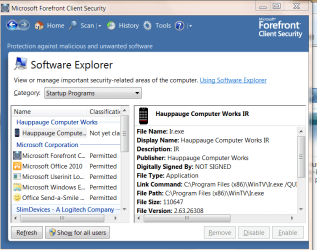
That's why I like the Server version Forefront Client security - MSE based but has more features - you can get a Free 180 day trial -- also works well on "Stand alone" computers and you don't have to run a Server OS either.

I really like the "Software explorer" tool -- pic enc

shows you at a glance all sorts of decent info over "start up programs" running programs. services etc etc.


Incidentally whether a program uses 50 MB / 100MB RAM in W7 is actually TOTALLY IRRELEVANT to how the OS performs / works.

"Real RAM" allocation as opposed to Virtual storage and paging is quite a complex matter -- just looking at the "Base use" numbers won't tell you anything anyway.

On most home computers -- even with a smallish amount of RAM (but not too small) the major bottleneck is in 99.99999% of the cases the appallingly slow I/O subsystems that are usually used on "non self build" machines - so don't get confused by misleading posts like "RAM Usage".

Poor graphic cards are another problem but usually unless you are a gamer this won't have major performance slowdowns except when using graphic processing programs like Photoshop. Even here the poor I/O will mask bad performance by the graphics card.

Your computer can be using 95% of available RAM and still run like greased lightning -- depends on what the computer is actually doing.

To slightly diagress - W7 uses a "Pre-fetch" algorithm -- knows after a while what type of apps you are using and often has the necessary pieces pre-loaded so that when you need them they are already in RAM and don't need to be loaded again.

This is often why when you first install and boot an OS you see Disk activity without knowing what it's doing -- the algorithm is trying to "learn" what you typically use.

Be VERY CAREFUL of statements like Huge RAM useage - not always a bad thing actually.


Of course poor applications will cause a "drain" on your system but that's another issue

Cheers
jimbo
.
 

Attachments

  • fcs.png
    fcs.png
    114.2 KB · Views: 64

My Computer

Computer type
PC/Desktop
Computer Manufacturer/Model Number
Custom built, several laptops HP/ASUS
OS
Linux CENTOS 7 / various Windows OS'es and servers
CPU
Intel i7 Intel i5
Memory
8GB, 16GB
Graphics Card(s)
On Motherboard
Sound Card
Realtek HD audio
Monitor(s) Displays
Apple Cinema display, Samsung LCD
Screen Resolution
1920 X 1080
Hard Drives
4 X 1TB SATA
Mouse
Toshiba wireless laser
Internet Speed
> 20MB up
Hi Dinesh,

Is it what you wanted to see?

Capture.JPG
 

My Computer

Computer Manufacturer/Model Number
Gateway P7805uFX
OS
Vista Ultimate x64
CPU
Intel T9600, 2.8GHz
Motherboard
Intel PM 45
Memory
8GB DDR3
Graphics Card(s)
Nvidia GeForce 9800M GTS 1GB
Monitor(s) Displays
LG WUXGA 17"
Screen Resolution
1920x 1200
Hard Drives
2x WD500GB
Case
Notebook FX
Other Info
B-Tooth, B-Drive, GPS
This is where most of the users make mistake. People simply open up taskmgr and then look at the Process and assume that its using a low amount of memory. They often forget to check Show Processes from All Users.
That's when they realize how much RAM is being used by the anti virus.

So my humble request to all the people here; Always check Show Processes from All Users under Processes tab and then look at all the processes used by your AV and then calculate the amount of RAM. ;)
 

My Computer

Computer Manufacturer/Model Number
Samsung NP530U4B-S02IN
OS
Windows® 8 Pro (64-bit)
CPU
Intel® Core™ i5 Processor 2467M (1.60GHz, 3MB L3 Cache)
Motherboard
Samsung Electronics
Memory
6GB DDR3 System Memory at 1,333MHz (on BD 4GB + 2GB x 1)
Graphics Card(s)
AMD Radeon™ HD7550M 1GB DDR3 (Ext. Graphic)
Sound Card
Realtek High Definition Audio
Monitor(s) Displays
35.56cm (14.0) SuperBright 300nit HD LED Display
Screen Resolution
1366x768
Hard Drives
1TB S-ATA II Hard Drive (5400RPM) with ExpressCache 16GB SSD
Internet Speed
sucks
Antivirus
Microsoft Security Essentials
Browser
Google Chrome (Sync enabled)

My Computer

Computer Manufacturer/Model Number
Samsung NP530U4B-S02IN
OS
Windows® 8 Pro (64-bit)
CPU
Intel® Core™ i5 Processor 2467M (1.60GHz, 3MB L3 Cache)
Motherboard
Samsung Electronics
Memory
6GB DDR3 System Memory at 1,333MHz (on BD 4GB + 2GB x 1)
Graphics Card(s)
AMD Radeon™ HD7550M 1GB DDR3 (Ext. Graphic)
Sound Card
Realtek High Definition Audio
Monitor(s) Displays
35.56cm (14.0) SuperBright 300nit HD LED Display
Screen Resolution
1366x768
Hard Drives
1TB S-ATA II Hard Drive (5400RPM) with ExpressCache 16GB SSD
Internet Speed
sucks
Antivirus
Microsoft Security Essentials
Browser
Google Chrome (Sync enabled)
Yep - you're right. Didn't show processes from all users, and it's actually using about 70MB - my apologies :o

Mind you, that is only 1.1% of what's installed :D
 

My Computer

Computer Manufacturer/Model Number
Custom
OS
Windows 7 Enterprise x64
CPU
Intel i7 920
Motherboard
Asus P6T Deluxe v2
Memory
6 GB
Graphics Card(s)
nVidia GTX260 + nVidia 3D
Sound Card
Onboard
Monitor(s) Displays
Samsung SyncMaster 2233RZ
Screen Resolution
1680 x 1050
Hard Drives
1 x 64GB SSD primary
2 x 1 TB (mirrored)
PSU
700W
Other Info
Edimax 802.11n Wireless PCI Card
Netgear DG834G router
My thoughts are that if you're that low on memory that 50mb of used memory is a concern, then its time to upgrade your memory...
 

My Computer

Computer type
PC/Desktop
Computer Manufacturer/Model Number
LENOVO K450 @3.0GHZ
OS
64-bit Windows 8.1 Pro
CPU
Core(TM) i5 CPU 4330 Haswell @ 3.20GHz
Motherboard
LENOVO
Memory
12.00 GB
Graphics Card(s)
Intel(R) HD Graphics
Sound Card
Intel HD integtrated
Monitor(s) Displays
HP 25' ISP Monitor
Screen Resolution
1900/1020
Hard Drives
(1) ST1000DM003-1CH162 (2) Generic STORAGE DEVICE USB Device (3) Generic STORAGE DEVICE USB Device
Internet Speed
100mb down/10mb up
Yep - you're right. Didn't show processes from all users, and it's actually using about 70MB - my apologies :o

Mind you, that is only 1.1% of what's installed :D
:zip:
 

My Computer

Computer Manufacturer/Model Number
Samsung NP530U4B-S02IN
OS
Windows® 8 Pro (64-bit)
CPU
Intel® Core™ i5 Processor 2467M (1.60GHz, 3MB L3 Cache)
Motherboard
Samsung Electronics
Memory
6GB DDR3 System Memory at 1,333MHz (on BD 4GB + 2GB x 1)
Graphics Card(s)
AMD Radeon™ HD7550M 1GB DDR3 (Ext. Graphic)
Sound Card
Realtek High Definition Audio
Monitor(s) Displays
35.56cm (14.0) SuperBright 300nit HD LED Display
Screen Resolution
1366x768
Hard Drives
1TB S-ATA II Hard Drive (5400RPM) with ExpressCache 16GB SSD
Internet Speed
sucks
Antivirus
Microsoft Security Essentials
Browser
Google Chrome (Sync enabled)
Dinesh, 70MB or 80MB is nothing, I don't feel it. I can't remember how much of ram the McAfee Total Security used, but everything was so slow. Now, it's the rocket.
 

My Computer

Computer Manufacturer/Model Number
Gateway P7805uFX
OS
Vista Ultimate x64
CPU
Intel T9600, 2.8GHz
Motherboard
Intel PM 45
Memory
8GB DDR3
Graphics Card(s)
Nvidia GeForce 9800M GTS 1GB
Monitor(s) Displays
LG WUXGA 17"
Screen Resolution
1920x 1200
Hard Drives
2x WD500GB
Case
Notebook FX
Other Info
B-Tooth, B-Drive, GPS
Hi there
C'mon Guys

This whole RAM business is irrelevant to the issue -- I've posted about 3 or 4 back in the thread a little about RAM allocation in W7.

Don't confuse people with misleading info -- if you like or dislike a particular product fine then by all means go for the juggler and state why it's no good / or is good with evidence to back up your case

-- but confusing people with TOTALLY IRRELEVANT stuff like "70 / 100MB" RAM usage which doesn't make a single €.01's worth of difference to anybody doesn't actually lead to a proper and intelligent discussion.

Note a BAD app is a BAD app - whatever the amount of RAM it uses

I could easily get your computer to almost seize up with a TINY program (probably using less than 1 MB of RAM, and less than 2% of the CPU) so let's forget the whole RAM issue and concentrate on REAL issues like does the AV software do it's job, is it badly written etc etc.

Cheers
jimbo
 

My Computer

Computer type
PC/Desktop
Computer Manufacturer/Model Number
Custom built, several laptops HP/ASUS
OS
Linux CENTOS 7 / various Windows OS'es and servers
CPU
Intel i7 Intel i5
Memory
8GB, 16GB
Graphics Card(s)
On Motherboard
Sound Card
Realtek HD audio
Monitor(s) Displays
Apple Cinema display, Samsung LCD
Screen Resolution
1920 X 1080
Hard Drives
4 X 1TB SATA
Mouse
Toshiba wireless laser
Internet Speed
> 20MB up
Jimbo,

You are absolutely right.
 

My Computer

Computer Manufacturer/Model Number
Gateway P7805uFX
OS
Vista Ultimate x64
CPU
Intel T9600, 2.8GHz
Motherboard
Intel PM 45
Memory
8GB DDR3
Graphics Card(s)
Nvidia GeForce 9800M GTS 1GB
Monitor(s) Displays
LG WUXGA 17"
Screen Resolution
1920x 1200
Hard Drives
2x WD500GB
Case
Notebook FX
Other Info
B-Tooth, B-Drive, GPS
Jimbo,

You are absolutely right.

Hi Martee

While I Love these Forums like anything else on the Internet you have to be careful with not only what you READ but also what you write -- we all make mistakes - hopefully not too many - but sometimes I see the most glaring elementary errors being written with the Authority of the Bible (or whatever other "authority" you wish to name).

Always double check first before taking action based on what you find on the Forums -- some people post useful stuff - but there is also a lot of "Hot Air" around or as a Friend of mine from Yorkshire in North England says "All Wind and P--s").

The W7 Forum is pretty good however in general -- you get to know the reliable posters after a while.

Have a good weekend. - Will be Off to Old Trafford -- Man Utd V A.Villa in English Premier League - however for "Round Ball Topics" that's another place.

Cheers
jimbo
 

My Computer

Computer type
PC/Desktop
Computer Manufacturer/Model Number
Custom built, several laptops HP/ASUS
OS
Linux CENTOS 7 / various Windows OS'es and servers
CPU
Intel i7 Intel i5
Memory
8GB, 16GB
Graphics Card(s)
On Motherboard
Sound Card
Realtek HD audio
Monitor(s) Displays
Apple Cinema display, Samsung LCD
Screen Resolution
1920 X 1080
Hard Drives
4 X 1TB SATA
Mouse
Toshiba wireless laser
Internet Speed
> 20MB up
Yep, second time I do agree with you. Thanks and have a nice day. See you around.

Martee :)
 

My Computer

Computer Manufacturer/Model Number
Gateway P7805uFX
OS
Vista Ultimate x64
CPU
Intel T9600, 2.8GHz
Motherboard
Intel PM 45
Memory
8GB DDR3
Graphics Card(s)
Nvidia GeForce 9800M GTS 1GB
Monitor(s) Displays
LG WUXGA 17"
Screen Resolution
1920x 1200
Hard Drives
2x WD500GB
Case
Notebook FX
Other Info
B-Tooth, B-Drive, GPS
Sure, but I don't use Avast anymore, I stopped using it three years ago. I use MSE right now. I even don't know that I'm using it, it's so light on the system. For me, it's a winner. :)

Fair enough. One thing though, I used to use Avast quite some time ago and was never really a fan. Especially the old interface, but also the way it seemed to slow down the system quite a bit.

The new Beta 5 is amazing compared to v4 of Avast. This v5 is going to be a very good product and I'm not sure why anyone would pay for anti virus anymore with something this good out there as well as the also very good MSE that you are using.

I tried MSE and didn't mind it, but I prefer Avast. Nicer interface, more configurable, more protection IMO and even better virus/malware prompts. Just like it better overall.
 

My Computer

Computer Manufacturer/Model Number
HP
OS
Windows 7 Home Premium 64-bit
CPU
Intel Core2 Quad Q6600 @ 2.40 Ghz
Memory
8GB RAM
Graphics Card(s)
ATI Radeon HD 4600
Monitor(s) Displays
HP w2007
Screen Resolution
1680 x 1050
Hard Drives
700 GB

My Computer

Computer type
PC/Desktop
Computer Manufacturer/Model Number
Custom built by me.
OS
Windows 10 Pro
CPU
Intel Core i7-4770K (3.5Ghz)
Motherboard
Gigabyte G1 Sniper 5 (F10 Bios)
Memory
32 gig Corsair Dominator Platinum (4x8Gig)
Graphics Card(s)
Sapphire Tri-X R9 Fury
Sound Card
Soundblaster ZXR
Monitor(s) Displays
NEC PA242W 24" LCD Monitor
Screen Resolution
1920 x 1200
Hard Drives
Primary - Samsung 850 Pro (512gig), Samsung 840 Pro (256gig), 2TB WD Caviar Black.
PSU
EVGA Supernova 1000 G2
Case
Cooler Master HAF X
Cooling
Corsair H100i with Corsair Air Series SP120 Quiet Fans
Keyboard
Logitech Wireless Wave
Mouse
Logitech Performance MX
Internet Speed
High Speed Cable
Antivirus
Norton Security
Browser
IE11
Other Info
Memory Timings - 1866MHz @ 9-9-9-27-1T @ 1.5 volts
Well, since my rig has been at maintenance for 2 weeks now I have been using my sister's ancient travelmate laptop, KIS 2010 was just too heavy on this poor thing so I removed it and installed MSE, now the system is like x5 faster than it was with KIS or BtD which I used previously on it.

I don't even feel like there is an antivirus installed.

Microsoft has managed to make an antivirus that not only is it simple, but also so unnoticeable that sometimes you would think your machine doesn't even have App installed.
 

My Computer

Computer Manufacturer/Model Number
Custom
OS
Windows 7 Ultimate x64
CPU
AMD Phenom II x4 B50
Motherboard
GA-MA770T-UD3P
Memory
2x4 G.skill DDR3 CL9 @1600
Graphics Card(s)
Powercolor HD 6950 2G GDDR5
Sound Card
Built in + Creative T6200 5.1 sub system
Monitor(s) Displays
LG FLATRON W1934S
Screen Resolution
1440x900
Hard Drives
2 1T WD Blacks (No Raid), 1 2T WD Green
PSU
NZXT HALE90 1000W 80Gold+
Case
HAF 932
Cooling
5 Fans
Keyboard
Upgrading~
Mouse
Upgrading~
Internet Speed
ADSL 2mb
Microsoft has managed to make an antivirus that not only is it simple, but also so unnoticeable that sometimes you would think your machine doesn't even have App installed.

I have to agree here. Somtimes I too wonder if it's working. Great program, and light.
 

My Computer

Computer type
PC/Desktop
Computer Manufacturer/Model Number
Custom built by me.
OS
Windows 10 Pro
CPU
Intel Core i7-4770K (3.5Ghz)
Motherboard
Gigabyte G1 Sniper 5 (F10 Bios)
Memory
32 gig Corsair Dominator Platinum (4x8Gig)
Graphics Card(s)
Sapphire Tri-X R9 Fury
Sound Card
Soundblaster ZXR
Monitor(s) Displays
NEC PA242W 24" LCD Monitor
Screen Resolution
1920 x 1200
Hard Drives
Primary - Samsung 850 Pro (512gig), Samsung 840 Pro (256gig), 2TB WD Caviar Black.
PSU
EVGA Supernova 1000 G2
Case
Cooler Master HAF X
Cooling
Corsair H100i with Corsair Air Series SP120 Quiet Fans
Keyboard
Logitech Wireless Wave
Mouse
Logitech Performance MX
Internet Speed
High Speed Cable
Antivirus
Norton Security
Browser
IE11
Other Info
Memory Timings - 1866MHz @ 9-9-9-27-1T @ 1.5 volts
MSE is by far the best antivirus for Windows 7. I have been loving it since the beta days. Microsoft has a real winner at their hands.
 

My Computer

OS
Windows 7 RTM x86
I had AVG installed on my school laptop and it failed to remove any threats. I uninstalled that, got MSE, it finds 5 threats, and they're removed.
 

My Computer

Computer Manufacturer/Model Number
Started out as an AST180
OS
Windows 7 Ultimate x64 | Windows XP Pro x86 | Windows Vista Ultimate x86
CPU
AMD Athlon 64 X2 Dual Core 5200 2.7 GHz
Motherboard
Acer EM61SM/EM61PM
Memory
3G RAM
Graphics Card(s)
ATI HD Radeon 4670
Screen Resolution
1280x1024
Hard Drives
Western Digital Caviar Black WD1001FALS 1TB 7200 RPM 32MB Cache, 160 GB Seagate
PSU
Corsair 450VX 450W
Keyboard
Microsoft Media Pro 3000
Mouse
Logitech MX310
Seems I am the only one who didn't like it much.

It didn't give me enough settings and preference to adjust. :(

It's nice, but will not be my favourite.
 

My Computer

OS
Windows 7 Ultimate x86 SP1
Back
Top