MS update KB4474419 & KB4490628

Davy

New member
Member
Local time
6:03 PM
Messages
69
I'm running Win 7 pro Sp1 x64.
I use Nod32 AV and to update I need to install KB4474419 & KB4490628 files... I turned Nod32 off and still won't install, I keep getting 'update not applicable' error.


Could anyone give me some pointers please, thanks.


Dave
 

My Computer

Computer type
PC/Desktop
Computer Manufacturer/Model Number
custom build
OS
win7 x64
CPU
Trinity A6-5600K
Motherboard
Gigabyte GA-F2A88X-D3H
Memory
8Gb
Graphics Card(s)
APU
Hard Drives
Western Digital
Antivirus
NoD32
Browser
Firefox
AFTER you installed Windows 7 Professional SP1 64-bit, did you update it in any manner?

If you have not, go HERE and click the UpdatePack7R2-20.9.10.exe link in the first post.

Download and save that file, then close all open windows, then double-click it to start the update process.

It will take about an hour to complete and needs no input from you.

Once it's done, your operating system will be up-to-date to September 2020.
 

My Computer

Computer type
PC/Desktop
Computer Manufacturer/Model Number
Dell OptiPlex 9020
OS
Windows 7 Professional SP1 64-bit
CPU
Intel Core i7-4790 3.60 GHz
Memory
32 GB DDR3-1600 MHz
Graphics Card(s)
Integrated Intel HD Graphics 4600
Monitor(s) Displays
Viewsonic 32" LCD
Hard Drives
Kingston SATA 3 240 GB SSD
Internet Speed
Spectrum Internet 1000 Mbps
With Simplix, you will have to restart your computer a few times too, and it goes right into searching for updates, not desktop.
Not sure, but I don't think Simplix updates Microsoft products such i.e. Office, etc.

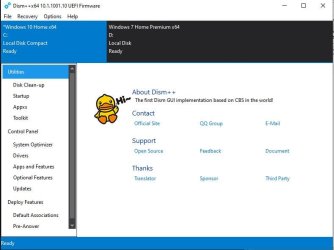
You can also use DISM++, depending on the amount of RAM you have, you may not be able to install all the updates.
Download Dism++ - MajorGeeks
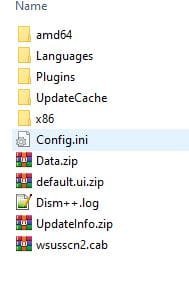
To prevent error message, you will need wsusscn3.cab too, download & place it in DISM++ Config folder.
DISM++ shows problematic update in Orange with a description too.
DISM++ does not update Microsoft products. You'll have to run Win Update
Click updates -> scan, will scan your computer for installed update then display what is available. Pick and choose as you wish.

Capture.JPG

Config folder screenshot

Capture 1.JPG

Snick


My Computer

Computer type
PC/Desktop
Computer Manufacturer/Model Number
HP Desktop & Compaq Laptop
OS
Win 10 x64, Linux Lite, Win 7 x64, BlackArch, & Kali
Hard Drives
Samsung 850 Pro 256Gb,
Hitachi HDD 1Tb,
Crucial MX SSD 250Gb
Segate 3Tb USB 3.0 Ext. Backup HDD
Internet Speed
150Mbps dn, 20Mbps up
Antivirus
Avast Free, Malwarebytes Anti-Exploit & Anti-Ransomware
Browser
Firefox, Chrome, Opera, & VPN
Back
Top