

Windows 7 categorises some Fonts as "Hidden" (based on the language setting).
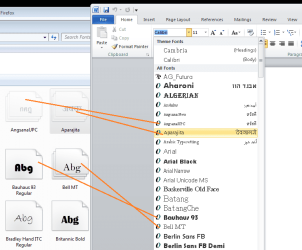
In the attachment there are "hidden" fonts showing up in MS Word 2010. Is there a setting somewhere I have missed? Or does it just not work?
As a workaround, can I just copy the fonts I do not currently want into another folder, then Delete them from the Fonts folder? Or will that cause problems?
In the attachment there are "hidden" fonts showing up in MS Word 2010. Is there a setting somewhere I have missed? Or does it just not work?
As a workaround, can I just copy the fonts I do not currently want into another folder, then Delete them from the Fonts folder? Or will that cause problems?
Attachments
My Computer
At a glance
Windows Home Premium (64)Intel Core i7 8608GB (4x2GB) Corsair TwinX XMS31GB Gainward 9500 GT
- Computer type
- PC/Desktop
- Computer Manufacturer/Model Number
- Scan 3XS P55 liteDAW
- OS
- Windows Home Premium (64)
- CPU
- Intel Core i7 860
- Motherboard
- Gigabyte GA-P55A-UD4
- Memory
- 8GB (4x2GB) Corsair TwinX XMS3
- Graphics Card(s)
- 1GB Gainward 9500 GT
- Sound Card
- M-Audio Delta 66
- Monitor(s) Displays
- Acer v223wBBd
- Screen Resolution
- 1680 x 1050
- Hard Drives
- 1 x 500 GB WD Barracuda (OS+Docs)
2 x 1TB Samsung Spinpoint F3 (Data)
- PSU
- Enermax EMD625AWT II - 625W Enermax Modu82+ II
- Case
- Fractal Design Define R2 Black
- Cooling
- Prolima Megahalems Super 6 Heatpipe Tower Cooler
- Keyboard
- Microsoft Digital Media Pro
- Mouse
- Belkin Optical Ergo
- Internet Speed
- 8 Mbps nominal (14.9 achieved !)
- Other Info
- Digital Audio Workstation


