msconfig Boot settings options unresponsive

Chunkles

New member
Local time
3:09 PM
Messages
3
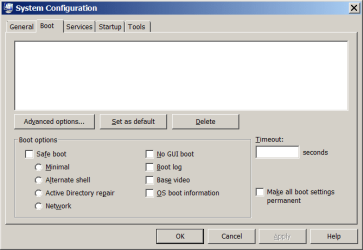
I am trying to do I tweak to allow both of my Cores to Boot the computer, but in the msconfig for the Boot tab, I can't click ANYTHING, I can click exit, cancel, and help, but I can;t go into advanced settings under Boot or check any boxes in the Boot tab. Why is this and how can I fix it? [Attached is an image of my msconfig screen depicting the details of this]

I have tried: Startup Repair, sfc/ scannow, disk defrag, and chkdsk
 

Attachments
  • msconfig.png
    msconfig.png
    14.1 KB · Views: 267

My Computer My Computer

Computer Manufacturer/Model Number
HP-G71-340US
OS
Windows 7 Home Premium 64bit
CPU
Intel(R) Core(TM)2 Duo CPU T6600 @ 2.20GHz
Motherboard
Hewlett-Packard 306B 21.14
Memory
8192 MBytes
Graphics Card(s)
Mobile Intel(R) 4 Series Express Chipset Family 1807 MBytes
Sound Card
IDT High Definition Audio CODEC
Monitor(s) Displays
Internal Laptop Mobile Intel(R) 4 Series Express Chipset
Screen Resolution
1600x900
Hard Drives
Disk 0- WDC WD3200BEVT-60A23T0 320.0GB
Disk 1- USB Flash Memory Device 1948.0GB
Disk 2- WDC WD10EARS-00MVWB0 : WD My Book 1130 USB Device
PSU
HP AC Power Supply Unit
Cooling
Average: 42ºC (CPU); 29ºC (ACPI); 38ºC (Internal Hard Drive)
Keyboard
Micosoft Natural PS/2 Keyboard 101/102-Key with HP QLB
Mouse
Synaptics PS/2 Port TouchPad; Microsoft Wireless Mouse 5000
That tweak you are trying to do is pointless. So there is really no point in doing it. Windows is already using your CPU to the maximum it can. There is no setting in Windows that will allow you to go beyond the capabilities of the hardware.

It being broken is a blessing I say. *nods* You never actually need it. All of those settings in there are for testing and developing.
 

My Computer My Computer

Computer type
PC/Desktop
Computer Manufacturer/Model Number
Alienware Aurora ALX R4
OS
Windows 10 Pro (x64)
CPU
Intel Core i7-3930K (3.2GHz - 4.5GHz)
Motherboard
Alienware Aurora-R4 x79
Memory
4x Samsung 4GB PC3-12800 DDR3 (16GB 1600MHz)
Graphics Card(s)
Nvidia Geforce GTX 690
Sound Card
SteelSeries Siberia Elite
Monitor(s) Displays
Dell UltraSharp U3011
Screen Resolution
2560x1600
Hard Drives
Samsung 850 Pro 256 GB, Seagate 1TB Desktop Hybrid HDD, 2x Western Digital 4TB Green HDD
PSU
875W Some Dell PSU <.<
Case
Alienware Aurora ALX
Cooling
Custom Liquid Cooling (EK CPU & GPU blocks) dual EK 480RAD
Keyboard
Logitech G710+ Mechanical
Mouse
Logitech G700s
Internet Speed
Verizon Fios (50 mbps average)
Other Info
Server: Intel NUC D54250WYK: i5-4250U, 16GB, 256 GB mSATA, Windows Server 2012 R2
This thread fixed my problem. I gave the OS partition a letter, (A: System) in my case, and then hid the drive using the registry tweak here.
 

My Computer My Computer

Computer Manufacturer/Model Number
HP-G71-340US
OS
Windows 7 Home Premium 64bit
CPU
Intel(R) Core(TM)2 Duo CPU T6600 @ 2.20GHz
Motherboard
Hewlett-Packard 306B 21.14
Memory
8192 MBytes
Graphics Card(s)
Mobile Intel(R) 4 Series Express Chipset Family 1807 MBytes
Sound Card
IDT High Definition Audio CODEC
Monitor(s) Displays
Internal Laptop Mobile Intel(R) 4 Series Express Chipset
Screen Resolution
1600x900
Hard Drives
Disk 0- WDC WD3200BEVT-60A23T0 320.0GB
Disk 1- USB Flash Memory Device 1948.0GB
Disk 2- WDC WD10EARS-00MVWB0 : WD My Book 1130 USB Device
PSU
HP AC Power Supply Unit
Cooling
Average: 42ºC (CPU); 29ºC (ACPI); 38ºC (Internal Hard Drive)
Keyboard
Micosoft Natural PS/2 Keyboard 101/102-Key with HP QLB
Mouse
Synaptics PS/2 Port TouchPad; Microsoft Wireless Mouse 5000
You should still leave those options alone. They do not do what you think they do.
 

My Computer My Computer

Computer type
PC/Desktop
Computer Manufacturer/Model Number
Alienware Aurora ALX R4
OS
Windows 10 Pro (x64)
CPU
Intel Core i7-3930K (3.2GHz - 4.5GHz)
Motherboard
Alienware Aurora-R4 x79
Memory
4x Samsung 4GB PC3-12800 DDR3 (16GB 1600MHz)
Graphics Card(s)
Nvidia Geforce GTX 690
Sound Card
SteelSeries Siberia Elite
Monitor(s) Displays
Dell UltraSharp U3011
Screen Resolution
2560x1600
Hard Drives
Samsung 850 Pro 256 GB, Seagate 1TB Desktop Hybrid HDD, 2x Western Digital 4TB Green HDD
PSU
875W Some Dell PSU <.<
Case
Alienware Aurora ALX
Cooling
Custom Liquid Cooling (EK CPU & GPU blocks) dual EK 480RAD
Keyboard
Logitech G710+ Mechanical
Mouse
Logitech G700s
Internet Speed
Verizon Fios (50 mbps average)
Other Info
Server: Intel NUC D54250WYK: i5-4250U, 16GB, 256 GB mSATA, Windows Server 2012 R2
The links in Chunkles last post are invalid. Where can I gind the information about enabling the options in the msconfig Boot panel?

The comments logicearth made about "you shouldn't be changing those settings" are out of line - they assume a user is incompetent, and would have no legitimate reason for using them. As an operating system developer and power user, I find the condescending attitude offensive.
 
Last edited:

My Computer My Computer

Computer type
PC/Desktop
Computer Manufacturer/Model Number
custom, IBM & Lenovo ThinkPads
OS
w2K AS, wXP, w7 Ultimate 32 bit, w7 Pro 64 bit
click on the advanced tab.
if your looking to multi core run.


That post was made years ago.
The original screenshot would also imply that the OP didnt have an OS?? possibly booting via grub.
Thats why he couldnt use/acccess the option


Roy
 

My Computer My Computer

Computer type
PC/Desktop
Computer Manufacturer/Model Number
medionl/Aspire 6930G/acer x55a
OS
W7 home premium 32bit/W7HP 64bit/w10 tp insider ring
CPU
E5300 dual core
Motherboard
medion MS7366
Memory
3gb
Graphics Card(s)
Nvidia Geforce 7100 Nforce 630i
Monitor(s) Displays
avixc
Internet Speed
n (isp resticted to 72)
Antivirus
mse/pands
Browser
palemoon
Other Info
Belkin Fd7050 n USB using Railink RT2870 drivers, more upto date
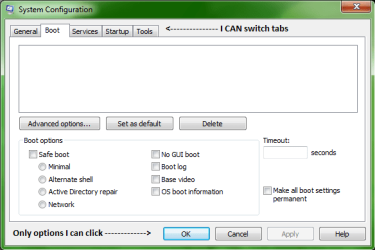
My problem is none of the options in the msconfig Boot tab do anything. I would like to set Boot log and OS boot information, but clicking on the checkboxes does nothing. Also, the Advanced... button doesn't do anything, but all of the other tabs in the msconfig window work correctly.


OS Name Microsoft Windows 7 Professional
Version 6.1.7601 Service Pack 1 Build 7601
Other OS Description Not Available
OS Manufacturer Microsoft Corporation
System Name HOTROD
System Manufacturer LENOVO
System Model 2441A75
System Type x64-based PC
Processor Intel(R) Core(TM) i7-3720QM CPU @ 2.60GHz, 2601 Mhz, 4 Core(s), 8 Logical Processor(s)
BIOS Version/Date LENOVO G5ETA7WW (2.67 ), 5/16/2017
SMBIOS Version 2.7
Windows Directory C:\windows
System Directory C:\windows\system32
Boot Device \Device\HarddiskVolume1
Locale United States
Hardware Abstraction Layer Version = "6.1.7601.17514"
User Name HOTROD\wfredk
Time Zone Eastern Daylight Time
Installed Physical Memory (RAM) 16.0 GB
Total Physical Memory 15.8 GB
Available Physical Memory 10.9 GB
Total Virtual Memory 31.6 GB
Available Virtual Memory 26.4 GB
Page File Space 15.8 GB
Page File C:\pagefile.sys
 

Attachments

  • msconfig-boot-tab.png
    msconfig-boot-tab.png
    9.2 KB · Views: 8

My Computer My Computer

Computer type
PC/Desktop
Computer Manufacturer/Model Number
custom, IBM & Lenovo ThinkPads
OS
w2K AS, wXP, w7 Ultimate 32 bit, w7 Pro 64 bit
Hi Hotrod,

Are you dual booting using Grub/bcd, looking at your mini profile looks that way.

Could be that the standard 100mb system reserve partition is either not present or not active


Roy
 

My Computer My Computer

Computer type
PC/Desktop
Computer Manufacturer/Model Number
medionl/Aspire 6930G/acer x55a
OS
W7 home premium 32bit/W7HP 64bit/w10 tp insider ring
CPU
E5300 dual core
Motherboard
medion MS7366
Memory
3gb
Graphics Card(s)
Nvidia Geforce 7100 Nforce 630i
Monitor(s) Displays
avixc
Internet Speed
n (isp resticted to 72)
Antivirus
mse/pands
Browser
palemoon
Other Info
Belkin Fd7050 n USB using Railink RT2870 drivers, more upto date
Further W7 hates being second it should set as the primary boot option.


Roy
 

My Computer My Computer

Computer type
PC/Desktop
Computer Manufacturer/Model Number
medionl/Aspire 6930G/acer x55a
OS
W7 home premium 32bit/W7HP 64bit/w10 tp insider ring
CPU
E5300 dual core
Motherboard
medion MS7366
Memory
3gb
Graphics Card(s)
Nvidia Geforce 7100 Nforce 630i
Monitor(s) Displays
avixc
Internet Speed
n (isp resticted to 72)
Antivirus
mse/pands
Browser
palemoon
Other Info
Belkin Fd7050 n USB using Railink RT2870 drivers, more upto date
This is a w7-only laptop that boots using the w7 boot manager. What in the system config makes you think I might be using grub?
 

My Computer My Computer

Computer type
PC/Desktop
Computer Manufacturer/Model Number
custom, IBM & Lenovo ThinkPads
OS
w2K AS, wXP, w7 Ultimate 32 bit, w7 Pro 64 bit
The profile under my username shows 4 O/S versions because I have 4 different computers currently running different flavors of Windows.
 

My Computer My Computer

Computer type
PC/Desktop
Computer Manufacturer/Model Number
custom, IBM & Lenovo ThinkPads
OS
w2K AS, wXP, w7 Ultimate 32 bit, w7 Pro 64 bit
Back
Top