Solved Msconfig maximum memory issue

Alojz

New member
Local time
8:44 PM
Messages
5
Hello!

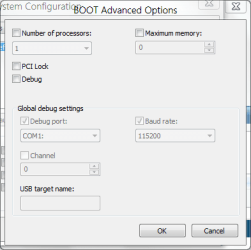
Msconfig - boot - advanced - unchecked maximum memory - windows 7 detected 4096 of memory (what is true, i have 4 gb memory on my system)

After ok, and restart in maximum memory field there is not 4096 it is 0

Is that normal behaviuor?

My computer - properties - installed memory - it says 4gb installed

Any idea?

Regards!!!
 

My Computer

OS
Windows 7 Ultimate x64
CPU
Intel Core i5 2500
Motherboard
Asus P8H67-M LE
Memory
4GB KINGMAX DDR 3 1333MHZ
Graphics Card(s)
Asus GeForce GTS 450
If that is 0 than Windows uses all the ram memory. It's normal. ;)
 

My Computer

Computer type
PC/Desktop
Computer Manufacturer/Model Number
Custom Build
OS
Windows 10 Pro x64
CPU
Intel Core i5 4440 @Stock
Motherboard
Gigabyte Z97 D3H
Memory
4 x 4GB HyperX Fury DDR3
Graphics Card(s)
Gigabyte GTX 1050Ti O4G
Sound Card
Integrated
Monitor(s) Displays
Dell P2417H
Screen Resolution
1920 x 1080
Hard Drives
Samsung EVO 850 120GB / Toshiba DT01ACA050 1TB 7200prm 32MB
PSU
Riotoro Onyx 750W
Case
NZXT H500 Black-Red
Cooling
Stock CPU + NZXT 120mm + 2x120mm red fans
Keyboard
Modecom Volcano Lanparty
Mouse
Asus ROG Gladius / DeepCool E-Pad Plus
Internet Speed
DOCSIS 50/3 Mbit
Browser
Google Chrome
Other Info
Asus K55VJ(i5 3210M, GT635M / 2GB, 8GB DDR3, 500GB HDD)

My Computer

Computer type
PC/Desktop
Computer Manufacturer/Model Number
Alienware Aurora ALX R4
OS
Windows 10 Pro (x64)
CPU
Intel Core i7-3930K (3.2GHz - 4.5GHz)
Motherboard
Alienware Aurora-R4 x79
Memory
4x Samsung 4GB PC3-12800 DDR3 (16GB 1600MHz)
Graphics Card(s)
Nvidia Geforce GTX 690
Sound Card
SteelSeries Siberia Elite
Monitor(s) Displays
Dell UltraSharp U3011
Screen Resolution
2560x1600
Hard Drives
Samsung 850 Pro 256 GB, Seagate 1TB Desktop Hybrid HDD, 2x Western Digital 4TB Green HDD
PSU
875W Some Dell PSU <.<
Case
Alienware Aurora ALX
Cooling
Custom Liquid Cooling (EK CPU & GPU blocks) dual EK 480RAD
Keyboard
Logitech G710+ Mechanical
Mouse
Logitech G700s
Internet Speed
Verizon Fios (50 mbps average)
Other Info
Server: Intel NUC D54250WYK: i5-4250U, 16GB, 256 GB mSATA, Windows Server 2012 R2
Thank you for quick reply!

Regards!!!
 

My Computer

OS
Windows 7 Ultimate x64
CPU
Intel Core i5 2500
Motherboard
Asus P8H67-M LE
Memory
4GB KINGMAX DDR 3 1333MHZ
Graphics Card(s)
Asus GeForce GTS 450
You're welcome !
 

My Computer

Computer type
PC/Desktop
Computer Manufacturer/Model Number
Custom Build
OS
Windows 10 Pro x64
CPU
Intel Core i5 4440 @Stock
Motherboard
Gigabyte Z97 D3H
Memory
4 x 4GB HyperX Fury DDR3
Graphics Card(s)
Gigabyte GTX 1050Ti O4G
Sound Card
Integrated
Monitor(s) Displays
Dell P2417H
Screen Resolution
1920 x 1080
Hard Drives
Samsung EVO 850 120GB / Toshiba DT01ACA050 1TB 7200prm 32MB
PSU
Riotoro Onyx 750W
Case
NZXT H500 Black-Red
Cooling
Stock CPU + NZXT 120mm + 2x120mm red fans
Keyboard
Modecom Volcano Lanparty
Mouse
Asus ROG Gladius / DeepCool E-Pad Plus
Internet Speed
DOCSIS 50/3 Mbit
Browser
Google Chrome
Other Info
Asus K55VJ(i5 3210M, GT635M / 2GB, 8GB DDR3, 500GB HDD)
Hi Alojz and welcome to W7 Forums :party:

That is perfectly normal. These options are meant for troubleshooting and not normal running. Regardless of what value is shown, so long as the checkbox Maximum memory: remains unticked (clear), as shown here, your system will use the full amount of memory installed (subject to the limitations imposed by a 32-bit OS, if using 32-bit). Likewise, if Number of processors: is unchecked then your system will use all available cores, otherwise if that option is checked it will be restricted to the number of cores stated.

Capture.png
 

My Computer

Computer type
PC/Desktop
Computer Manufacturer/Model Number
Dwarf Dwf/11/2012 r09/2013
OS
Windows 8.1 Pro RTM x64
CPU
Intel Core-i5-3570K 4-core @ 3.4GHz (Ivy Bridge) (OC 4.4GHz)
Motherboard
ASRock Z77 Extreme4-M
Memory
4 x 4GB DDR3-1600 Corsair Vengeance CMZ8GX3M2A1600C9B (16GB)
Graphics Card(s)
MSI GeForce GTX770 Gaming OC 2GB
Sound Card
Realtek High Definition on board solution (ALC 898)
Monitor(s) Displays
ViewSonic VA1912w Widescreen (VGA)
Screen Resolution
1440x900
Hard Drives
OCZ Agility 3 SSD 120GB SATA III x2 (RAID 0)
Samsung HD501LJ 500GB SATA II x2
Hitachi HDS721010CLA332 1TB SATA II
Iomega 1.5TB Ext USB 2.0
WD 2.0TB Ext USB 3.0
PSU
XFX Pro Series 850W Semi-Modular
Case
Gigabyte IF233
Cooling
1 x 120mm Front Inlet 1 x 120mm Rear Exhaust
Keyboard
Microsoft Comfort Curve Keyboard 3000 (USB)
Mouse
Microsoft Comfort Mouse 3000 for Business (USB)
Internet Speed
NetGear DG834Gv3 ADSL Modem/Router (Ethernet) ~4.0 Mb/s (O2)
Antivirus
Avast! 8.0.1497
Browser
IE 11
Other Info
Optical Drive: HL-DT-ST BD-RE BH10LS30 SATA Bluray
Lexmark S305 Printer/Scanner/Copier (USB)
WEI Score: 8.1/8.1/8.5/8.5/8.25
Asus Eee PC 1011PX Netbook (Windows 7 x86 Starter)

My Computer

Computer type
PC/Desktop
Computer Manufacturer/Model Number
Custom Build
OS
Windows 10 Pro x64
CPU
Intel Core i5 4440 @Stock
Motherboard
Gigabyte Z97 D3H
Memory
4 x 4GB HyperX Fury DDR3
Graphics Card(s)
Gigabyte GTX 1050Ti O4G
Sound Card
Integrated
Monitor(s) Displays
Dell P2417H
Screen Resolution
1920 x 1080
Hard Drives
Samsung EVO 850 120GB / Toshiba DT01ACA050 1TB 7200prm 32MB
PSU
Riotoro Onyx 750W
Case
NZXT H500 Black-Red
Cooling
Stock CPU + NZXT 120mm + 2x120mm red fans
Keyboard
Modecom Volcano Lanparty
Mouse
Asus ROG Gladius / DeepCool E-Pad Plus
Internet Speed
DOCSIS 50/3 Mbit
Browser
Google Chrome
Other Info
Asus K55VJ(i5 3210M, GT635M / 2GB, 8GB DDR3, 500GB HDD)
You guys are great, thank you all for quick support!:party:
 

My Computer

OS
Windows 7 Ultimate x64
CPU
Intel Core i5 2500
Motherboard
Asus P8H67-M LE
Memory
4GB KINGMAX DDR 3 1333MHZ
Graphics Card(s)
Asus GeForce GTS 450
You're welcome, Alojz. :)
 

My Computer

Computer type
PC/Desktop
Computer Manufacturer/Model Number
Dwarf Dwf/11/2012 r09/2013
OS
Windows 8.1 Pro RTM x64
CPU
Intel Core-i5-3570K 4-core @ 3.4GHz (Ivy Bridge) (OC 4.4GHz)
Motherboard
ASRock Z77 Extreme4-M
Memory
4 x 4GB DDR3-1600 Corsair Vengeance CMZ8GX3M2A1600C9B (16GB)
Graphics Card(s)
MSI GeForce GTX770 Gaming OC 2GB
Sound Card
Realtek High Definition on board solution (ALC 898)
Monitor(s) Displays
ViewSonic VA1912w Widescreen (VGA)
Screen Resolution
1440x900
Hard Drives
OCZ Agility 3 SSD 120GB SATA III x2 (RAID 0)
Samsung HD501LJ 500GB SATA II x2
Hitachi HDS721010CLA332 1TB SATA II
Iomega 1.5TB Ext USB 2.0
WD 2.0TB Ext USB 3.0
PSU
XFX Pro Series 850W Semi-Modular
Case
Gigabyte IF233
Cooling
1 x 120mm Front Inlet 1 x 120mm Rear Exhaust
Keyboard
Microsoft Comfort Curve Keyboard 3000 (USB)
Mouse
Microsoft Comfort Mouse 3000 for Business (USB)
Internet Speed
NetGear DG834Gv3 ADSL Modem/Router (Ethernet) ~4.0 Mb/s (O2)
Antivirus
Avast! 8.0.1497
Browser
IE 11
Other Info
Optical Drive: HL-DT-ST BD-RE BH10LS30 SATA Bluray
Lexmark S305 Printer/Scanner/Copier (USB)
WEI Score: 8.1/8.1/8.5/8.5/8.25
Asus Eee PC 1011PX Netbook (Windows 7 x86 Starter)
msconfig

Please I checked d box for maximum memory and edited from 4097 to 256 please from all indications now seems am finished as I can no longer understand my system. I tried going back, but instead it is telling me no space for that again. Please what must be done to reverse this... thanks
 

My Computer

Computer type
Laptop
Computer Manufacturer/Model Number
hp
OS
windows 7 home premium 32 bit
This Thread REALLY Saved Me

[FONT=&quot]I am now using Windows 8.1 (and will post something on the Win-8 Forum) on an old Dell XPS 600 desktop PC. But this Win-7 thread on maximum memory settings really saved me; THANKS. Lessons learned:[/FONT]


  • [FONT=&quot]First off, there is probably NO legitimate way to increase RAM capacity of most old computers.

    [/FONT]
  • [FONT=&quot]Second, never fiddle with the Maximum Memory settings in Msconfig.exe (“System Configuration;” “Boot” tab; “Advanced options”). No matter the temptation, leave the "Maximum Memory" box unchecked.

    [/FONT]
  • [FONT=&quot]And for the love of God whatever you do, do NOT re-boot the computer with the Maximum Memory box checked and maximum memory set (e.g., by Windows) at zero. (Very BAD!)

    [/FONT]
  • [FONT=&quot]Regardless of the Windows version, it seems like corrective options provided at boot-up almost never help with YOUR particular problem.

    [/FONT]
  • [FONT=&quot]So if you find yourself in the quandary where your computer won’t boot after you inadvertently changed memory settings in Msconfig, use instructions in the recommended tutorial (Memory - Set Maximum Amount Used by Windows) to manually reset the maximum memory (using Command Prompt commands) to some reasonable number greater than zero.

    [/FONT]
  • [FONT=&quot]Then without re-booting start-up Windows from the Command Prompt if you can (e.g., using Winint.exe). (Re-booting did not work for me.)

    [/FONT]
  • [FONT=&quot]If you manage to get Windows back up and running, re-enter Msconfig a final time, make sure the maximum memory box is unchecked (the way it is supposed to be in order to use maximum available memory), save, and re-boot. Then, as someone said, do not ever touch these settings again if you know what’s good for you.[/FONT]
(Whew! My next step was going to be to re-install Windows. Thanks, people.)
 

My Computer

Computer type
PC/Desktop
Computer Manufacturer/Model Number
Dell Dimension XPS 600
OS
Windows 8.1 Pro 64-bit (previous Windows 7 Pro 64-bit)
CPU
Intel Pentium D 4-processor 3.73 GHz CPU
Motherboard
Dell XPS 600 factory motherboard
Memory
8 GB
Graphics Card(s)
NVidia GeForce GTX 970
Hard Drives
- Samsung SSD 850 Pro 1 TB
- Samsung/Seagate 2.5" ST2000LM 003 HN-M201R HDD
- Seagate 2.5" ST2000LM 007-1R8174 HDD
Antivirus
Microsoft Windows Defender
Browser
Firefox 54.0.1 (64-bit)

My Computer

Computer type
PC/Desktop
Computer Manufacturer/Model Number
n/a
OS
W7 Ultimate SP1, LM19.2 MATE, W10 Home 1703, W10 Pro 1703 VM, #All 64 bit
CPU
AMD Phenom II x6 1100T, 3.3 GHz
Motherboard
ASUS M4A88T-M/USB3 (AM3)
Memory
12GB DDR3 1333 G-Skill (4GB x 2), G-Skill (2GB x 2)
Graphics Card(s)
NVIDIA GeForce GTX 660
Sound Card
Realtek?
Monitor(s) Displays
Samsung S23B350
Screen Resolution
1920x1080
Hard Drives
WD Green 2TB (SATA), WD Green 3TB (SATA), WD Blue 4TB (SATA), WD Blue 6TB (SATA)
PSU
Cooler Master
Case
Antec GX300 Tower
Cooling
3x Antec TRICOOL 120mm Fans
Mouse
Wired Optical
Internet Speed
DSL
Antivirus
Avast
Browser
Pale Moon (64 bit)
Other Info
2018-12-27 Upgraded HDDs
2015-12-10 Upgraded case, graphics card, storage
2015-08-15 Upgraded motherboard & RAM
2015-07-15 Upgraded LM17.1 to LM17.2
Back
Top