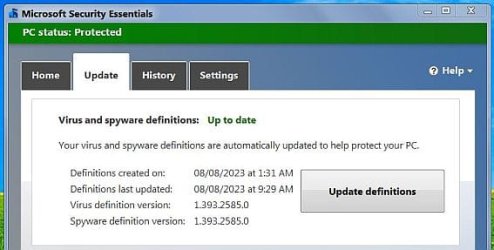
MSE is totally down/end support on Windows 7 ?

Last week I fixed a 17 year old laptop and installed Windows 7 on it. I then installed MSE on it. Even though Windows 7 worked OK on it I wanted better compatibility and security on the Internet. I took the plunge and did a free upgrade to Windows 10. Surprisingly the upgrade went quite well. Note before it started the upgrade it looks for compatibility problems. It is ironic that the only problem it found was that it needed to remove MSE.
 

My Computers My Computers

  • At a glance

    Windows 7 Home Premium 64-bitsAMD FX-8350GSKILL Ripjaw-X PC3 12800 8GB (2x4GB)ASUS ROG STRIX GTX 1060 6GB
    Computer type
    PC/Desktop
    Computer Manufacturer/Model Number
    Custom build
    OS
    Windows 7 Home Premium 64-bits
    CPU
    AMD FX-8350
    Motherboard
    Gigabyte GA-990FXA-UD3 (AM3+)
    Memory
    GSKILL Ripjaw-X PC3 12800 8GB (2x4GB)
    Graphics Card(s)
    ASUS ROG STRIX GTX 1060 6GB
    Sound Card
    Integrated
    Monitor(s) Displays
    Asus VE228H (21.5-in)
    Screen Resolution
    1920x1080 60Hz
    Hard Drives
    SAMSUNG 870 EVO 2.5 Inch SATA SSD (1TB)
    SAMSUNG 870 EVO 2.5 Inch SATA SSD (1TB)
    SAMSUNG 870 EVO 2.5 Inch SATA SSD (1TB)
    PSU
    Corsair RM750x (750 watts)
    Case
    Corsair Carbide Series 200R
    Cooling
    Corsair Hydro Series H60 (CWCH60)
    Keyboard
    Logitech Elite
    Mouse
    Logitech M510 Wireless Mouse
    Internet Speed
    Comcast Gigabit Extra (1200Mbps down / 35Mbps up)
    Antivirus
    Malwarebytes
    Browser
    Firefox, Edge, Chrome
    Other Info
    ASUS DRW-24B1ST DVD-RW (24X) optical drive
    Seagate Expansion Desk (5TB) external SATA/USB HDD
    Comcast XB8 Internet Gateway
  • At a glance

    Windows 7 Pro (64-bit)AMD Phenom II 960T X4Corsair XMS2 DDR2-800 8GB (4x2GB)ASUS ENGTX560 DCII OC/2DI/1GD5 1GB
    Computer type
    PC/Desktop
    System Manufacturer/Model Number
    Custom
    OS
    Windows 7 Pro (64-bit)
    CPU
    AMD Phenom II 960T X4
    Motherboard
    ASUS M4N82 Deluxe
    Memory
    Corsair XMS2 DDR2-800 8GB (4x2GB)
    Graphics Card(s)
    ASUS ENGTX560 DCII OC/2DI/1GD5 1GB
    Monitor(s) Displays
    Samsung 930B 19-inch LCD
    Screen Resolution
    1280x1024
    Hard Drives
    Samsung SSD 870 EVO 1000 GB (Windows 10)
    Seagate ST1000DM003 1000 GB (Windows 7)
    PSU
    Antec TruePower (new) TP-650
    Case
    Antec Three Hundred
    Cooling
    AMD stock cooler from FX8350
    Mouse
    Logitech M100
    Internet Speed
    Xfinity Gigabit Extra 1200/35 Mbps
Last week I fixed a 17 year old laptop and installed Windows 7 on it. I then installed MSE on it. Even though Windows 7 worked OK on it I wanted better compatibility and security on the Internet. I took the plunge and did a free upgrade to Windows 10. Surprisingly the upgrade went quite well. Note before it started the upgrade it looks for compatibility problems. It is ironic that the only problem it found was that it needed to remove MSE.
That's because MSE is not needed.The built in built in Windows Security for Windows 10 (and Windows 11) already use the same scan engine and definitions as MSE.

1659439702247-png.35459
 

My Computers My Computers

  • At a glance

    Windows 7 Home Premium x64AMD V1204GB
    Computer type
    Laptop
    Computer Manufacturer/Model Number
    Toshiba satellite C650D
    OS
    Windows 7 Home Premium x64
    CPU
    AMD V120
    Memory
    4GB
    Internet Speed
    150 Mbps
    Antivirus
    MSE
    Browser
    IE11, Edge, Firefox
    Other Info
    I also have W7 Pro on my System Two, and several W7 Hyper-V VMs. My other machines run Windows 10/11. Their specs are in my Ten Forums & Eleven Forum profiles.
  • At a glance

    Windows 7 Pro x64Intel i5-3320M8 GB
    Computer type
    Laptop
    System Manufacturer/Model Number
    Lenovo Thinkpad T430
    OS
    Windows 7 Pro x64
    CPU
    Intel i5-3320M
    Memory
    8 GB
    Hard Drives
    250GB Samsung SSD 860 EVO
    Antivirus
    MSE
I am also having this problem? any fix available?

Edit...
Managed to get it working by enabling Win Update (had it disabled) any way to keep the Win Update disabled but still update MSE?
 
Last edited:

My Computer My Computer

At a glance

Windows 7 SP1 X64i7 4770kKingston KHX2133MSI GTX 1070 8Gb
Computer type
PC/Desktop
Computer Manufacturer/Model Number
Custom
OS
Windows 7 SP1 X64
CPU
i7 4770k
Motherboard
MSI Z87 Xpower
Memory
Kingston KHX2133
Graphics Card(s)
MSI GTX 1070 8Gb
I am also having this problem? any fix available?

Edit...
Managed to get it working by enabling Win Update (had it disabled) any way to keep the Win Update disabled but still update MSE?
When you check for updates using MSE itself the error message that the update has failed is misleading.

Look carefully at the sequence of screenshots in my post #9.

You will see that whatever network issue is that's causing the message, it actually occurs after the definitions have been successfully updated.
 

My Computers My Computers

  • At a glance

    Windows 7 Home Premium x64AMD V1204GB
    Computer type
    Laptop
    Computer Manufacturer/Model Number
    Toshiba satellite C650D
    OS
    Windows 7 Home Premium x64
    CPU
    AMD V120
    Memory
    4GB
    Internet Speed
    150 Mbps
    Antivirus
    MSE
    Browser
    IE11, Edge, Firefox
    Other Info
    I also have W7 Pro on my System Two, and several W7 Hyper-V VMs. My other machines run Windows 10/11. Their specs are in my Ten Forums & Eleven Forum profiles.
  • At a glance

    Windows 7 Pro x64Intel i5-3320M8 GB
    Computer type
    Laptop
    System Manufacturer/Model Number
    Lenovo Thinkpad T430
    OS
    Windows 7 Pro x64
    CPU
    Intel i5-3320M
    Memory
    8 GB
    Hard Drives
    250GB Samsung SSD 860 EVO
    Antivirus
    MSE
ok but will it auto update in the background? i got some event log errors witch point to a failed update
 

My Computer My Computer

At a glance

Windows 7 SP1 X64i7 4770kKingston KHX2133MSI GTX 1070 8Gb
Computer type
PC/Desktop
Computer Manufacturer/Model Number
Custom
OS
Windows 7 SP1 X64
CPU
i7 4770k
Motherboard
MSI Z87 Xpower
Memory
Kingston KHX2133
Graphics Card(s)
MSI GTX 1070 8Gb
Microsoft Security Essentials 4.10.209.0 updates fine.
Ignore and close the error message when it appears.
You will see the definition files have been updated.
 

Attachments

  • Clipboard.jpg
    Clipboard.jpg
    88.9 KB · Views: 2

My Computer My Computer

At a glance

Windows 7 Professional SP1 64-bitIntel Core i7-4790 3.60 GHz32 GB DDR3-1600 MHzIntegrated Intel HD Graphics 4600
Computer type
PC/Desktop
Computer Manufacturer/Model Number
Dell OptiPlex 9020
OS
Windows 7 Professional SP1 64-bit
CPU
Intel Core i7-4790 3.60 GHz
Memory
32 GB DDR3-1600 MHz
Graphics Card(s)
Integrated Intel HD Graphics 4600
Monitor(s) Displays
Viewsonic 32" LCD
Hard Drives
Kingston SATA 3 240 GB SSD
Internet Speed
Spectrum Internet 1000 Mbps
Hi, I've been having this problem as well. I noticed MSE automatically updates definitions. If I do another update by pressing the Update definitions button ,the error comes up at the Installing.... stage. However, the definitions still update OK when the operation finishes. I also noticed if I press the Update definitions button again, the error disappears when the search operation finishes.

I hope that helps.
 

My Computer My Computer

At a glance

Windows 7 Home Premium 64bit
Computer type
Laptop
OS
Windows 7 Home Premium 64bit
Hi, I've been having this problem as well. I noticed MSE automatically updates definitions. If I do another update by pressing the Update definitions button ,the error comes up at the Installing.... stage. However, the definitions still update OK when the operation finishes. I also noticed if I press the Update definitions button again, the error disappears when the search operation finishes.

I hope that helps.
Wont work for me...it's stuck on searching....
 

My Computer My Computer

At a glance

Windows 7 SP1 X64i7 4770kKingston KHX2133MSI GTX 1070 8Gb
Computer type
PC/Desktop
Computer Manufacturer/Model Number
Custom
OS
Windows 7 SP1 X64
CPU
i7 4770k
Motherboard
MSI Z87 Xpower
Memory
Kingston KHX2133
Graphics Card(s)
MSI GTX 1070 8Gb
I maybe fixed by reinstalling MSE, remove SoftwareDistribution folder (C:\Windows\SoftwareDistribution) and Check updates in WU again. Then MSE check new updates without this Error table.
 

My Computer My Computer

At a glance

Dual boot W7 Pro x64 / W10 Pro x64Intel Core i5-4210H2x Kingston 8GB DDR3 1600 CL11Nvidia GeForce GTX960M 4GB
Computer type
Laptop
Computer Manufacturer/Model Number
Lenovo Y50-70 (20378)
OS
Dual boot W7 Pro x64 / W10 Pro x64
CPU
Intel Core i5-4210H
Memory
2x Kingston 8GB DDR3 1600 CL11
Graphics Card(s)
Nvidia GeForce GTX960M 4GB
Sound Card
Sound Blaster PLAY! 3
Monitor(s) Displays
2
Screen Resolution
2x 1920x1080
Hard Drives
Vi560 S3 M.2 SSD 1TB
Cooling
Deepcool Multi Core X6
Keyboard
Yenkee YKB 1002 CS USB
Mouse
Crono CM645 Wired optical mouse
Internet Speed
95 Mb/s Down 95 Mb/s Up
Antivirus
MSE
Browser
Firefox 115.36.0esr x64bit
like i said it works when WU is enabled (service) once disabled it wont work anymore like it used to...
 

My Computer My Computer

At a glance

Windows 7 SP1 X64i7 4770kKingston KHX2133MSI GTX 1070 8Gb
Computer type
PC/Desktop
Computer Manufacturer/Model Number
Custom
OS
Windows 7 SP1 X64
CPU
i7 4770k
Motherboard
MSI Z87 Xpower
Memory
Kingston KHX2133
Graphics Card(s)
MSI GTX 1070 8Gb

My Computer My Computer

At a glance

Windows 7 Ultimate x641.86 GHz Intrel Core 23 GB Dual Channel DDR2 @ 3.32 MHzIntel Q965/Q963 Express chipset
Computer type
PC/Desktop
Computer Manufacturer/Model Number
refurb in an HP/Compaq case
OS
Windows 7 Ultimate x64
CPU
1.86 GHz Intrel Core 2
Motherboard
HP 0A60h XU1
Memory
3 GB Dual Channel DDR2 @ 3.32 MHz
Graphics Card(s)
Intel Q965/Q963 Express chipset
Monitor(s) Displays
Dell CRT
Hard Drives
977GB Samsung HD 103 SI ATA
Case
HP Compaq DC5800
Mouse
wired optical
Antivirus
Microsoft Security Essentials, MalwareBytes, Spyware Blaster
Browser
Firefox 32-bit
I maybe fixed by reinstalling MSE, remove SoftwareDistribution folder (C:\Windows\SoftwareDistribution) and Check updates in WU again. Then MSE check new updates without this Error table.

Have you solved the problem?
 

My Computer My Computer

At a glance

Windows 7 Home Premium 64bit
Computer type
Laptop
OS
Windows 7 Home Premium 64bit

My Computer My Computer

At a glance

Dual boot W7 Pro x64 / W10 Pro x64Intel Core i5-4210H2x Kingston 8GB DDR3 1600 CL11Nvidia GeForce GTX960M 4GB
Computer type
Laptop
Computer Manufacturer/Model Number
Lenovo Y50-70 (20378)
OS
Dual boot W7 Pro x64 / W10 Pro x64
CPU
Intel Core i5-4210H
Memory
2x Kingston 8GB DDR3 1600 CL11
Graphics Card(s)
Nvidia GeForce GTX960M 4GB
Sound Card
Sound Blaster PLAY! 3
Monitor(s) Displays
2
Screen Resolution
2x 1920x1080
Hard Drives
Vi560 S3 M.2 SSD 1TB
Cooling
Deepcool Multi Core X6
Keyboard
Yenkee YKB 1002 CS USB
Mouse
Crono CM645 Wired optical mouse
Internet Speed
95 Mb/s Down 95 Mb/s Up
Antivirus
MSE
Browser
Firefox 115.36.0esr x64bit
No, after did these things, MSE and Windows Update works perfectly now / back to normal :-) . MSE not showing that error table and WU shows only actual version of Defender definition.
 

My Computer My Computer

At a glance

Dual boot W7 Pro x64 / W10 Pro x64Intel Core i5-4210H2x Kingston 8GB DDR3 1600 CL11Nvidia GeForce GTX960M 4GB
Computer type
Laptop
Computer Manufacturer/Model Number
Lenovo Y50-70 (20378)
OS
Dual boot W7 Pro x64 / W10 Pro x64
CPU
Intel Core i5-4210H
Memory
2x Kingston 8GB DDR3 1600 CL11
Graphics Card(s)
Nvidia GeForce GTX960M 4GB
Sound Card
Sound Blaster PLAY! 3
Monitor(s) Displays
2
Screen Resolution
2x 1920x1080
Hard Drives
Vi560 S3 M.2 SSD 1TB
Cooling
Deepcool Multi Core X6
Keyboard
Yenkee YKB 1002 CS USB
Mouse
Crono CM645 Wired optical mouse
Internet Speed
95 Mb/s Down 95 Mb/s Up
Antivirus
MSE
Browser
Firefox 115.36.0esr x64bit
Do you have WU enabled in the services? i am trying to find a way to get it to work without WU enabled (like it did a month or so ago)
 

My Computer My Computer

At a glance

Windows 7 SP1 X64i7 4770kKingston KHX2133MSI GTX 1070 8Gb
Computer type
PC/Desktop
Computer Manufacturer/Model Number
Custom
OS
Windows 7 SP1 X64
CPU
i7 4770k
Motherboard
MSI Z87 Xpower
Memory
Kingston KHX2133
Graphics Card(s)
MSI GTX 1070 8Gb
dtoxic : I think, this is not possible. MSE use WU for updating, so. If you turn off WU service, MSE will start this service automatically when start search new definition.
 

My Computer My Computer

At a glance

Dual boot W7 Pro x64 / W10 Pro x64Intel Core i5-4210H2x Kingston 8GB DDR3 1600 CL11Nvidia GeForce GTX960M 4GB
Computer type
Laptop
Computer Manufacturer/Model Number
Lenovo Y50-70 (20378)
OS
Dual boot W7 Pro x64 / W10 Pro x64
CPU
Intel Core i5-4210H
Memory
2x Kingston 8GB DDR3 1600 CL11
Graphics Card(s)
Nvidia GeForce GTX960M 4GB
Sound Card
Sound Blaster PLAY! 3
Monitor(s) Displays
2
Screen Resolution
2x 1920x1080
Hard Drives
Vi560 S3 M.2 SSD 1TB
Cooling
Deepcool Multi Core X6
Keyboard
Yenkee YKB 1002 CS USB
Mouse
Crono CM645 Wired optical mouse
Internet Speed
95 Mb/s Down 95 Mb/s Up
Antivirus
MSE
Browser
Firefox 115.36.0esr x64bit
Nope,it was working like a month ago no problems at all,and i always have WU disabled (and use Windows Update BLocker 1.5, and i renamed the logon credentials to a non existent user...so WU is completely disabled and cannot auto change startup type or start it self) i think that MSE has reached EOL when it comes to definitions updates coming from the program ,however updates work if WU is enabled and can be manually updated regardless of WU enabled status, i tried some reg edits but without success to make it work like before. Guess ill have to do manual updates (trough some PS script or something)
 

My Computer My Computer

At a glance

Windows 7 SP1 X64i7 4770kKingston KHX2133MSI GTX 1070 8Gb
Computer type
PC/Desktop
Computer Manufacturer/Model Number
Custom
OS
Windows 7 SP1 X64
CPU
i7 4770k
Motherboard
MSI Z87 Xpower
Memory
Kingston KHX2133
Graphics Card(s)
MSI GTX 1070 8Gb
No problem here. MSE still automatically updates its definition files without any intervention from me. :-)
 

Attachments

  • Capture.JPG
    Capture.JPG
    32.6 KB · Views: 5

My Computer My Computer

At a glance

Windows 7 Professional SP1 64-bitIntel Core i7-4790 3.60 GHz32 GB DDR3-1600 MHzIntegrated Intel HD Graphics 4600
Computer type
PC/Desktop
Computer Manufacturer/Model Number
Dell OptiPlex 9020
OS
Windows 7 Professional SP1 64-bit
CPU
Intel Core i7-4790 3.60 GHz
Memory
32 GB DDR3-1600 MHz
Graphics Card(s)
Integrated Intel HD Graphics 4600
Monitor(s) Displays
Viewsonic 32" LCD
Hard Drives
Kingston SATA 3 240 GB SSD
Internet Speed
Spectrum Internet 1000 Mbps
No, after did these things, MSE and Windows Update works perfectly now / back to normal :-) . MSE not showing that error table and WU shows only actual version of Defender definition.

No problem here. MSE still automatically updates its definition files without any intervention from me. :-)

Ok...but the most important is to check event viewer, even if "MSE still automatically updates its definition" :
- Error messages indicating that MSE updates have failed ;
- Schannel error 40 or 70.

Checking the event viewer is the only way to confirm that there is no problem.
 
Last edited:

My Computers My Computers

  • At a glance

    Windows 10 64bit
    OS
    Windows 10 64bit
  • Computer type
    PC/Desktop
Back
Top