MSE shuts down on reboot

bnwrx

New member
Member
Local time
12:53 PM
Messages
47
I am trying to use MSE on my Win7 computer, but when the computer reboots I get a flag saying MSE is not on and do I want to turn it on. I click yes everytime but when I reboot it is off again. What am I doing wrong here?
 

My Computer

Computer Manufacturer/Model Number
Optima
OS
Windows 7 home Premium x64
CPU
IntelDuoCore 2.85ghz
Memory
4GB
Graphics Card(s)
onboard
Sound Card
on board
Hard Drives
2x320GB SATA
Keyboard
Logitech
Mouse
Logitech
Other Info
Litescribe CD/DVD RW
Try typing services in search. Make sure MSE is set to on or automatic

Go to msconfig, make sure it is set as a service that starts at boot. Type msconfig in search.
 

My Computer

Computer type
PC/Desktop
Computer Manufacturer/Model Number
Dell XPS 420
OS
Windows 10, Home Clean Install
CPU
Intel Core2 processsor Q8200(2.33Ghz 1333FSB) Quad Core Tech
Motherboard
Dell
Memory
6 gb
Graphics Card(s)
ATI Radeon 256MB HD3650
Sound Card
Intergrated 7.1 Channel Audio
Monitor(s) Displays
Dell SP2009W 20"
Hard Drives
640 GB Serial ATA Hard drive
Cooling
Fan
Keyboard
Dell USB Keyboard
Mouse
Dell Premium Optical USB
Internet Speed
DSL 2.85
MSE is not listed under services. MSCONFg shows MSE is running.

Thanks for your reply
 

My Computer

Computer Manufacturer/Model Number
Optima
OS
Windows 7 home Premium x64
CPU
IntelDuoCore 2.85ghz
Memory
4GB
Graphics Card(s)
onboard
Sound Card
on board
Hard Drives
2x320GB SATA
Keyboard
Logitech
Mouse
Logitech
Other Info
Litescribe CD/DVD RW

My Computer

Computer Manufacturer/Model Number
Apple Macbook Pro (April 2009)
OS
W7 Ult. x64 | OS X
CPU
Intel Mobile Core 2 Duo 2.93Ghz [T9800 Penryn]
Motherboard
NVIDIA nForce 730i Rev. B1 [Mac-F2268EC8 (U2E1)]
Memory
4096MB Samsung DDR3 Dual Channel [PC3-8500F 1066Mhz]
Graphics Card(s)
NVIDIA GeForce 9600M GT 512MB [G96M Rev. C1]
Sound Card
SB X-Fi Surround 5.1 USB | Onboard Realtek (Disabled)
Monitor(s) Displays
Acer x223wbd 22" | Apple Anti-Glare 17" (Disabled)
Screen Resolution
{Current} 1440x900 {Acer} 1680x1050 {Apple} 1920x1200
Hard Drives
{Internal}
Seagate Momentus 320GB 2.5" 7200RPM [ST9320421AS]

{Externals}
LaCie 320GB USB 2.0 HDD [301284UR]
LaCie 750GB USB 2.0 FW400 eSATA HDD [301314U]
LaCie 1TB USB 2.0 HDD [301304UR]
PSU
Magsafe
Case
Aluminum/Unibody (MBP52)
Cooling
2 x 6000 RPM Fans
Keyboard
Logitech G-15v2 [PN 920-000379]
Mouse
Logitech G-9 [PN 910-000338]
Internet Speed
12Mbps/2.5Mbps w/ 24Mbps Speed Boost [Comcast]
Other Info
Logitech X-540 Speakers [PN 970223-0122]
Sennheiser PC-151 Headset
It is in the list under the "Startup" tab. But I have to manually turn it on. ?
 

My Computer

Computer Manufacturer/Model Number
Optima
OS
Windows 7 home Premium x64
CPU
IntelDuoCore 2.85ghz
Memory
4GB
Graphics Card(s)
onboard
Sound Card
on board
Hard Drives
2x320GB SATA
Keyboard
Logitech
Mouse
Logitech
Other Info
Litescribe CD/DVD RW
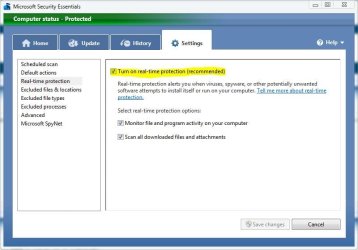
Is this box checked in the settings tab?
 

Attachments

  • mse.JPG
    mse.JPG
    47.5 KB · Views: 20

My Computer

Computer type
PC/Desktop
Computer Manufacturer/Model Number
Self Built
OS
Win 10 Pro x64
CPU
Intel I5-2500K @3.3GHz
Motherboard
Asrock P67 Extreme4
Memory
16GB G.Skill Ripjaws X (4x4GB)
Graphics Card(s)
EVGA GeForce 750 Ti SC 2GB
Sound Card
ASUS Xonar DG 5.1 Channels 24-bit 96KHz PCI Interface Sound
Monitor(s) Displays
auria eq2367
Screen Resolution
1920 x 1080
Hard Drives
250GB Samsung 850 EVO SSD
1TB WD Blue
1TB Hitachi
PSU
SeaSonic X 650W 80 Plus Gold
Case
Corsair Obsidian 750D
Cooling
Corsair H60, Three 140mm case fans
Keyboard
Logitech Wireless Keyboard K520
Mouse
Logitech Wireless Mouse M310
Internet Speed
Wave Broadband ~ 100 dn 5 up
Antivirus
Windows Defender, Malwarebytes Premium
Browser
Edge, IE11, Chrome
Other Info
Laptop specs: HP g7-1365dx /
CPU: AMD A6-3420M APU with Radeon(tm) HD Graphics /
RAM: Crucial 8Gb (2x4Gb) /
SSD: Crucial M4-CT128M4SSD2 ATA Device/ FW 000F /
GFX: AMD Radeon HD 6520G /
OS: Windows 10 Pro x64
Yes
 

My Computer

Computer Manufacturer/Model Number
Optima
OS
Windows 7 home Premium x64
CPU
IntelDuoCore 2.85ghz
Memory
4GB
Graphics Card(s)
onboard
Sound Card
on board
Hard Drives
2x320GB SATA
Keyboard
Logitech
Mouse
Logitech
Other Info
Litescribe CD/DVD RW
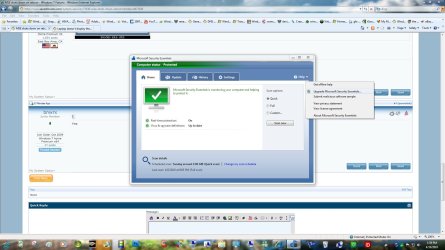
Maybe see if checking for an upgrade will help.
 

Attachments

  • mse upgrade.jpg
    mse upgrade.jpg
    173.1 KB · Views: 5

My Computer

Computer type
PC/Desktop
Computer Manufacturer/Model Number
Self Built
OS
Win 10 Pro x64
CPU
Intel I5-2500K @3.3GHz
Motherboard
Asrock P67 Extreme4
Memory
16GB G.Skill Ripjaws X (4x4GB)
Graphics Card(s)
EVGA GeForce 750 Ti SC 2GB
Sound Card
ASUS Xonar DG 5.1 Channels 24-bit 96KHz PCI Interface Sound
Monitor(s) Displays
auria eq2367
Screen Resolution
1920 x 1080
Hard Drives
250GB Samsung 850 EVO SSD
1TB WD Blue
1TB Hitachi
PSU
SeaSonic X 650W 80 Plus Gold
Case
Corsair Obsidian 750D
Cooling
Corsair H60, Three 140mm case fans
Keyboard
Logitech Wireless Keyboard K520
Mouse
Logitech Wireless Mouse M310
Internet Speed
Wave Broadband ~ 100 dn 5 up
Antivirus
Windows Defender, Malwarebytes Premium
Browser
Edge, IE11, Chrome
Other Info
Laptop specs: HP g7-1365dx /
CPU: AMD A6-3420M APU with Radeon(tm) HD Graphics /
RAM: Crucial 8Gb (2x4Gb) /
SSD: Crucial M4-CT128M4SSD2 ATA Device/ FW 000F /
GFX: AMD Radeon HD 6520G /
OS: Windows 10 Pro x64

My Computer

Computer Manufacturer/Model Number
Toshiba Satellite S875D-S7239 laptop
OS
MS Windows 7 Ultimate SP1 64-bit
CPU
AMD A10-4600M
Motherboard
AMD Pumori (Socket FT1)
Memory
6.00 GB Dual-Channel DDR3 @ 798MHz (11-11-12-28)
Graphics Card(s)
AMD Radeon HD 7660G
Sound Card
High Definition Audio Device
Monitor(s) Displays
Generic PnP Monitor (1600x900@60Hz)
Screen Resolution
1600x900@60Hz
Hard Drives
SSD 119GB Corsair CSSD-V128GB2 ATA Device
Keyboard
Standard PS/2 Keyboard
Mouse
HP Wireless Optical Mobile Mouse Model FHA-3410
Internet Speed
What the local pub, local coffee shop offers.
Other Info
Optical Drive:MATSHITA BD-CMB UJ160B ATA Device


Also have an Asus ha1002xp netbook with Win 7 Ultimate installed.

My Computer

Computer Manufacturer/Model Number
Optima
OS
Windows 7 home Premium x64
CPU
IntelDuoCore 2.85ghz
Memory
4GB
Graphics Card(s)
onboard
Sound Card
on board
Hard Drives
2x320GB SATA
Keyboard
Logitech
Mouse
Logitech
Other Info
Litescribe CD/DVD RW

My Computer

Computer Manufacturer/Model Number
Optima
OS
Windows 7 home Premium x64
CPU
IntelDuoCore 2.85ghz
Memory
4GB
Graphics Card(s)
onboard
Sound Card
on board
Hard Drives
2x320GB SATA
Keyboard
Logitech
Mouse
Logitech
Other Info
Litescribe CD/DVD RW
Are you using Mouseimp Pro? If so post back for the solution.
 

My Computer

Computer Manufacturer/Model Number
Dell DXP061
OS
windows 7 RTM
CPU
Intel core 2 6400 @2.13GHz
Motherboard
Dell ??
Memory
2 Gig.
Graphics Card(s)
NVIDIA GeForce 7300 GT
Sound Card
High Definition Audio Device - Microsoft
Monitor(s) Displays
Dell LCD
Screen Resolution
1280 x 1024 75 hertz
Hard Drives
WDC WD2500JS-75NCB3 ATA Device

WDC WD5000AAKS-65YGA0 ATA Device
Keyboard
Logitech Cordless
Mouse
Logitech Cordless
Internet Speed
760k

My Computer

Computer Manufacturer/Model Number
Optima
OS
Windows 7 home Premium x64
CPU
IntelDuoCore 2.85ghz
Memory
4GB
Graphics Card(s)
onboard
Sound Card
on board
Hard Drives
2x320GB SATA
Keyboard
Logitech
Mouse
Logitech
Other Info
Litescribe CD/DVD RW
So I just rebooted and the same result. MSE is turned OFF, and I have the 3 choices:
Turn on Windows Defender
Turn on MSE(choosing this option will run a signed program registered to MSE that Windows Can't monitor)
Get a different antispyware program online

I always select the 2nd option but when I turn off the computer, then turn it on again MSE is not running and I repeat this process. Question, what do they mean with that "choosing this option" phrase?

thanks
 

My Computer

Computer Manufacturer/Model Number
Optima
OS
Windows 7 home Premium x64
CPU
IntelDuoCore 2.85ghz
Memory
4GB
Graphics Card(s)
onboard
Sound Card
on board
Hard Drives
2x320GB SATA
Keyboard
Logitech
Mouse
Logitech
Other Info
Litescribe CD/DVD RW
bnwrx,

Let's try the good old uninstall / reinstall route.

first download a fresh copy of MSE, then disconnect from the Internet.

Using Control Panel | Programs and Features, uninstall MSE.

Now install that fresh download and proceed just as if this was the very first time with MSE. Quck Scan, reconnect, update MSE, rescan.

If this doesn't work then I suspect an evil virus and we'll go at it that way.
 

My Computer

Computer Manufacturer/Model Number
Toshiba Satellite S875D-S7239 laptop
OS
MS Windows 7 Ultimate SP1 64-bit
CPU
AMD A10-4600M
Motherboard
AMD Pumori (Socket FT1)
Memory
6.00 GB Dual-Channel DDR3 @ 798MHz (11-11-12-28)
Graphics Card(s)
AMD Radeon HD 7660G
Sound Card
High Definition Audio Device
Monitor(s) Displays
Generic PnP Monitor (1600x900@60Hz)
Screen Resolution
1600x900@60Hz
Hard Drives
SSD 119GB Corsair CSSD-V128GB2 ATA Device
Keyboard
Standard PS/2 Keyboard
Mouse
HP Wireless Optical Mobile Mouse Model FHA-3410
Internet Speed
What the local pub, local coffee shop offers.
Other Info
Optical Drive:MATSHITA BD-CMB UJ160B ATA Device


Also have an Asus ha1002xp netbook with Win 7 Ultimate installed.

My Computer

Computer type
PC/Desktop
Computer Manufacturer/Model Number
Bruce ... somewhere in his 40's
OS
Windows 7 Ultimate 32bit SP1
CPU
Intel(R) Core(TM)2 Quad CPU @ 2.40GHz, 2400 MHz
Motherboard
INTEL/D975XBX2
Memory
4 GB
Graphics Card(s)
ATI Radeon HD 2600 Pro
Monitor(s) Displays
Samsung SyncMaster 914v
Screen Resolution
1280 x 1024
Hard Drives
2/500GB each ... ST3500630AS ATA Device.
One is not connected
PSU
Rocketfish 700 W
Case
G.Skill Gigabyte Chassis
Keyboard
Standard PS/2 Keyboard
Mouse
Microsoft PS/2 Mouse
Internet Speed
DSL
Antivirus
Avira Internet Security
Browser
IE 11
Other Info
ATI HDMI Audio
Jacee,

"If you haven't activated your valid copy of Windows 7 then MSE won't run."

That I didn't know. I'll need to tuck that piece of info away in the memory banks.

thanks, karl
 

My Computer

Computer Manufacturer/Model Number
Toshiba Satellite S875D-S7239 laptop
OS
MS Windows 7 Ultimate SP1 64-bit
CPU
AMD A10-4600M
Motherboard
AMD Pumori (Socket FT1)
Memory
6.00 GB Dual-Channel DDR3 @ 798MHz (11-11-12-28)
Graphics Card(s)
AMD Radeon HD 7660G
Sound Card
High Definition Audio Device
Monitor(s) Displays
Generic PnP Monitor (1600x900@60Hz)
Screen Resolution
1600x900@60Hz
Hard Drives
SSD 119GB Corsair CSSD-V128GB2 ATA Device
Keyboard
Standard PS/2 Keyboard
Mouse
HP Wireless Optical Mobile Mouse Model FHA-3410
Internet Speed
What the local pub, local coffee shop offers.
Other Info
Optical Drive:MATSHITA BD-CMB UJ160B ATA Device


Also have an Asus ha1002xp netbook with Win 7 Ultimate installed.
Uninstall MSE and reinstall it again ....
http://www.microsoft.com/security_essentials/

If you haven't activated your valid copy of Windows 7 then MSE won't run.

.
I've been running a purchased version of 7 since it was released in Oct 09. MSE seemed to work fine then. I tried some other AV programs, which I have uninstalled and cleaned any residual files that I found, then installed MSE again. I also, today, uninstalled/reinstalled MSE with the latest version available from MS. It is this version which I am now running. I am only running MSE currently, no other AV or Spyware software is running.

thanks
 

My Computer

Computer Manufacturer/Model Number
Optima
OS
Windows 7 home Premium x64
CPU
IntelDuoCore 2.85ghz
Memory
4GB
Graphics Card(s)
onboard
Sound Card
on board
Hard Drives
2x320GB SATA
Keyboard
Logitech
Mouse
Logitech
Other Info
Litescribe CD/DVD RW
I bet some residual is left. Try either ccleaner or a system restore. If not too far back my vote is for SR

http://www.ccleaner.com/
 

My Computer

Computer type
PC/Desktop
Computer Manufacturer/Model Number
Dell XPS 420
OS
Windows 10, Home Clean Install
CPU
Intel Core2 processsor Q8200(2.33Ghz 1333FSB) Quad Core Tech
Motherboard
Dell
Memory
6 gb
Graphics Card(s)
ATI Radeon 256MB HD3650
Sound Card
Intergrated 7.1 Channel Audio
Monitor(s) Displays
Dell SP2009W 20"
Hard Drives
640 GB Serial ATA Hard drive
Cooling
Fan
Keyboard
Dell USB Keyboard
Mouse
Dell Premium Optical USB
Internet Speed
DSL 2.85
Did both earlier to no avail...
 

My Computer

Computer Manufacturer/Model Number
Optima
OS
Windows 7 home Premium x64
CPU
IntelDuoCore 2.85ghz
Memory
4GB
Graphics Card(s)
onboard
Sound Card
on board
Hard Drives
2x320GB SATA
Keyboard
Logitech
Mouse
Logitech
Other Info
Litescribe CD/DVD RW
Back
Top