Solved MSI 880gm-E41 BUOS backup and upgrade procedures AHCI SATA RAID driver

loninappleton

New member
Member
VIP
Local time
5:36 AM
Messages
892
MSI 880gm-E41 BiOS backup and upgrade procedures AHCI SATA RAID driver

This is a question on an older PC. An MSI 880gm E41. I upgraded the BIOS in steps after not having

known how or had the need yesterday. MSI also has an area for upgrading the system and driver files for things like ethernet.

I ran into a problem involving ATI Catlayst, MSI as the download source and an AMD AHCI compatible SATA RAID driver. MSI is too hard to deal with. I brought the problem in here.

The component files are:

msi 760gma-p34(fx) (ms7641) amd ahci compatible SATA RAID driver

ati_sb8xxRAID_764_mb. Folder 764A

The goal is to just get update functionality from any SSD's I put on the PC, not a raid array
of any kind. If the operation itself is unneded, please advise on that. AHCI always is in the
discussion of SSD.

What happens is the loader file asks if I want to use Catrlyst installer and then I guess
proceeds to look for it, then hangs and the throbber just spins looking for something it
can't find. I've reinstalled the Catalyst component at least twice but really have no
use for the advanced graphics features for gaming and whatnot.


I know from past discussions on Sevenforums that there are sometimes insertion tools or
dll's that the forum has. How can I get this inserted into my PC?


I can make screen shots as needed.
 
Last edited:

My Computer My Computer

At a glance

Windows 7 x64 UltimateAMD Athlon II x3 4502 GB
Computer type
PC/Desktop
Computer Manufacturer/Model Number
custom
OS
Windows 7 x64 Ultimate
CPU
AMD Athlon II x3 450
Motherboard
MSI 880GM
Memory
2 GB
Hard Drives
various
Browser
Firefox, Opera
Kind of curious. You have an 880GM motherboard but the driver you're trying to install is for a different motherboard. Are the drivers supposed to be the same?
 

My Computer My Computer

At a glance

Windows 7 Pro SP1 64 bit8 GB
Computer type
Laptop
Computer Manufacturer/Model Number
Dell M6500 Precision Work Station
OS
Windows 7 Pro SP1 64 bit
Memory
8 GB
Screen Resolution
1920x
Internet Speed
30 Mbps
Antivirus
Norton Security
Browser
IE 11
I'm not aware of any discrepancies since they both come off the same link. Always a possibility of error like misspelling the subject line. What should I be looking for?
 

My Computer My Computer

At a glance

Windows 7 x64 UltimateAMD Athlon II x3 4502 GB
Computer type
PC/Desktop
Computer Manufacturer/Model Number
custom
OS
Windows 7 x64 Ultimate
CPU
AMD Athlon II x3 450
Motherboard
MSI 880GM
Memory
2 GB
Hard Drives
various
Browser
Firefox, Opera
Jeez, yes. I just reread what you saw. I may have my wires crossed. Will look again.
 

My Computer My Computer

At a glance

Windows 7 x64 UltimateAMD Athlon II x3 4502 GB
Computer type
PC/Desktop
Computer Manufacturer/Model Number
custom
OS
Windows 7 x64 Ultimate
CPU
AMD Athlon II x3 450
Motherboard
MSI 880GM
Memory
2 GB
Hard Drives
various
Browser
Firefox, Opera
Here is the thing itself. The instructions shown in the screen shot mention floppy drives so this routine might
be just too old. I do have a 1.44 in storage but the details start with XP and the go on to show
Win7 which does not pause for that old F6 routine which I remember trying on a PC that is even
older than this.

Can these be extracted to pen drive or cd?

The page is simply the one given from my previous question on BIOS upgrades which
are finally done. I have made an SSD and it runs on the 880gm. That may be all there is, but

I understood that SSD efficiencies and utilities do not function without these upgrades.

Support For 880GM-E41 | Motherboard - The world leader in motherboard design | MSI Global

I will try to do the procedure they give while waiting for reply and using a cd.
 

My Computer My Computer

At a glance

Windows 7 x64 UltimateAMD Athlon II x3 4502 GB
Computer type
PC/Desktop
Computer Manufacturer/Model Number
custom
OS
Windows 7 x64 Ultimate
CPU
AMD Athlon II x3 450
Motherboard
MSI 880GM
Memory
2 GB
Hard Drives
various
Browser
Firefox, Opera
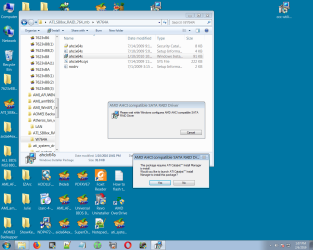
Ok I went through everything again and have a screen shot showing the prompts.


At the last select, that prompt looks for something it can't find which is ATI Catalyst Installer.


Anything I find related to Calalyst installer and reinstalling that is all about graphics drivers

since that what Catalyst is. Any search links go to the ubiquitous Toms Hardware (always what Google presents regardlless of the question) which is always on top and does not provide any adequate answers.


When Windows says it cannot open the thing and and presents some options, Catalyst is not in that nor
can I find it any other way on a browse. I have installed it several times-- it's all graphics setup.-- and ads.


This is why I mentioned an insertion dll or something to install the thing direct.
 

Attachments

  • ATI installer hanggs.png
    ATI installer hanggs.png
    83.5 KB · Views: 1

My Computer My Computer

At a glance

Windows 7 x64 UltimateAMD Athlon II x3 4502 GB
Computer type
PC/Desktop
Computer Manufacturer/Model Number
custom
OS
Windows 7 x64 Ultimate
CPU
AMD Athlon II x3 450
Motherboard
MSI 880GM
Memory
2 GB
Hard Drives
various
Browser
Firefox, Opera
I didn't look at the MSI link your provided. :o I did a search on the 880gm-e43 and came up with a similar page. Basically, they're the same and the drivers do apply to a 7xx motherboard (and others) so you have the correct one.
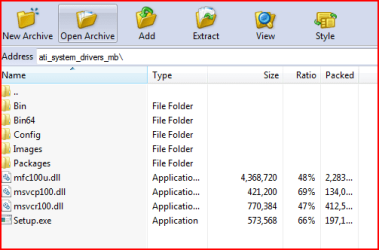
I can't answer why the setup is having a problem with the Catalyst installation manager. If you look in the Bin 64 folder, it's there as InstallManagerAPP.exe. It might be helpful to run it first rather than run the setup.exe.
 

My Computer My Computer

At a glance

Windows 7 Pro SP1 64 bit8 GB
Computer type
Laptop
Computer Manufacturer/Model Number
Dell M6500 Precision Work Station
OS
Windows 7 Pro SP1 64 bit
Memory
8 GB
Screen Resolution
1920x
Internet Speed
30 Mbps
Antivirus
Norton Security
Browser
IE 11
Thanks for this response.

Where is the bin install manager then: In Windows folder? Can you give the directory tree for that?
Anything to bypass what is certainly a broken link or bad program element. In the folder under discussion there is four elements. One is AHCI64.exe and some dll and text files to describe. It doesn't complete either.

I don't know if these problems are historic-- going back to when the board was current. One thing I can think of is the fact that the video is onboard. Both of my MSIs have that and I have never moved off of it.


This Catalyst business seems to be a lot more trouble for driver install than I am getting out of it. Right now it's just something I want to fix.

I'll see over the days what the 880 - 43 board build has in the way of an AHCI driver download.

Catalyst has always been something I thought to be an interference and intrusion on system. Now when I need to access the install manager I cannot even see it in the programs list.
 

My Computer My Computer

At a glance

Windows 7 x64 UltimateAMD Athlon II x3 4502 GB
Computer type
PC/Desktop
Computer Manufacturer/Model Number
custom
OS
Windows 7 x64 Ultimate
CPU
AMD Athlon II x3 450
Motherboard
MSI 880GM
Memory
2 GB
Hard Drives
various
Browser
Firefox, Opera
Hi All,
Greets,

Sir,
I think you want to add SSD to your PC & therefore want to switch to AHCI to avoid any problems.

1) Ascertain what is the current configuration ? AHCI or RAID ?
(a) Go to the Disk Management window. Then click VIEW tab from the top menu bar. Navigate to View > Top >Disk List & take the snap.
(b) Go to the Device Manager, expand IDE ATA/ATAPI controllers & look what it shows ?

2) Check BIOS : What are the active/existing settings ? & What are the available options/settings for AHCI/RAID ?
Please don't mess & make changes in the BIOS as of now!

3) Have you got a compatible SSD ? If you are going to buy a new SSD only for this cause, you should be careful! Even if all the things are good, compatibility may get crucial.
I see that you have SATA II support for 6 Hard Disks which can be run at max speed of 3gb/sec.
MSI compatibility report talks : https://storage-asset.msi.com/file/test_report/TR3_2069.pdf
Though I can't help you with this enough, I would suggest SATA II SSDs only.

4) Only use the resources from the correct Support Page or you may get in serious problems.

Thanks & Regards. ...
 

My Computer My Computer

At a glance

Windows 7 Ultimate x32 With Sp1 + Vista Ultim...Intel Mobile Core 2 Duo T5750 @ 2.00GHz Merom...2.00GB Dual-Channel DDR2 @ 332MHz (5-5-5-15)Mobile Intel(R) 965 Express Chipset Family
Computer type
Laptop
Computer Manufacturer/Model Number
hp compaq presario c795VU notebook pc
OS
Windows 7 Ultimate x32 With Sp1 + Vista Ultimate x32 with Sp1 & Sp2 !!
CPU
Intel Mobile Core 2 Duo T5750 @ 2.00GHz Merom 65nm Technolog
Motherboard
Hewlett-Packard 30D9 (CPU)
Memory
2.00GB Dual-Channel DDR2 @ 332MHz (5-5-5-15)
Graphics Card(s)
Mobile Intel(R) 965 Express Chipset Family
Sound Card
High Definition Audio Device
Monitor(s) Displays
LP154WX4-TLCB on Mobile Intel 965 Express Chipset Family
Screen Resolution
1280x800 @ 60Hz
Hard Drives
149GB Western Digital WDC WD1600BEVS-60VAT0 ATA Device (SATA)
Keyboard
Standard 101/102-Key or Microsoft Natural PS/2 Key + HP QLB
Mouse
ALPS pointing device
Antivirus
Kaspersky AV 2017(Win 7) & AVG AntiVirus Free 2016 (VISTA)
Browser
google chrome
Veneet,


Thanks for the diagnostic tips I overlooked on this. I'll report back any findings.
I recall that even finding the right submenu to locate the setting is not straightforward.
With all the BIOS upgrade steps completed, there are no obvious BIOS menu changes.

This search for AHCI error started when I wanted to use Adata SSD tools from their Utilities disk. I'll see if I canduplicate that error.

Also from earlier response on looking up 880gm E43, I saw no difference in the RAID driver
offered there: Exact same number, date and file size.
 

My Computer My Computer

At a glance

Windows 7 x64 UltimateAMD Athlon II x3 4502 GB
Computer type
PC/Desktop
Computer Manufacturer/Model Number
custom
OS
Windows 7 x64 Ultimate
CPU
AMD Athlon II x3 450
Motherboard
MSI 880GM
Memory
2 GB
Hard Drives
various
Browser
Firefox, Opera
When I open the .zip file from MSI which contains the drivers, the Bin64 folder is shown-
 

Attachments

  • zipfilebin64.PNG
    zipfilebin64.PNG
    10.5 KB · Views: 16

My Computer My Computer

At a glance

Windows 7 Pro SP1 64 bit8 GB
Computer type
Laptop
Computer Manufacturer/Model Number
Dell M6500 Precision Work Station
OS
Windows 7 Pro SP1 64 bit
Memory
8 GB
Screen Resolution
1920x
Internet Speed
30 Mbps
Antivirus
Norton Security
Browser
IE 11
And this is the one for the RAID/AHCI SATA? It looks a bit different to me but will redo it.
Hopefully we are using the same page.


If the Setup goes to Catalyst I'll know I've been there before.


After now connecting the SSD from Adata as a boot drive, the Utilities Adata Tools is running.
That's a downloadable program for the Adata and provides diagnostics and Trim function.

That was my goal. But I'm still going to inspect for AHCI in devices etc as described above.
 

My Computer My Computer

At a glance

Windows 7 x64 UltimateAMD Athlon II x3 4502 GB
Computer type
PC/Desktop
Computer Manufacturer/Model Number
custom
OS
Windows 7 x64 Ultimate
CPU
AMD Athlon II x3 450
Motherboard
MSI 880GM
Memory
2 GB
Hard Drives
various
Browser
Firefox, Opera
That's the .zip file for the drivers. The problem you had is that the SATA/Raid installation required the Catalyst install manager to be installed but, it apparently didn't work when you clicked on Yes to install it. Running the drivers installation first should install it.
 

My Computer My Computer

At a glance

Windows 7 Pro SP1 64 bit8 GB
Computer type
Laptop
Computer Manufacturer/Model Number
Dell M6500 Precision Work Station
OS
Windows 7 Pro SP1 64 bit
Memory
8 GB
Screen Resolution
1920x
Internet Speed
30 Mbps
Antivirus
Norton Security
Browser
IE 11
I'll wait a bit for the cross posting to slow down but you'll have to give a detailed instruction to get to the

BIN info you show above. Just now I made a screen shot from MSI showing what opens and I'll post that.


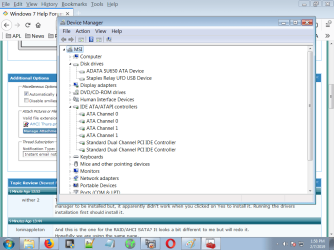
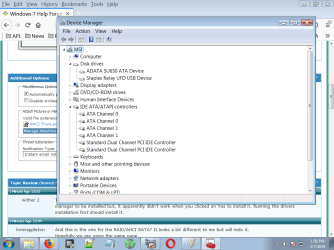
Also made a screen shot of device manager as it looks now. I'm simply not seeing the BIN64.


My path is to the third option at MSI 880GM E41 for Win 7 64.


I'll inspect the other chipset downloads etc that I have run on here. Just now I have a lot of

duplicate things on the desktop from trying things.
 

Attachments

  • AHCI Thurs.png
    AHCI Thurs.png
    43.6 KB · Views: 1
  • device manager thursday.png
    device manager thursday.png
    43.6 KB · Views: 0

My Computer My Computer

At a glance

Windows 7 x64 UltimateAMD Athlon II x3 4502 GB
Computer type
PC/Desktop
Computer Manufacturer/Model Number
custom
OS
Windows 7 x64 Ultimate
CPU
AMD Athlon II x3 450
Motherboard
MSI 880GM
Memory
2 GB
Hard Drives
various
Browser
Firefox, Opera
Erf, It looks like the mailer only wants to handle one at a time but the screen is the _same_ as the one posted earlier.
 

My Computer My Computer

At a glance

Windows 7 x64 UltimateAMD Athlon II x3 4502 GB
Computer type
PC/Desktop
Computer Manufacturer/Model Number
custom
OS
Windows 7 x64 Ultimate
CPU
AMD Athlon II x3 450
Motherboard
MSI 880GM
Memory
2 GB
Hard Drives
various
Browser
Firefox, Opera
Found it. Screen shot posted with the BIN64 files and the Catalyst 'Setup' exe. Which of the

items should be executed rather than 'Setup" at this screen? Thanks for your patience.
 

Attachments

  • BIN64.png
    BIN64.png
    63 KB · Views: 1

My Computer My Computer

At a glance

Windows 7 x64 UltimateAMD Athlon II x3 4502 GB
Computer type
PC/Desktop
Computer Manufacturer/Model Number
custom
OS
Windows 7 x64 Ultimate
CPU
AMD Athlon II x3 450
Motherboard
MSI 880GM
Memory
2 GB
Hard Drives
various
Browser
Firefox, Opera
My understanding is that you have the e43 mobo but it doesn't seem to matter.

All I did was download the driver software from the MSI website just to try to help you with the Catalyst problem. I didn't need the SATA/Raid files. Both are provided as .zip files. You have to open the .zip file and extract the files to your disc before running the installation. I open them using J-zip, as shown in my screen shot. The name of the driver file is shown in that screen shot.
 

My Computer My Computer

At a glance

Windows 7 Pro SP1 64 bit8 GB
Computer type
Laptop
Computer Manufacturer/Model Number
Dell M6500 Precision Work Station
OS
Windows 7 Pro SP1 64 bit
Memory
8 GB
Screen Resolution
1920x
Internet Speed
30 Mbps
Antivirus
Norton Security
Browser
IE 11
Seems we were typing at the same time.

As I understand it, the problem you're having with the Catalyst install manager occurs when you're running the SATA/Raid installation. It apparently can't find the Catalyst manager installer so I looked for it in the driver files. I would run the driver setup first using it's setup.exe file (I assume that's what it uses). The setup.exe I was alluding to earlier when I said don't run it first was the one for the SATA/Raid installation.
 

My Computer My Computer

At a glance

Windows 7 Pro SP1 64 bit8 GB
Computer type
Laptop
Computer Manufacturer/Model Number
Dell M6500 Precision Work Station
OS
Windows 7 Pro SP1 64 bit
Memory
8 GB
Screen Resolution
1920x
Internet Speed
30 Mbps
Antivirus
Norton Security
Browser
IE 11
No other solution for me than clicking on a few things then and see what I get. That Setup however
did not give what was needed.


At least I can't damage anything as with BIOS.


I appreciate all the help given. Will mark solved when I get this resolved but in simple terms,
I have the SSD going as shown in the device manager and the Adata Utils are working. I'll give it
a few days before closing it as solved.
 

My Computer My Computer

At a glance

Windows 7 x64 UltimateAMD Athlon II x3 4502 GB
Computer type
PC/Desktop
Computer Manufacturer/Model Number
custom
OS
Windows 7 x64 Ultimate
CPU
AMD Athlon II x3 450
Motherboard
MSI 880GM
Memory
2 GB
Hard Drives
various
Browser
Firefox, Opera
Another angle on this. A new search said that for AHCI to take, It must be set int he BIOS first.
I found that under the Peripherals location in the BIOS. Set that to AHCI. Windows 7 which was installed
hangs on the SSD. This is all practice so nothing lost.

I started a new install of Win7 which I have on a USB stick. And I was overlooking a Windows Setup promptI have ignored always before where it says install drivers? and you are supposed to go to a location.

The SSD will be wiped. The USB is bootable ISO with the Windows 7 install only.

If I put the Drivers files on a cd to load from the dvd-cd drive perhaps I can get a ressult of

1.) AHCI in BIOS
2.) Windows runs without error.

I also have the FAT32 USB peanut.

I'll see if any of this works and shows up in Device Manager.
 

My Computer My Computer

At a glance

Windows 7 x64 UltimateAMD Athlon II x3 4502 GB
Computer type
PC/Desktop
Computer Manufacturer/Model Number
custom
OS
Windows 7 x64 Ultimate
CPU
AMD Athlon II x3 450
Motherboard
MSI 880GM
Memory
2 GB
Hard Drives
various
Browser
Firefox, Opera
Back
Top