Solved MSI Afterburner Files of type "MinimumPrice"?

Ocman76

New member
Local time
2:20 PM
Messages
54
While browsing files on my computer recently I keep noticing files which are apparently of the type "MinimumPrice". A while ago I had the minimum price virus but after some hard work I got rid of it, I thought for good. For some reason I still find lots of files on my computer of the "minimumPrice" type even though I know the files are legitimate and the virus is gone. For example in MSI Afterburner some of the files that are functioning normally and should normally exist are of the type:

Untitled.png


Does anyone have any idea whats going on? Did the virus permanently screw something up on my computer? I unfortunately can't use google to solve this problem because the only results I get are about removing the MinimumPrice virus which I already did.

Any help is greatly appreciated.
 

My Computer My Computer

At a glance

Windows 7 Ultimate x64 SP1AMD FX-8320 @ 4.5 GHz (4.3 Volts)2 X 4 GB G Skill Ares 1600 @ 8-8-8-24Gigabyte G1 Gaming GTX 970
Computer type
PC/Desktop
Computer Manufacturer/Model Number
Custom Build
OS
Windows 7 Ultimate x64 SP1
CPU
AMD FX-8320 @ 4.5 GHz (4.3 Volts)
Motherboard
ASUS M5A99X EVO R2.0 AM3+
Memory
2 X 4 GB G Skill Ares 1600 @ 8-8-8-24
Graphics Card(s)
Gigabyte G1 Gaming GTX 970
Sound Card
On Board
Monitor(s) Displays
Asus 24" @ 144 Hz
Screen Resolution
1920 X 1080
Hard Drives
Samsung 840 EVO 120 GB SSD + WD Black Series 1 TB 7200 RPM
PSU
Corsair CXM 600 Watt
Case
NZXT Phantom 410
Cooling
3x 120 mm + 3x 140 mm + Corsair H80i Push/Pull
Keyboard
CM Storm QuickFire Rapid (mechanical)
Mouse
Anker 4000 DPI Gaming Mouse
Internet Speed
90 DL & 90 UL
Antivirus
MSE
Browser
Firefox
Other Info
Logitech Z-906 Speakers
Do you have other folders like this?

Try you uninstall/install MSI Afterburner?

Maybe you can search for MinimumPrice in registry and see what comes up.

There are a few tutorials to unassociated/restore file extensions but not sure if they apply to your case.
 

My Computer My Computer

At a glance

Windows 7 Ultimate x64 SP1AMD Phenom 2 1090T2x8GB Kingston HyperX Fury Black 1600Mhz Unga...MSI GTX 970 Gaming 4G
Computer type
PC/Desktop
Computer Manufacturer/Model Number
Custom Build
OS
Windows 7 Ultimate x64 SP1
CPU
AMD Phenom 2 1090T
Motherboard
Gigabyte GA-890FXA-UD5
Memory
2x8GB Kingston HyperX Fury Black 1600Mhz Unganged
Graphics Card(s)
MSI GTX 970 Gaming 4G
Sound Card
Realtek On-Board HD 7.1 Audio / Logitech G35
Monitor(s) Displays
3xAcer GD245HQ
Screen Resolution
1920x1080
Hard Drives
Samsung 850 Pro 512GB SSD - OS /
WD Caviar Black SATA 3 - 1 TBx2 - Dynamic RAID 0 /
WD Caviar Green SATA 2 - 640GBx2 - Dynamic RAID 0 /
WD Caviar Green SATA 2 - 640GB - Internal Backup /
Seagate Barracude SATA 3 - 3TB - External Backup/ Sync
PSU
HighPower 1000W
Case
Cooler Master HAF 932
Cooling
Noctua NH-D14
Keyboard
Logitech G19
Mouse
Logitech G500
Internet Speed
100/4 Mbit Cable (100GB quota)
Antivirus
ZoneAlarm Extreme Security / MBAM Pro / MBAE Free / SAS Free
Browser
IE 11 - Firefox - Chrome
Other Info
Logitech F710/ G27/ G940/ Z5500 // TrackIR 5 // Nvidia 3D Surround Vision
Do you have other folders like this?

Try you uninstall/install MSI Afterburner?

Maybe you can search for MinimumPrice in registry and see what comes up.

There are a few tutorials to unassociated/restore file extensions but not sure if they apply to your case.

I have tons of other folders like this. It seems to me like some sort of file association has been created and thats why all sorts of normal files are of the type. I even recently saw some files in one of my Windows created SSD backups that were of the type!

I have not yet tried reinstalling MSI Afterburner because I am afraid I will lose my overclock settings :o
I recently updated the program and lost a couple of my profiles for some reason so I am worried if I reinstall I will lose everything. If I really have to I can try reinstalling but I would prefer not to.

I searched for mimimumprice in the registry and came up with some weird stuff that I don't understand. This seemed suspicious to me:

Untitled.png


I think unassociating or restoring file extensions could help me, any chance you could point me to a good tutorial on sevenforums about it?
 

My Computer My Computer

At a glance

Windows 7 Ultimate x64 SP1AMD FX-8320 @ 4.5 GHz (4.3 Volts)2 X 4 GB G Skill Ares 1600 @ 8-8-8-24Gigabyte G1 Gaming GTX 970
Computer type
PC/Desktop
Computer Manufacturer/Model Number
Custom Build
OS
Windows 7 Ultimate x64 SP1
CPU
AMD FX-8320 @ 4.5 GHz (4.3 Volts)
Motherboard
ASUS M5A99X EVO R2.0 AM3+
Memory
2 X 4 GB G Skill Ares 1600 @ 8-8-8-24
Graphics Card(s)
Gigabyte G1 Gaming GTX 970
Sound Card
On Board
Monitor(s) Displays
Asus 24" @ 144 Hz
Screen Resolution
1920 X 1080
Hard Drives
Samsung 840 EVO 120 GB SSD + WD Black Series 1 TB 7200 RPM
PSU
Corsair CXM 600 Watt
Case
NZXT Phantom 410
Cooling
3x 120 mm + 3x 140 mm + Corsair H80i Push/Pull
Keyboard
CM Storm QuickFire Rapid (mechanical)
Mouse
Anker 4000 DPI Gaming Mouse
Internet Speed
90 DL & 90 UL
Antivirus
MSE
Browser
Firefox
Other Info
Logitech Z-906 Speakers

My Computer My Computer

At a glance

Windows 7 Ultimate x64 SP1AMD Phenom 2 1090T2x8GB Kingston HyperX Fury Black 1600Mhz Unga...MSI GTX 970 Gaming 4G
Computer type
PC/Desktop
Computer Manufacturer/Model Number
Custom Build
OS
Windows 7 Ultimate x64 SP1
CPU
AMD Phenom 2 1090T
Motherboard
Gigabyte GA-890FXA-UD5
Memory
2x8GB Kingston HyperX Fury Black 1600Mhz Unganged
Graphics Card(s)
MSI GTX 970 Gaming 4G
Sound Card
Realtek On-Board HD 7.1 Audio / Logitech G35
Monitor(s) Displays
3xAcer GD245HQ
Screen Resolution
1920x1080
Hard Drives
Samsung 850 Pro 512GB SSD - OS /
WD Caviar Black SATA 3 - 1 TBx2 - Dynamic RAID 0 /
WD Caviar Green SATA 2 - 640GBx2 - Dynamic RAID 0 /
WD Caviar Green SATA 2 - 640GB - Internal Backup /
Seagate Barracude SATA 3 - 3TB - External Backup/ Sync
PSU
HighPower 1000W
Case
Cooler Master HAF 932
Cooling
Noctua NH-D14
Keyboard
Logitech G19
Mouse
Logitech G500
Internet Speed
100/4 Mbit Cable (100GB quota)
Antivirus
ZoneAlarm Extreme Security / MBAM Pro / MBAE Free / SAS Free
Browser
IE 11 - Firefox - Chrome
Other Info
Logitech F710/ G27/ G940/ Z5500 // TrackIR 5 // Nvidia 3D Surround Vision
Those files in your screenshot are all without any extensions.
The registry entry you show, right click and export. Then delete the OpenwithProgIds on left side.
Check MSI folder.

Problem is it may have replaced other file extensions as well.

Try http://www.sevenforums.com/tutorials/19449-default-file-type-associations-restore.html

Why don't they have any file extensions?

I tried removing the registry entry, no luck.

I also restored all file associations from the post you linked me to. Also no luck. :huh:

Any other ideas?

I appreciate the help by the way!
 

My Computer My Computer

At a glance

Windows 7 Ultimate x64 SP1AMD FX-8320 @ 4.5 GHz (4.3 Volts)2 X 4 GB G Skill Ares 1600 @ 8-8-8-24Gigabyte G1 Gaming GTX 970
Computer type
PC/Desktop
Computer Manufacturer/Model Number
Custom Build
OS
Windows 7 Ultimate x64 SP1
CPU
AMD FX-8320 @ 4.5 GHz (4.3 Volts)
Motherboard
ASUS M5A99X EVO R2.0 AM3+
Memory
2 X 4 GB G Skill Ares 1600 @ 8-8-8-24
Graphics Card(s)
Gigabyte G1 Gaming GTX 970
Sound Card
On Board
Monitor(s) Displays
Asus 24" @ 144 Hz
Screen Resolution
1920 X 1080
Hard Drives
Samsung 840 EVO 120 GB SSD + WD Black Series 1 TB 7200 RPM
PSU
Corsair CXM 600 Watt
Case
NZXT Phantom 410
Cooling
3x 120 mm + 3x 140 mm + Corsair H80i Push/Pull
Keyboard
CM Storm QuickFire Rapid (mechanical)
Mouse
Anker 4000 DPI Gaming Mouse
Internet Speed
90 DL & 90 UL
Antivirus
MSE
Browser
Firefox
Other Info
Logitech Z-906 Speakers
> Why don't they have any file extensions?

Because they never did have file extensions. That is normal for these files.

I'm not sure how to clean up your registry :-(
 

My Computer My Computer

At a glance

W7 Pro SP1 64biti78GBIntel HD Graphics
Computer type
Laptop
Computer Manufacturer/Model Number
Employer provided Dell Latitude
OS
W7 Pro SP1 64bit
CPU
i7
Memory
8GB
Graphics Card(s)
Intel HD Graphics
Hard Drives
crappy SSD
Antivirus
Employer mandated Symantec Endpoint Protection
Browser
Pale Moon 64bit, IE11 64bit & Chrome 64bit
> Why don't they have any file extensions?

Because they never did have file extensions. That is normal for these files.

I'm not sure how to clean up your registry :-(

Well as far as I can tell these types of files don't seem to be hurting my computer at this point. If nobody has a solution I guess I will just have to live with it haha.
 

My Computer My Computer

At a glance

Windows 7 Ultimate x64 SP1AMD FX-8320 @ 4.5 GHz (4.3 Volts)2 X 4 GB G Skill Ares 1600 @ 8-8-8-24Gigabyte G1 Gaming GTX 970
Computer type
PC/Desktop
Computer Manufacturer/Model Number
Custom Build
OS
Windows 7 Ultimate x64 SP1
CPU
AMD FX-8320 @ 4.5 GHz (4.3 Volts)
Motherboard
ASUS M5A99X EVO R2.0 AM3+
Memory
2 X 4 GB G Skill Ares 1600 @ 8-8-8-24
Graphics Card(s)
Gigabyte G1 Gaming GTX 970
Sound Card
On Board
Monitor(s) Displays
Asus 24" @ 144 Hz
Screen Resolution
1920 X 1080
Hard Drives
Samsung 840 EVO 120 GB SSD + WD Black Series 1 TB 7200 RPM
PSU
Corsair CXM 600 Watt
Case
NZXT Phantom 410
Cooling
3x 120 mm + 3x 140 mm + Corsair H80i Push/Pull
Keyboard
CM Storm QuickFire Rapid (mechanical)
Mouse
Anker 4000 DPI Gaming Mouse
Internet Speed
90 DL & 90 UL
Antivirus
MSE
Browser
Firefox
Other Info
Logitech Z-906 Speakers
> I tried removing the registry entry, no luck.
Are you talking about the entry shown in post #3?
What happened...
...an error while removing it?
...or the entry came back?
...or Windows Explorer still shows MinimumPrice in the Type column?
...or something else.


> I also restored all file associations from the post you linked me to. Also no luck.
I might have missed it, but I scanned thru that list of files and I did not happen to see one that changes/fixes the registry entry shown in post #3. That is probably because the reg files in that tutorial only deal with items that are a part of Windows 7. Some app, infection or something that you did created the entry shown in post #3.

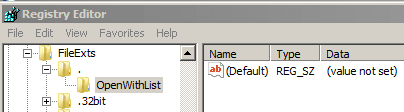
That said, I have an entry for just a dot (with no file extension) on the W7 computer that I'm on at the moment. But that entry is missing from another W7 computer and from a W7 Virtual Machine that I checked. It seems to be created when there needs to be a default action for files without a file extension.

dot1.PNG

dot2.PNG

I have no idea what app (or action that I took) made that entry.
 

My Computer My Computer

At a glance

W7 Pro SP1 64biti78GBIntel HD Graphics
Computer type
Laptop
Computer Manufacturer/Model Number
Employer provided Dell Latitude
OS
W7 Pro SP1 64bit
CPU
i7
Memory
8GB
Graphics Card(s)
Intel HD Graphics
Hard Drives
crappy SSD
Antivirus
Employer mandated Symantec Endpoint Protection
Browser
Pale Moon 64bit, IE11 64bit & Chrome 64bit
Sorry I should have been more specific.

I removed the entry, and upon rebooting the entry is back just like it was before.
Windows Explorer still shows MinimumPrice in the Type column.

Any idea how I could prevent the creation of the registry entry upon bootup?

"It seems to be created when there needs to be a default action for files without a file extension."
Is there a way to reset the default action for a file without an extension?

I am 99% sure this registry entry (and problem) is linked in some way to this virus: Remove Minimum Price adware (Virus Removal Guide)
 

My Computer My Computer

At a glance

Windows 7 Ultimate x64 SP1AMD FX-8320 @ 4.5 GHz (4.3 Volts)2 X 4 GB G Skill Ares 1600 @ 8-8-8-24Gigabyte G1 Gaming GTX 970
Computer type
PC/Desktop
Computer Manufacturer/Model Number
Custom Build
OS
Windows 7 Ultimate x64 SP1
CPU
AMD FX-8320 @ 4.5 GHz (4.3 Volts)
Motherboard
ASUS M5A99X EVO R2.0 AM3+
Memory
2 X 4 GB G Skill Ares 1600 @ 8-8-8-24
Graphics Card(s)
Gigabyte G1 Gaming GTX 970
Sound Card
On Board
Monitor(s) Displays
Asus 24" @ 144 Hz
Screen Resolution
1920 X 1080
Hard Drives
Samsung 840 EVO 120 GB SSD + WD Black Series 1 TB 7200 RPM
PSU
Corsair CXM 600 Watt
Case
NZXT Phantom 410
Cooling
3x 120 mm + 3x 140 mm + Corsair H80i Push/Pull
Keyboard
CM Storm QuickFire Rapid (mechanical)
Mouse
Anker 4000 DPI Gaming Mouse
Internet Speed
90 DL & 90 UL
Antivirus
MSE
Browser
Firefox
Other Info
Logitech Z-906 Speakers
I had never heard of this infection name before - but malware removal is not my specialty. I read several things about it (including that removal guide) the first day that you started this thread. I was hoping to find info on what it does to the registry and how to fix same. I have not found any mention of this infection messing with file extensions. Perhaps you were blessed with a variant that has not been fully documented yet.

It is your call, you can:

1) make a new thread here: http://www.sevenforums.com/system-security/ and let those volunteers make sure that all parts of the infection is gone...

or

2) we can try to figure out what is creating that key
(with these steps: http://www.sevenforums.com/tutorial...ation-conflicts-performing-clean-startup.html)

or

3) we can prevent changes to that key via these steps:

Merge the attached reg file. It removes and recreates the dot key.
View attachment dot-file-extension.reg

Open regedit to that key.

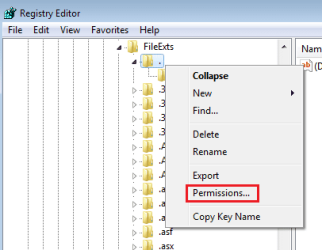
Right-click on the dot key in the left pane...
...and select permissions from the context menu.
R1.png

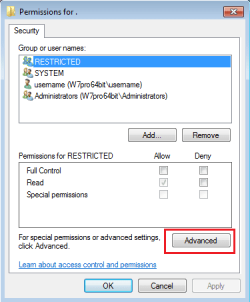
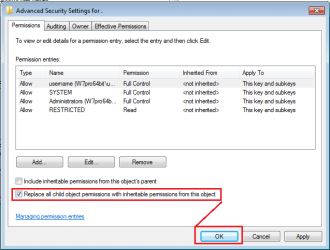
Click on Advanced.
R2.png

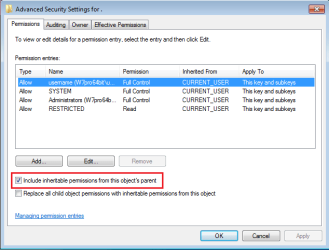
UNCHECK the option highlighted below.
R3.png

Click Add.
R4.png

CHECK the option highlighted below and click OK.
R5.png

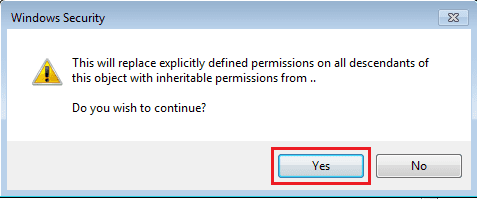
Click on Yes.
R6.png

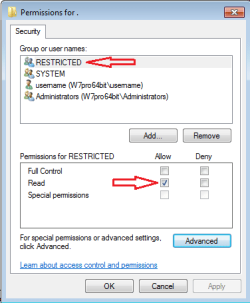
The account named RESTRICTED should look like this:
R7.png
For the screen above, make all of the other accounts look just like that (i.e. Read only) and click OK.

Search the registry for more entries like this.
R8.png
I would not repeat the steps above on any other registry key that you might find. Just let us know if you find others.


Now that it is blocked from changing...
...you can pick from the options mentioned above
(e.g. option 1 or option 2 or both options).


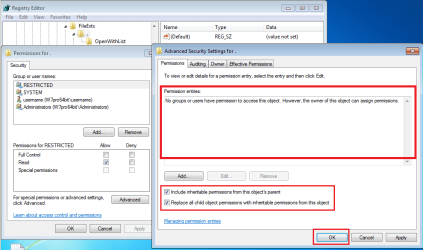
If you want to put things back the way that they were:
Remove each entry, CHECK the options highlighted below and click OK.
R9.png
 

My Computer My Computer

At a glance

W7 Pro SP1 64biti78GBIntel HD Graphics
Computer type
Laptop
Computer Manufacturer/Model Number
Employer provided Dell Latitude
OS
W7 Pro SP1 64bit
CPU
i7
Memory
8GB
Graphics Card(s)
Intel HD Graphics
Hard Drives
crappy SSD
Antivirus
Employer mandated Symantec Endpoint Protection
Browser
Pale Moon 64bit, IE11 64bit & Chrome 64bit
Thank you for the very thorough reply!

I decided to start with option 3. I followed your directions exactly, and then rebooted my computer. The entry with minimumprice is back just like it was before! :( Any idea why the entry came back even after restricting its permissions?

I would like to go through more registry entries before trying option 1 or 2. When I search the registry I actually end up with about 15 separate results. Would it help if I posted all of them? Here are two in specific that look like they are related to the . file extension:

asdfg.png

asdf.png
 

My Computer My Computer

At a glance

Windows 7 Ultimate x64 SP1AMD FX-8320 @ 4.5 GHz (4.3 Volts)2 X 4 GB G Skill Ares 1600 @ 8-8-8-24Gigabyte G1 Gaming GTX 970
Computer type
PC/Desktop
Computer Manufacturer/Model Number
Custom Build
OS
Windows 7 Ultimate x64 SP1
CPU
AMD FX-8320 @ 4.5 GHz (4.3 Volts)
Motherboard
ASUS M5A99X EVO R2.0 AM3+
Memory
2 X 4 GB G Skill Ares 1600 @ 8-8-8-24
Graphics Card(s)
Gigabyte G1 Gaming GTX 970
Sound Card
On Board
Monitor(s) Displays
Asus 24" @ 144 Hz
Screen Resolution
1920 X 1080
Hard Drives
Samsung 840 EVO 120 GB SSD + WD Black Series 1 TB 7200 RPM
PSU
Corsair CXM 600 Watt
Case
NZXT Phantom 410
Cooling
3x 120 mm + 3x 140 mm + Corsair H80i Push/Pull
Keyboard
CM Storm QuickFire Rapid (mechanical)
Mouse
Anker 4000 DPI Gaming Mouse
Internet Speed
90 DL & 90 UL
Antivirus
MSE
Browser
Firefox
Other Info
Logitech Z-906 Speakers

My Computer My Computer

At a glance

W7 Pro SP1 64biti78GBIntel HD Graphics
Computer type
Laptop
Computer Manufacturer/Model Number
Employer provided Dell Latitude
OS
W7 Pro SP1 64bit
CPU
i7
Memory
8GB
Graphics Card(s)
Intel HD Graphics
Hard Drives
crappy SSD
Antivirus
Employer mandated Symantec Endpoint Protection
Browser
Pale Moon 64bit, IE11 64bit & Chrome 64bit
What level is your UAC set to?
http://www.sevenforums.com/tutorials/299-user-account-control-uac-change-notification-settings.html


Did the any of account permissions for the FileExts\dot key change to something other than Read?

My UAC setting is:

Untitled.png


I set it to this myself when I first installed windows because if the UAC is set any higher than this then CCleaner dims my desktop every time I use it which started to get pretty annoying. However if needed I will raise my UAC setting.

Account permissions for RESTRICTED are still only read. However all other groups (system, me, administrators) still have full control because that was not changed before. Would it be worth a try to disable full control for all entities, reboot, and see if the entry still comes back?
 

My Computer My Computer

At a glance

Windows 7 Ultimate x64 SP1AMD FX-8320 @ 4.5 GHz (4.3 Volts)2 X 4 GB G Skill Ares 1600 @ 8-8-8-24Gigabyte G1 Gaming GTX 970
Computer type
PC/Desktop
Computer Manufacturer/Model Number
Custom Build
OS
Windows 7 Ultimate x64 SP1
CPU
AMD FX-8320 @ 4.5 GHz (4.3 Volts)
Motherboard
ASUS M5A99X EVO R2.0 AM3+
Memory
2 X 4 GB G Skill Ares 1600 @ 8-8-8-24
Graphics Card(s)
Gigabyte G1 Gaming GTX 970
Sound Card
On Board
Monitor(s) Displays
Asus 24" @ 144 Hz
Screen Resolution
1920 X 1080
Hard Drives
Samsung 840 EVO 120 GB SSD + WD Black Series 1 TB 7200 RPM
PSU
Corsair CXM 600 Watt
Case
NZXT Phantom 410
Cooling
3x 120 mm + 3x 140 mm + Corsair H80i Push/Pull
Keyboard
CM Storm QuickFire Rapid (mechanical)
Mouse
Anker 4000 DPI Gaming Mouse
Internet Speed
90 DL & 90 UL
Antivirus
MSE
Browser
Firefox
Other Info
Logitech Z-906 Speakers
As long as the UAC is turned on, then infections should not run at the highest integrity level (where they can do lots of damage). As far as I know, CCleaner should not cause the display to dim. After you solve this issue, you might want to create a thread for that.


> ...still have full control because that was not changed before.
That explains why it came back.

Please repeat the steps in post #10.

I probably should have highlighted this line:
For the screen above, make all of the other accounts look just like that (i.e. Read only) and click OK.

Let us know if the key gets changed after reboot. If it does change, let us know which (if any) permissions changed.
 

My Computer My Computer

At a glance

W7 Pro SP1 64biti78GBIntel HD Graphics
Computer type
Laptop
Computer Manufacturer/Model Number
Employer provided Dell Latitude
OS
W7 Pro SP1 64bit
CPU
i7
Memory
8GB
Graphics Card(s)
Intel HD Graphics
Hard Drives
crappy SSD
Antivirus
Employer mandated Symantec Endpoint Protection
Browser
Pale Moon 64bit, IE11 64bit & Chrome 64bit
As long as the UAC is turned on, then infections should not run at the highest integrity level (where they can do lots of damage). As far as I know, CCleaner should not cause the display to dim. After you solve this issue, you might want to create a thread for that.


> ...still have full control because that was not changed before.
That explains why it came back.

Please repeat the steps in post #10.

I probably should have highlighted this line:
For the screen above, make all of the other accounts look just like that (i.e. Read only) and click OK.

Let us know if the key gets changed after reboot. If it does change, let us know which (if any) permissions changed.

I just did some quick research and it turns out that updates to Ccleaner in the last year have created an in program option to not dim the screen during operation regardless of UAC setting:

Untitled.png


Sorry about missing that step in the registry permissions directions before. I just changed all the permissions to read only and rebooted. This time the permissions have stayed as I left them, read only. However the files of minimumprice type still exist, so it unfortunately has not solved my problem.
 

My Computer My Computer

At a glance

Windows 7 Ultimate x64 SP1AMD FX-8320 @ 4.5 GHz (4.3 Volts)2 X 4 GB G Skill Ares 1600 @ 8-8-8-24Gigabyte G1 Gaming GTX 970
Computer type
PC/Desktop
Computer Manufacturer/Model Number
Custom Build
OS
Windows 7 Ultimate x64 SP1
CPU
AMD FX-8320 @ 4.5 GHz (4.3 Volts)
Motherboard
ASUS M5A99X EVO R2.0 AM3+
Memory
2 X 4 GB G Skill Ares 1600 @ 8-8-8-24
Graphics Card(s)
Gigabyte G1 Gaming GTX 970
Sound Card
On Board
Monitor(s) Displays
Asus 24" @ 144 Hz
Screen Resolution
1920 X 1080
Hard Drives
Samsung 840 EVO 120 GB SSD + WD Black Series 1 TB 7200 RPM
PSU
Corsair CXM 600 Watt
Case
NZXT Phantom 410
Cooling
3x 120 mm + 3x 140 mm + Corsair H80i Push/Pull
Keyboard
CM Storm QuickFire Rapid (mechanical)
Mouse
Anker 4000 DPI Gaming Mouse
Internet Speed
90 DL & 90 UL
Antivirus
MSE
Browser
Firefox
Other Info
Logitech Z-906 Speakers
Great! The permissions survived a reboot.

Does the FileExts\dot key look like the screenshots that I show in post #8?

Once we have this one key cleaned and locked, we can move on to the HKEY_CLASSES_ROOT\dot key. But I would not go beyond that just yet. Cleaning those two keys might "fix" the files shown in your first post.
 

My Computer My Computer

At a glance

W7 Pro SP1 64biti78GBIntel HD Graphics
Computer type
Laptop
Computer Manufacturer/Model Number
Employer provided Dell Latitude
OS
W7 Pro SP1 64bit
CPU
i7
Memory
8GB
Graphics Card(s)
Intel HD Graphics
Hard Drives
crappy SSD
Antivirus
Employer mandated Symantec Endpoint Protection
Browser
Pale Moon 64bit, IE11 64bit & Chrome 64bit
Yes, the FileExts\dot key looks like it should from post #8.

What would you suggest I do with the HKEY_CLASSES_ROOT\dot key?
 

My Computer My Computer

At a glance

Windows 7 Ultimate x64 SP1AMD FX-8320 @ 4.5 GHz (4.3 Volts)2 X 4 GB G Skill Ares 1600 @ 8-8-8-24Gigabyte G1 Gaming GTX 970
Computer type
PC/Desktop
Computer Manufacturer/Model Number
Custom Build
OS
Windows 7 Ultimate x64 SP1
CPU
AMD FX-8320 @ 4.5 GHz (4.3 Volts)
Motherboard
ASUS M5A99X EVO R2.0 AM3+
Memory
2 X 4 GB G Skill Ares 1600 @ 8-8-8-24
Graphics Card(s)
Gigabyte G1 Gaming GTX 970
Sound Card
On Board
Monitor(s) Displays
Asus 24" @ 144 Hz
Screen Resolution
1920 X 1080
Hard Drives
Samsung 840 EVO 120 GB SSD + WD Black Series 1 TB 7200 RPM
PSU
Corsair CXM 600 Watt
Case
NZXT Phantom 410
Cooling
3x 120 mm + 3x 140 mm + Corsair H80i Push/Pull
Keyboard
CM Storm QuickFire Rapid (mechanical)
Mouse
Anker 4000 DPI Gaming Mouse
Internet Speed
90 DL & 90 UL
Antivirus
MSE
Browser
Firefox
Other Info
Logitech Z-906 Speakers
Please right click on the the HKEY_CLASSES_ROOT\dot key.
Select Export from the context menu.
Save the reg file somewhere...
...and attach it to your next post.
 

My Computer My Computer

At a glance

W7 Pro SP1 64biti78GBIntel HD Graphics
Computer type
Laptop
Computer Manufacturer/Model Number
Employer provided Dell Latitude
OS
W7 Pro SP1 64bit
CPU
i7
Memory
8GB
Graphics Card(s)
Intel HD Graphics
Hard Drives
crappy SSD
Antivirus
Employer mandated Symantec Endpoint Protection
Browser
Pale Moon 64bit, IE11 64bit & Chrome 64bit
Here it is.
 

Attachments

My Computer My Computer

At a glance

Windows 7 Ultimate x64 SP1AMD FX-8320 @ 4.5 GHz (4.3 Volts)2 X 4 GB G Skill Ares 1600 @ 8-8-8-24Gigabyte G1 Gaming GTX 970
Computer type
PC/Desktop
Computer Manufacturer/Model Number
Custom Build
OS
Windows 7 Ultimate x64 SP1
CPU
AMD FX-8320 @ 4.5 GHz (4.3 Volts)
Motherboard
ASUS M5A99X EVO R2.0 AM3+
Memory
2 X 4 GB G Skill Ares 1600 @ 8-8-8-24
Graphics Card(s)
Gigabyte G1 Gaming GTX 970
Sound Card
On Board
Monitor(s) Displays
Asus 24" @ 144 Hz
Screen Resolution
1920 X 1080
Hard Drives
Samsung 840 EVO 120 GB SSD + WD Black Series 1 TB 7200 RPM
PSU
Corsair CXM 600 Watt
Case
NZXT Phantom 410
Cooling
3x 120 mm + 3x 140 mm + Corsair H80i Push/Pull
Keyboard
CM Storm QuickFire Rapid (mechanical)
Mouse
Anker 4000 DPI Gaming Mouse
Internet Speed
90 DL & 90 UL
Antivirus
MSE
Browser
Firefox
Other Info
Logitech Z-906 Speakers
Since you have that dot key backed up now, please delete it from HKEY_CLASSES_ROOT.

Reboot and see if it comes back. If it does not come back, what is in the type column for the folder shown in the OP?

Also, please search all parts of the registry (keys, values, data) for
{269c2e5e-96b3-48fc-91d8-4ade5a925355}
 

My Computer My Computer

At a glance

W7 Pro SP1 64biti78GBIntel HD Graphics
Computer type
Laptop
Computer Manufacturer/Model Number
Employer provided Dell Latitude
OS
W7 Pro SP1 64bit
CPU
i7
Memory
8GB
Graphics Card(s)
Intel HD Graphics
Hard Drives
crappy SSD
Antivirus
Employer mandated Symantec Endpoint Protection
Browser
Pale Moon 64bit, IE11 64bit & Chrome 64bit
Back
Top