Solved MSI Afterburner ?

MoeX

New member
Member
VIP
Local time
6:16 AM
Messages
185
Hi
Does this software really help with gaming ? about the fan control part ? if it does can you please explain how do i set the fan with my computer..
thanks.
 

My Computer

Computer type
PC/Desktop
Computer Manufacturer/Model Number
AlienWare x51
OS
Windows 7 Home Premium 64bit SP1
CPU
Intel Core i7-3770 3.4GHz (8MB Cache)
Memory
8GB Dual Channel DDR3 at 1600MHz
Graphics Card(s)
Nvidia GeForce GTX 660 1.5GB
Sound Card
Realtek High Definiton Audio
Monitor(s) Displays
LG 3D HDTV 1080p
Screen Resolution
1920 x 1080
Hard Drives
1 TB
Just install the software and it will control your fan profile as your GPU gets put under load. You can also set up to five custom profiles for the fan/s to run at whatever percentage you want them to.
 

My Computer

Computer type
PC/Desktop
Computer Manufacturer/Model Number
Custom Build
OS
W7 Pro x64 SP1 | W10 Pro IP x64 | W8.1 Pro x64 VM | Linux Mint VM
CPU
i7-4790k @ 4GHz (4.4GHz Boost)
Motherboard
ASUS Sabertooth Z87 (BIOS Rev 2004)
Memory
16GB DDR3 Kingston HyperX Fury @ 1600MHz CL 9-9-9-27
Graphics Card(s)
EVGA GTX 980 Classified
Sound Card
Realtek Onboard
Monitor(s) Displays
Samsung S27D390
Screen Resolution
1920 x 1080
Hard Drives
240GB Intel 520 Series SSD |
Samsung 850 EVO 120GB SSD |
2TB WD Caviar Black |
2TB WD Caviar Green
PSU
Corsair HX850-80 Gold Modular
Case
Cooler Master Silencio 650
Cooling
Corsair H80i w/2 x Corsair SP120 | 2 x 120mm Noctua NF-S12B
Keyboard
Microsoft Sidewinder X4
Mouse
Gigabyte M6900 optical
Internet Speed
152mb
Antivirus
F-Secure
Browser
Firefox 38.0
Other Info
Backup Rig: Win 7 Pro 64-bit | AMD A10-5800k | ASUS F2A85-V Pro | 8GB Samsung DDR3 @1600MHz | 120GB Toshiba SDD | 2TB Seagate HDD | Cooler Master Silencio 550
I've installed it but have no idea what to do next,im a noob with this can you please provide steps in order to do this right.
are you saying that it will do the fan part by it self or i should configure it ?
 

My Computer

Computer type
PC/Desktop
Computer Manufacturer/Model Number
AlienWare x51
OS
Windows 7 Home Premium 64bit SP1
CPU
Intel Core i7-3770 3.4GHz (8MB Cache)
Memory
8GB Dual Channel DDR3 at 1600MHz
Graphics Card(s)
Nvidia GeForce GTX 660 1.5GB
Sound Card
Realtek High Definiton Audio
Monitor(s) Displays
LG 3D HDTV 1080p
Screen Resolution
1920 x 1080
Hard Drives
1 TB
It will auto control your fan, it will ramp up when the GPU is under load. I'll post some screenshots tonight when I'm home regarding the custom profiles. If you open MSI when just on desktop you'll notice your fan is running around 26%, then run a game in windowed mode and check MSI again, your fan should be running at around 50%. To be honest the 'stock' profile should be fine unless you're not happy with your GPU temps.
 

My Computer

Computer type
PC/Desktop
Computer Manufacturer/Model Number
Custom Build
OS
W7 Pro x64 SP1 | W10 Pro IP x64 | W8.1 Pro x64 VM | Linux Mint VM
CPU
i7-4790k @ 4GHz (4.4GHz Boost)
Motherboard
ASUS Sabertooth Z87 (BIOS Rev 2004)
Memory
16GB DDR3 Kingston HyperX Fury @ 1600MHz CL 9-9-9-27
Graphics Card(s)
EVGA GTX 980 Classified
Sound Card
Realtek Onboard
Monitor(s) Displays
Samsung S27D390
Screen Resolution
1920 x 1080
Hard Drives
240GB Intel 520 Series SSD |
Samsung 850 EVO 120GB SSD |
2TB WD Caviar Black |
2TB WD Caviar Green
PSU
Corsair HX850-80 Gold Modular
Case
Cooler Master Silencio 650
Cooling
Corsair H80i w/2 x Corsair SP120 | 2 x 120mm Noctua NF-S12B
Keyboard
Microsoft Sidewinder X4
Mouse
Gigabyte M6900 optical
Internet Speed
152mb
Antivirus
F-Secure
Browser
Firefox 38.0
Other Info
Backup Rig: Win 7 Pro 64-bit | AMD A10-5800k | ASUS F2A85-V Pro | 8GB Samsung DDR3 @1600MHz | 120GB Toshiba SDD | 2TB Seagate HDD | Cooler Master Silencio 550
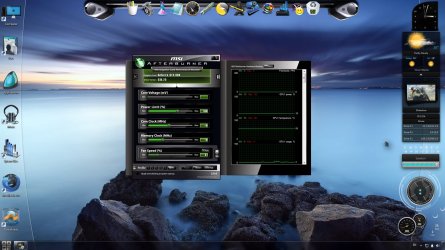
I'd really appreciate that,i ran it did not understand a thing :shock: so i just toke a SS for it :
 

Attachments

  • Untitled.jpg
    Untitled.jpg
    215.8 KB · Views: 5

My Computer

Computer type
PC/Desktop
Computer Manufacturer/Model Number
AlienWare x51
OS
Windows 7 Home Premium 64bit SP1
CPU
Intel Core i7-3770 3.4GHz (8MB Cache)
Memory
8GB Dual Channel DDR3 at 1600MHz
Graphics Card(s)
Nvidia GeForce GTX 660 1.5GB
Sound Card
Realtek High Definiton Audio
Monitor(s) Displays
LG 3D HDTV 1080p
Screen Resolution
1920 x 1080
Hard Drives
1 TB
When you run MSI it will sit there not doing a lot, basically it's telling you what's happening with your card which isn't a lot when you're lounging on your desktop, so that explains MSI not doing a lot. If you minimise MSI to your taskbar and launch a game in windowed mode (easier to get to MSI while in game) your fan speed will ramp up, maximise MSI and you'll see the fan speed has increased (yours is currently at 37%).
This is with MSI set to Auto.

MSI 1.JPG

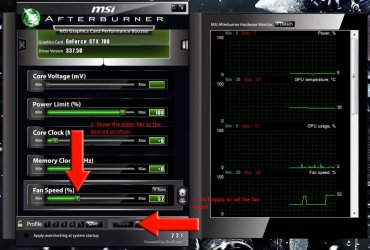
You can override the fan speed by clicking on the Auto button and manually adjusting the slider bar. Click apply to set the fan speed.

MSI 2.JPG

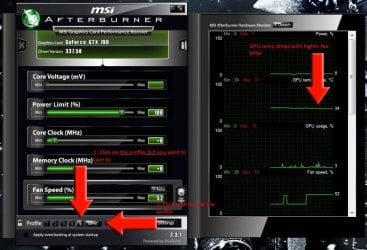
To save a certain fan speed to a custom profile, click one of the numbers (1 - 5) and click save. You'll get a 'Profile Saved' message flash up. These are handy to quickly switch fan speeds while in game. Just click on a number to load that specific profile, click Auto to revert back to Auto mode.

MSI 3.JPG

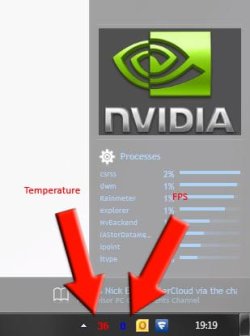
You can configure MSI to display your GPU temperature and FPS in your system tray which is handy for monitoring your GPU while in game.

MSI 4.JPG

Nice Rainmeter skin by the way.

   Warning
Do not change any overclocking settings within MSI. Overclocking your GPU will void the warranty and can possibly brick card if you don't know exactly what you're doing.
 

My Computer

Computer type
PC/Desktop
Computer Manufacturer/Model Number
Custom Build
OS
W7 Pro x64 SP1 | W10 Pro IP x64 | W8.1 Pro x64 VM | Linux Mint VM
CPU
i7-4790k @ 4GHz (4.4GHz Boost)
Motherboard
ASUS Sabertooth Z87 (BIOS Rev 2004)
Memory
16GB DDR3 Kingston HyperX Fury @ 1600MHz CL 9-9-9-27
Graphics Card(s)
EVGA GTX 980 Classified
Sound Card
Realtek Onboard
Monitor(s) Displays
Samsung S27D390
Screen Resolution
1920 x 1080
Hard Drives
240GB Intel 520 Series SSD |
Samsung 850 EVO 120GB SSD |
2TB WD Caviar Black |
2TB WD Caviar Green
PSU
Corsair HX850-80 Gold Modular
Case
Cooler Master Silencio 650
Cooling
Corsair H80i w/2 x Corsair SP120 | 2 x 120mm Noctua NF-S12B
Keyboard
Microsoft Sidewinder X4
Mouse
Gigabyte M6900 optical
Internet Speed
152mb
Antivirus
F-Secure
Browser
Firefox 38.0
Other Info
Backup Rig: Win 7 Pro 64-bit | AMD A10-5800k | ASUS F2A85-V Pro | 8GB Samsung DDR3 @1600MHz | 120GB Toshiba SDD | 2TB Seagate HDD | Cooler Master Silencio 550
Thank you so much mate :)
 

My Computer

Computer type
PC/Desktop
Computer Manufacturer/Model Number
AlienWare x51
OS
Windows 7 Home Premium 64bit SP1
CPU
Intel Core i7-3770 3.4GHz (8MB Cache)
Memory
8GB Dual Channel DDR3 at 1600MHz
Graphics Card(s)
Nvidia GeForce GTX 660 1.5GB
Sound Card
Realtek High Definiton Audio
Monitor(s) Displays
LG 3D HDTV 1080p
Screen Resolution
1920 x 1080
Hard Drives
1 TB
No problem at all mate. Let us know how it serves you. :)
 

My Computer

Computer type
PC/Desktop
Computer Manufacturer/Model Number
Custom Build
OS
W7 Pro x64 SP1 | W10 Pro IP x64 | W8.1 Pro x64 VM | Linux Mint VM
CPU
i7-4790k @ 4GHz (4.4GHz Boost)
Motherboard
ASUS Sabertooth Z87 (BIOS Rev 2004)
Memory
16GB DDR3 Kingston HyperX Fury @ 1600MHz CL 9-9-9-27
Graphics Card(s)
EVGA GTX 980 Classified
Sound Card
Realtek Onboard
Monitor(s) Displays
Samsung S27D390
Screen Resolution
1920 x 1080
Hard Drives
240GB Intel 520 Series SSD |
Samsung 850 EVO 120GB SSD |
2TB WD Caviar Black |
2TB WD Caviar Green
PSU
Corsair HX850-80 Gold Modular
Case
Cooler Master Silencio 650
Cooling
Corsair H80i w/2 x Corsair SP120 | 2 x 120mm Noctua NF-S12B
Keyboard
Microsoft Sidewinder X4
Mouse
Gigabyte M6900 optical
Internet Speed
152mb
Antivirus
F-Secure
Browser
Firefox 38.0
Other Info
Backup Rig: Win 7 Pro 64-bit | AMD A10-5800k | ASUS F2A85-V Pro | 8GB Samsung DDR3 @1600MHz | 120GB Toshiba SDD | 2TB Seagate HDD | Cooler Master Silencio 550
Back
Top