MSN Taskbar problem/bug?

Bjostabarn

New member
Local time
12:44 AM
Messages
3
Here's the deal..
I'm using Windows Seven and i have the latest version of MSN, so i pinned it down to my taskbar so I can access it easily.
When I then start MSN and talk to my friends, every time I minimize a conversation window or someone starts a conversation with me the window stays minimized (it doesn't pop up) and there then comes my problem:
As you know it in Windows 7 the minimized programs sort in groups, therefore, the opened conversation windows are all under a single icon on the taskbar and when someone sends me a message while this conversation window is minimized it starts blinking, and then when i try to open it i must catch the exact moment between two blinks or else the little screen that pops out showing all the opened windows under a program just minimizes again quickly...
So I have to be quick to reopen a minimized conversation...and it stresses me!

I beg for help! Thx!
 

My Computer My Computer

At a glance

Windows 7
OS
Windows 7
Hi Bjostabarn,

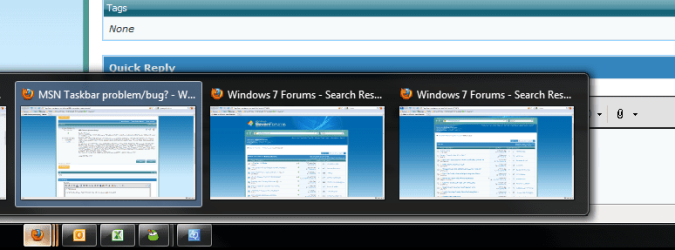
By "the little screen that pops out" etc. do you mean the Thumbnail Previews?

aero preview.png

They appear when mouse hovering over the Taskbar icon for that program, and shouldn't minimize again until you stop hovering over it. Could you maybe try to explain in more detail?

Don't know if this will help, but you could try right-clicking the Taskbar, selecting Properties, and changing "Always combine, hide labels" to "Combine when taskbar is full" or "Never combine". Let me know if that helps.

Cheers,

Walker
Windows Outreach Team
 

My Computer My Computer

At a glance

Windows 7 Home Premium (64-bit) *** Windows X...AMD Athlon Neo X2 1.6GHz *** Intel Core i7 Qu...4.00 GB *** 4.00 GBATI Radeon HD 3200, 384MB *** ATI Radeon HD 4...
Computer Manufacturer/Model Number
HP Pavilion dm3 (netbook) *** 27" iMac (Dual-Boot)
OS
Windows 7 Home Premium (64-bit) *** Windows XP SP3 (32-bit), OSX 10.6
CPU
AMD Athlon Neo X2 1.6GHz *** Intel Core i7 Quad Core 2.8GHz
Memory
4.00 GB *** 4.00 GB
Graphics Card(s)
ATI Radeon HD 3200, 384MB *** ATI Radeon HD 4850, 1GB
Sound Card
ATI High Definition Audio *** ATI High Definition Audio
Monitor(s) Displays
LG Flatron W2053TX
Screen Resolution
1600 x 900 (monitor), 1266 x 768 (laptop) *** 2560 x 1440
Hard Drives
300 GB SATA (internal), 500 GB HP SimpleSave (external) *** 1 TB SATA (internal), 160 GB LaCie (external)
Mouse
Logitech Cordless Optical Mouse for Notebooks
Internet Speed
Broadband
The preview panes should stay long enough to allow you to select the relevant window.
 

My Computer My Computer

At a glance

Windows 7 Professional 64-bitIntel E8400 3GHzKingston PC3-10700H 4GbXFX Radeon HD 5850 BlackEd.
Computer Manufacturer/Model Number
self built
OS
Windows 7 Professional 64-bit
CPU
Intel E8400 3GHz
Motherboard
Intel DX48BT2
Memory
Kingston PC3-10700H 4Gb
Graphics Card(s)
XFX Radeon HD 5850 BlackEd.
Sound Card
Asus Xonar DG
Monitor(s) Displays
2x Samsung SM-T220HD 22"
Screen Resolution
1680x1050 on two monitors
Hard Drives
OCZ Vertex 2 120gb 3.5" (OS)
Seagate Momentus XT 500gb
Samsung F3 1Tb (games)
2x Samsung F1 1Tb
PSU
Thermaltake ToughPower 850w
Case
Thermaltake Armor
Cooling
Scythe Mugen II
Keyboard
Microsoft Comfort Curve USB
Mouse
Razer Diamondback 3G
Internet Speed
8128/443
Hi Bjostabarn,

By "the little screen that pops out" etc. do you mean the Thumbnail Previews?

Yes, this is what I was refering to...

When I change the "Always combine, hide labels" to, for example, "Combine when taskbar is full" there is no problem with the thumbnail view (because there is no thumbnail view :sarc:)

My problem is that when the thumbnail view is set to always combine and someone sends me a message on MSN, the icon starts flashing and when i put my mouse over the icon or click on it the thumbnail preview pops up but it immediately closes when that stupid conversation window is flashing...

I'll try to make a breef video of what's going on and upload it here...
 

My Computer My Computer

At a glance

Windows 7
OS
Windows 7
The preview panes should stay long enough to allow you to select the relevant window.

well that's kind of my problem...it stays only for a moment, often not enough for me to select the conversation window :confused:
 

My Computer My Computer

At a glance

Windows 7
OS
Windows 7
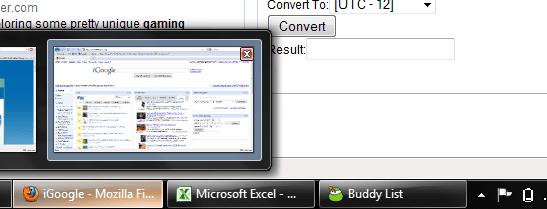
When I change the "Always combine, hide labels" to, for example, "Combine when taskbar is full" there is no problem with the thumbnail view (because there is no thumbnail view :sarc:)
In this screenshot, my Taskbar is set to "Combine when taskbar is full" and yet the Thumbnail previews are clearly active.
aero preview 2.png
This makes me think it's either a problem with MSN's functionality in Windows 7, in which case you could try running it in Compatibility Mode for Vista, or an issue with your Win7 install (let's hope not.)

Cheers,

Walker
Windows Outreach Team
 

My Computer My Computer

At a glance

Windows 7 Home Premium (64-bit) *** Windows X...AMD Athlon Neo X2 1.6GHz *** Intel Core i7 Qu...4.00 GB *** 4.00 GBATI Radeon HD 3200, 384MB *** ATI Radeon HD 4...
Computer Manufacturer/Model Number
HP Pavilion dm3 (netbook) *** 27" iMac (Dual-Boot)
OS
Windows 7 Home Premium (64-bit) *** Windows XP SP3 (32-bit), OSX 10.6
CPU
AMD Athlon Neo X2 1.6GHz *** Intel Core i7 Quad Core 2.8GHz
Memory
4.00 GB *** 4.00 GB
Graphics Card(s)
ATI Radeon HD 3200, 384MB *** ATI Radeon HD 4850, 1GB
Sound Card
ATI High Definition Audio *** ATI High Definition Audio
Monitor(s) Displays
LG Flatron W2053TX
Screen Resolution
1600 x 900 (monitor), 1266 x 768 (laptop) *** 2560 x 1440
Hard Drives
300 GB SATA (internal), 500 GB HP SimpleSave (external) *** 1 TB SATA (internal), 160 GB LaCie (external)
Mouse
Logitech Cordless Optical Mouse for Notebooks
Internet Speed
Broadband
Back
Top