- Local time
- 1:00 AM
- Messages
- 705
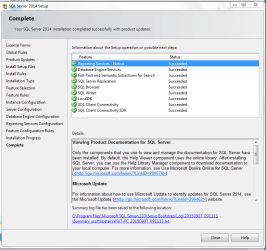
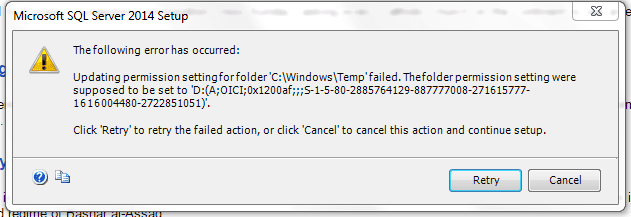
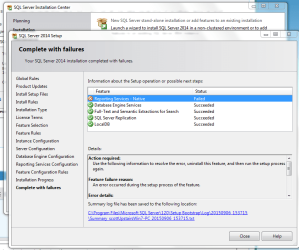
I tried several things, but always get this error, so the install of MS sqlserver express fails.
One suggestion was to change ownership to the name of the person installing the sql express
I did the other changes suggested here.
https://social.technet.microsoft.co...am-filesmicrosoft-sql-server100dts-failed-the
Then this says about taking ownership here, but I will not let me take ownership of windows temp as scott
All I can do is cancel uninstall and maybe try run the install as administrator??
text output of failure
One suggestion was to change ownership to the name of the person installing the sql express
I did the other changes suggested here.
https://social.technet.microsoft.co...am-filesmicrosoft-sql-server100dts-failed-the
Then this says about taking ownership here, but I will not let me take ownership of windows temp as scott
All I can do is cancel uninstall and maybe try run the install as administrator??
text output of failure
Code:
Overall summary:
  Final result:                  Failed: see details below
  Exit code (Decimal):           -2066808829
  Start time:                    2015-09-06 15:37:17
  End time:                      2015-09-06 16:03:20
  Requested action:              Install

Setup completed with required actions for features.
Troubleshooting information for those features:
  Next step for RS:              Use the following information to resolve the error, uninstall this feature, and then run the setup process again.


Machine Properties:
  Machine name:                  SCOTTUPSTAIRSWI
  Machine processor count:       2
  OS version:                    Windows 7
  OS service pack:               Service Pack 1
  OS region:                     United States
  OS language:                   English (United States)
  OS architecture:               x64
  Process architecture:          64 Bit
  OS clustered:                  No

Product features discovered:
  Product              Instance             Instance ID                    Feature                                  Language             Edition              Version         Clustered  Configured
  SQL Server 2014      SQLEXPRESS           MSSQL12.SQLEXPRESS             Database Engine Services                 1033                 Express Edition      12.0.2000.8     No         Yes
  SQL Server 2014      SQLEXPRESS           MSSQL12.SQLEXPRESS             SQL Server Replication                   1033                 Express Edition      12.0.2000.8     No         Yes
  SQL Server 2014      SQLEXPRESS           MSSQL12.SQLEXPRESS             Full-Text and Semantic Extractions for Search 1033                 Express Edition      12.0.2000.8     No         Yes
  SQL Server 2014      SQLEXPRESS           MSRS12.SQLEXPRESS              Reporting Services - Native              1033                 Express Edition      12.0.2000.8     No         Yes
  SQL Server 2014                                                          Management Tools - Basic                 1033                 Express Edition      12.0.2000.8     No         Yes
  SQL Server 2014                                                          Management Tools - Complete              1033                 Express Edition      12.0.2000.8     No         Yes
  SQL Server 2014                                                          Client Tools Connectivity                1033                 Express Edition      12.0.2000.8     No         Yes
  SQL Server 2014                                                          Client Tools Backwards Compatibility     1033                 Express Edition      12.0.2000.8     No         Yes
  SQL Server 2014                                                          Client Tools SDK                         1033                 Express Edition      12.0.2000.8     No         Yes

Package properties:
  Description:                   Microsoft SQL Server 2014
  ProductName:                   SQL Server 2014
  Type:                          RTM
  Version:                       12
  SPLevel:                       0
  Installation location:         C:\Users\scott\Downloads\SQLEXPRADV_x64_ENU\x64\setup\
  Installation edition:          Express

Product Update Status:
  None discovered.

User Input Settings:
  ACTION:                        Install
  ADDCURRENTUSERASSQLADMIN:      true
  AGTSVCACCOUNT:                 NT AUTHORITY\NETWORK SERVICE
  AGTSVCPASSWORD:                *****
  AGTSVCSTARTUPTYPE:             Disabled
  ASBACKUPDIR:                   Backup
  ASCOLLATION:                   Latin1_General_CI_AS
  ASCONFIGDIR:                   Config
  ASDATADIR:                     Data
  ASLOGDIR:                      Log
  ASPROVIDERMSOLAP:              1
  ASSERVERMODE:                  MULTIDIMENSIONAL
  ASSVCACCOUNT:                  <empty>
  ASSVCPASSWORD:                 <empty>
  ASSVCSTARTUPTYPE:              Automatic
  ASSYSADMINACCOUNTS:            <empty>
  ASTEMPDIR:                     Temp
  BROWSERSVCSTARTUPTYPE:         Disabled
  CLTCTLRNAME:                   <empty>
  CLTRESULTDIR:                  <empty>
  CLTSTARTUPTYPE:                0
  CLTSVCACCOUNT:                 <empty>
  CLTSVCPASSWORD:                <empty>
  CLTWORKINGDIR:                 <empty>
  COMMFABRICENCRYPTION:          0
  COMMFABRICNETWORKLEVEL:        0
  COMMFABRICPORT:                0
  CONFIGURATIONFILE:
  CTLRSTARTUPTYPE:               0
  CTLRSVCACCOUNT:                <empty>
  CTLRSVCPASSWORD:               <empty>
  CTLRUSERS:                     <empty>
  ENABLERANU:                    true
  ENU:                           true
  ERRORREPORTING:                true
  FEATURES:                      SQLENGINE, REPLICATION, FULLTEXT, RS, LOCALDB
  FILESTREAMLEVEL:               0
  FILESTREAMSHARENAME:           <empty>
  FTSVCACCOUNT:                  NT Service\MSSQLFDLauncher
  FTSVCPASSWORD:                 <empty>
  HELP:                          false
  IACCEPTSQLSERVERLICENSETERMS:  true
  INDICATEPROGRESS:              false
  INSTALLSHAREDDIR:              C:\Program Files\Microsoft SQL Server\
  INSTALLSHAREDWOWDIR:           C:\Program Files (x86)\Microsoft SQL Server\
  INSTALLSQLDATADIR:             <empty>
  INSTANCEDIR:                   C:\Program Files\Microsoft SQL Server\
  INSTANCEID:                    MSSQLSERVER
  INSTANCENAME:                  MSSQLSERVER
  ISSVCACCOUNT:                  NT AUTHORITY\Network Service
  ISSVCPASSWORD:                 <empty>
  ISSVCSTARTUPTYPE:              Automatic
  MATRIXCMBRICKCOMMPORT:         0
  MATRIXCMSERVERNAME:            <empty>
  MATRIXNAME:                    <empty>
  NPENABLED:                     0
  PID:                           *****
  QUIET:                         false
  QUIETSIMPLE:                   false
  ROLE:                          AllFeatures_WithDefaults
  RSINSTALLMODE:                 DefaultNativeMode
  RSSHPINSTALLMODE:              DefaultSharePointMode
  RSSVCACCOUNT:                  NT Service\ReportServer
  RSSVCPASSWORD:                 <empty>
  RSSVCSTARTUPTYPE:              Automatic
  SAPWD:                         *****
  SECURITYMODE:                  SQL
  SQLBACKUPDIR:                  <empty>
  SQLCOLLATION:                  SQL_Latin1_General_CP1_CI_AS
  SQLSVCACCOUNT:                 NT Service\MSSQLSERVER
  SQLSVCPASSWORD:                <empty>
  SQLSVCSTARTUPTYPE:             Automatic
  SQLSYSADMINACCOUNTS:           SCOTTUPSTAIRSWI\scott
  SQLTEMPDBDIR:                  <empty>
  SQLTEMPDBLOGDIR:               <empty>
  SQLUSERDBDIR:                  <empty>
  SQLUSERDBLOGDIR:               <empty>
  SQMREPORTING:                  true
  TCPENABLED:                    0
  UIMODE:                        AutoAdvance
  UpdateEnabled:                 true
  UpdateSource:                  MU
  USEMICROSOFTUPDATE:            false
  X86:                           false

  Configuration file:            C:\Program Files\Microsoft SQL Server\120\Setup Bootstrap\Log\20150906_153715\ConfigurationFile.ini

Detailed results:
  Feature:                       Reporting Services - Native
  Status:                        Failed: see logs for details
  Reason for failure:            An error occurred during the setup process of the feature.
  Next Step:                     Use the following information to resolve the error, uninstall this feature, and then run the setup process again.
  Component name:                SQL Server Reporting Services
  Component error code:          0x84CF0003
  Error description:             Updating permission setting for folder 'C:\Windows\Temp' failed. The folder permission setting were supposed to be set to 'D:(A;OICI;0x1200af;;;S-1-5-80-2885764129-887777008-271615777-1616004480-2722851051)'.
  Error help link:               http://go.microsoft.com/fwlink?LinkId=20476&ProdName=Microsoft+SQL+Server&EvtSrc=setup.rll&EvtID=50000&ProdVer=12.0.2000.8&EvtType=0x0ADF5303%400xBB814387&EvtType=0x0ADF5303%400xBB814387

  Feature:                       Database Engine Services
  Status:                        Passed

  Feature:                       Full-Text and Semantic Extractions for Search
  Status:                        Passed

  Feature:                       SQL Server Replication
  Status:                        Passed

  Feature:                       LocalDB
  Status:                        Passed

Rules with failures:

Global rules:

Scenario specific rules:

Rules report file:               C:\Program Files\Microsoft SQL Server\120\Setup Bootstrap\Log\20150906_153715\SystemConfigurationCheck_Report.htm
Attachments
My Computer
At a glance
Windows 7 Ultimate x64
- OS
- Windows 7 Ultimate x64