- Local time
- 9:58 PM
- Messages
- 3,615
You might want to try a Repair Install it replaces Windows7 and keeps all your installed programs, files, folder, music, pictures, etc.
Here's SevenForums instruction that has both options from USB or DVD and from extracted ISO
Repair Install - Windows 7 Help Forums
Here's an excellent video by Brian at Britec Computer UK
Repair Install to Fix Windows 7 Without Reformatting by Britec
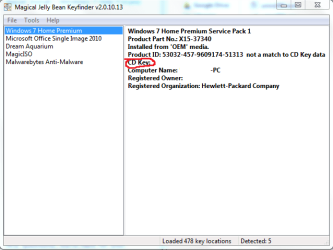
You will need your 25 character product key, you can obtain it from your computer with
KeyFinder | Magical Jelly Bean
You want the CD key not Product ID. I usually copy and paste it into, say, notepad and print it to avoid typos.
If you don't have a Win7 DVD you can obtain an ISO from
TechBench by WZT
The only working downloads are for Win7 Ultimate x64 and Win7 Ultimate x32
To make all version available use
eicfg_removal_utility.zip
You can't copy and paste an ISO file to DVD or USB Flash Drive, it has to be burned
To dvd Burn .ISO Image Files ImgBurn
To USB Rufus - Create bootable USB drives the easy way
To avoid days of updates, 230+ and counting, and numerous reboots, use
Website Dism++ | New Windows Utility.
Direct Download DISM++
Yes, it's from Chinese firm! When you run it, click on Updates, then Scan, Choose the updates you wish to install, and then click Install updates.
Any questions, we're here for you!
Here's SevenForums instruction that has both options from USB or DVD and from extracted ISO
Repair Install - Windows 7 Help Forums
Here's an excellent video by Brian at Britec Computer UK
Repair Install to Fix Windows 7 Without Reformatting by Britec
You will need your 25 character product key, you can obtain it from your computer with
KeyFinder | Magical Jelly Bean
You want the CD key not Product ID. I usually copy and paste it into, say, notepad and print it to avoid typos.
If you don't have a Win7 DVD you can obtain an ISO from
TechBench by WZT
The only working downloads are for Win7 Ultimate x64 and Win7 Ultimate x32
To make all version available use
eicfg_removal_utility.zip
You can't copy and paste an ISO file to DVD or USB Flash Drive, it has to be burned
To dvd Burn .ISO Image Files ImgBurn
To USB Rufus - Create bootable USB drives the easy way
To avoid days of updates, 230+ and counting, and numerous reboots, use
Website Dism++ | New Windows Utility.
Direct Download DISM++
Yes, it's from Chinese firm! When you run it, click on Updates, then Scan, Choose the updates you wish to install, and then click Install updates.
Any questions, we're here for you!
Last edited:
My Computer
At a glance
Win 10 x64, Linux Lite, Win 7 x64, BlackArch,...
- Computer type
- PC/Desktop
- Computer Manufacturer/Model Number
- HP Desktop & Compaq Laptop
- OS
- Win 10 x64, Linux Lite, Win 7 x64, BlackArch, & Kali
- Hard Drives
- Samsung 850 Pro 256Gb,
Hitachi HDD 1Tb,
Crucial MX SSD 250Gb
Segate 3Tb USB 3.0 Ext. Backup HDD
- Internet Speed
- 150Mbps dn, 20Mbps up
- Antivirus
- Avast Free, Malwarebytes Anti-Exploit & Anti-Ransomware
- Browser
- Firefox, Chrome, Opera, & VPN