MTU Limit - Test and change your connection's MTU limit

An MTU limit that is set too high can cause fragmented packets and packet loss on your connection. This tutorial will explain how to test if your MTU limit is sending fragmented packets and will explain how to find what value you should be using.

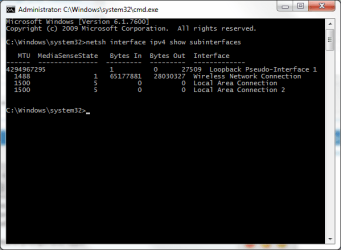
1) Open an elevated command prompt and type:

netsh interface ipv4 show subinterfaces

and hit Enter.

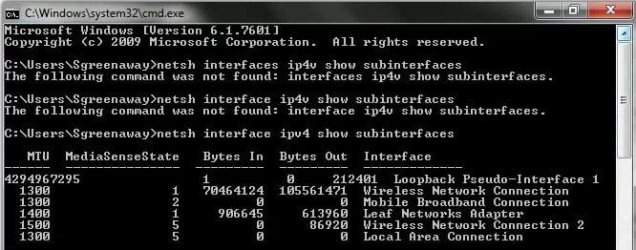
You should get a list of all your network adapters installed on your PC. The MTU value is listed on the left.
cmd1.png

All PPP connections (Point-to-Point Protocol) have a default MTU size of 1500 bytes and VPN connections have a defualt size of 1400. 28 bytes of this number is reserved for IP/ICMP overhead, so the effective MTU size here is 1472 (1500-28).

To work out if this MTU is too high for your connection, you need to ping with this amount of bytes. The best way to start is start with the default MTU and work your way down.

2) In an elevated command prompt, type the following to ping with an MTU size

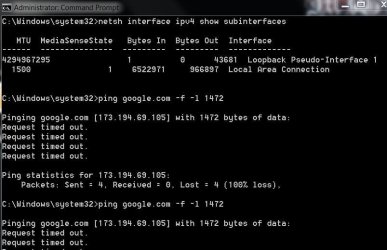
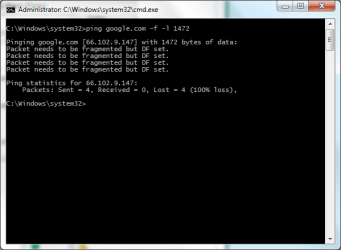
ping google.com -f -l 1472

The -f marks packets that should not be fragmented in the ping. -l 1472 sets the size of the packet.
cmd2.png

If you get successful replies, then your current MTU is fine for your connection. If you receive error messages like in the above image, then your packets are getting fragmented.

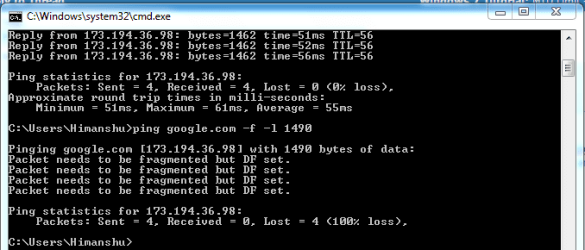
Keep trying to ping until you get 4 successful replies. Keep decreasing the MTU by 10, so if 1472 fails, try 1462.

You shouldn't go below 1400.

When you find a value that is successful, start to increase that value by 1, so if 1462 is successful, for example, try again with 1463 etc until you get errors again.

3) When you find a successful value, you can then set a new MTU limit with this value.

You will need to add 28 back on to the value for IP/ICMP overheads, so if 1462 is successful, then 1490 is your MTU limit.

To set your new limit, in an elevated command prompt use the following command

For a wired connection use:

netsh interface ipv4 set subinterface "Local Area Connection" mtu=1490 store=persistent

(You can change the interface name to whatever you're using. If you're connected via "Local Area Connection 2" then use this instead and so on)

For a wireless connection use:

netsh interface ipv4 set subinterface "Wireless Network Connection" mtu=1490 store=persistent

Change the MTU value to whatever value you found yourself. Remember you need to add 28 on to the value you were using in your pings. So if you were using a value of 1460 to ping, add 28 on, and the MTU value to set in the above commands will be 1488.

Simply hit Enter and the MTU value will be set.

Restart your PC for the changes to be effective.

If your router also has an MTU value that can be set, such as Netgear routers can have an MTU value set in the WAN settings, then you can add your value here as well.

I've done these steps myself, and it did infact help connections in some online games where I was getting packet loss. After doing these, I now get 0% packet loss. Web browsing is also a lot smoother on my wireless network with this tweak.
 
Last edited:
nice i had 75% packet loss,checked this thread out because i was noticing connection loss in cod mw2 when playing. Again thank you, bookmarked:)
 

My Computer My Computer

At a glance

Windows 10 64bitAMD Phenom II X4 925 (Deneb)(2.8GHz) OC 3.4GHzCorsair Vengeance DDR3 4GBX2 (8192MB)XFX HD 6870 1GB (OC)- 940MHz core, mem 1150MHz
Computer type
PC/Desktop
Computer Manufacturer/Model Number
custom build
OS
Windows 10 64bit
CPU
AMD Phenom II X4 925 (Deneb)(2.8GHz) OC 3.4GHz
Motherboard
M5A78L-MLX Plus
Memory
Corsair Vengeance DDR3 4GBX2 (8192MB)
Graphics Card(s)
XFX HD 6870 1GB (OC)- 940MHz core, mem 1150MHz
Monitor(s) Displays
Vizio 26' 1920x1080 / Acer 1336x768
Screen Resolution
1920x1080 60Hz /1336x768
Hard Drives
Kingston Digital 60GB SSDNow V300/500gb HDD Western Digital 7200rpm (/WD 160GB HDD 7200rpm
PSU
CORSAIR CX600 600w
Case
AZZA Orion 202 EVO
Cooling
cooler master hyper TX3 cpu cooler
Keyboard
Razer DeathStalker
Mouse
Logitech Optical Gaming Mouse G400
Antivirus
Defualt on win 10
Browser
Firefox
Other Info
cpu is overclocked in bios
This is the result of my ping to google.
What does it mean?
It's ok I've sussed it out my end figure was 1476.:D
 

Attachments

  • ping.JPG
    ping.JPG
    53.9 KB · Views: 1,161

My Computer My Computer

At a glance

Windows 7 Ultimate SP1 64- bitIntel Core i7-3770K @3.50ghzKingston Technology 16GB (2x 8GB) 2133MHz DDR...EVGA GTX 670 4gb SC
Computer type
PC/Desktop
Computer Manufacturer/Model Number
Home Built
OS
Windows 7 Ultimate SP1 64- bit
CPU
Intel Core i7-3770K @3.50ghz
Motherboard
EVGA Z77 FTW
Memory
Kingston Technology 16GB (2x 8GB) 2133MHz DDR3 Non-ECC
Graphics Card(s)
EVGA GTX 670 4gb SC
Sound Card
Nil
Monitor(s) Displays
Samsung 22"
Screen Resolution
1920 x 1080 60hz
Hard Drives
OCZ Vertex 4 SSD 128GB
SAMSUNG Spinpoint F3 HD502HJ 500GB 7200 RPM
PSU
Enermax Platinax EPM1000EWT Special OC Edition
Case
Cooler Master HAF Full Tower nVIDIA Edition
Cooling
CoolerMaster Hyper 212 Plus
Keyboard
HP Wireless Keyboard
Mouse
Corsair Vengeance M90
Internet Speed
20 Mb
Other Info
ASUS DRW-24B1ST/BLK/B/AS Black SATA 24X DVD Burner
Glad it helped :)
 

My Computer My Computer

At a glance

Windows 8.1 Pro x64Intel Core i7 4790k8GB Corsair Dominator 1600MHzMSI TwinFrozr GeForce GTX770
Computer type
PC/Desktop
Computer Manufacturer/Model Number
Custom Built
OS
Windows 8.1 Pro x64
CPU
Intel Core i7 4790k
Motherboard
MSI Z97S Krait Edition
Memory
8GB Corsair Dominator 1600MHz
Graphics Card(s)
MSI TwinFrozr GeForce GTX770
Sound Card
ASUS Xonar DX/XD 7.1
Monitor(s) Displays
Dell 24" S2409W + Dell 20" E207WFP
Screen Resolution
1920x1080 + 1680x1050
Hard Drives
1x 120GB OCZ Agility 3, 1x 750GB Western Digital Caviar Black, 1x 1TB Western Digital Caviar Blue
PSU
Corsair HX850 modular
Case
Fractal Design Define R4
Cooling
Corsair H60 w/ twin Corsair SP120 fans
Keyboard
Logitech G510S Keyboard
Mouse
Logitech G500S Laser Mouse
Internet Speed
40Mbps
Antivirus
Microsoft Security Essentials
Browser
Google Chrome
Other Info
LG Blu-Ray player
hi, i used this method and successfully changed my MTU, thanks so much!
but i have a related question. every time i reboot or shut my computer down and boot it up again later, the MTU settings i adjusted are lost
icon_sad.gif

i’m running cmd.exe as administrator and using store=persistent at the end of the command line, but still it keeps resetting itself to MTU=1300 after every (re)boot.
is there anything i can do to save this setting ?
 

My Computer My Computer

At a glance

Windows 7 Home Premium x64
OS
Windows 7 Home Premium x64
so i got 0 percent loss this is good?
 

My Computer My Computer

At a glance

Microsoft Windows 7 Ultimate 64-bit 7601 Mult...Intel(R) Core(TM) i7 CPU Q [email protected] (Turbo...4.00 GBATI Mobility Radeon HD 5730
Computer type
Laptop
Computer Manufacturer/Model Number
Lenovo Y560 Laptop
OS
Microsoft Windows 7 Ultimate 64-bit 7601 Multiprocessor Free Service Pack 1
CPU
Intel(R) Core(TM) i7 CPU Q [email protected] (Turbo boost 2.93ghz)
Motherboard
Lenovo KL3
Memory
4.00 GB
Graphics Card(s)
ATI Mobility Radeon HD 5730
Sound Card
(1) ATI HDMI Audio (2) Realtek High Definition Audio
Monitor(s) Displays
1024 x 768 x 32 bits (4294967296 colors) @ 60 Hz
Screen Resolution
1366 x 768 x 32 bits (4294967296 colors) @ 60 Hz
Hard Drives
WDC WD5000BEVT-24A0RT0
Mouse
Logitech M305
Internet Speed
10 Mbps
Antivirus
My brain
Browser
Google Chrome
Other Info
Trying my best to learn.
1492 is the right number for me:)
 

My Computer My Computer

At a glance

Windows 7 Home Premium x64 SP1intel(R)core(TM)2 duo CPU T6600 @ 2.20GHz3 gb ddr3ati radeon hd4570/512mb
Computer Manufacturer/Model Number
acer aspire 5935g
OS
Windows 7 Home Premium x64 SP1
CPU
intel(R)core(TM)2 duo CPU T6600 @ 2.20GHz
Motherboard
intel gm45/gm47 revision 07
Memory
3 gb ddr3
Graphics Card(s)
ati radeon hd4570/512mb
Monitor(s) Displays
lop156wh2-tle1 15.3 flat
Screen Resolution
1366x768
Hard Drives
OCZ-Agility3 60gig ssd
320gig external hdd
500gig external hdd
Mouse
Optical
Internet Speed
30Mbps Down/30Mbps Up
hi, i used this method and successfully changed my MTU, thanks so much!
but i have a related question. every time i reboot or shut my computer down and boot it up again later, the MTU settings i adjusted are lost
icon_sad.gif

i’m running cmd.exe as administrator and using store=persistent at the end of the command line, but still it keeps resetting itself to MTU=1300 after every (re)boot.
is there anything i can do to save this setting ?

I don't know, sorry. You'd have to have a search. The only method I know is the store = persistent.

so i got 0 percent loss this is good?

It is. If you don't have any loss, then you're already good.

1492 is the right number for me:)

Good to hear it helped :)
 

My Computer My Computer

At a glance

Windows 8.1 Pro x64Intel Core i7 4790k8GB Corsair Dominator 1600MHzMSI TwinFrozr GeForce GTX770
Computer type
PC/Desktop
Computer Manufacturer/Model Number
Custom Built
OS
Windows 8.1 Pro x64
CPU
Intel Core i7 4790k
Motherboard
MSI Z97S Krait Edition
Memory
8GB Corsair Dominator 1600MHz
Graphics Card(s)
MSI TwinFrozr GeForce GTX770
Sound Card
ASUS Xonar DX/XD 7.1
Monitor(s) Displays
Dell 24" S2409W + Dell 20" E207WFP
Screen Resolution
1920x1080 + 1680x1050
Hard Drives
1x 120GB OCZ Agility 3, 1x 750GB Western Digital Caviar Black, 1x 1TB Western Digital Caviar Blue
PSU
Corsair HX850 modular
Case
Fractal Design Define R4
Cooling
Corsair H60 w/ twin Corsair SP120 fans
Keyboard
Logitech G510S Keyboard
Mouse
Logitech G500S Laser Mouse
Internet Speed
40Mbps
Antivirus
Microsoft Security Essentials
Browser
Google Chrome
Other Info
LG Blu-Ray player
hi 10Q for help!!!
dear mine is 1272 can i increase dat? how??? :-s i can't connect to xbox live because dat want MiN mtu in 1364 :( pls help me
 

My Computer My Computer

At a glance

windows 7 64bit :|
OS
windows 7 64bit :|
1500 worked for me. Nice post.
 

My Computer My Computer

At a glance

Windows 7 Ultimate x64
OS
Windows 7 Ultimate x64
Weird. I got fragmentations at 1500 and after following your procedure I ended at 1498 without fragmentations. Just two too many.
 

My Computer My Computer

At a glance

Windows 7 x64 Home PremiumIntel i3-2105Two 4gig Corsair Vengeance BlueSapphire Radeon HD 6670
Computer type
PC/Desktop
Computer Manufacturer/Model Number
Home Built
OS
Windows 7 x64 Home Premium
CPU
Intel i3-2105
Motherboard
Gigabyte B75M-HD3
Memory
Two 4gig Corsair Vengeance Blue
Graphics Card(s)
Sapphire Radeon HD 6670
Sound Card
Soundblaster Audigy
Monitor(s) Displays
AOC LM742
Screen Resolution
1280 x 1024
Hard Drives
Seagate Constellation 1TB
PSU
Seasonic M12II 520 Bronze
Case
Xigmatek Gigas cube
Cooling
Intel stock
Hi

Looking at my router, the MTU is set at 1500 but when I ran the command netsh interface ipv4 show subinterfaces, the results suggests that over the wireless connection, the MTU was 1300 (see attached screenshot). I then ran the ping google.com command and only received successful results at 1272 i.e. ping google.com -f -1 -1272.

Any suggestions? I've no real expertise in this area but came across the posts as I've been trying to understand why transfers to and from my ReadyNas have been so slow.

Thanks
 

Attachments

  • MTU.JPG
    MTU.JPG
    45.6 KB · Views: 6,160

My Computer My Computer

At a glance

Windows 7 32 bit
Computer type
PC/Desktop
OS
Windows 7 32 bit
What wireless device are you using? I think some are limited to 1300.
 

My Computer My Computer

At a glance

Windows 8.1 Pro x64Intel Core i7 4790k8GB Corsair Dominator 1600MHzMSI TwinFrozr GeForce GTX770
Computer type
PC/Desktop
Computer Manufacturer/Model Number
Custom Built
OS
Windows 8.1 Pro x64
CPU
Intel Core i7 4790k
Motherboard
MSI Z97S Krait Edition
Memory
8GB Corsair Dominator 1600MHz
Graphics Card(s)
MSI TwinFrozr GeForce GTX770
Sound Card
ASUS Xonar DX/XD 7.1
Monitor(s) Displays
Dell 24" S2409W + Dell 20" E207WFP
Screen Resolution
1920x1080 + 1680x1050
Hard Drives
1x 120GB OCZ Agility 3, 1x 750GB Western Digital Caviar Black, 1x 1TB Western Digital Caviar Blue
PSU
Corsair HX850 modular
Case
Fractal Design Define R4
Cooling
Corsair H60 w/ twin Corsair SP120 fans
Keyboard
Logitech G510S Keyboard
Mouse
Logitech G500S Laser Mouse
Internet Speed
40Mbps
Antivirus
Microsoft Security Essentials
Browser
Google Chrome
Other Info
LG Blu-Ray player
Thanks for getting back to me.

I have a Sky router (SR101) running to three Netgear WNDAP360 wireless access units (am connected using 2.4ghz band). I've had a look in the admin pages of the netgear wireless points and can't see any reference to setting MTU. If I can't change anything on these wireless points, is it worth setting the network to run at 1272 (i.e. 28 below the 1300 limit) or is this going to cause things to slow down even further?
 

My Computer My Computer

At a glance

Windows 7 32 bit
Computer type
PC/Desktop
OS
Windows 7 32 bit
Flipkart Not open

Hi,

I am MTNL Broadband User. I have 1mbps plan and I am using WIFI. My problem is Flipkart.com is not opening in my laptop and my phone also. I tried all your steps but those steps are confusing me and I did not get resolution.

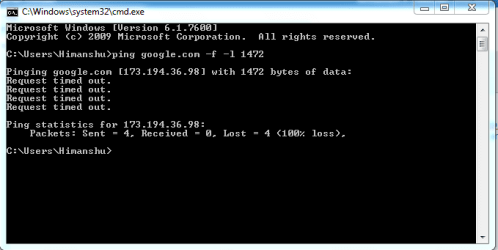
I ping with "ping google.com -f -l 1472"
the reply got request time out. (see the attachment capture1.png )

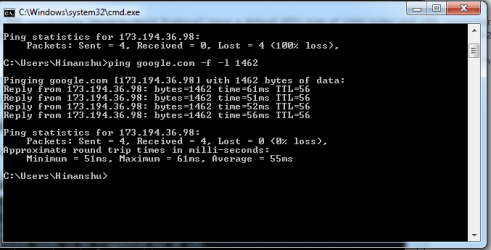
then i entered "ping google.com -f -l 1462"
I got reply (see the attachment capture2.png )

then I add 28 "ping google.com -f -l 1490"
I got reply:Packet needs to be fragmented but DF set. (see the attachment capture3.png )
If you have any solution, please help me.

Thank you.
 

Attachments

  • Capture1.PNG
    Capture1.PNG
    7.9 KB · Views: 4,469
  • Capture2.PNG
    Capture2.PNG
    12.1 KB · Views: 4,525
  • Capture3.PNG
    Capture3.PNG
    9.3 KB · Views: 4,449

My Computer My Computer

At a glance

Windows 7 Home Premium 32bit2.10 GHz3 GBRadeon
Computer type
Laptop
Computer Manufacturer/Model Number
HP
OS
Windows 7 Home Premium 32bit
CPU
2.10 GHz
Motherboard
intel core i3
Memory
3 GB
Graphics Card(s)
Radeon
Hard Drives
TOSHIBA
Antivirus
Symantech Endpoint Protection
Browser
Google Chrome, Mozila Firefox
Thanks
1500 work fine for me
 

My Computer My Computer

At a glance

98SE/XP/windows7 32bit/ win10
Computer type
PC/Desktop
OS
98SE/XP/windows7 32bit/ win10
i tried it and cmd says:The filename, directory name, or volume label syntax is incorrect.
please help
 

My Computer My Computer

At a glance

windows 10 pro
Computer type
PC/Desktop
OS
windows 10 pro
This article here from microsoft forms step by step will solve your mtu settings issues from ranges of Windows XP all the way to windows 10. Only difference is the beginning steps are a bit different. The MTU settings in the later steps are just about the same. No reason to use cmd or powershell. Some windows versions do not support certain commands in powershell and cmd. Specially windows 10. Most commands i use on the common version dont work period.
How to change MTU Settings in Windows 10 - Microsoft Community
 

My Computer My Computer

At a glance

64Xeons, I7, and AMD FX 8 Core250gbonboard, gtx 1080, gtx 1080ti
Computer type
PC/Desktop
Computer Manufacturer/Model Number
Dell R Series Servers, Omen HP Laptop, Custom Built Mobo
OS
64
CPU
Xeons, I7, and AMD FX 8 Core
Motherboard
Call me Daddy Board
Memory
250gb
Graphics Card(s)
onboard, gtx 1080, gtx 1080ti
Hard Drives
All SSD's Raid setups.
Antivirus
Covid-19
Browser
Whats wrong with my brows?
Back
Top