Solved Multi Boot computer - how to keep data and programs in sync

So Macrium Free can restore individual files and folders (I just seem to have found, Paragon can do this as well) - That changes a whole lot (it might remove the need for the Hardlink Backup step).

Why I want to image the whole drive: As has been said, both OS´s documents folders (and other as well) have been moved to the data partition, and are shared between the OSes (Win7´s Documents is in D:\UserFolders\Markus as is Win8´s Documents). This is done via Windows built-in controls, and has been said to make D a system partition as well. That´s why I want it included in the image, just to be sure (if that´s overkill, please tell me :) )

As for how often or how "firmly" compressed backups will be done, that´s not yet decided. I´m still trying to settle on a general concept before thinking about things that depend on the capabilities of the program used in the end.

Cheers, Markus
 

My Computer

Computer type
Laptop
Computer Manufacturer/Model Number
Sony Vaio / Toshiba Satellite L70-B
OS
Win7-64 Home Premium single boot / Win7-64 Professional & Win8.1-64 dual boot
CPU
Intel Core i5 M430 @ 2,27GHz / Intel Core 17-470HQ @ 2,5GHz
Motherboard
Sony Vaio / Toshiba Portable PC
Memory
4GB DDR3 / 8GB DDR3L
Graphics Card(s)
AMD RadeonHD 5650 / AMD Radeo R9 M265X & Intel HD 4600
Sound Card
Realtek High Definition Audio
Screen Resolution
1366x768 / 1600x900
Hard Drives
Original built-in HDDs only (450 GB / 1000 GB)
Two external HDDs (both WD MyPassport Ultra 2TB, USB-3)
PSU
Builder-supplied AC adaptors
Mouse
Built-in touchpads / Logitech M305 wireless battery-powered
Internet Speed
LTE
Antivirus
Avira AntiVir
Browser
Palemoon x64
Other Info
Acquired MAY-2010 / JUN-2015
Hmm, perhaps it is a good idea to image D as well, because you will have unknown SIDs for the other OS in NTFS permissions as well. How much used space will all 3 partitions will be (not the disk capacity)? Multiply that by how many copies you want to keep after adjusting for future growth.
 

My Computer

Computer type
PC/Desktop
Computer Manufacturer/Model Number
Custom Build
OS
Windows 7 Ultimate x64 SP1
CPU
AMD Phenom 2 1090T
Motherboard
Gigabyte GA-890FXA-UD5
Memory
2x8GB Kingston HyperX Fury Black 1600Mhz Unganged
Graphics Card(s)
MSI GTX 970 Gaming 4G
Sound Card
Realtek On-Board HD 7.1 Audio / Logitech G35
Monitor(s) Displays
3xAcer GD245HQ
Screen Resolution
1920x1080
Hard Drives
Samsung 850 Pro 512GB SSD - OS /
WD Caviar Black SATA 3 - 1 TBx2 - Dynamic RAID 0 /
WD Caviar Green SATA 2 - 640GBx2 - Dynamic RAID 0 /
WD Caviar Green SATA 2 - 640GB - Internal Backup /
Seagate Barracude SATA 3 - 3TB - External Backup/ Sync
PSU
HighPower 1000W
Case
Cooler Master HAF 932
Cooling
Noctua NH-D14
Keyboard
Logitech G19
Mouse
Logitech G500
Internet Speed
100/4 Mbit Cable (100GB quota)
Antivirus
ZoneAlarm Extreme Security / MBAM Pro / MBAE Free / SAS Free
Browser
IE 11 - Firefox - Chrome
Other Info
Logitech F710/ G27/ G940/ Z5500 // TrackIR 5 // Nvidia 3D Surround Vision
The attachment shows my partition layout with some info.

Basically, all partitions will go into the backup, except for the 81 GB of unallocated space at the right in the pic.

Three partitions combined are smaller than 1 GB (doesn´really matter how much is used there). The OS partitions (both 50 GB capacity) are all filled to around 75%. The big Data partition one currently has about 335 GB in use. Altogether that amounts to roughly 410 GB used, without any growth calculated into it.

The Data partition´s amount of stored data will constantly rise, due to my growing collection of content for a game (up to 5 GB per week at times) and other factors.

Also, the space for differential backups has not been factored in there yet. With that all in mind, I´d say 800 GB of backups for this new PC alone should keep me on the safe side for years to come. And if less space is needed, I can always shrink he backup partition using MiniTool PartitionWizard 9 (installed or bootable).


The old PC has a 500 GB HDD, of which I assume 200 will be used (he PC is in dire need of a complete system restore, and doing so, a completely new disk layout similar o the one on the new PC will be applied - data on a separate partition from the OS). Since backups will be necessary less often, I assume 300 GB should be enough for this computer´s backups.


Altogether, that makes 1100 GB necessary for image backups only. Add another 350 GB for stuff only located on my existing external drive, that will also be backed up on the second drive (Hardlink Backup will be used), and there we are at 1500 GB (including some spare space for the 350 GB mentioned).


Now, some more questions:


  • Since Macrium can restore individual files, I assume a separate file-level backup (created with Hardlink Backup) will be an unnecessary effort - right?
    (except for stuff not included in the image backups)
  • Macrium can do differential backups in the free version - that means, I´ll always have the original backup, plus some newer sets. Thus, it might be unnecessary to do a separate image of the original PC setup (note 1), right?
  • Will it be reasonably safe to keep the image backups on one (brand-new) drive only, that is usually disconnected from the PC or should I keep a copy of the most recent backup on another drive as well (older drive (3 yrs), usually connected to PC)?


Cheers, Markus


Note 1: Original = fully set up as dual boot with everything installed, settings tweaked and all data on the HDD, but not used much - the current state, which I might want to go back to later, for whatever reason.
 

Attachments

  • PartitionLayout.JPG
    PartitionLayout.JPG
    36 KB · Views: 1

My Computer

Computer type
Laptop
Computer Manufacturer/Model Number
Sony Vaio / Toshiba Satellite L70-B
OS
Win7-64 Home Premium single boot / Win7-64 Professional & Win8.1-64 dual boot
CPU
Intel Core i5 M430 @ 2,27GHz / Intel Core 17-470HQ @ 2,5GHz
Motherboard
Sony Vaio / Toshiba Portable PC
Memory
4GB DDR3 / 8GB DDR3L
Graphics Card(s)
AMD RadeonHD 5650 / AMD Radeo R9 M265X & Intel HD 4600
Sound Card
Realtek High Definition Audio
Screen Resolution
1366x768 / 1600x900
Hard Drives
Original built-in HDDs only (450 GB / 1000 GB)
Two external HDDs (both WD MyPassport Ultra 2TB, USB-3)
PSU
Builder-supplied AC adaptors
Mouse
Built-in touchpads / Logitech M305 wireless battery-powered
Internet Speed
LTE
Antivirus
Avira AntiVir
Browser
Palemoon x64
Other Info
Acquired MAY-2010 / JUN-2015
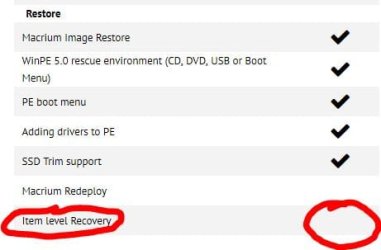
Follow up: According to this page (Macrium Reflect Free), Macrium free does not support item level recovery (see also attached image).

Comments?

Cheers, Markus
 

Attachments

  • MacriumReflect-FileLeelRestore.JPG
    MacriumReflect-FileLeelRestore.JPG
    26 KB · Views: 15

My Computer

Computer type
Laptop
Computer Manufacturer/Model Number
Sony Vaio / Toshiba Satellite L70-B
OS
Win7-64 Home Premium single boot / Win7-64 Professional & Win8.1-64 dual boot
CPU
Intel Core i5 M430 @ 2,27GHz / Intel Core 17-470HQ @ 2,5GHz
Motherboard
Sony Vaio / Toshiba Portable PC
Memory
4GB DDR3 / 8GB DDR3L
Graphics Card(s)
AMD RadeonHD 5650 / AMD Radeo R9 M265X & Intel HD 4600
Sound Card
Realtek High Definition Audio
Screen Resolution
1366x768 / 1600x900
Hard Drives
Original built-in HDDs only (450 GB / 1000 GB)
Two external HDDs (both WD MyPassport Ultra 2TB, USB-3)
PSU
Builder-supplied AC adaptors
Mouse
Built-in touchpads / Logitech M305 wireless battery-powered
Internet Speed
LTE
Antivirus
Avira AntiVir
Browser
Palemoon x64
Other Info
Acquired MAY-2010 / JUN-2015
You will need a couple of copies of Full Backups. Differential backups require their base full backup to function. And if your backup gets corrupted somehow everything will be useless. So say 3-4 full backups (worth of 3-4 weeks, say, 1st is the original, and then others are latest 2-3 weeks) and differentials (or incremental if your app support it) in between will determine the space requirement.

Keep backups on 2 drives, even new drives can die.

Maybe you can't use the image file to restore to their original places? What I wanted to say is when you explore the image you can copy/paste any folder/file as you wish. Try it yourself to see if it is good enough for you.
 

My Computer

Computer type
PC/Desktop
Computer Manufacturer/Model Number
Custom Build
OS
Windows 7 Ultimate x64 SP1
CPU
AMD Phenom 2 1090T
Motherboard
Gigabyte GA-890FXA-UD5
Memory
2x8GB Kingston HyperX Fury Black 1600Mhz Unganged
Graphics Card(s)
MSI GTX 970 Gaming 4G
Sound Card
Realtek On-Board HD 7.1 Audio / Logitech G35
Monitor(s) Displays
3xAcer GD245HQ
Screen Resolution
1920x1080
Hard Drives
Samsung 850 Pro 512GB SSD - OS /
WD Caviar Black SATA 3 - 1 TBx2 - Dynamic RAID 0 /
WD Caviar Green SATA 2 - 640GBx2 - Dynamic RAID 0 /
WD Caviar Green SATA 2 - 640GB - Internal Backup /
Seagate Barracude SATA 3 - 3TB - External Backup/ Sync
PSU
HighPower 1000W
Case
Cooler Master HAF 932
Cooling
Noctua NH-D14
Keyboard
Logitech G19
Mouse
Logitech G500
Internet Speed
100/4 Mbit Cable (100GB quota)
Antivirus
ZoneAlarm Extreme Security / MBAM Pro / MBAE Free / SAS Free
Browser
IE 11 - Firefox - Chrome
Other Info
Logitech F710/ G27/ G940/ Z5500 // TrackIR 5 // Nvidia 3D Surround Vision
My plan is to have differential backups done weekly, and full backups monthly. So there will always be three differential backups for a full one. How many will be kept I will see when trying out constraints (will be three full backups for sure - once of the state as the PC is as of today, that will always be kept, plus the most recent 2 weeks, maybe more). If backups are needed more often, they can still be done on demand.

Alright, so the image backups will be created on one and then copied to the other external drive.

Currently installing Macrium, will be trying out with a test partition soon. Will report back.

Cheers, Markus
 

My Computer

Computer type
Laptop
Computer Manufacturer/Model Number
Sony Vaio / Toshiba Satellite L70-B
OS
Win7-64 Home Premium single boot / Win7-64 Professional & Win8.1-64 dual boot
CPU
Intel Core i5 M430 @ 2,27GHz / Intel Core 17-470HQ @ 2,5GHz
Motherboard
Sony Vaio / Toshiba Portable PC
Memory
4GB DDR3 / 8GB DDR3L
Graphics Card(s)
AMD RadeonHD 5650 / AMD Radeo R9 M265X & Intel HD 4600
Sound Card
Realtek High Definition Audio
Screen Resolution
1366x768 / 1600x900
Hard Drives
Original built-in HDDs only (450 GB / 1000 GB)
Two external HDDs (both WD MyPassport Ultra 2TB, USB-3)
PSU
Builder-supplied AC adaptors
Mouse
Built-in touchpads / Logitech M305 wireless battery-powered
Internet Speed
LTE
Antivirus
Avira AntiVir
Browser
Palemoon x64
Other Info
Acquired MAY-2010 / JUN-2015
Installed Macrium, can mount image and get individual files from it.

Still downloading to create the WinPE bootable recovery CD, will take a look at that as well, but it I´m almost sure I´ll go with Macrium for imaging.

Cheers, Markus
 

My Computer

Computer type
Laptop
Computer Manufacturer/Model Number
Sony Vaio / Toshiba Satellite L70-B
OS
Win7-64 Home Premium single boot / Win7-64 Professional & Win8.1-64 dual boot
CPU
Intel Core i5 M430 @ 2,27GHz / Intel Core 17-470HQ @ 2,5GHz
Motherboard
Sony Vaio / Toshiba Portable PC
Memory
4GB DDR3 / 8GB DDR3L
Graphics Card(s)
AMD RadeonHD 5650 / AMD Radeo R9 M265X & Intel HD 4600
Sound Card
Realtek High Definition Audio
Screen Resolution
1366x768 / 1600x900
Hard Drives
Original built-in HDDs only (450 GB / 1000 GB)
Two external HDDs (both WD MyPassport Ultra 2TB, USB-3)
PSU
Builder-supplied AC adaptors
Mouse
Built-in touchpads / Logitech M305 wireless battery-powered
Internet Speed
LTE
Antivirus
Avira AntiVir
Browser
Palemoon x64
Other Info
Acquired MAY-2010 / JUN-2015
Have installed Macrium, made an image of an especially created test partition, retrieved files from it by mounting the image as a drive as well by restoring through Macrium while on one of the two OSes on this PC. I also created a Macrium WinPE Recovery CD and restored the partition using that method.

No matter what, everything went well. Thus, I will be using Macrium for my backups, because it´s easier and more straightforward to use than any alternative I´ve had so far, plus it´s free and can fulfill both demands (full drive image backup as well as single file retrieval) in one.

Now, on to making a backup plan :)

Cheers, Markus
 

My Computer

Computer type
Laptop
Computer Manufacturer/Model Number
Sony Vaio / Toshiba Satellite L70-B
OS
Win7-64 Home Premium single boot / Win7-64 Professional & Win8.1-64 dual boot
CPU
Intel Core i5 M430 @ 2,27GHz / Intel Core 17-470HQ @ 2,5GHz
Motherboard
Sony Vaio / Toshiba Portable PC
Memory
4GB DDR3 / 8GB DDR3L
Graphics Card(s)
AMD RadeonHD 5650 / AMD Radeo R9 M265X & Intel HD 4600
Sound Card
Realtek High Definition Audio
Screen Resolution
1366x768 / 1600x900
Hard Drives
Original built-in HDDs only (450 GB / 1000 GB)
Two external HDDs (both WD MyPassport Ultra 2TB, USB-3)
PSU
Builder-supplied AC adaptors
Mouse
Built-in touchpads / Logitech M305 wireless battery-powered
Internet Speed
LTE
Antivirus
Avira AntiVir
Browser
Palemoon x64
Other Info
Acquired MAY-2010 / JUN-2015
:thumbsup:
Keep us updated!
 

My Computer

Computer type
PC/Desktop
Computer Manufacturer/Model Number
Custom Build
OS
Windows 7 Ultimate x64 SP1
CPU
AMD Phenom 2 1090T
Motherboard
Gigabyte GA-890FXA-UD5
Memory
2x8GB Kingston HyperX Fury Black 1600Mhz Unganged
Graphics Card(s)
MSI GTX 970 Gaming 4G
Sound Card
Realtek On-Board HD 7.1 Audio / Logitech G35
Monitor(s) Displays
3xAcer GD245HQ
Screen Resolution
1920x1080
Hard Drives
Samsung 850 Pro 512GB SSD - OS /
WD Caviar Black SATA 3 - 1 TBx2 - Dynamic RAID 0 /
WD Caviar Green SATA 2 - 640GBx2 - Dynamic RAID 0 /
WD Caviar Green SATA 2 - 640GB - Internal Backup /
Seagate Barracude SATA 3 - 3TB - External Backup/ Sync
PSU
HighPower 1000W
Case
Cooler Master HAF 932
Cooling
Noctua NH-D14
Keyboard
Logitech G19
Mouse
Logitech G500
Internet Speed
100/4 Mbit Cable (100GB quota)
Antivirus
ZoneAlarm Extreme Security / MBAM Pro / MBAE Free / SAS Free
Browser
IE 11 - Firefox - Chrome
Other Info
Logitech F710/ G27/ G940/ Z5500 // TrackIR 5 // Nvidia 3D Surround Vision
Will Do.

There´ll be a small delay, though, because I jut noticed I made a nasty (but not fatal, thank goodness) error when copying over data from the old PC: I did not copy with a method tat reproduces inner links from the source in the target. Has to be corrected now, partially...

Cheers, Markus
 

My Computer

Computer type
Laptop
Computer Manufacturer/Model Number
Sony Vaio / Toshiba Satellite L70-B
OS
Win7-64 Home Premium single boot / Win7-64 Professional & Win8.1-64 dual boot
CPU
Intel Core i5 M430 @ 2,27GHz / Intel Core 17-470HQ @ 2,5GHz
Motherboard
Sony Vaio / Toshiba Portable PC
Memory
4GB DDR3 / 8GB DDR3L
Graphics Card(s)
AMD RadeonHD 5650 / AMD Radeo R9 M265X & Intel HD 4600
Sound Card
Realtek High Definition Audio
Screen Resolution
1366x768 / 1600x900
Hard Drives
Original built-in HDDs only (450 GB / 1000 GB)
Two external HDDs (both WD MyPassport Ultra 2TB, USB-3)
PSU
Builder-supplied AC adaptors
Mouse
Built-in touchpads / Logitech M305 wireless battery-powered
Internet Speed
LTE
Antivirus
Avira AntiVir
Browser
Palemoon x64
Other Info
Acquired MAY-2010 / JUN-2015
I might be too late to contribute to this thread, but I have a dual-boot machine and I have no problem with sharing data files between the OSes. Moreover, I have never bothered with moving C:\Users\... files, syncing, sharing and so on. Heck, I even have search completely disabled on my machine since I have no need for it whatsoever.

The simple answer about using same data files between the two operating systems is to put those files onto a separate drive. In a dual boot scenario I'm thinking three separate drive (physical drives, not partitions). One for one OS, one for another, and the third one for data. I would keep all Windows-created folders where they are. Who said that my stuff has to be in C:\Users\username\Documents? I never put anything there. If y files are in H:\files\ then this can be accessed from any OS. You probably want to set security settings such that the said folders can be accessed by "everyone". On a single-user machine that's not a problem.

This completely solves the problem of accessing data. If you want to run the same program in both OSes, then clearly you would have to either set them up separately, or point the program to store configuration files, etc. on the separate data drive rather than in the default location. There are some programs that won't allow that, but I personally either don't use such programs, or use them on a single OS, or if absolutely necessary, just set them up twice.
 

My Computer

Computer Manufacturer/Model Number
Dell Inspiron 530
OS
Windows 7 Ultimate (x64)
CPU
Q6600
Memory
8 GB
Graphics Card(s)
ATI Radeon HD 2600 XT
Monitor(s) Displays
Samsung Syncmaster P2450
Screen Resolution
1920x1080
Hard Drives
Samsung HD103UJ
Samsung HD501LJ
Internet Speed
25 Mb/s
Separate partitions are sufficient.

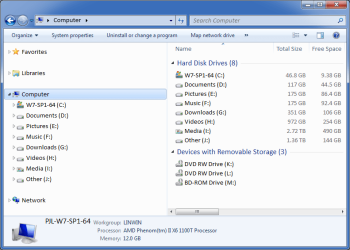
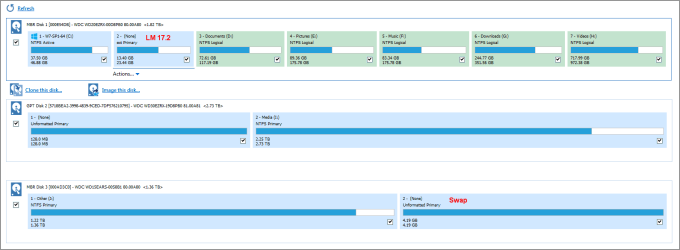
Here is my setup (I have no issues reading files):

HDD Setup (2015-09-25).png

HDD Setup (2015-09-25) Macrium.png
The Linux Distros that I've tried can all read Windows files without requiring any additional tools.
Windows can't read Linux file systems without additional tools.

If you need to read files (e.g. documents, music, pictures & videos) in Linux and Windows, you need to use a HDD/partition file system that they both understand (e.g. FAT or NTFS).

You can get tools for Windows that will allow it to read EXT file systems, but the two I tried didn't impress me.
 

My Computer

Computer type
PC/Desktop
Computer Manufacturer/Model Number
n/a
OS
W7 Ultimate SP1, LM19.2 MATE, W10 Home 1703, W10 Pro 1703 VM, #All 64 bit
CPU
AMD Phenom II x6 1100T, 3.3 GHz
Motherboard
ASUS M4A88T-M/USB3 (AM3)
Memory
12GB DDR3 1333 G-Skill (4GB x 2), G-Skill (2GB x 2)
Graphics Card(s)
NVIDIA GeForce GTX 660
Sound Card
Realtek?
Monitor(s) Displays
Samsung S23B350
Screen Resolution
1920x1080
Hard Drives
WD Green 2TB (SATA), WD Green 3TB (SATA), WD Blue 4TB (SATA), WD Blue 6TB (SATA)
PSU
Cooler Master
Case
Antec GX300 Tower
Cooling
3x Antec TRICOOL 120mm Fans
Mouse
Wired Optical
Internet Speed
DSL
Antivirus
Avast
Browser
Pale Moon (64 bit)
Other Info
2018-12-27 Upgraded HDDs
2015-12-10 Upgraded case, graphics card, storage
2015-08-15 Upgraded motherboard & RAM
2015-07-15 Upgraded LM17.1 to LM17.2
Thanks folks :)

This problem has actually been solved already, though. Here´s what what I went with for disk / partition layout:

attachment.php


Note, this is a laptop PC, with only a single HDD, so multiple drives, one for each OS and one for data, was not possible.

I needed to sync Documents because of some programs storing profiles and settings there. Since moving and merging both OS' documents folder into one on the data partition was no problem, I also did so with Music, etc. I could store those files elsewhere, but i works (for me), so I use it ;)

Also, since both OSes on this machine are Windows (7 and 8.1), no problem whatsoever with file system incompatibilities :)


Now, to the backup plan.

After thorough consideration, my data does not change so much every day that I need daily backups. Not doing those will also keep backup size down a little, or extend the time span for which individual backups can be kept without increasing the disk space requirements - a nice side effect.

That said, I´ll be doing a full system image every three months, keeping the most recent two of them plus the first one ever done. Differential backups will be created once a week. That should give reasonable security at a reasonable space requirement.

Some folders will still need special backups, which will be done by Hardlink backup (specifically, my game content collection and video / picture archive). Those will follow not be created on a scheduled basis, but manually when necessary.

All image backups will be saved twice, on different external drives. The game content collection I talked about is included in the image backups, so it will only be backed up by hardlink backup to one drive. The pic and video archive is already located on an external drive, so it ca only be backed up to the other external one.

Comments?

Cheers, Markus
 

Attachments

  • PartitionLayout.JPG
    PartitionLayout.JPG
    36 KB · Views: 7

My Computer

Computer type
Laptop
Computer Manufacturer/Model Number
Sony Vaio / Toshiba Satellite L70-B
OS
Win7-64 Home Premium single boot / Win7-64 Professional & Win8.1-64 dual boot
CPU
Intel Core i5 M430 @ 2,27GHz / Intel Core 17-470HQ @ 2,5GHz
Motherboard
Sony Vaio / Toshiba Portable PC
Memory
4GB DDR3 / 8GB DDR3L
Graphics Card(s)
AMD RadeonHD 5650 / AMD Radeo R9 M265X & Intel HD 4600
Sound Card
Realtek High Definition Audio
Screen Resolution
1366x768 / 1600x900
Hard Drives
Original built-in HDDs only (450 GB / 1000 GB)
Two external HDDs (both WD MyPassport Ultra 2TB, USB-3)
PSU
Builder-supplied AC adaptors
Mouse
Built-in touchpads / Logitech M305 wireless battery-powered
Internet Speed
LTE
Antivirus
Avira AntiVir
Browser
Palemoon x64
Other Info
Acquired MAY-2010 / JUN-2015
Back
Top