multi boot linux problem

roelof

New member
Local time
10:33 AM
Messages
16
Hello,

I have a system with 2 disk.
One Win7 disk and one for playingh with linux.
I have installed easybcd so I can boot in Win or Linux.

But when I choose for linux the only thing I see is boot error.

I have asked in the easybcd and in the forum of the linux distro but on easybcd I got no answer and the linux guy's don't know what is going wrong.

I hope anyone who can help me figure this out

Roelof
 

My Computer

OS
Win 7 Premium home
CPU
AMD K8 3400+
Motherboard
MSI RS182mx
Memory
1G
Graphics Card(s)
Nvidia 7300 LE
Sound Card
on board
Monitor(s) Displays
Medion
Screen Resolution
1280x1024
Hard Drives
HDS72880Plat20
Maxtor 6Y060L0
Keyboard
MS Wired Keyboard 600
Mouse
Logitech wired mouse
This tutorial is a simple guide that will explain the two easiest ways to setup and install Ubuntu to dual-boot with your current installation of Windows. One option describes how to do this via WUBI. Another describes how to do this as a native dual-boot.

How to Dual Boot Windows 7 and Ubuntu

Hope this helps .. ;)
 

My Computer

Computer type
PC/Desktop
Computer Manufacturer/Model Number
LENOVO K450 @3.0GHZ
OS
64-bit Windows 8.1 Pro
CPU
Core(TM) i5 CPU 4330 Haswell @ 3.20GHz
Motherboard
LENOVO
Memory
12.00 GB
Graphics Card(s)
Intel(R) HD Graphics
Sound Card
Intel HD integtrated
Monitor(s) Displays
HP 25' ISP Monitor
Screen Resolution
1900/1020
Hard Drives
(1) ST1000DM003-1CH162 (2) Generic STORAGE DEVICE USB Device (3) Generic STORAGE DEVICE USB Device
Internet Speed
100mb down/10mb up
Thanks fort the help but it don't answered my question.

I use pc-bsd and that one don't come with Grub so I had to install another bootloader.
So I decided to use the Win7 boot loader.

Roelof
 

My Computer

OS
Win 7 Premium home
CPU
AMD K8 3400+
Motherboard
MSI RS182mx
Memory
1G
Graphics Card(s)
Nvidia 7300 LE
Sound Card
on board
Monitor(s) Displays
Medion
Screen Resolution
1280x1024
Hard Drives
HDS72880Plat20
Maxtor 6Y060L0
Keyboard
MS Wired Keyboard 600
Mouse
Logitech wired mouse
I never heard of any Windows based boot loader that worked with Linux.
There are 3d party applications that may help you restore the MBR, like System Commander. A reinstall/repair of your BSD might also help. I would however make sure to make a backup of the Windows partition/files, before attempting this.

You also have a LOT of tips on related issues at the PC-BSD forums, so I am a bit puzzled about why you ask here? Bootloader can't boot Windows after installing PC-BSD 8.2 - PC-BSD Forums
 

My Computer

Computer type
PC/Desktop
Computer Manufacturer/Model Number
Main WKS/Gaming Sloth
OS
W10 Pro
CPU
AMD Ryzen 5 2600X
Motherboard
Asus TUF B450M-PRO-GAMING
Memory
32 GB DDR4
Graphics Card(s)
AMD Radeon RX 5600 XT
Sound Card
Generic Motherboard
Monitor(s) Displays
2 x Dell 24" LED P2415Q
Screen Resolution
2 x 3840 x 2160
Hard Drives
Samsung NVME
PSU
750 W
Case
Fractal Design
Cooling
Fractal Design
Keyboard
Roccat Horde AIMO
Mouse
Logitech G703
Internet Speed
ADSL 30 MBit
Antivirus
Bitdefender
Browser
Firefox
Thanks fort the help but it don't answered my question.

I use pc-bsd and that one don't come with Grub so I had to install another bootloader.
So I decided to use the Win7 boot loader.

Roelof

You can use the Win7 bootloader, but then you need to have Grub or something similar installed in the root partition of your *nix. The Win7 bootloader simply chains off to whatever bootloader you have on you *nix system.

EasyBCD has options in the "Add New Entry" dialog for Grub (Legacy), Grub 2, Lilo/eLilo, FreeBSD, and Wubi. I don't know much about *BSD - perhaps the FreeBSD option would work?
 

My Computer

Computer Manufacturer/Model Number
Compaq Presario SR5518F (desktop)
OS
Windows 7 Home Premium 64bit
CPU
Intel Pentium Dual Core E2180 @2GHz
Motherboard
MSI "Boston"
Memory
4 GB
Graphics Card(s)
NVIDIA GeForce 8500 GT
Sound Card
Integrated - Realtek High Definition Audio
Monitor(s) Displays
Acer
Hard Drives
Hitachi HDP725025GLA380 ATA Device
Optiarc DVD RW AD-7201S5 ATA Device
Internet Speed
5 Mbps
Hello,

Like i said I use Easybcd.
But when I want to start up BSD I see a boot error.

I posted here because I wonder if some protection thing is messing this up.

Roelof
 

My Computer

OS
Win 7 Premium home
CPU
AMD K8 3400+
Motherboard
MSI RS182mx
Memory
1G
Graphics Card(s)
Nvidia 7300 LE
Sound Card
on board
Monitor(s) Displays
Medion
Screen Resolution
1280x1024
Hard Drives
HDS72880Plat20
Maxtor 6Y060L0
Keyboard
MS Wired Keyboard 600
Mouse
Logitech wired mouse
I am also having two OSs, essentially windows7 and ubuntu . But not in a dual boot set up . I use single time boot menu to select which disk is to boot up , and the key is F10 for my intel motherboard .

It is the better way to handle multiple OSs when they are installed in separate disks . So what is your motherboard ? your System specs is silent about it :)
 

My Computer

Computer type
PC/Desktop
Computer Manufacturer/Model Number
Self Assembled
OS
Microsoft Windows 10 Pro Insider Preview 64-bit
CPU
Intel(R) Core(TM) i3-4130 CPU @ 3.40GHz
Motherboard
Gigabyte Technology Co., Ltd. B85M-D3H
Memory
Corsair Vengence 4GB x2 (8.00GB Dual-Channel DDR3 @ 798MHz)
Graphics Card(s)
2047MB GeForce GTS 450 (ZOTAC International)
Sound Card
Onboard (Realtek High Definition Audio)
Monitor(s) Displays
LG Flatron E2040T
Screen Resolution
1600x900
Hard Drives
Western Digital 1 TB
Seagate 500 GB
PSU
Corsair VS550
Case
Cooler Master K380
Cooling
Cooler Master Seidon 120V Plus
Keyboard
Logitech MK260r
Mouse
Logitech MK260r
Internet Speed
PMPL Broadband
Antivirus
Windows Defender + MBAM
Browser
Firefox
Other Info
Dell Studio 15" Laptop
Hoi,

I filled in my system specs and I hope i did it right.
Can you help me now ?

Roelof
 

My Computer

OS
Win 7 Premium home
CPU
AMD K8 3400+
Motherboard
MSI RS182mx
Memory
1G
Graphics Card(s)
Nvidia 7300 LE
Sound Card
on board
Monitor(s) Displays
Medion
Screen Resolution
1280x1024
Hard Drives
HDS72880Plat20
Maxtor 6Y060L0
Keyboard
MS Wired Keyboard 600
Mouse
Logitech wired mouse
Hi roelof ...
As yours a MSI board, the F11 key should be the boot menu key for you .

During startup, just when the MSI screen appears, hold and tap F11 key (or you may tap it after power on , but hold it until the list appears).... it should show a list of your existing disks . Using the scroll key, select the disk that contains the ubuntu installation and hit enter ....

Ubuntu should boot up .
 

My Computer

Computer type
PC/Desktop
Computer Manufacturer/Model Number
Self Assembled
OS
Microsoft Windows 10 Pro Insider Preview 64-bit
CPU
Intel(R) Core(TM) i3-4130 CPU @ 3.40GHz
Motherboard
Gigabyte Technology Co., Ltd. B85M-D3H
Memory
Corsair Vengence 4GB x2 (8.00GB Dual-Channel DDR3 @ 798MHz)
Graphics Card(s)
2047MB GeForce GTS 450 (ZOTAC International)
Sound Card
Onboard (Realtek High Definition Audio)
Monitor(s) Displays
LG Flatron E2040T
Screen Resolution
1600x900
Hard Drives
Western Digital 1 TB
Seagate 500 GB
PSU
Corsair VS550
Case
Cooler Master K380
Cooling
Cooler Master Seidon 120V Plus
Keyboard
Logitech MK260r
Mouse
Logitech MK260r
Internet Speed
PMPL Broadband
Antivirus
Windows Defender + MBAM
Browser
Firefox
Other Info
Dell Studio 15" Laptop
The chain loading of *nix based systems over Windows 7 boot environment is like this:

1. Create an entry in BCD of type BootSectorLoader.
2. Give it a file to be loaded which has the contents of the MBR(master) or PBR(partition) boot record of the installed *nix system.

On my system I am very happy with chainloading the file boot.img from grub2 environment.

In Windows 7 you can use Ext2fsd version 0.50 to gain access to ext3,4 file system.

If the *nix loader is grub legacy you can first repair the *nix boot environment.
Then copy the MBR and PBR to two separate files with dd utility.
Examine with a hex editor if the last two bytes of the PBR (512 bytes long) are 55AA.
If not use the saved MBR-file for chainloading. Check here: Visual BCD Editor - How To , Section 8. Create new Boot-Sector Loader (Linux, Mac OS X)

If you destroy Windows MBR you have to repair it using the Windows Recovery CD or installation DVD - Startup repair or "bootrec /fixmbr" from command prompt
 

My Computer

Computer Manufacturer/Model Number
Acer Notebook
OS
Win 8 RP, Win 7, XP
CPU
Intel
Hello Arc,

On that menu the second disk don't show up.
I can only choose floppy., first hard disk, dvd and network startup.

Boyans,

I use a mbr file to start up linux.


Roelof
 

My Computer

OS
Win 7 Premium home
CPU
AMD K8 3400+
Motherboard
MSI RS182mx
Memory
1G
Graphics Card(s)
Nvidia 7300 LE
Sound Card
on board
Monitor(s) Displays
Medion
Screen Resolution
1280x1024
Hard Drives
HDS72880Plat20
Maxtor 6Y060L0
Keyboard
MS Wired Keyboard 600
Mouse
Logitech wired mouse
This is a "good" *nix boot entry (bcdedit output):

Real-mode Boot Sector
---------------------
identifier {d63df79f-bbda-4319-ae91-9bd67f12b3da}
device partition=D:
path \Boot\boot.img
description Kubuntu over boot.img

If your *nix system does not start properly you have to fix it first then try chainloading with Windows 7.
 

My Computer

Computer Manufacturer/Model Number
Acer Notebook
OS
Win 8 RP, Win 7, XP
CPU
Intel
Oke,

I see the difference.
The drive which contains pc-bsd has no drive name. Can I do that or do I have to make the partition on the second disk again to give it a drive name.

Roelof
 

My Computer

OS
Win 7 Premium home
CPU
AMD K8 3400+
Motherboard
MSI RS182mx
Memory
1G
Graphics Card(s)
Nvidia 7300 LE
Sound Card
on board
Monitor(s) Displays
Medion
Screen Resolution
1280x1024
Hard Drives
HDS72880Plat20
Maxtor 6Y060L0
Keyboard
MS Wired Keyboard 600
Mouse
Logitech wired mouse
In my post obove drive D: is a Windows drive and a NTFS drive and happens to be my boot and system drive !

The file boot.img can be placed anywhere on a Windows mapped drive.
The real important thing is the CONTENTS of this file.

It must have the contents (be an exact copy) of the first sector loaded by the *nix system. It is also called - first stage boot loader and is usually placed in the MBR when you install a *nix system - it does not matter what kind of loader used grub legacy or grub2 or other boot loader - first stage is always 512 bytes in size and last two bytes are always 55AA(hex).
 

My Computer

Computer Manufacturer/Model Number
Acer Notebook
OS
Win 8 RP, Win 7, XP
CPU
Intel
Hello,

The mbr file is 512 bytes and ends with 55 AA.
So that can't be the problem.

I can't check if it's a exact copy because I can't boot into pc-bsd.

Roelof
 

My Computer

OS
Win 7 Premium home
CPU
AMD K8 3400+
Motherboard
MSI RS182mx
Memory
1G
Graphics Card(s)
Nvidia 7300 LE
Sound Card
on board
Monitor(s) Displays
Medion
Screen Resolution
1280x1024
Hard Drives
HDS72880Plat20
Maxtor 6Y060L0
Keyboard
MS Wired Keyboard 600
Mouse
Logitech wired mouse
Hello Arc,

On that menu the second disk don't show up.
I can only choose floppy., first hard disk, dvd and network startup.
Roelof
Please dont take me otherwise, but IMO, you should check it for another time that the sata and power cables are properly connected to the second drive .

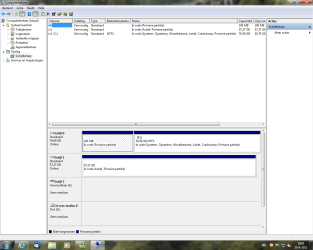
And, Can you post a full screen snip of your disk management window , just to make it sure that it is deleted by the bios ? here's mine .....
Capture.JPG

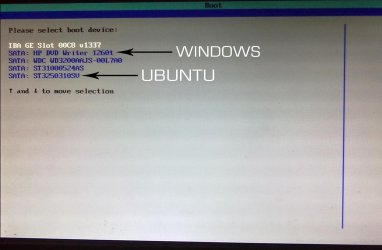
EDIT : and a photograph of boot menu .... all the windows and ubuntu drives are listed
20062011122.jpg

EDIT again .... if you try to update GRUB, both the OSs will be included in GRUB . But adding linux entry in MBR is a rare situation , as I seen .
 

My Computer

Computer type
PC/Desktop
Computer Manufacturer/Model Number
Self Assembled
OS
Microsoft Windows 10 Pro Insider Preview 64-bit
CPU
Intel(R) Core(TM) i3-4130 CPU @ 3.40GHz
Motherboard
Gigabyte Technology Co., Ltd. B85M-D3H
Memory
Corsair Vengence 4GB x2 (8.00GB Dual-Channel DDR3 @ 798MHz)
Graphics Card(s)
2047MB GeForce GTS 450 (ZOTAC International)
Sound Card
Onboard (Realtek High Definition Audio)
Monitor(s) Displays
LG Flatron E2040T
Screen Resolution
1600x900
Hard Drives
Western Digital 1 TB
Seagate 500 GB
PSU
Corsair VS550
Case
Cooler Master K380
Cooling
Cooler Master Seidon 120V Plus
Keyboard
Logitech MK260r
Mouse
Logitech MK260r
Internet Speed
PMPL Broadband
Antivirus
Windows Defender + MBAM
Browser
Firefox
Other Info
Dell Studio 15" Laptop
Oke,

Here a screenshot of the disk management.
 

Attachments

  • schijfbeheer.png
    schijfbeheer.png
    215.5 KB · Views: 9

My Computer

OS
Win 7 Premium home
CPU
AMD K8 3400+
Motherboard
MSI RS182mx
Memory
1G
Graphics Card(s)
Nvidia 7300 LE
Sound Card
on board
Monitor(s) Displays
Medion
Screen Resolution
1280x1024
Hard Drives
HDS72880Plat20
Maxtor 6Y060L0
Keyboard
MS Wired Keyboard 600
Mouse
Logitech wired mouse
As the second disk is detected by the disk management, it should be listed in the boot menu , whether or not it contains a bootable media . As for my case, the disk1 have nothing bootable there, and it is listed in the boot menu .

This is the only situation that makes me confused . I can guess that we may get some more help in this issue .
 

My Computer

Computer type
PC/Desktop
Computer Manufacturer/Model Number
Self Assembled
OS
Microsoft Windows 10 Pro Insider Preview 64-bit
CPU
Intel(R) Core(TM) i3-4130 CPU @ 3.40GHz
Motherboard
Gigabyte Technology Co., Ltd. B85M-D3H
Memory
Corsair Vengence 4GB x2 (8.00GB Dual-Channel DDR3 @ 798MHz)
Graphics Card(s)
2047MB GeForce GTS 450 (ZOTAC International)
Sound Card
Onboard (Realtek High Definition Audio)
Monitor(s) Displays
LG Flatron E2040T
Screen Resolution
1600x900
Hard Drives
Western Digital 1 TB
Seagate 500 GB
PSU
Corsair VS550
Case
Cooler Master K380
Cooling
Cooler Master Seidon 120V Plus
Keyboard
Logitech MK260r
Mouse
Logitech MK260r
Internet Speed
PMPL Broadband
Antivirus
Windows Defender + MBAM
Browser
Firefox
Other Info
Dell Studio 15" Laptop
Hello,

I looked in the BIOS and at some place I can see all the drives.
There I have to choose which drive is the first drive and which one is the second drive.
The drive which is choosen first drive appears in the boot menu.

So maybe it's a bios limitation because my computer seems to be about 10 years old.

Roelof
 

My Computer

OS
Win 7 Premium home
CPU
AMD K8 3400+
Motherboard
MSI RS182mx
Memory
1G
Graphics Card(s)
Nvidia 7300 LE
Sound Card
on board
Monitor(s) Displays
Medion
Screen Resolution
1280x1024
Hard Drives
HDS72880Plat20
Maxtor 6Y060L0
Keyboard
MS Wired Keyboard 600
Mouse
Logitech wired mouse
Hello,

I looked in the BIOS and at some place I can see all the drives.
There I have to choose which drive is the first drive and which one is the second drive.
The drive which is choosen first drive appears in the boot menu.

So maybe it's a bios limitation because my computer seems to be about 10 years old.

Roelof
Maybe... I am not sure . I dont have such a long experience of serious computing :D
But found some tutorials and discussions in neosmart .... about adding linux to MBR .
Ubuntu - EasyBCD - NeoSmart Technologies Wiki
Ubuntu_Win7 Dual Boot Adding Ubuntu to MBR - The NeoSmart Forums
 

My Computer

Computer type
PC/Desktop
Computer Manufacturer/Model Number
Self Assembled
OS
Microsoft Windows 10 Pro Insider Preview 64-bit
CPU
Intel(R) Core(TM) i3-4130 CPU @ 3.40GHz
Motherboard
Gigabyte Technology Co., Ltd. B85M-D3H
Memory
Corsair Vengence 4GB x2 (8.00GB Dual-Channel DDR3 @ 798MHz)
Graphics Card(s)
2047MB GeForce GTS 450 (ZOTAC International)
Sound Card
Onboard (Realtek High Definition Audio)
Monitor(s) Displays
LG Flatron E2040T
Screen Resolution
1600x900
Hard Drives
Western Digital 1 TB
Seagate 500 GB
PSU
Corsair VS550
Case
Cooler Master K380
Cooling
Cooler Master Seidon 120V Plus
Keyboard
Logitech MK260r
Mouse
Logitech MK260r
Internet Speed
PMPL Broadband
Antivirus
Windows Defender + MBAM
Browser
Firefox
Other Info
Dell Studio 15" Laptop
Back
Top