Multiple Chrome.exe processes

Thanks for your input, ICIT2LOL, but as I am not a techie I'd prefer to hold off on this as I'm not sure how to handle this procedure.
 

My Computer

Computer type
PC/Desktop
Computer Manufacturer/Model Number
Toshiba
OS
Win 7(32)
CPU
Intel(R) Pentium(R) Dual CPU T3400 @ 2.16GHz
Motherboard
Base Board
Memory
Hynix 2 GB DDR-2
Graphics Card(s)
Mobile Intel(R) 4 Series Express Chipset Family
Sound Card
Realtek High Definition Audio
Hard Drives
WDC WD2500BEVS-26UST0 ATA Device
Antivirus
MS Security Essentials
Browser
Chrome
weybrew,
ADWCleaner is best used under the guidance of someone that knows how to research the things that it finds. In your case, it found two Chrome Extensions that are considered Potentially Unwanted Programs. The first extension listed in the scan results was probably responsible for your problems with Chrome and it might have brought in other Potentially Unwanted Programs.

The jury is still out on the second extension mentioned in the scan log from ADWCleaner. I found no reason for that extension to be flagged. But there are other (better?) extensions that can do what that one did for you. Forum rule #13 prevents us from talking about this.

One issue detected by ADWCleaner is Wavepad from NCH Software. You can read about that here: What's The Problem With NCH Software & How To Remove It? That article is just FYI. Don't take any action toward removal of that software just yet. For what it is worth, I installed the current version of Wavepad into a Virtual Machine and scanned it with ADWCleaner. Wavepad was not flagged as bad. I still would suggest that you stay away from NCH Software.

I would also avoid any downloads from Softonic and CNET.

Downloading television shows via torrent software is also a bad idea.

As you have found, Microsoft Security Essentials is not going to flag most Potentially Unwanted Programs. You will probably need to use other scanners (like Malwarebytes) to watch for PUPs.
 

My Computer

Computer type
Laptop
Computer Manufacturer/Model Number
Employer provided Dell Latitude
OS
W7 Pro SP1 64bit
CPU
i7
Memory
8GB
Graphics Card(s)
Intel HD Graphics
Hard Drives
crappy SSD
Antivirus
Employer mandated Symantec Endpoint Protection
Browser
Pale Moon 64bit, IE11 64bit & Chrome 64bit
WOW! Thank for all this info, UsernameIssues. I see WavePad mentioned but I don't see the other items you pointed out. I didn't consciously install this. And why didn't it affect Firefox or IE? If ADW has it quarantined, is it still harmful? I'll stand by until you give me further instructions.
 

My Computer

Computer type
PC/Desktop
Computer Manufacturer/Model Number
Toshiba
OS
Win 7(32)
CPU
Intel(R) Pentium(R) Dual CPU T3400 @ 2.16GHz
Motherboard
Base Board
Memory
Hynix 2 GB DDR-2
Graphics Card(s)
Mobile Intel(R) 4 Series Express Chipset Family
Sound Card
Realtek High Definition Audio
Hard Drives
WDC WD2500BEVS-26UST0 ATA Device
Antivirus
MS Security Essentials
Browser
Chrome
WOW! Thank for all this info, UsernameIssues. I see WavePad mentioned but I don't see the other items you pointed out. I didn't consciously install this. And why didn't it affect Firefox or IE? If ADW has it quarantined, is it still harmful? I'll stand by until you give me further instructions.
Things that are quarantined should no longer be a problem.

WavePad might have come in via some other software installation. As far as getting rid of it, I would wait for advice from someone that normally helps with these type of things to pick up your thread. (That would not be me :-)

The two extensions that I mentioned are specific to Chrome - they should only impact Chrome:

...Google\Chrome\User Data\Default\Extensions\lbfehkoinhhcknnbdgnnmjhiladcgbol\
Searching online for that red part, led me to this info. I cannot be positive that the extension that you had is that exact one, but judging from the way that Chrome was acting, it probably was. That long string of letters is supposed to uniquely identify an extension. As you can see from the info that I linked to, the bad guys (and gals) are using the same letters and names like Evernote to fool people.

...Google\Chrome\User Data\Default\Extensions\cbhfdchmklhpcngcgjmpdbjakdggkkjp\
Searching online for that red part, led me to this info. Again, I cannot be positive that the extension that you had is that exact one. I would have to examine some of the files that were quarantined to be sure... but it is not worth doing that now.

The extensions are not a problem after ADWCleaner quarantined them - but something on your computer could put them back without you doing a thing (even with Microsoft Security Essentials watching). There are ways for infections to hide from antivirus products. That is why offline scanners are used. "Offline" meaning that the Operating System (in this case Windows) is not running during the scan. There are lots of offline scanners out there. Here are some of them. I usually point people to this one because of its simplicity. The user interface to WDO (Windows Defender Offline) will look just like MSE (Microsoft Security Essentials). But don't do anything until someone that normally helps with these type of things picks up your thread.

SoftwareUpdater.Bootstrapper seems to be a PUP (Potentially Unwanted Program) that ADWCleaner removed.

grooveshark-dlm_Setup_softonic_en-US.exe probably offers adverts and other software while installing the Grooveshark download manager. Some of the installers from Softonic and CNET are just not worth using. There are safer places to get apps from. Places where the installers have not been modified to deliver PUPs.


While you are waiting for guidance/instructions - you might want to download/run Process Explorer from Sysinternals (A Microsoft company). You can use this tutorial to help you make use Virus Total scans via the Process Explorer tool. Think of it like a better version of Task Manager. It does not remove or change things. It just lets you see more info about what is running. Apps can still hide from it :-(

 
Last edited:

My Computer

Computer type
Laptop
Computer Manufacturer/Model Number
Employer provided Dell Latitude
OS
W7 Pro SP1 64bit
CPU
i7
Memory
8GB
Graphics Card(s)
Intel HD Graphics
Hard Drives
crappy SSD
Antivirus
Employer mandated Symantec Endpoint Protection
Browser
Pale Moon 64bit, IE11 64bit & Chrome 64bit
Thanks again for all the terrific and detailed info...I'm going to learn a lot. I've run another AdwCleaner scan FYI. Maybe it has more information that will be helpful.
 

Attachments

My Computer

Computer type
PC/Desktop
Computer Manufacturer/Model Number
Toshiba
OS
Win 7(32)
CPU
Intel(R) Pentium(R) Dual CPU T3400 @ 2.16GHz
Motherboard
Base Board
Memory
Hynix 2 GB DDR-2
Graphics Card(s)
Mobile Intel(R) 4 Series Express Chipset Family
Sound Card
Realtek High Definition Audio
Hard Drives
WDC WD2500BEVS-26UST0 ATA Device
Antivirus
MS Security Essentials
Browser
Chrome
weybrew,

:info: Please go to Start >Control Panel and click the System icon.
Select: System Protection (on the left column)
When the prompt appears, click the bottom button labeled: Create
This action saves your system settings as they are now.

:info: Now, please try Google's Software Removal Tool for Chrome:
https://support.google.com/chrome/answer/6086368?p=ui_software_removal_tool&rd=1
When done, use Chrome, and see how it goes.


:info: If still the same issues, please use the Farbar Recovery Scan Tool.
Download: Farbar Recovery Scan Tool Download
Select the version that applies to your system.
Save it to your Desktop.
Double-click the downloaded file to run it.

When the tool opens, click Yes to the disclaimer.

Press the Scan button.

When done, the tool makes a log, FRST.txt, in the same directory from which the tool is run (Desktop).

:ar: Please provide the FRST.txt in your reply.

The first time the tool is run, it also creates another log: Addition.txt
:ar: Also post the Addition.txt in your reply.
 
Last edited:

My Computer

Computer type
PC/Desktop
Computer Manufacturer/Model Number
An ol' eMachines
OS
Windows 7 Home Premium
Internet Speed
Fine for me...I'm retired!
As you can see, AdwCleaner removed several search engines (including one from softonic). These were not in the AdwCleaner log that was attached posted to post #13. But that log seems to have been edited; so... I'm not sure when these search engine entries/settings were added to Chrome.
 

My Computer

Computer type
Laptop
Computer Manufacturer/Model Number
Employer provided Dell Latitude
OS
W7 Pro SP1 64bit
CPU
i7
Memory
8GB
Graphics Card(s)
Intel HD Graphics
Hard Drives
crappy SSD
Antivirus
Employer mandated Symantec Endpoint Protection
Browser
Pale Moon 64bit, IE11 64bit & Chrome 64bit
Thanks for your input, ICIT2LOL, but as I am not a techie I'd prefer to hold off on this as I'm not sure how to handle this procedure.
Hmm well it is all laid out in that link and it runs like I say without Windows being involved and will scan through everything not just the OS. But the choice is yours - I am just concerned that ADW came up with so much stuff and not to run this scan to check where ADW doesn't would be a shame.

If the making of the disk is causing you concern as in mashing up the OS or your data then it will not.
All you need to do is download the software from Kaspersky and then use the Windows burning feature to make the disk - or stick plus make it bootable too.

If there are any steps you are not sure of there are plenty of us to guide you through.;)
 

My Computer

Computer type
PC/Desktop
Computer Manufacturer/Model Number
Own build (new) Desk1 / Asus ROG Win 7 / Desk2 1st build
OS
Desk1 7 Home Prem / Desk2 10 Pro / Main lap Asus ROG 10 Pro 2 laptop Toshiba 7 Pro Asus P2520 7 & 10
CPU
Desk1 i5 3750K / Laptop i7 GTX 860M / Desk2 i5 2500
Motherboard
Desk1 Asus P877-V / Desk2 Gigabyte H67 UD3H / Laptop ?
Memory
Desk1 8GB (1866) / Desk2 16GB (1333) / Laptop 8Gb DDR3
Graphics Card(s)
Desk 1& 2NVidia GTX 650 & Laptops on board Intel
Sound Card
Desk 1 & 2 -XONAR DG Realtek High Def audio Laptop
Monitor(s) Displays
Desk 1 Benq HD 2450 / Desk2 Philips 24" / Laptop 17.5"
Screen Resolution
1920x1080 D1 & D2 & Laptop 1
Hard Drives
Desk1 Samsung 120GB 830 SSD
Asus ROG 256GB 850 Pro SSD
Desk2 Samsung 840 256 SSD
Toshiba 120GB EVO
PSU
Desk 1 Corsair HX 1050/ Laptop ? / Desk 2 Corsair HX 650
Case
Desk 1 Cooler HAF XM ? Toshiba laptop / Desk2 Coolermaster
Cooling
Fans on all Desk1 -2 Desk2 - all Coolermasters 5 Laptop ?
Keyboard
Desk 1 MS Sidewinder X6 Desk 2 MS Sidewinder X 4
Mouse
Desk 1&2 - Gigabyte MS 900 gamer - laptop - Logitec wireless
Internet Speed
ADSL2+
Other Info
One other Desktop (tester) and spare Toshba laptop both with SSD's
Running Kaspersky 2016 ISS on all machines config'd identically
Logitec audio stereo systems on each machine (x3)
Canon MG5250MFC
Router/modem TP-Link running WPA2SK
To UsernameIssues Post #27...I did not edit any of the previous attachments and I have not added any search engines. Where is all this stuff coming from? I just ran Google's Software Removal Tool (per cottonball) and when Chrome reopened this page was opened and hung up...would not load...chrome://settings/resetProfileSettings.

Will proceed with cottonball.
 

My Computer

Computer type
PC/Desktop
Computer Manufacturer/Model Number
Toshiba
OS
Win 7(32)
CPU
Intel(R) Pentium(R) Dual CPU T3400 @ 2.16GHz
Motherboard
Base Board
Memory
Hynix 2 GB DDR-2
Graphics Card(s)
Mobile Intel(R) 4 Series Express Chipset Family
Sound Card
Realtek High Definition Audio
Hard Drives
WDC WD2500BEVS-26UST0 ATA Device
Antivirus
MS Security Essentials
Browser
Chrome
To Cottonball post #26 Thanks for picking up on my Chrome woes.

I've run the Google Software Removal Tool and it found no programs, but the Chrome restart gave me a tab that would not load...chrome://settings/resetProfileSettings.

My run of the Farbar Recovery Scan Tool gave the results as attached.

Will await your review. Thanks.
 

Attachments

My Computer

Computer type
PC/Desktop
Computer Manufacturer/Model Number
Toshiba
OS
Win 7(32)
CPU
Intel(R) Pentium(R) Dual CPU T3400 @ 2.16GHz
Motherboard
Base Board
Memory
Hynix 2 GB DDR-2
Graphics Card(s)
Mobile Intel(R) 4 Series Express Chipset Family
Sound Card
Realtek High Definition Audio
Hard Drives
WDC WD2500BEVS-26UST0 ATA Device
Antivirus
MS Security Essentials
Browser
Chrome
To UsernameIssues Post #27...I did not edit any of the previous attachments and I have not added any search engines. Where is all this stuff coming from? I just ran Google's Software Removal Tool (per cottonball) and when Chrome reopened this page was opened and hung up...would not load...chrome://settings/resetProfileSettings.

Will proceed with cottonball.
Thanks for the info. It is not very important at this point to figure out why the AdwCleaner results files differed. As for "Where is all this stuff coming from?", we hope that cottonball can help us find/remove the sources and the things that they changed.
 

My Computer

Computer type
Laptop
Computer Manufacturer/Model Number
Employer provided Dell Latitude
OS
W7 Pro SP1 64bit
CPU
i7
Memory
8GB
Graphics Card(s)
Intel HD Graphics
Hard Drives
crappy SSD
Antivirus
Employer mandated Symantec Endpoint Protection
Browser
Pale Moon 64bit, IE11 64bit & Chrome 64bit
weybrew,

It is possible that malware/adware is causing Google Chrome to crash.

Please use the Farbar Recovery Scan Tool as requested, and post its results. The tool is easy to use, has a very good detection rate, and could pinpoint some specifics causing your issues.

Also, please let us know what version of Chrome you are using. To do that, in Chrome, click the 3 small horizontal bars on the far upper right, and select About Google Chrome. You will see the version number, and it will also tell you if Chrome is up to date.
 

My Computer

Computer type
PC/Desktop
Computer Manufacturer/Model Number
An ol' eMachines
OS
Windows 7 Home Premium
Internet Speed
Fine for me...I'm retired!
weybrew,

It is possible that malware/adware is causing Google Chrome to crash.

Please use the Farbar Recovery Scan Tool as requested, and post its results. The tool is easy to use, has a very good detection rate, and could pinpoint some specifics causing your issues.

Also, please let us know what version of Chrome you are using. To do that, in Chrome, click the 3 small horizontal bars on the far upper right, and select About Google Chrome. You will see the version number, and it will also tell you if Chrome is up to date.
My apologies cottonball. My chatting with weybrew might have pushed post #30 to a prior page for you (assuming that you use ten posts per page).

weybrew attached both scan logs from the Farbar Recovery Scan Tool to post #30.
 

My Computer

Computer type
Laptop
Computer Manufacturer/Model Number
Employer provided Dell Latitude
OS
W7 Pro SP1 64bit
CPU
i7
Memory
8GB
Graphics Card(s)
Intel HD Graphics
Hard Drives
crappy SSD
Antivirus
Employer mandated Symantec Endpoint Protection
Browser
Pale Moon 64bit, IE11 64bit & Chrome 64bit
Sorry for the delay, ICIT2LOL, but the instructions for Kaspersky tell me to set the USB keyboard to Enable, but to do that I've got to have a non-USB keyboard to access BIOS. Working on it...
 

My Computer

Computer type
PC/Desktop
Computer Manufacturer/Model Number
Toshiba
OS
Win 7(32)
CPU
Intel(R) Pentium(R) Dual CPU T3400 @ 2.16GHz
Motherboard
Base Board
Memory
Hynix 2 GB DDR-2
Graphics Card(s)
Mobile Intel(R) 4 Series Express Chipset Family
Sound Card
Realtek High Definition Audio
Hard Drives
WDC WD2500BEVS-26UST0 ATA Device
Antivirus
MS Security Essentials
Browser
Chrome
weybrew,

My apology for the delay! :o

:info: Please open Notepad (Start > All Programs > Accessories > Notepad)
Copy the entire contents of the code box below (Do not copy the word 'code') to Notepad.
Save it to the Desktop, and name it: fixlist.txt

Code:
start
CreateRestorePoint:
CloseProcesses:
CHR HKLM\SOFTWARE\Policies\Google: Policy restriction <======= ATTENTION
R2 Everything; C:\Program Files (x86)\Everything\Everything.exe [1048576 2014-08-05] () [File not signed] <==== ATTENTION
C:\Program Files (x86)\Everything
C:\Users\Ted2\AppData\Local\Temp\8.3.30.1-EasyShrx.Dll
C:\Users\Ted2\AppData\Local\Temp\dropbox_sqlite_ext.{5f3e3153-5bce-5766-8f84-3e3e7ecf0d81}.tmpgieedf.dll
C:\Users\Ted2\AppData\Local\Temp\HRBlock_2014_North_Carolina_Upd.exe
C:\Users\Ted2\AppData\Local\Temp\optprosetup.exe
C:\Users\Ted2\AppData\Local\Temp\SandboxieInstall.exe
C:\Users\Ted2\AppData\Local\Temp\setup.exe
C:\Users\Ted2\AppData\Local\Temp\tbsetup.exe
C:\Users\Ted2\AppData\Local\Temp\tmp5hje3btmp.exe
C:\Users\Ted2\AppData\Local\Temp\tmp5lxyxn.exe
C:\Users\Ted2\AppData\Local\Temp\tmp5lxyxn.exetmp.exe
C:\Users\Ted2\AppData\Local\Temp\tmp7hxh59.exe
C:\Users\Ted2\AppData\Local\Temp\tmp7hxh59.exetmp.exe
C:\Users\Ted2\AppData\Local\Temp\tmpauh3wxtmp.exe
C:\Users\Ted2\AppData\Local\Temp\tmpbh9ff4tmp.exe
C:\Users\Ted2\AppData\Local\Temp\tmpbof3ep.exe
C:\Users\Ted2\AppData\Local\Temp\tmpbof3ep.exetmp.exe
C:\Users\Ted2\AppData\Local\Temp\tmpcvkfwx.exe
C:\Users\Ted2\AppData\Local\Temp\tmpcvkfwx.exetmp.exe
C:\Users\Ted2\AppData\Local\Temp\tmpfjvjdl.exe
C:\Users\Ted2\AppData\Local\Temp\tmpfjvjdl.exetmp.exe
C:\Users\Ted2\AppData\Local\Temp\tmphprxn6tmp.exe
C:\Users\Ted2\AppData\Local\Temp\tmpht_oimtmp.exe
C:\Users\Ted2\AppData\Local\Temp\tmpifmmzo.exe
C:\Users\Ted2\AppData\Local\Temp\tmpifmmzo.exetmp.exe
C:\Users\Ted2\AppData\Local\Temp\tmpijtu2q.exe
C:\Users\Ted2\AppData\Local\Temp\tmpijtu2q.exetmp.exe
C:\Users\Ted2\AppData\Local\Temp\tmpilicjn.exe
C:\Users\Ted2\AppData\Local\Temp\tmpilicjn.exetmp.exe
C:\Users\Ted2\AppData\Local\Temp\tmpinitja.exe
C:\Users\Ted2\AppData\Local\Temp\tmpinitja.exetmp.exe
C:\Users\Ted2\AppData\Local\Temp\tmprgihme.exe
C:\Users\Ted2\AppData\Local\Temp\tmprgihme.exetmp.exe
C:\Users\Ted2\AppData\Local\Temp\tmpwrlyll.exe
C:\Users\Ted2\AppData\Local\Temp\tmpwrlyll.exetmp.exe
C:\Users\Ted2\AppData\Local\Temp\tmpzezagstmp.exe
C:\Users\Ted2\AppData\Local\Temp\tmp_lm_6e.exe
C:\Users\Ted2\AppData\Local\Temp\tmp_lm_6e.exetmp.exe
C:\Users\Ted2\AppData\Local\Temp\tmp_qg0xp.exe
C:\Users\Ted2\AppData\Local\Temp\tmp_qg0xp.exetmp.exe
C:\Users\Ted2\AppData\Local\Temp\uninst.exe
C:\Users\Ted2\AppData\Local\Temp\vcredist_x64.exe
C:\Users\Ted2\AppData\Local\Temp\VistaLib64_1.dll
C:\Users\Ted2\AppData\Local\Temp\wpsetup.exe
C:\Users\Ted2\AppData\Local\Temp\_is3BA.exe
C:\Users\Ted2\AppData\Local\Temp\_is5FE6.exe
C:\Users\Ted2\AppData\Local\Temp\_isBB65.exe
C:\Users\Ted2\AppData\Local\Temp\_isD62A.exe
C:\Users\Ted2\AppData\Local\Temp\_isF10A.exe
C:\Users\Ted2\AppData\Local\Temp\{756BE3C9-C366-41EE-86F9-521DD102CAFF}.exe
EmptyTemp:
end

NOTICE: This script is written specifically for this computer!!!
Running this on another computer may cause damage to the Operating System.

Now, please run FRST or FRST64, and press the Fix button, just once, and wait.
If for some reason the tool needs a restart, please let the system restart normally. After that let the tool complete its run.
When done, the tool creates a report on the Desktop called: Fixlog.txt

:ar: Please post the Fixlog.txt in your reply.

Also, please try Chrome, and let us know if there is any improvement.

:info: If not better, please run a new scan with FRST and :ar: attach the new FRST.txt in your reply.
 
Last edited:

My Computer

Computer type
PC/Desktop
Computer Manufacturer/Model Number
An ol' eMachines
OS
Windows 7 Home Premium
Internet Speed
Fine for me...I'm retired!
Sorry for the delay, ICIT2LOL, but the instructions for Kaspersky tell me to set the USB keyboard to Enable, but to do that I've got to have a non-USB keyboard to access BIOS. Working on it...
Hmm odd one for me I cannot see why Kaspersky is even asking for a keyboard. Once the disk has been made and the BIOS set to boot from whatever source it should just be a matter of putting it in the optical drive when powering up..


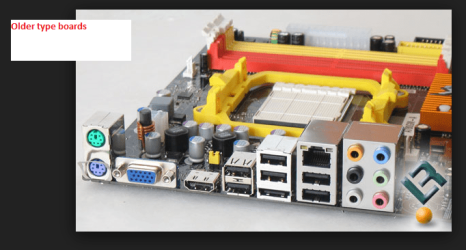
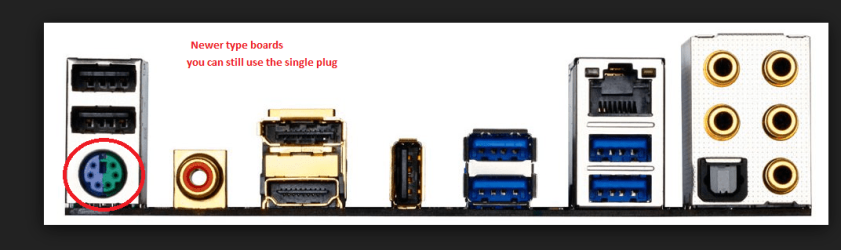
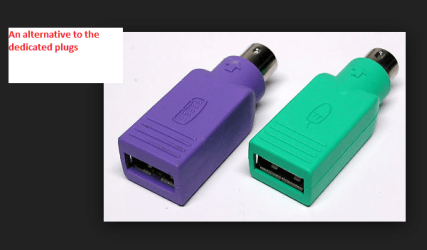
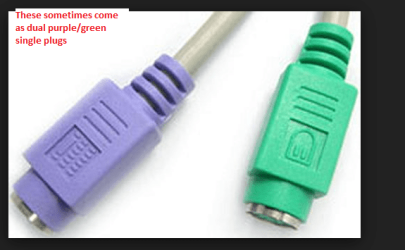
Don't suppose you have one or can ask a friend to borrow a wireless one or better still one of the old PS2 types - see pic for the plug end of that. I have often got myself out of a fix using my old Dell XP machine keyboard and mouse when the usual USB fitting ones will not work.
 

Attachments

  • PS2 x4.PNG
    PS2 x4.PNG
    312.8 KB · Views: 28
  • PS2 x3.PNG
    PS2 x3.PNG
    307.7 KB · Views: 1
  • PS2 x2.PNG
    PS2 x2.PNG
    157.9 KB · Views: 28
  • PS2 x1.PNG
    PS2 x1.PNG
    172.4 KB · Views: 28

My Computer

Computer type
PC/Desktop
Computer Manufacturer/Model Number
Own build (new) Desk1 / Asus ROG Win 7 / Desk2 1st build
OS
Desk1 7 Home Prem / Desk2 10 Pro / Main lap Asus ROG 10 Pro 2 laptop Toshiba 7 Pro Asus P2520 7 & 10
CPU
Desk1 i5 3750K / Laptop i7 GTX 860M / Desk2 i5 2500
Motherboard
Desk1 Asus P877-V / Desk2 Gigabyte H67 UD3H / Laptop ?
Memory
Desk1 8GB (1866) / Desk2 16GB (1333) / Laptop 8Gb DDR3
Graphics Card(s)
Desk 1& 2NVidia GTX 650 & Laptops on board Intel
Sound Card
Desk 1 & 2 -XONAR DG Realtek High Def audio Laptop
Monitor(s) Displays
Desk 1 Benq HD 2450 / Desk2 Philips 24" / Laptop 17.5"
Screen Resolution
1920x1080 D1 & D2 & Laptop 1
Hard Drives
Desk1 Samsung 120GB 830 SSD
Asus ROG 256GB 850 Pro SSD
Desk2 Samsung 840 256 SSD
Toshiba 120GB EVO
PSU
Desk 1 Corsair HX 1050/ Laptop ? / Desk 2 Corsair HX 650
Case
Desk 1 Cooler HAF XM ? Toshiba laptop / Desk2 Coolermaster
Cooling
Fans on all Desk1 -2 Desk2 - all Coolermasters 5 Laptop ?
Keyboard
Desk 1 MS Sidewinder X6 Desk 2 MS Sidewinder X 4
Mouse
Desk 1&2 - Gigabyte MS 900 gamer - laptop - Logitec wireless
Internet Speed
ADSL2+
Other Info
One other Desktop (tester) and spare Toshba laptop both with SSD's
Running Kaspersky 2016 ISS on all machines config'd identically
Logitec audio stereo systems on each machine (x3)
Canon MG5250MFC
Router/modem TP-Link running WPA2SK
I think I know why I need the keyboard enabled...Kaspersky tells you to "press any key" to initiate running the disk, but the USB keyboard isn't usable until after Windows starts. Still trying to find an older keyboard. Please bear with me.
 

My Computer

Computer type
PC/Desktop
Computer Manufacturer/Model Number
Toshiba
OS
Win 7(32)
CPU
Intel(R) Pentium(R) Dual CPU T3400 @ 2.16GHz
Motherboard
Base Board
Memory
Hynix 2 GB DDR-2
Graphics Card(s)
Mobile Intel(R) 4 Series Express Chipset Family
Sound Card
Realtek High Definition Audio
Hard Drives
WDC WD2500BEVS-26UST0 ATA Device
Antivirus
MS Security Essentials
Browser
Chrome
For cottonball, post #35...Have made the code run per your instructions. Fixlog.txt attached. Chrome seems to be running much better, but I'll run FRST64 again for reference and attach FRST.txt. Didn't think about it before, but should I create a new user for Chrome?
 

Attachments

My Computer

Computer type
PC/Desktop
Computer Manufacturer/Model Number
Toshiba
OS
Win 7(32)
CPU
Intel(R) Pentium(R) Dual CPU T3400 @ 2.16GHz
Motherboard
Base Board
Memory
Hynix 2 GB DDR-2
Graphics Card(s)
Mobile Intel(R) 4 Series Express Chipset Family
Sound Card
Realtek High Definition Audio
Hard Drives
WDC WD2500BEVS-26UST0 ATA Device
Antivirus
MS Security Essentials
Browser
Chrome
weybrew,

Good job!! :D Thanks for hanging in there.

The Chrome browser showed as a Developer version. In Developer version, Chrome's internal checks are disabled and adware/malware is able to operate.

:info: Please try Google's Software Removal Tool once again:
https://support.google.com/chrome/answer/6086368?p=ui_software_removal_tool&rd=1
See if, when Chrome reopens, the following page hangs up again:
chrome://settings/resetProfileSettings
Let us know.


:info: As far as all the items that ADWCleaner showed, they are in Quarantine. They are going nowhere, and we can get rid of them any time.

If you wish to create a new User for Chrome, that is fine. However, first try the Software Removal Tool and see how it goes with it.

Also, as requested previously, please let us know what version of Chrome you are using.
To do that, in Chrome, click the 3 small horizontal bars on the far upper right, and select:
About Google Chrome

You will see the version number, and it will also tell you if Chrome is up to date. If not up to date, let it run and update Chrome. Then let us know what version of Chrome is installed.
 
Last edited:

My Computer

Computer type
PC/Desktop
Computer Manufacturer/Model Number
An ol' eMachines
OS
Windows 7 Home Premium
Internet Speed
Fine for me...I'm retired!
Two things to cottonball mate would it be an idea to take a quick look in the HKEY's LOCALL and CURRENT > Software to make sure the Goolge stuff has gone??

Plus just how does one get the ADW stuff out of quarantine? - sorry weybrew for going OT a bit:p
 

My Computer

Computer type
PC/Desktop
Computer Manufacturer/Model Number
Own build (new) Desk1 / Asus ROG Win 7 / Desk2 1st build
OS
Desk1 7 Home Prem / Desk2 10 Pro / Main lap Asus ROG 10 Pro 2 laptop Toshiba 7 Pro Asus P2520 7 & 10
CPU
Desk1 i5 3750K / Laptop i7 GTX 860M / Desk2 i5 2500
Motherboard
Desk1 Asus P877-V / Desk2 Gigabyte H67 UD3H / Laptop ?
Memory
Desk1 8GB (1866) / Desk2 16GB (1333) / Laptop 8Gb DDR3
Graphics Card(s)
Desk 1& 2NVidia GTX 650 & Laptops on board Intel
Sound Card
Desk 1 & 2 -XONAR DG Realtek High Def audio Laptop
Monitor(s) Displays
Desk 1 Benq HD 2450 / Desk2 Philips 24" / Laptop 17.5"
Screen Resolution
1920x1080 D1 & D2 & Laptop 1
Hard Drives
Desk1 Samsung 120GB 830 SSD
Asus ROG 256GB 850 Pro SSD
Desk2 Samsung 840 256 SSD
Toshiba 120GB EVO
PSU
Desk 1 Corsair HX 1050/ Laptop ? / Desk 2 Corsair HX 650
Case
Desk 1 Cooler HAF XM ? Toshiba laptop / Desk2 Coolermaster
Cooling
Fans on all Desk1 -2 Desk2 - all Coolermasters 5 Laptop ?
Keyboard
Desk 1 MS Sidewinder X6 Desk 2 MS Sidewinder X 4
Mouse
Desk 1&2 - Gigabyte MS 900 gamer - laptop - Logitec wireless
Internet Speed
ADSL2+
Other Info
One other Desktop (tester) and spare Toshba laptop both with SSD's
Running Kaspersky 2016 ISS on all machines config'd identically
Logitec audio stereo systems on each machine (x3)
Canon MG5250MFC
Router/modem TP-Link running WPA2SK
Back
Top