Multiple Chrome.exe processes

To cotonball (post #39)...Have run Google Software Removal Tool with "no programs" result. Restart of Chrome had 3 pages hung up:
chrome://settings/resetProfileSettings
htts://mail.google.com/mail/u/o/#inbox
titantv/default.aspx
 

My Computer

Computer type
PC/Desktop
Computer Manufacturer/Model Number
Toshiba
OS
Win 7(32)
CPU
Intel(R) Pentium(R) Dual CPU T3400 @ 2.16GHz
Motherboard
Base Board
Memory
Hynix 2 GB DDR-2
Graphics Card(s)
Mobile Intel(R) 4 Series Express Chipset Family
Sound Card
Realtek High Definition Audio
Hard Drives
WDC WD2500BEVS-26UST0 ATA Device
Antivirus
MS Security Essentials
Browser
Chrome
To ICIT2LOL (post #40)..........Have solved keyboard problem. Tried to run Kaspersky Rescue Disk 10 but Terms screen froze. Had to hard stop/reboot. Should I try to continue or continue to follow cottonball's suggestions?
 

My Computer

Computer type
PC/Desktop
Computer Manufacturer/Model Number
Toshiba
OS
Win 7(32)
CPU
Intel(R) Pentium(R) Dual CPU T3400 @ 2.16GHz
Motherboard
Base Board
Memory
Hynix 2 GB DDR-2
Graphics Card(s)
Mobile Intel(R) 4 Series Express Chipset Family
Sound Card
Realtek High Definition Audio
Hard Drives
WDC WD2500BEVS-26UST0 ATA Device
Antivirus
MS Security Essentials
Browser
Chrome
To ICIT2LOL (post #40)..........Have solved keyboard problem. Tried to run Kaspersky Rescue Disk 10 but Terms screen froze. Had to hard stop/reboot. Should I try to continue or continue to follow cottonball's suggestions?
Go with cottonball mate there are other rescue disks to be had free but unless cottonball thinks one is needed then just do ass you are.
 

My Computer

Computer type
PC/Desktop
Computer Manufacturer/Model Number
Own build (new) Desk1 / Asus ROG Win 7 / Desk2 1st build
OS
Desk1 7 Home Prem / Desk2 10 Pro / Main lap Asus ROG 10 Pro 2 laptop Toshiba 7 Pro Asus P2520 7 & 10
CPU
Desk1 i5 3750K / Laptop i7 GTX 860M / Desk2 i5 2500
Motherboard
Desk1 Asus P877-V / Desk2 Gigabyte H67 UD3H / Laptop ?
Memory
Desk1 8GB (1866) / Desk2 16GB (1333) / Laptop 8Gb DDR3
Graphics Card(s)
Desk 1& 2NVidia GTX 650 & Laptops on board Intel
Sound Card
Desk 1 & 2 -XONAR DG Realtek High Def audio Laptop
Monitor(s) Displays
Desk 1 Benq HD 2450 / Desk2 Philips 24" / Laptop 17.5"
Screen Resolution
1920x1080 D1 & D2 & Laptop 1
Hard Drives
Desk1 Samsung 120GB 830 SSD
Asus ROG 256GB 850 Pro SSD
Desk2 Samsung 840 256 SSD
Toshiba 120GB EVO
PSU
Desk 1 Corsair HX 1050/ Laptop ? / Desk 2 Corsair HX 650
Case
Desk 1 Cooler HAF XM ? Toshiba laptop / Desk2 Coolermaster
Cooling
Fans on all Desk1 -2 Desk2 - all Coolermasters 5 Laptop ?
Keyboard
Desk 1 MS Sidewinder X6 Desk 2 MS Sidewinder X 4
Mouse
Desk 1&2 - Gigabyte MS 900 gamer - laptop - Logitec wireless
Internet Speed
ADSL2+
Other Info
One other Desktop (tester) and spare Toshba laptop both with SSD's
Running Kaspersky 2016 ISS on all machines config'd identically
Logitec audio stereo systems on each machine (x3)
Canon MG5250MFC
Router/modem TP-Link running WPA2SK
@ICItT2LOL,

As far as the Registry keys mentioned, FRST scans them.

On ADWCleaner...
When finished using the program, use the Uninstall option.
Upon clicking, you are prompted with another window mentioning a Quarantine folder.
Inside this folder the files detected by AdwCleaner are contained.

When you use the Uninstall option, AdwCleaner removes the Quarantine folder, as well as itself!

If you wish to use ADWCleaner again at some other time, download a new version. Most programs change to accomodate new adware, etc., so a new version is best.

~~~~
Alternatively to the Uninstall option in ADWCleaner, there is the DELFIX tool ( also by Xplode (ADWcleaner)) to get rid of all the ADWCleaner logs and program files.
It also removes a comprehensive list of tools after their usage:

https://toolslib.net/downloads/viewdownload/2-delfix/

delfix-select.png


@weybrew,

Will get back with you this evening. Need to check those three pages that hang.
For now, use Chrome, and let us know if you are experiencing any problems.
Still would like to know the version of Chrome that is installed!
 

My Computer

Computer type
PC/Desktop
Computer Manufacturer/Model Number
An ol' eMachines
OS
Windows 7 Home Premium
Internet Speed
Fine for me...I'm retired!
Ok cottonball got that and yes I always download each time I use the ADW from bleeping computer. But thanks for the heads up on the FRST:D It was just that I have often removed Norton and AVG found Symantec and AVG stuff still buried in there.
 

My Computer

Computer type
PC/Desktop
Computer Manufacturer/Model Number
Own build (new) Desk1 / Asus ROG Win 7 / Desk2 1st build
OS
Desk1 7 Home Prem / Desk2 10 Pro / Main lap Asus ROG 10 Pro 2 laptop Toshiba 7 Pro Asus P2520 7 & 10
CPU
Desk1 i5 3750K / Laptop i7 GTX 860M / Desk2 i5 2500
Motherboard
Desk1 Asus P877-V / Desk2 Gigabyte H67 UD3H / Laptop ?
Memory
Desk1 8GB (1866) / Desk2 16GB (1333) / Laptop 8Gb DDR3
Graphics Card(s)
Desk 1& 2NVidia GTX 650 & Laptops on board Intel
Sound Card
Desk 1 & 2 -XONAR DG Realtek High Def audio Laptop
Monitor(s) Displays
Desk 1 Benq HD 2450 / Desk2 Philips 24" / Laptop 17.5"
Screen Resolution
1920x1080 D1 & D2 & Laptop 1
Hard Drives
Desk1 Samsung 120GB 830 SSD
Asus ROG 256GB 850 Pro SSD
Desk2 Samsung 840 256 SSD
Toshiba 120GB EVO
PSU
Desk 1 Corsair HX 1050/ Laptop ? / Desk 2 Corsair HX 650
Case
Desk 1 Cooler HAF XM ? Toshiba laptop / Desk2 Coolermaster
Cooling
Fans on all Desk1 -2 Desk2 - all Coolermasters 5 Laptop ?
Keyboard
Desk 1 MS Sidewinder X6 Desk 2 MS Sidewinder X 4
Mouse
Desk 1&2 - Gigabyte MS 900 gamer - laptop - Logitec wireless
Internet Speed
ADSL2+
Other Info
One other Desktop (tester) and spare Toshba laptop both with SSD's
Running Kaspersky 2016 ISS on all machines config'd identically
Logitec audio stereo systems on each machine (x3)
Canon MG5250MFC
Router/modem TP-Link running WPA2SK
Thanks, ICIT2LOL, for your input and suggestions!
 

My Computer

Computer type
PC/Desktop
Computer Manufacturer/Model Number
Toshiba
OS
Win 7(32)
CPU
Intel(R) Pentium(R) Dual CPU T3400 @ 2.16GHz
Motherboard
Base Board
Memory
Hynix 2 GB DDR-2
Graphics Card(s)
Mobile Intel(R) 4 Series Express Chipset Family
Sound Card
Realtek High Definition Audio
Hard Drives
WDC WD2500BEVS-26UST0 ATA Device
Antivirus
MS Security Essentials
Browser
Chrome
ICIT2LOL,

Do not recall any reports or conversations on this thread mentioning AVG, Norton or Symantec!!

My brain cells are fried...can you point me as to what you are referencing?
 

My Computer

Computer type
PC/Desktop
Computer Manufacturer/Model Number
An ol' eMachines
OS
Windows 7 Home Premium
Internet Speed
Fine for me...I'm retired!
ICIT2LOL,

Do not recall any reports or conversations on this thread mentioning AVG, Norton or Symantec!!

My brain cells are fried...can you point me as to what you are referencing?
I was just referring to what I asked in post #40 re the HKEY's entries and the "brands" I mentioned are the ones I always seem to find still lurking after the removal tools for that particular software has "removed" the software.
The brands were really just a reference / example of stuff lurking and that the Google software that was being discussed may have left remnants behind much in the way that the brands I mentioned do. Perhaps I shouldn't have named brands and just hinted at Google remnants being left behind. My mistake:o
 

My Computer

Computer type
PC/Desktop
Computer Manufacturer/Model Number
Own build (new) Desk1 / Asus ROG Win 7 / Desk2 1st build
OS
Desk1 7 Home Prem / Desk2 10 Pro / Main lap Asus ROG 10 Pro 2 laptop Toshiba 7 Pro Asus P2520 7 & 10
CPU
Desk1 i5 3750K / Laptop i7 GTX 860M / Desk2 i5 2500
Motherboard
Desk1 Asus P877-V / Desk2 Gigabyte H67 UD3H / Laptop ?
Memory
Desk1 8GB (1866) / Desk2 16GB (1333) / Laptop 8Gb DDR3
Graphics Card(s)
Desk 1& 2NVidia GTX 650 & Laptops on board Intel
Sound Card
Desk 1 & 2 -XONAR DG Realtek High Def audio Laptop
Monitor(s) Displays
Desk 1 Benq HD 2450 / Desk2 Philips 24" / Laptop 17.5"
Screen Resolution
1920x1080 D1 & D2 & Laptop 1
Hard Drives
Desk1 Samsung 120GB 830 SSD
Asus ROG 256GB 850 Pro SSD
Desk2 Samsung 840 256 SSD
Toshiba 120GB EVO
PSU
Desk 1 Corsair HX 1050/ Laptop ? / Desk 2 Corsair HX 650
Case
Desk 1 Cooler HAF XM ? Toshiba laptop / Desk2 Coolermaster
Cooling
Fans on all Desk1 -2 Desk2 - all Coolermasters 5 Laptop ?
Keyboard
Desk 1 MS Sidewinder X6 Desk 2 MS Sidewinder X 4
Mouse
Desk 1&2 - Gigabyte MS 900 gamer - laptop - Logitec wireless
Internet Speed
ADSL2+
Other Info
One other Desktop (tester) and spare Toshba laptop both with SSD's
Running Kaspersky 2016 ISS on all machines config'd identically
Logitec audio stereo systems on each machine (x3)
Canon MG5250MFC
Router/modem TP-Link running WPA2SK
weybrew,

Please create a Restore Point before you proceed, since we are going to remove Chrome's Registry entries, folders and files.

Now, please download and install Revo Uninstaller 1.95:
Download Revo Uninstaller Freeware - Free and Full Download - Uninstall software, remove programs, solve uninstall problems

Run the Revo Uninstaller and select: Google Chrome
Click the Uninstall icon to remove the selected program.
Select: Advanced
Click: Next, and follow the prompts.
Click: Select All and Delete to remove all Registry items, folders and files listed by Revo.
If asked to restart the computer, please do so.

Next, install the latest stable build of Google Chrome:
Chrome

Try the Chrome Browser, and let us know how it goes.
 
Last edited:

My Computer

Computer type
PC/Desktop
Computer Manufacturer/Model Number
An ol' eMachines
OS
Windows 7 Home Premium
Internet Speed
Fine for me...I'm retired!
Sorry for the delay, cottonball, I didn't get email notification of a new post.

I ran a Revo uninstall as instructed. It found 6 leftover registry entries and 4100 leftover files after Chrome uninstall. I have installed Chrome v 43.0.2357.134 m and will try it out over the next couple of days. My initial start-up was not promising as it gave me a blank white screen...then another blank "unresponsive" white screen. After closing both, another start-up went OK. I noticed before, and now again, that some commands to open new tabs result in a blank tab and no response. Closing that tab and repeating the command goes fine (?). I'll continue to monitor things and report back.


My Computer

Computer type
PC/Desktop
Computer Manufacturer/Model Number
Toshiba
OS
Win 7(32)
CPU
Intel(R) Pentium(R) Dual CPU T3400 @ 2.16GHz
Motherboard
Base Board
Memory
Hynix 2 GB DDR-2
Graphics Card(s)
Mobile Intel(R) 4 Series Express Chipset Family
Sound Card
Realtek High Definition Audio
Hard Drives
WDC WD2500BEVS-26UST0 ATA Device
Antivirus
MS Security Essentials
Browser
Chrome
weybrew,

Let's find out what is starting in Google, if anything...

Please download to the Desktop the Free version of CCleaner:
Download > CCleaner - Download

Once downloaded, run the installer, and do not accept to install any other suggested software.

When the main CCleaner program opens, click on: Tools > Startup > Google tab
Use the Save to Text file button (lower right) to obtain the information listed on the Google tab, and save the Startup.txt file to the Desktop.

:ar: Please post the Startup report in your reply.
 

My Computer

Computer type
PC/Desktop
Computer Manufacturer/Model Number
An ol' eMachines
OS
Windows 7 Home Premium
Internet Speed
Fine for me...I'm retired!
I have been continuing my evaluation of the re-installed Chrome v 43 and find things about the same as always...going fine for a while and then I get the slow loading tabs, unresponsive tabs as I described before. I have now run the CCleaner per your instructions and am attaching the file. Hope this helps. And, again, you are being so very helpful...and patient!
 

Attachments

My Computer

Computer type
PC/Desktop
Computer Manufacturer/Model Number
Toshiba
OS
Win 7(32)
CPU
Intel(R) Pentium(R) Dual CPU T3400 @ 2.16GHz
Motherboard
Base Board
Memory
Hynix 2 GB DDR-2
Graphics Card(s)
Mobile Intel(R) 4 Series Express Chipset Family
Sound Card
Realtek High Definition Audio
Hard Drives
WDC WD2500BEVS-26UST0 ATA Device
Antivirus
MS Security Essentials
Browser
Chrome
If cottonball doesn't mind me asking weybrew in CCleaner > Tools > take a look at Duplicate Finder and see what is in there - I find it quite surprising sometimes how certain files tend to duplicate.
 

My Computer

Computer type
PC/Desktop
Computer Manufacturer/Model Number
Own build (new) Desk1 / Asus ROG Win 7 / Desk2 1st build
OS
Desk1 7 Home Prem / Desk2 10 Pro / Main lap Asus ROG 10 Pro 2 laptop Toshiba 7 Pro Asus P2520 7 & 10
CPU
Desk1 i5 3750K / Laptop i7 GTX 860M / Desk2 i5 2500
Motherboard
Desk1 Asus P877-V / Desk2 Gigabyte H67 UD3H / Laptop ?
Memory
Desk1 8GB (1866) / Desk2 16GB (1333) / Laptop 8Gb DDR3
Graphics Card(s)
Desk 1& 2NVidia GTX 650 & Laptops on board Intel
Sound Card
Desk 1 & 2 -XONAR DG Realtek High Def audio Laptop
Monitor(s) Displays
Desk 1 Benq HD 2450 / Desk2 Philips 24" / Laptop 17.5"
Screen Resolution
1920x1080 D1 & D2 & Laptop 1
Hard Drives
Desk1 Samsung 120GB 830 SSD
Asus ROG 256GB 850 Pro SSD
Desk2 Samsung 840 256 SSD
Toshiba 120GB EVO
PSU
Desk 1 Corsair HX 1050/ Laptop ? / Desk 2 Corsair HX 650
Case
Desk 1 Cooler HAF XM ? Toshiba laptop / Desk2 Coolermaster
Cooling
Fans on all Desk1 -2 Desk2 - all Coolermasters 5 Laptop ?
Keyboard
Desk 1 MS Sidewinder X6 Desk 2 MS Sidewinder X 4
Mouse
Desk 1&2 - Gigabyte MS 900 gamer - laptop - Logitec wireless
Internet Speed
ADSL2+
Other Info
One other Desktop (tester) and spare Toshba laptop both with SSD's
Running Kaspersky 2016 ISS on all machines config'd identically
Logitec audio stereo systems on each machine (x3)
Canon MG5250MFC
Router/modem TP-Link running WPA2SK
Hi again, ICIT2LOL. I ran CCleaner and the duplicate file finder listed only some torrent files that I have positioned deliberately. Thanks for your thoughts.
 

My Computer

Computer type
PC/Desktop
Computer Manufacturer/Model Number
Toshiba
OS
Win 7(32)
CPU
Intel(R) Pentium(R) Dual CPU T3400 @ 2.16GHz
Motherboard
Base Board
Memory
Hynix 2 GB DDR-2
Graphics Card(s)
Mobile Intel(R) 4 Series Express Chipset Family
Sound Card
Realtek High Definition Audio
Hard Drives
WDC WD2500BEVS-26UST0 ATA Device
Antivirus
MS Security Essentials
Browser
Chrome
weybrew,

Wee can give this a shot...
Too many entries at Startup can make the browser slow and often decrease stability.

Using CCleaner again, would Disable a few extensions at a time, open Chrome and see if it starts and runs fine.

If no luck, disable a few more, and do the same.
See if you can pin-point the culprit.

You can later select any disabled entries in CCleaner and click Enable to turn back on.
Do not use the Delete button.
 

My Computer

Computer type
PC/Desktop
Computer Manufacturer/Model Number
An ol' eMachines
OS
Windows 7 Home Premium
Internet Speed
Fine for me...I'm retired!
I have now tried Chrome with NO extensions/addon enabled. All symptoms continue...start up usually OK, but it will hang up occasionally...on start up I would hang up on one tab (starting Firefox for comparison had no problems with that same tab URL). In general, performance is spotty, again, with NO addons active.

After all your hard work...and time...and that of others who have offered suggestions, I am resigned to me being forced to abandon Chrome. I had gotten used to the sluggishness and "unresponsive" web pages as a normal operating situation, but now that I have returned to Firefox (I switched to Chrome because Firefox loaded pages erratically) and find it to be much faster and not so temperamental, I'll stick with it until something makes me switch again.

So, unless you have another magic arrow, I'll thank all Windows SevenForums contributors again for helping me, and accept the inevitable.
 

My Computer

Computer type
PC/Desktop
Computer Manufacturer/Model Number
Toshiba
OS
Win 7(32)
CPU
Intel(R) Pentium(R) Dual CPU T3400 @ 2.16GHz
Motherboard
Base Board
Memory
Hynix 2 GB DDR-2
Graphics Card(s)
Mobile Intel(R) 4 Series Express Chipset Family
Sound Card
Realtek High Definition Audio
Hard Drives
WDC WD2500BEVS-26UST0 ATA Device
Antivirus
MS Security Essentials
Browser
Chrome
Ah well these little mysteries pop up from time to time mate and me I have always IE I really don't see any advantage in using other browsers even though other reckon they are faster. I just hit a query and in the blink of an eye the options for what I ant are there but there again I am just a general user.

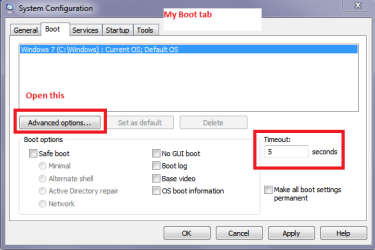
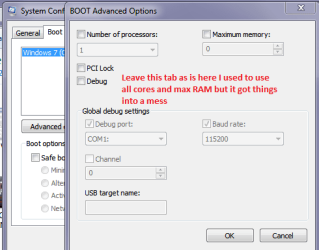
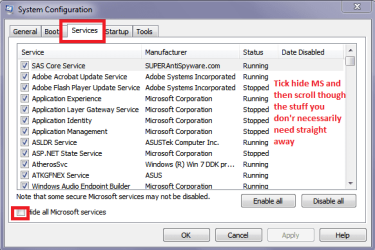
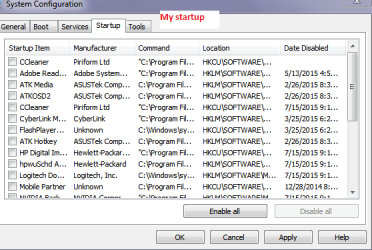
Like cottonball suggested I also think it is worth disabling everything in the start up tab - I do mine through msconfig but each to his own.
While I am thinking of it I did get a tip by A Guy or Layback Bear a long time ago to uncheck everything in the Boot tad in msconfig because I was starting with four core etc etc thinking it would be faster when in fact it made it slower. so worth a look in there too see pics.
msconfig > Start > type msconfig > Run as admin (right click) > set and close > restart if you want to although the settings will take place next time you power up. (Sorry if I am telling your grandmother how to suck eggs)

A good tutorial if you would like to follow some of the tips http://www.sevenforums.com/tutorials/11728-optimize-windows-7-a.html
 

Attachments

  • MSCONFIG 1.PNG
    MSCONFIG 1.PNG
    47.2 KB · Views: 9
  • MSCONFIG 2.PNG
    MSCONFIG 2.PNG
    33.2 KB · Views: 9
  • MSCONFIG 2.5.PNG
    MSCONFIG 2.5.PNG
    37.6 KB · Views: 9
  • MSCONFG 3.PNG
    MSCONFG 3.PNG
    51.2 KB · Views: 9

My Computer

Computer type
PC/Desktop
Computer Manufacturer/Model Number
Own build (new) Desk1 / Asus ROG Win 7 / Desk2 1st build
OS
Desk1 7 Home Prem / Desk2 10 Pro / Main lap Asus ROG 10 Pro 2 laptop Toshiba 7 Pro Asus P2520 7 & 10
CPU
Desk1 i5 3750K / Laptop i7 GTX 860M / Desk2 i5 2500
Motherboard
Desk1 Asus P877-V / Desk2 Gigabyte H67 UD3H / Laptop ?
Memory
Desk1 8GB (1866) / Desk2 16GB (1333) / Laptop 8Gb DDR3
Graphics Card(s)
Desk 1& 2NVidia GTX 650 & Laptops on board Intel
Sound Card
Desk 1 & 2 -XONAR DG Realtek High Def audio Laptop
Monitor(s) Displays
Desk 1 Benq HD 2450 / Desk2 Philips 24" / Laptop 17.5"
Screen Resolution
1920x1080 D1 & D2 & Laptop 1
Hard Drives
Desk1 Samsung 120GB 830 SSD
Asus ROG 256GB 850 Pro SSD
Desk2 Samsung 840 256 SSD
Toshiba 120GB EVO
PSU
Desk 1 Corsair HX 1050/ Laptop ? / Desk 2 Corsair HX 650
Case
Desk 1 Cooler HAF XM ? Toshiba laptop / Desk2 Coolermaster
Cooling
Fans on all Desk1 -2 Desk2 - all Coolermasters 5 Laptop ?
Keyboard
Desk 1 MS Sidewinder X6 Desk 2 MS Sidewinder X 4
Mouse
Desk 1&2 - Gigabyte MS 900 gamer - laptop - Logitec wireless
Internet Speed
ADSL2+
Other Info
One other Desktop (tester) and spare Toshba laptop both with SSD's
Running Kaspersky 2016 ISS on all machines config'd identically
Logitec audio stereo systems on each machine (x3)
Canon MG5250MFC
Router/modem TP-Link running WPA2SK
Back
Top