Solved Multiple DDoS attacks prevention?

...Apart from Avast, MSE and malwarebytes these are the only things which have realtime scanning enabled, look at my first post to see what else I use...

So Avast is not running realtime, right?
 

My Computer

OS
Windows 7 Ultimate x64
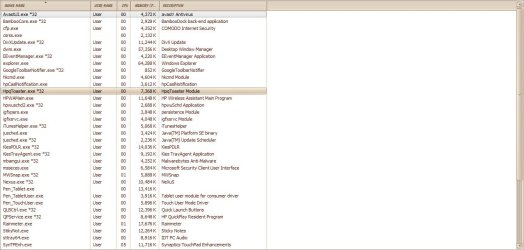
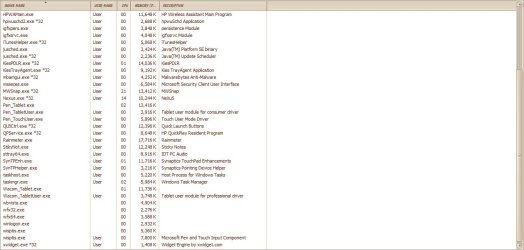
Had to post it in 2 photo's. I did a quick check through the process list for anything that looked out of place but couldn't find anything.
 

Attachments

  • Process 1.jpg
    Process 1.jpg
    143.2 KB · Views: 29
  • Process 2.jpg
    Process 2.jpg
    133.8 KB · Views: 14

My Computer

Computer Manufacturer/Model Number
HP G61
OS
Windows 7 Home Premium x64
CPU
Pentium Dual Core T4300
Screen Resolution
1366 x 768
Internet Speed
8mbps
Strange brown color with only the top Avast entry in black. What method did you use to present this snap shot?

The screen shot I provided was done with the sniping tool, using full screen-snip.

Ok, I'll take a look through your list.
 
Last edited:

My Computer

Computer Manufacturer/Model Number
HP/ Pavilion P6751C
OS
windows 7 home premium 64 bit
CPU
AMD Phenom(tm) II X4 830 Processor, 2800 Mhz, 4 core
Motherboard
N-Alvorix-RS880-uATX (Alvorix) motherboard
Memory
12.00 GB
Graphics Card(s)
ATI Radeon 4200
Sound Card
Creative Labs Sound Blaster Recon3D
Monitor(s) Displays
46" Sony TV KDL-46NX810
Screen Resolution
1920x1090P
Hard Drives
1 TB
PSU
Internal 250W
Case
Mid-size ATX
Cooling
1 rear case fan
Keyboard
Logitech USB Wireless K800
Mouse
Logitech USB Wireless M305
Internet Speed
22mb-28mb
I think Avast may have appeared in a different color because it was the selected line.
 

My Computer

OS
Windows 7 Ultimate x64
Sorry for the late replies was busy today. It's brown because I skinned my Windows theme, you'll notice some of the processes from the Stardock Corporation and other taskbar programs(rainmeter,nexus etc). Sorry Sibbil, avast is running in realtime. I used MWsnap 3 to take the screenshot.
 
Last edited:

My Computer

Computer Manufacturer/Model Number
HP G61
OS
Windows 7 Home Premium x64
CPU
Pentium Dual Core T4300
Screen Resolution
1366 x 768
Internet Speed
8mbps
Okay, I was just making sure there was only one antivirus program running realtime (more than one can cause conflicts/slowdowns).
 

My Computer

OS
Windows 7 Ultimate x64
Had to post it in 2 photo's. I did a quick check through the process list for anything that looked out of place but couldn't find anything.

When you take screen shots, make sure your not copying doubles. You have so many doubles in the screen shots, I had to print it out to make sense of it. LOL

In comparision, I have 24 processes running on my HP desktop, to your 23 processes on your HP Tablet PC.

When I use selective statup in Msconfig, I can reduce that number to only 8 processes.

Reboot your computer and go direstly to Task manager and count the total number of processes. Should be a few less.

So far, nothing in there to really be concerned about. And the amount of resources being used is almost nothing.

Let's take a look at Msconfig. Post a screen shot of the Startup Tab entries, if you have to take two shots, please avoid doubles.

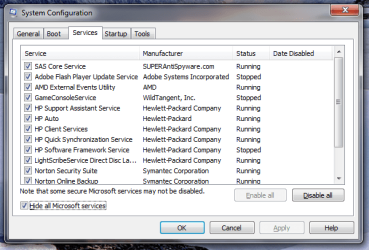
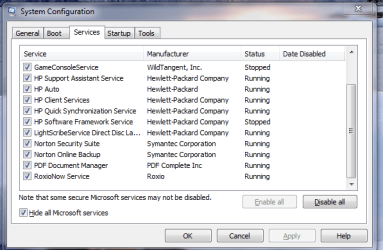
Next, open the Services tab and tick the box to, Hide all Microsoft Services. Now post a screen shot of these entries, please avoid doubles.

Below are the msconfig screen shots from my PC.
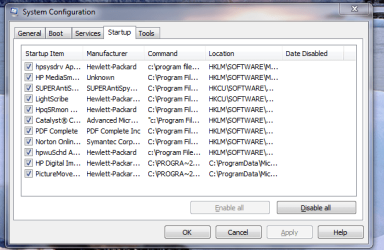
msconfig startup tab.PNG

msconfig services tab 1.PNG

msconfig services tab 2.PNG

As you can see I have several unnecessary services running. And a few startups which can be stopped.

QuickDraw

 
Last edited:

My Computer

Computer Manufacturer/Model Number
HP/ Pavilion P6751C
OS
windows 7 home premium 64 bit
CPU
AMD Phenom(tm) II X4 830 Processor, 2800 Mhz, 4 core
Motherboard
N-Alvorix-RS880-uATX (Alvorix) motherboard
Memory
12.00 GB
Graphics Card(s)
ATI Radeon 4200
Sound Card
Creative Labs Sound Blaster Recon3D
Monitor(s) Displays
46" Sony TV KDL-46NX810
Screen Resolution
1920x1090P
Hard Drives
1 TB
PSU
Internal 250W
Case
Mid-size ATX
Cooling
1 rear case fan
Keyboard
Logitech USB Wireless K800
Mouse
Logitech USB Wireless M305
Internet Speed
22mb-28mb
I did a system restore like you said to do on one of my machines, and the amount of DoS attacks dropped to none. After waiting a day to see if they'd stopped completely I realised that it was that machine that was infected. But the day after that I noticed small scale DoS attacks reported by my router, checked the log information and saw that it was coming from a program called PPStream(an asian video torrenting program or something), which was being used by one of my family. I'm not sure if the program was giving legitimate packets and my router is just logging them as attacks or whether they're attacks. But either way the program is removed and I'll let you know in a day or 2 to see if the attacks continue. Also do you still want me to post the process list of the machine with PPStream on, and I'm very sorry if I caused you any hassle with the double posts and I really appreciate the time and effort you've put into helping me!
 

My Computer

Computer Manufacturer/Model Number
HP G61
OS
Windows 7 Home Premium x64
CPU
Pentium Dual Core T4300
Screen Resolution
1366 x 768
Internet Speed
8mbps
I would guess they wouldn't need the process list anymore as it seems you have your machine back in order. Even though you're router indicates you're all back to normal, I think I would scrutinize the other machines. Once some malware happens to get into one of your machines behind your router it's a breeze for it to contaminate your other machines.

Good job analyzing these issues!
 

My Computer

OS
Windows 7 Ultimate x64
So after waiting a while to see if anymore attacks were logged, I believe that the attacks have stopped. Although I'm still seeing DoS attack logs in the router's log. I suspect that this is a router error, as it keeps on logging my skype calls to a person who I know is not trying to cause me harm and as far as I can tell their computer is not infected with anything. Along with skype, various other programs have also been shown as attacking me, such as through Xbox live. I'm pretty sure that it's a problem with my router. So if you are a Virgin Media(UK) customer and you're receiving similar problems as me. I suggest looking at your router, or replacing it with an alternate one and seeing if problems persist.

I'm very thankful for the help that was given to me and hope that this helps other people.
 

My Computer

Computer Manufacturer/Model Number
HP G61
OS
Windows 7 Home Premium x64
CPU
Pentium Dual Core T4300
Screen Resolution
1366 x 768
Internet Speed
8mbps
Thanks for posting an update for us!

Curious about some of the router errors: are you saying it's logging packets as dropped when it's really letting them through (skype calls)?
 

My Computer

OS
Windows 7 Ultimate x64
More like it's blocking/dropping them and logging them as DoS attacks, skype call quality deteriorates whenever this happens so I don't think it's letting the packets through. Same sort of thing with Xbox Live. If anyone wants to shed some light on this feel free, but at the moment the problem is manageable.
 

My Computer

Computer Manufacturer/Model Number
HP G61
OS
Windows 7 Home Premium x64
CPU
Pentium Dual Core T4300
Screen Resolution
1366 x 768
Internet Speed
8mbps
Gotcha. The router is properly logging dropped packets, but it's dropping packets that it should be letting through...
 

My Computer

OS
Windows 7 Ultimate x64
Back
Top