Multiple explorer.exe running in the memory

Sunimar

New member
Power User
Local time
11:18 AM
Messages
206
Location
Mumbai
I checked as this has been happening for the last 2-3 days that mulitple explorer.exe is running in the memory at the time of loggin it has 4-5 instances running with an error: explorer has stopped working.

I ran MSE twice but nothing was found that might be causing the error.

Also in the startup two new program has been added & their path is same i.e., c:\windows\driver\win.exe. Now this has been showing for the last 2-3 days in CCleaner & msconfig & even if i remove/diaable it, it shows up again.

I know that mulitple explorer.exe is normal & common for Windows7 but this is not for me as happening for the 1st time. Need some help on this.
 

My Computer

Computer type
Laptop
OS
Windows 7 Ultimate

My Computer

Computer type
PC/Desktop
Computer Manufacturer/Model Number
Custom Build
OS
Windows 10 Pro x64
CPU
Intel Core i5 4440 @Stock
Motherboard
Gigabyte Z97 D3H
Memory
4 x 4GB HyperX Fury DDR3
Graphics Card(s)
Gigabyte GTX 1050Ti O4G
Sound Card
Integrated
Monitor(s) Displays
Dell P2417H
Screen Resolution
1920 x 1080
Hard Drives
Samsung EVO 850 120GB / Toshiba DT01ACA050 1TB 7200prm 32MB
PSU
Riotoro Onyx 750W
Case
NZXT H500 Black-Red
Cooling
Stock CPU + NZXT 120mm + 2x120mm red fans
Keyboard
Modecom Volcano Lanparty
Mouse
Asus ROG Gladius / DeepCool E-Pad Plus
Internet Speed
DOCSIS 50/3 Mbit
Browser
Google Chrome
Other Info
Asus K55VJ(i5 3210M, GT635M / 2GB, 8GB DDR3, 500GB HDD)

Also in the startup two new program has been added & their path is same i.e., c:\windows\driver\win.exe. Now this has been showing for the last 2-3 days in CCleaner & msconfig & even if i remove/diaable it, it shows up again.

Yea, you're infected with something. That path doesn't exist normally. Boot into safe mode and do another scan. Something should be catching that. Do you not have any antivirus (not counting MSE)?
 

My Computer

OS
XP / Win7 x64 Pro
CPU
Intel Quad-Core Q9450 @ 3.2GHz
Motherboard
Asus P5-E
Memory
2x2GB GSkill DDR2
Graphics Card(s)
NVIDIA GeForce 8600 GTS (EVGA)
Monitor(s) Displays
Dell 2408WFP
Screen Resolution
1920x1200
Hi Sunimar. In addition to running a Virus Scan in safe mode as suggested by FliGi7, I would download MALWAREBYTES, install, run update tab and the do a full system scan.
Cheers
JohnnyA
 

My Computer

Computer Manufacturer/Model Number
Toshiba C650
OS
Windows Home Premium 64bit
CPU
T61-- 2.0ghz
Motherboard
Toshiba
Memory
4 GB
Graphics Card(s)
On board
Sound Card
On board
Monitor(s) Displays
15.6"
Hard Drives
500 GB
check for the win.exe in msconfig /startup... disable it there, then scan.
 

My Computer

OS
7 Pro

Yea, you're infected with something. That path doesn't exist normally. Boot into safe mode and do another scan. Something should be catching that. Do you not have any antivirus (not counting MSE)?

Hmmm will give a try to running in safe mode & then running the scan again. Even i had the same impression that something is creating this .exe file again even if i delete it. Well i got only 1 AV i.e., Microsoft Security Essentials & Malwarbytes.
 

My Computer

Computer type
Laptop
OS
Windows 7 Ultimate
check for the win.exe in msconfig /startup... disable it there, then scan.

Brady my friend have already done that from BOTH msconfig & CCleaner but this shows up on a Restart Windows Explorer or after a Restart/Reboot. :mad:
 

My Computer

Computer type
Laptop
OS
Windows 7 Ultimate
Give a look here. Ezio has solved his problem with 2 explorer.exe proccesses running
http://www.sevenforums.com/system-security/132438-two-explorer-exe-running.html

Well i did checked that & yeah there is a similarity but not sure if its the same reason as Ezio is using a x64 while i'm on a x32 machine, as i'm aware that x64 does show two instance of explorer.exe....Though will try few tools & methods that he has tried... few i already tried like removing the pregram from CCleaner & msconfig Startup but that couldn't resolve the problem as it comes every time i Restart Windows Explorer/Reboot.
At the time of this post i'm running a scan through MalwareBytes (also updated).
 

My Computer

Computer type
Laptop
OS
Windows 7 Ultimate
If I go into Tools -> Folder options -> View tab and tick "Launch folder windows in a seperate process" then when I open a Folder I have two eplorer.exes running in Task Manager. Now that option i had un-checked recently & now i checked it & restarted my Windows Explorer (through Context Menu) but still there are two instance of explorer.exe.......

Btw while posting this post Windows Explorer crashed twice i.e., "Windows was not responding" & if i click on the option "Check online for solution & close explorer" it still does nothing i.e., checking online for any solution but just the message windows goes away.
 

My Computer

Computer type
Laptop
OS
Windows 7 Ultimate
If you are still seeing two instances of explorer.exe running, and you've done all these other scans and they are negative, I suggest running first from a command prompt sfc /scannow.

Reboot afterwards and if the problem exists, then I would do a repair of windows 7.

http://www.sevenforums.com/tutorials/3413-repair-install.html?ltr=R
 

My Computer

Computer Manufacturer/Model Number
HP Pavilion dv7
OS
Windows 7
CPU
Core i7
Memory
8 GB
Graphics Card(s)
ATI FireGL
Monitor(s) Displays
Secondary is an HP L1940T
Screen Resolution
1680x1050
Hard Drives
160 GB SSD and 500 GB SATA
Keyboard
G11 Logitech
Mouse
G7 Logitech
Internet Speed
Fiber
Other Info
My rig smegging rules!
If you are still seeing two instances of explorer.exe running, and you've done all these other scans and they are negative, I suggest running first from a command prompt sfc /scannow.

Reboot afterwards and if the problem exists, then I would do a repair of windows 7.

http://www.sevenforums.com/tutorials/3413-repair-install.html?ltr=R

Thank you Buddy...but now its resolved...after updating & then running MalwareBytes. That took care of it & now no more multiple explorer.exe or explorer crash... Thank you all!!!
 

My Computer

Computer type
Laptop
OS
Windows 7 Ultimate
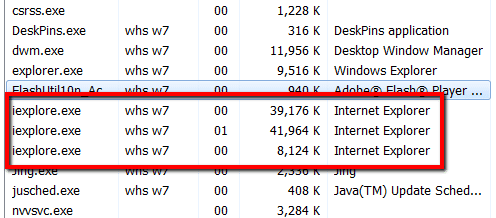
Multiple instances of IE are pretty normal. Some are usually cached.
 

Attachments

  • 2011-03-25_1231.png
    2011-03-25_1231.png
    6.2 KB · Views: 4

My Computer

Computer Manufacturer/Model Number
HP, Dell, Gateway, Toshiba - 4 laptops and 2 desktops
OS
Vista, Windows7, Mint Mate, Zorin, Windows 8
CPU
from 1.6GHz Duo to i7
Monitor(s) Displays
2x HP w2207
Hard Drives
5x HDD, 7x SSD, 12x Externals
Keyboard
with trackball - no mices
Mouse
Trackball mice
Internet Speed
DSL 6000
Multiple instances of IE are pretty normal. Some are usually cached.

iexplore.exe is Internet Explorer. The issue is with explorer.exe, the window/task/file management process.
 

My Computer

OS
XP / Win7 x64 Pro
CPU
Intel Quad-Core Q9450 @ 3.2GHz
Motherboard
Asus P5-E
Memory
2x2GB GSkill DDR2
Graphics Card(s)
NVIDIA GeForce 8600 GTS (EVGA)
Monitor(s) Displays
Dell 2408WFP
Screen Resolution
1920x1200
Multiple instances of IE are pretty normal. Some are usually cached.

iexplore.exe is Internet Explorer. The issue is with explorer.exe, the window/task/file management process.
Hmm, I guess I mixed that up. Should have read better, sorry.
 

My Computer

Computer Manufacturer/Model Number
HP, Dell, Gateway, Toshiba - 4 laptops and 2 desktops
OS
Vista, Windows7, Mint Mate, Zorin, Windows 8
CPU
from 1.6GHz Duo to i7
Monitor(s) Displays
2x HP w2207
Hard Drives
5x HDD, 7x SSD, 12x Externals
Keyboard
with trackball - no mices
Mouse
Trackball mice
Internet Speed
DSL 6000

My Computer

Computer Manufacturer/Model Number
WALLONN7 / LIN BLACK SERIES II
OS
Windows 7 Ultimate x64 SP1
CPU
AMD PHENOM II X6 1090T 3.2GHz
Motherboard
GIGABYTE GA-890FXA-UD7
Memory
8GB G.SKILL RIPJAWS - F3-10666CL7D
Graphics Card(s)
SAPPHIRE ATI RADEON HD 5870 VAPOR X OC
Sound Card
REALTEK DOLBY HOME THEATER
Monitor(s) Displays
LED LG W2486L
Screen Resolution
1080p
Hard Drives
SEAGATE 1TB -ST31000528AS - AHCI MODE - AS SATA
PSU
ZALMAN ZM1000-HP 1000W
Case
THERMALTAKE XASER VI VG4000SWA
Cooling
140MM x3 / 120MM x1 AIR COOLING - THERMALTAKE
Keyboard
MICROSOFT DIGITAL MEDIA KEYBOARD 3000 - USB
Mouse
MICROSOFT BASIC OPTICAL MOUSE 2.0 - USB
Internet Speed
600KBPS
Other Info
MICROSOFT XBOX 360 CONTROLLER
Multiple instances of IE are pretty normal. Some are usually cached.

iexplore.exe is Internet Explorer. The issue is with explorer.exe, the window/task/file management process.
Hmm, I guess I mixed that up. Should have read better, sorry.

No biggie, just don't to spur a "multiple instances of iexplore.exe running on my computer!@$#!@" thread :D
 

My Computer

OS
XP / Win7 x64 Pro
CPU
Intel Quad-Core Q9450 @ 3.2GHz
Motherboard
Asus P5-E
Memory
2x2GB GSkill DDR2
Graphics Card(s)
NVIDIA GeForce 8600 GTS (EVGA)
Monitor(s) Displays
Dell 2408WFP
Screen Resolution
1920x1200
Back
Top