Multiple games crashing at logo screen

Blees

New member
Local time
10:19 AM
Messages
9
So far, my list of crashing games includes:
Portal 2, Half-Life 2, HL2 Episodes 1 and 2, Left 4 Dead 2, Team Fortress 2, Skyrim, Oblivion, Fallout: New Vegas, and Metro 2033. (Portal 1 and Far Cry 3 don't crash.)
I've worked with Bethesda's customer support to try and resolve the Skyrim issue. I've tried:
Running as Administrator
Running in Compatability Mode
Running with Selective Startup
Verifying Game Cache in Steam
Uninstalling and re-installing the game
Rolling back graphics drivers
Uninstalling and re-installing graphics drivers
Buying a new graphics card

While reading some other threads about strange and multiple game crashes, someone mentioned looking at Event Viewer. If you like, I can post my events, but it looks like some of the crashes (maybe all) are throwing this error:
The Intel(R) HD Graphics Control Panel Service service terminated with the following error:
%%-2147467259
Since I am using an NVidia card (first a GTX 660 Ti, now a GTX 770), the Intel HD Graphics shouldn't be coming into it, I think.

I noticed the Skyrim problem about 3 weeks ago, but it may have been going on longer. I can attest that every one of these games has worked on my system previously.
 

My Computer My Computer

Computer type
PC/Desktop
Computer Manufacturer/Model Number
Custom build
OS
Windows 7 Pro x64 SP1
CPU
Intel Core i7-3770K CPU @ 3.50GHz
Motherboard
Intel DZ77GA-70K
Memory
32GB
Graphics Card(s)
NVidia 770
Hard Drives
500GB Samsung SSD 840 EVO
2TB Seagate (?) ST2000DM001-1CH164
Antivirus
Norton Internet Security
Browser
Firefox
Welcome to Seven Forums Blees. Almost all searches for your error lead to threads on malware forums. Let's start with some scans just to be sure. I'd d/l the free Malwarebytes if you don't have it already

Malwarebytes | Free Anti-Malware Detection & Removal Software

Do not choose the free trial of Premium. Run a complete Threat Scan post results here

Also, d/l AdwCleaner

AdwCleaner Download

Choose the Download Now @BleepingComputer link

How To Use AdwCleaner [Manual]

Again, post the log here.

If these scans come up clean, we'd take another path. If they find items, we'd pursue that avenue. A Guy
 

My Computer My Computer

Computer type
PC/Desktop
OS
Windows 10 Home x64
CPU
INTEL Core i5-750 Quad-Core 3.37GHz
Motherboard
ASUS P7P55D
Memory
HyperX Fury Black Series 8GB (2 x 4GB) 1866Mhz
Graphics Card(s)
EVGA GeForce GTX 750 Superclocked 1GB 128-Bit GDDR5
Monitor(s) Displays
LG 32MA68HY 32" IPS
Screen Resolution
1920 x 1080
Hard Drives
Samsung 840 Evo 120GB, SEAGATE 500GB Barracuda® 7200.12, SATA 3 Gb/s, 7200 RPM, 16MB cache
PSU
ANTEC TruePower New TP-550, 80 PLUS, 550W
Case
ANTEC Three Hundred Illusion
Cooling
COOLER MASTER Hyper 212 Plus, 4 x 120mm 1 x 140mm Noctua's
Internet Speed
85 + Mbps
Antivirus
Avast
Browser
Vivaldi
Malwarebytes Anti-Malware
Malwarebytes | Free Anti-Malware & Internet Security Software

Scan Date: 6/15/2014
Scan Time: 8:01:01 AM
Logfile: malwarebytes.txt
Administrator: Yes

Version: 2.00.2.1012
Malware Database: v2014.06.15.02
Rootkit Database: v2014.06.02.01
License: Free
Malware Protection: Disabled
Malicious Website Protection: Disabled
Self-protection: Disabled

OS: Windows 7 Service Pack 1
CPU: x64
File System: NTFS
User: BisselBox

Scan Type: Threat Scan
Result: Completed
Objects Scanned: 289396
Time Elapsed: 4 min, 59 sec

Memory: Enabled
Startup: Enabled
Filesystem: Enabled
Archives: Enabled
Rootkits: Disabled
Heuristics: Enabled
PUP: Enabled
PUM: Enabled

Processes: 0
(No malicious items detected)

Modules: 0
(No malicious items detected)

Registry Keys: 1
PUP.Optional.Linkury.A, HKLM\SOFTWARE\WOW6432NODE\MICROSOFT\WINDOWS\CURRENTVERSION\UNINSTALL\{BC0BF363-63AB-4FF7-8EF1-AE0D7F711B24}, , [b10ddf99116af1457f4a8224d9298f71],

Registry Values: 0
(No malicious items detected)

Registry Data: 0
(No malicious items detected)

Folders: 0
(No malicious items detected)

Files: 4
PUP.Optional.MultiPlug.A, C:\$Recycle.Bin\S-1-5-21-271821404-2781116903-2202626412-1001\$R7T5JJR\J2RWgokbGL.dll, , [5866bbbd5427ea4c7de9b39ae51ce917],
PUP.Optional.MultiPlug.A, C:\$Recycle.Bin\S-1-5-21-271821404-2781116903-2202626412-1001\$R07ZP37\I7LBDNtH.dll, , [c0fe9adeec8f2b0b91d52f1eb1506997],
PUP.Optional.Amonetize, C:\Users\BisselBox\AppData\Local\Temp\Launcher__5640_il3930.exe, , [239b1c5c56251f17048878018081ac54],
PUP.Optional.Perion.A, C:\Windows\SysWOW64\ARFC\wrtc.exe, , [922cd4a493e8c76ff113c3ebfb0743bd],

Physical Sectors: 0
(No malicious items detected)


(end)
 

My Computer My Computer

Computer type
PC/Desktop
Computer Manufacturer/Model Number
Custom build
OS
Windows 7 Pro x64 SP1
CPU
Intel Core i7-3770K CPU @ 3.50GHz
Motherboard
Intel DZ77GA-70K
Memory
32GB
Graphics Card(s)
NVidia 770
Hard Drives
500GB Samsung SSD 840 EVO
2TB Seagate (?) ST2000DM001-1CH164
Antivirus
Norton Internet Security
Browser
Firefox
# AdwCleaner v3.212 - Report created 15/06/2014 at 08:08:13
# Updated 05/06/2014 by Xplode
# Operating System : Windows 7 Professional Service Pack 1 (64 bits)
# Username : BisselBox - BISSELBOX-PC
# Running from : C:\Users\BisselBox\Downloads\AdwCleaner.exe
# Option : Clean

***** [ Services ] *****


***** [ Files / Folders ] *****

Folder Deleted : C:\ProgramData\apn
Folder Deleted : C:\ProgramData\WinFilter
Folder Deleted : C:\ProgramData\WinterSoft
Folder Deleted : C:\ProgramData\50CoUpons
Folder Deleted : C:\ProgramData\DownloaD keepeer
Folder Deleted : C:\ProgramData\EnjoyCoupon
Folder Deleted : C:\ProgramData\SaaveoLots
Folder Deleted : C:\ProgramData\surff And kEep
Folder Deleted : C:\ProgramData\UTubeRAdBlocker
Folder Deleted : C:\ProgramData\Microsoft\Windows\Start Menu\Programs\Leap Motion
Folder Deleted : C:\Program Files (x86)\ss helper
Folder Deleted : C:\Program Files (x86)\Leap Motion
Folder Deleted : C:\Windows\SysWOW64\ARFC
Folder Deleted : C:\Windows\SysWOW64\jmdp
Folder Deleted : C:\Windows\SysWOW64\WNLT
Folder Deleted : C:\Windows\System32\ljkb
Folder Deleted : C:\Users\BisselBox\AppData\Local\apn
Folder Deleted : C:\Users\BisselBox\AppData\LocalLow\SweetIM
Folder Deleted : C:\Users\BisselBox\AppData\Roaming\Leap Motion
File Deleted : C:\END
File Deleted : C:\Windows\System32\ImhxxpComm.dll
File Deleted : C:\Users\BISSEL~1\AppData\Local\Temp\Uninstall.exe
File Deleted : C:\Users\BISSEL~1\AppData\Local\Temp\uninstaller.exe
File Deleted : C:\Users\BisselBox\AppData\LocalLow\SkwConfig.bin

***** [ Shortcuts ] *****


***** [ Registry ] *****

Value Deleted : HKLM\SOFTWARE\Mozilla\Firefox\Extensions [{8E9E3331-D360-4f87-8803-52DE43566502}]
Value Deleted : [x64] HKLM\SOFTWARE\Mozilla\Firefox\Extensions [{8E9E3331-D360-4f87-8803-52DE43566502}]
Key Deleted : HKLM\SOFTWARE\Google\Chrome\Extensions\ogccgbmabaphcakpiclgcnmcnimhokcj
Key Deleted : HKLM\SOFTWARE\Classes\AppID\Extension.DLL
Key Deleted : HKLM\SOFTWARE\Classes\SWEETIE.IEToolbar
Key Deleted : HKLM\SOFTWARE\Classes\SWEETIE.IEToolbar.1
Key Deleted : HKLM\SOFTWARE\Microsoft\Tracing\ApnSetup_RASAPI32
Key Deleted : HKLM\SOFTWARE\Microsoft\Tracing\ApnSetup_RASMANCS
Key Deleted : HKLM\SOFTWARE\Microsoft\Tracing\apnstub_RASAPI32
Key Deleted : HKLM\SOFTWARE\Microsoft\Tracing\apnstub_RASMANCS
Key Deleted : HKLM\SOFTWARE\Microsoft\Tracing\askpartnercobrandingtool_rasapi32
Key Deleted : HKLM\SOFTWARE\Microsoft\Tracing\askpartnercobrandingtool_rasmancs
Key Deleted : HKLM\SOFTWARE\Microsoft\Tracing\AskSLib_RASAPI32
Key Deleted : HKLM\SOFTWARE\Microsoft\Tracing\AskSLib_RASMANCS
Key Deleted : HKLM\SOFTWARE\Microsoft\Tracing\SnapDo_RASAPI32
Key Deleted : HKLM\SOFTWARE\Microsoft\Tracing\SnapDo_RASMANCS
Key Deleted : HKLM\SOFTWARE\Microsoft\Tracing\TaskScheduler_RASAPI32
Key Deleted : HKLM\SOFTWARE\Microsoft\Tracing\TaskScheduler_RASMANCS
Value Deleted : HKLM\SOFTWARE\Microsoft\Windows\CurrentVersion\SharedDLLs [C:\Program Files (x86)\SweetIM\Toolbars\Internet Explorer\mgHelperApp.exe]
Value Deleted : HKLM\SOFTWARE\Microsoft\Windows\CurrentVersion\SharedDLLs [C:\Program Files (x86)\SweetIM\Toolbars\Internet Explorer\mgToolbarProxy.dll]
Key Deleted : HKCU\Software\AppDataLow\{5F189DF5-2D05-472B-9091-84D9848AE48B}
Key Deleted : HKLM\SOFTWARE\Microsoft\Windows\CurrentVersion\Uninstall\{5F189DF5-2D05-472B-9091-84D9848AE48B}{3e661da}
Key Deleted : HKLM\SOFTWARE\Classes\AppID\{B302A1BD-0157-49FA-90F1-4E94F22C7B4B}
Key Deleted : HKLM\SOFTWARE\Classes\CLSID\{AE07101B-46D4-4A98-AF68-0333EA26E113}
Key Deleted : HKLM\SOFTWARE\Classes\CLSID\{EEE6C35D-6118-11DC-9C72-001320C79847}
Key Deleted : HKLM\SOFTWARE\Classes\CLSID\{68BA25BE-3436-859B-E3E8-18285B0729BA}
Key Deleted : HKLM\SOFTWARE\Classes\CLSID\{9BFFA323-7E4F-6B0C-1452-35B374BDE6D3}
Key Deleted : HKLM\SOFTWARE\Classes\CLSID\{11111111-1111-1111-1111-110211621178}
Key Deleted : HKLM\SOFTWARE\Classes\CLSID\{22222222-2222-2222-2222-220222622278}
Key Deleted : HKLM\SOFTWARE\Classes\Interface\{EAF749DC-CD87-4B04-B22A-D4AC3FBCB2BC}
Key Deleted : HKLM\SOFTWARE\Classes\Interface\{EEE6C358-6118-11DC-9C72-001320C79847}
Key Deleted : HKLM\SOFTWARE\Classes\Interface\{EEE6C359-6118-11DC-9C72-001320C79847}
Key Deleted : HKLM\SOFTWARE\Classes\Interface\{EEE6C35A-6118-11DC-9C72-001320C79847}
Key Deleted : HKLM\SOFTWARE\Classes\Interface\{55555555-5555-5555-5555-550255625578}
Key Deleted : HKLM\SOFTWARE\Classes\Interface\{66666666-6666-6666-6666-660266626678}
Key Deleted : HKLM\SOFTWARE\Classes\TypeLib\{EEE6C35E-6118-11DC-9C72-001320C79847}
Key Deleted : HKLM\SOFTWARE\Classes\TypeLib\{EEE6C35F-6118-11DC-9C72-001320C79847}
Key Deleted : HKLM\SOFTWARE\Classes\TypeLib\{44444444-4444-4444-4444-440244624478}
Key Deleted : HKCU\Software\Microsoft\Windows\CurrentVersion\Ext\Stats\{68BA25BE-3436-859B-E3E8-18285B0729BA}
Key Deleted : HKCU\Software\Microsoft\Windows\CurrentVersion\Ext\Stats\{11111111-1111-1111-1111-110211621178}
Key Deleted : HKCU\Software\Microsoft\Windows\CurrentVersion\Ext\Settings\{68BA25BE-3436-859B-E3E8-18285B0729BA}
Key Deleted : HKCU\Software\Microsoft\Windows\CurrentVersion\Ext\Settings\{11111111-1111-1111-1111-110211621178}
Key Deleted : HKLM\SOFTWARE\Microsoft\Windows\CurrentVersion\Ext\PreApproved\{68BA25BE-3436-859B-E3E8-18285B0729BA}
Key Deleted : HKLM\SOFTWARE\Microsoft\Windows\CurrentVersion\Ext\PreApproved\{9BFFA323-7E4F-6B0C-1452-35B374BDE6D3}
Key Deleted : HKLM\SOFTWARE\Microsoft\Windows\CurrentVersion\Ext\PreApproved\{11111111-1111-1111-1111-110211621178}
Key Deleted : HKLM\SOFTWARE\Microsoft\Internet Explorer\Low Rights\ElevationPolicy\{EEE6C367-6118-11DC-9C72-001320C79847}
Key Deleted : HKCU\Software\Microsoft\Internet Explorer\SearchScopes\{006EE092-9658-4FD6-BD8E-A21A348E59F5}
Key Deleted : HKCU\Software\Microsoft\Internet Explorer\SearchScopes\{EEE6C360-6118-11DC-9C72-001320C79847}
Key Deleted : HKLM\SOFTWARE\Microsoft\Internet Explorer\SearchScopes\{006EE092-9658-4FD6-BD8E-A21A348E59F5}
Value Deleted : HKLM\SOFTWARE\Microsoft\Internet Explorer\Toolbar [{AE07101B-46D4-4A98-AF68-0333EA26E113}]
Value Deleted : HKCU\Software\Microsoft\Internet Explorer\Toolbar\WebBrowser [{EEE6C35B-6118-11DC-9C72-001320C79847}]
Key Deleted : [x64] HKLM\SOFTWARE\Classes\CLSID\{AE07101B-46D4-4A98-AF68-0333EA26E113}
Key Deleted : [x64] HKLM\SOFTWARE\Classes\CLSID\{68BA25BE-3436-859B-E3E8-18285B0729BA}
Key Deleted : [x64] HKLM\SOFTWARE\Classes\CLSID\{9BFFA323-7E4F-6B0C-1452-35B374BDE6D3}
Key Deleted : [x64] HKLM\SOFTWARE\Classes\Interface\{31E3BC75-2A09-4CFF-9C92-8D0ED8D1DC0F}
Key Deleted : [x64] HKLM\SOFTWARE\Classes\Interface\{C66F0B7A-BD67-4982-AF71-C6CA6E7F016F}
Key Deleted : [x64] HKLM\SOFTWARE\Classes\Interface\{EAF749DC-CD87-4B04-B22A-D4AC3FBCB2BC}
Key Deleted : [x64] HKLM\SOFTWARE\Classes\Interface\{EEE6C358-6118-11DC-9C72-001320C79847}
Key Deleted : [x64] HKLM\SOFTWARE\Classes\Interface\{EEE6C359-6118-11DC-9C72-001320C79847}
Key Deleted : [x64] HKLM\SOFTWARE\Classes\Interface\{EEE6C35A-6118-11DC-9C72-001320C79847}
Key Deleted : [x64] HKLM\SOFTWARE\Classes\Interface\{55555555-5555-5555-5555-550255625578}
Key Deleted : [x64] HKLM\SOFTWARE\Classes\Interface\{66666666-6666-6666-6666-660266626678}
Value Deleted : [x64] HKLM\SOFTWARE\Microsoft\Internet Explorer\Toolbar [{AE07101B-46D4-4A98-AF68-0333EA26E113}]
Key Deleted : HKCU\Software\IM
Key Deleted : HKCU\Software\ImInstaller
Key Deleted : HKCU\Software\installedbrowserextensions
Key Deleted : HKCU\Software\SmartBar
Key Deleted : HKLM\Software\{3A7D3E19-1B79-4E4E-BD96-5467DA2C4EF0}
Key Deleted : HKLM\Software\{5F189DF5-2D05-472B-9091-84D9848AE48B}
Key Deleted : HKLM\Software\{77D46E27-0E41-4478-87A6-AABE6FBCF252}
Key Deleted : HKLM\Software\SP Global
Key Deleted : HKLM\Software\SProtector
Key Deleted : HKLM\Software\WNLT
Key Deleted : HKLM\Software\Leap Motion
Key Deleted : HKLM\SOFTWARE\Microsoft\Windows\CurrentVersion\Uninstall\{DD85D6BF-4787-4A93-99A5-3F0CF0AE8834}
Data Deleted : [x64] HKLM\SOFTWARE\Microsoft\Windows NT\CurrentVersion\Windows [AppInit_DLLs] - C:\PROGRA~3\WINFIL~1\WINFIL~2.DLL

***** [ Browsers ] *****

-\\ Internet Explorer v11.0.9600.17126


-\\ Mozilla Firefox v30.0 (en-US)

[ File : C:\Users\BisselBox\AppData\Roaming\Mozilla\Firefox\Profiles\ssa5bpbi.default-1400021020387\prefs.js ]


-\\ Google Chrome v33.0.1750.146

[ File : C:\Users\BisselBox\AppData\Local\Google\Chrome\User Data\Default\preferences ]


*************************

AdwCleaner[R0].txt - [9278 octets] - [15/06/2014 08:01:32]
AdwCleaner[S0].txt - [8498 octets] - [15/06/2014 08:08:13]

########## EOF - C:\AdwCleaner\AdwCleaner[S0].txt - [8558 octets] ##########
 

My Computer My Computer

Computer type
PC/Desktop
Computer Manufacturer/Model Number
Custom build
OS
Windows 7 Pro x64 SP1
CPU
Intel Core i7-3770K CPU @ 3.50GHz
Motherboard
Intel DZ77GA-70K
Memory
32GB
Graphics Card(s)
NVidia 770
Hard Drives
500GB Samsung SSD 840 EVO
2TB Seagate (?) ST2000DM001-1CH164
Antivirus
Norton Internet Security
Browser
Firefox
The Malwarebytes log doesn't look too bad, some PUPs (Potentially unwanted programs) you can do some google searching on, but doesn't appear bad on the surface. AdwCleaner found a load of stuff that also appears somewhat minor. I take it the original problem was not corrected? A Guy
 

My Computer My Computer

Computer type
PC/Desktop
OS
Windows 10 Home x64
CPU
INTEL Core i5-750 Quad-Core 3.37GHz
Motherboard
ASUS P7P55D
Memory
HyperX Fury Black Series 8GB (2 x 4GB) 1866Mhz
Graphics Card(s)
EVGA GeForce GTX 750 Superclocked 1GB 128-Bit GDDR5
Monitor(s) Displays
LG 32MA68HY 32" IPS
Screen Resolution
1920 x 1080
Hard Drives
Samsung 840 Evo 120GB, SEAGATE 500GB Barracuda® 7200.12, SATA 3 Gb/s, 7200 RPM, 16MB cache
PSU
ANTEC TruePower New TP-550, 80 PLUS, 550W
Case
ANTEC Three Hundred Illusion
Cooling
COOLER MASTER Hyper 212 Plus, 4 x 120mm 1 x 140mm Noctua's
Internet Speed
85 + Mbps
Antivirus
Avast
Browser
Vivaldi
Correct. Some of the stuff Adwcleaner found was legit software that I haven't used for a while. Also, one of the things it found (WinFilter) has been throwing errors in Error Viewer.
 

My Computer My Computer

Computer type
PC/Desktop
Computer Manufacturer/Model Number
Custom build
OS
Windows 7 Pro x64 SP1
CPU
Intel Core i7-3770K CPU @ 3.50GHz
Motherboard
Intel DZ77GA-70K
Memory
32GB
Graphics Card(s)
NVidia 770
Hard Drives
500GB Samsung SSD 840 EVO
2TB Seagate (?) ST2000DM001-1CH164
Antivirus
Norton Internet Security
Browser
Firefox
I'll see if any of our hardware experts have any ideas for you. A Guy
 

My Computer My Computer

Computer type
PC/Desktop
OS
Windows 10 Home x64
CPU
INTEL Core i5-750 Quad-Core 3.37GHz
Motherboard
ASUS P7P55D
Memory
HyperX Fury Black Series 8GB (2 x 4GB) 1866Mhz
Graphics Card(s)
EVGA GeForce GTX 750 Superclocked 1GB 128-Bit GDDR5
Monitor(s) Displays
LG 32MA68HY 32" IPS
Screen Resolution
1920 x 1080
Hard Drives
Samsung 840 Evo 120GB, SEAGATE 500GB Barracuda® 7200.12, SATA 3 Gb/s, 7200 RPM, 16MB cache
PSU
ANTEC TruePower New TP-550, 80 PLUS, 550W
Case
ANTEC Three Hundred Illusion
Cooling
COOLER MASTER Hyper 212 Plus, 4 x 120mm 1 x 140mm Noctua's
Internet Speed
85 + Mbps
Antivirus
Avast
Browser
Vivaldi
I can attest that every one of these games has worked on my system previously.

That indicates something's changed in your setup. Did all the games start crashing at the same time or did it happen over a period of time?

What PSU do you have? It would be helpful if you could flesh out your system specs.

Open Device Manger and expand Display Adapters. What shows in there?

Check in the BIOS to see if the iGPU is enabled or disabled.

Download the tool linked below, run it and upload the logs so we can have a look at what's going on driver wise.


My Computer My Computer

Computer type
PC/Desktop
Computer Manufacturer/Model Number
Custom Build
OS
W7 Pro x64 SP1 | W10 Pro IP x64 | W8.1 Pro x64 VM | Linux Mint VM
CPU
i7-4790k @ 4GHz (4.4GHz Boost)
Motherboard
ASUS Sabertooth Z87 (BIOS Rev 2004)
Memory
16GB DDR3 Kingston HyperX Fury @ 1600MHz CL 9-9-9-27
Graphics Card(s)
EVGA GTX 980 Classified
Sound Card
Realtek Onboard
Monitor(s) Displays
Samsung S27D390
Screen Resolution
1920 x 1080
Hard Drives
240GB Intel 520 Series SSD |
Samsung 850 EVO 120GB SSD |
2TB WD Caviar Black |
2TB WD Caviar Green
PSU
Corsair HX850-80 Gold Modular
Case
Cooler Master Silencio 650
Cooling
Corsair H80i w/2 x Corsair SP120 | 2 x 120mm Noctua NF-S12B
Keyboard
Microsoft Sidewinder X4
Mouse
Gigabyte M6900 optical
Internet Speed
152mb
Antivirus
F-Secure
Browser
Firefox 38.0
Other Info
Backup Rig: Win 7 Pro 64-bit | AMD A10-5800k | ASUS F2A85-V Pro | 8GB Samsung DDR3 @1600MHz | 120GB Toshiba SDD | 2TB Seagate HDD | Cooler Master Silencio 550
just going to throw this out there, have you disabled your onboard GPU within the BIOS? sounds to me like it's running in hybrid/discrete mode
 

My Computer My Computer

Computer type
PC/Desktop
Computer Manufacturer/Model Number
Custom Build
OS
Windows 7 Ultimate x64 SP1
CPU
Intel Q6600 @ 2.6Ghz
Motherboard
Evga NF78-CK-132-A 3-Way SLI
Memory
4Gb DDR2 Corsair Dominator @ 800Mhz 5-5-5-15
Graphics Card(s)
EVGA 560 GTX SC FTW 1GB
Sound Card
Realtek HD 7.1 Audio, Plantronics GameCom780 7.1 Headset
Monitor(s) Displays
Dell S2409W
Screen Resolution
1920 x 1080
Hard Drives
SanDisk SDSSDHII-120G-G25 120GB SSD
Samsung 7200RPM 750Gb SATA
Samsung 850 EVO 120GB SSD
Western Digital Green 1TB 7200RPM
PSU
Xigmatek 750W Quad sli quad core 80% eff
Case
Antec 900 Gaming Case
Cooling
Zalman CNPS9700-NT NVIDIA Tritium
Keyboard
Logitech generic keyboard, MS wireless keyboard
Mouse
Razor Lachesis Banshee V2 Blue, 4000DPI, MS wireless mouse
Internet Speed
152Mb Virgin Media Fibre Optic
Antivirus
Microsoft Security Essentials
Browser
Google Chrome
Other Info
Wireless Gaming Receiver for Windows, Wireless Xbox 360 Pad
I unfortunately didn't play the games all enough to notice a shift. I was playing Team Fortress 2 less than a month ago, and I honestly never loaded any of the other games until I tried Skyrim 2 weeks ago.
My PSU is a Corsair GS700.

Other system specs:
Processor:Intel i7-3770K
RAM: 32GB Intel
Motherboard: DZ77GA-70K
SSD: Samsung SSD 840 EVO 500GB ATA Device
HDD: ST2000DM001-1CH164 ATA Device
Graphics: ST2000DM001-1CH164 ATA Device
OS: Microsoft Windows 7 Professional 64-bit SP1

In my Display Adapters, I only have the Geforce GTX 770.
I was pretty sure I had disabled the onboard GPU, but I will try again.
The logs are attached.

Edit:
Aha! Brain now working. I installed the SSD fairly recently (upgrading from a Intel 120GB). Not all the games are loaded on that drive, but is it possible some files didn't get cloned onto the new drive properly, and if so, how would I fix that?
 

Attachments

My Computer My Computer

Computer type
PC/Desktop
Computer Manufacturer/Model Number
Custom build
OS
Windows 7 Pro x64 SP1
CPU
Intel Core i7-3770K CPU @ 3.50GHz
Motherboard
Intel DZ77GA-70K
Memory
32GB
Graphics Card(s)
NVidia 770
Hard Drives
500GB Samsung SSD 840 EVO
2TB Seagate (?) ST2000DM001-1CH164
Antivirus
Norton Internet Security
Browser
Firefox
So far, my list of crashing games includes:
Portal 2, Half-Life 2, HL2 Episodes 1 and 2, Left 4 Dead 2, Team Fortress 2, Skyrim, Oblivion, Fallout: New Vegas, and Metro 2033. (Portal 1 and Far Cry 3 don't crash.)
I've worked with Bethesda's customer support to try and resolve the Skyrim issue. I've tried:
Running as Administrator
Running in Compatability Mode
Running with Selective Startup
Verifying Game Cache in Steam
Uninstalling and re-installing the game
Rolling back graphics drivers
Uninstalling and re-installing graphics drivers
Buying a new graphics card.

Everyone one of those games are Steam based so I'm thinking the issue is between Steam and your system.

Question...

- Do you have an active Steam account?
- Are you trying to run it in off-line mode?
- Are the games registered with Steam?

It's just weird that all the games listed are Steam based :confused:

Edit, this helps a little...

Edit:
Aha! Brain now working. I installed the SSD fairly recently (upgrading from a Intel 120GB). Not all the games are loaded on that drive, but is it possible some files didn't get cloned onto the new drive properly, and if so, how would I fix that?

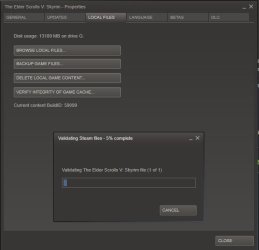
Open Steam, go to your Library, and see if the game is listed, if so right click on it and hit properties; from there, click Verify Integrity of game cache and see if it completes a cache check. You'll see a progress bar...

Capture.JPG

Anyway if it completes see if you can play the game? If not you're probably going to have to reinstall Steam (just the app), and that see what it does from there. It may need to re-download all the games.

You could also try re-cloning the old drive if you still have it. This time making sure everything have be copied. But that's another direction.
 

My Computer My Computer

Computer type
PC/Desktop
Computer Manufacturer/Model Number
Custom built by me.
OS
Windows 10 Pro
CPU
Intel Core i7-4770K (3.5Ghz)
Motherboard
Gigabyte G1 Sniper 5 (F10 Bios)
Memory
32 gig Corsair Dominator Platinum (4x8Gig)
Graphics Card(s)
Sapphire Tri-X R9 Fury
Sound Card
Soundblaster ZXR
Monitor(s) Displays
NEC PA242W 24" LCD Monitor
Screen Resolution
1920 x 1200
Hard Drives
Primary - Samsung 850 Pro (512gig), Samsung 840 Pro (256gig), 2TB WD Caviar Black.
PSU
EVGA Supernova 1000 G2
Case
Cooler Master HAF X
Cooling
Corsair H100i with Corsair Air Series SP120 Quiet Fans
Keyboard
Logitech Wireless Wave
Mouse
Logitech Performance MX
Internet Speed
High Speed Cable
Antivirus
Norton Security
Browser
IE11
Other Info
Memory Timings - 1866MHz @ 9-9-9-27-1T @ 1.5 volts
Edit:
Aha! Brain now working. I installed the SSD fairly recently (upgrading from a Intel 120GB). Not all the games are loaded on that drive, but is it possible some files didn't get cloned onto the new drive properly, and if so, how would I fix that?

Is your Steam install on that drive? That could very well be key and would tie in with what sygnus21 has mentioned.
 

My Computer My Computer

Computer type
PC/Desktop
Computer Manufacturer/Model Number
Custom Build
OS
W7 Pro x64 SP1 | W10 Pro IP x64 | W8.1 Pro x64 VM | Linux Mint VM
CPU
i7-4790k @ 4GHz (4.4GHz Boost)
Motherboard
ASUS Sabertooth Z87 (BIOS Rev 2004)
Memory
16GB DDR3 Kingston HyperX Fury @ 1600MHz CL 9-9-9-27
Graphics Card(s)
EVGA GTX 980 Classified
Sound Card
Realtek Onboard
Monitor(s) Displays
Samsung S27D390
Screen Resolution
1920 x 1080
Hard Drives
240GB Intel 520 Series SSD |
Samsung 850 EVO 120GB SSD |
2TB WD Caviar Black |
2TB WD Caviar Green
PSU
Corsair HX850-80 Gold Modular
Case
Cooler Master Silencio 650
Cooling
Corsair H80i w/2 x Corsair SP120 | 2 x 120mm Noctua NF-S12B
Keyboard
Microsoft Sidewinder X4
Mouse
Gigabyte M6900 optical
Internet Speed
152mb
Antivirus
F-Secure
Browser
Firefox 38.0
Other Info
Backup Rig: Win 7 Pro 64-bit | AMD A10-5800k | ASUS F2A85-V Pro | 8GB Samsung DDR3 @1600MHz | 120GB Toshiba SDD | 2TB Seagate HDD | Cooler Master Silencio 550
My Steam install is on that drive. I've verified the game caches, so that shouldn't be the problem.
I'm running in on-line mode, all the games were bought and registered through Steam.

I'm going to try:
Repairing Win7
Uninstalling and re-installing Steam
 

My Computer My Computer

Computer type
PC/Desktop
Computer Manufacturer/Model Number
Custom build
OS
Windows 7 Pro x64 SP1
CPU
Intel Core i7-3770K CPU @ 3.50GHz
Motherboard
Intel DZ77GA-70K
Memory
32GB
Graphics Card(s)
NVidia 770
Hard Drives
500GB Samsung SSD 840 EVO
2TB Seagate (?) ST2000DM001-1CH164
Antivirus
Norton Internet Security
Browser
Firefox
Uninstalling and re-installing Steam

Just do that first. It's a lot easier and may be quicker, though you may wind up re-downloading all your games again. Still, that'll be easier that redoing Windows.

Let us know.
 

My Computer My Computer

Computer type
PC/Desktop
Computer Manufacturer/Model Number
Custom built by me.
OS
Windows 10 Pro
CPU
Intel Core i7-4770K (3.5Ghz)
Motherboard
Gigabyte G1 Sniper 5 (F10 Bios)
Memory
32 gig Corsair Dominator Platinum (4x8Gig)
Graphics Card(s)
Sapphire Tri-X R9 Fury
Sound Card
Soundblaster ZXR
Monitor(s) Displays
NEC PA242W 24" LCD Monitor
Screen Resolution
1920 x 1200
Hard Drives
Primary - Samsung 850 Pro (512gig), Samsung 840 Pro (256gig), 2TB WD Caviar Black.
PSU
EVGA Supernova 1000 G2
Case
Cooler Master HAF X
Cooling
Corsair H100i with Corsair Air Series SP120 Quiet Fans
Keyboard
Logitech Wireless Wave
Mouse
Logitech Performance MX
Internet Speed
High Speed Cable
Antivirus
Norton Security
Browser
IE11
Other Info
Memory Timings - 1866MHz @ 9-9-9-27-1T @ 1.5 volts
Yeah, that's what I thought. 11GB download incoming.
 

My Computer My Computer

Computer type
PC/Desktop
Computer Manufacturer/Model Number
Custom build
OS
Windows 7 Pro x64 SP1
CPU
Intel Core i7-3770K CPU @ 3.50GHz
Motherboard
Intel DZ77GA-70K
Memory
32GB
Graphics Card(s)
NVidia 770
Hard Drives
500GB Samsung SSD 840 EVO
2TB Seagate (?) ST2000DM001-1CH164
Antivirus
Norton Internet Security
Browser
Firefox
Yeah, that's what I thought. 11GB download incoming.

Well if you've still got the old drive you could try copying those files over, than re-installing Steam in the same location, open Steam and click on a game. It should see the files and may download some stuff to do some cleanup and maintenance, but it shouldn't be nearly as much as downloading all the files (games) again.
 

My Computer My Computer

Computer type
PC/Desktop
Computer Manufacturer/Model Number
Custom built by me.
OS
Windows 10 Pro
CPU
Intel Core i7-4770K (3.5Ghz)
Motherboard
Gigabyte G1 Sniper 5 (F10 Bios)
Memory
32 gig Corsair Dominator Platinum (4x8Gig)
Graphics Card(s)
Sapphire Tri-X R9 Fury
Sound Card
Soundblaster ZXR
Monitor(s) Displays
NEC PA242W 24" LCD Monitor
Screen Resolution
1920 x 1200
Hard Drives
Primary - Samsung 850 Pro (512gig), Samsung 840 Pro (256gig), 2TB WD Caviar Black.
PSU
EVGA Supernova 1000 G2
Case
Cooler Master HAF X
Cooling
Corsair H100i with Corsair Air Series SP120 Quiet Fans
Keyboard
Logitech Wireless Wave
Mouse
Logitech Performance MX
Internet Speed
High Speed Cable
Antivirus
Norton Security
Browser
IE11
Other Info
Memory Timings - 1866MHz @ 9-9-9-27-1T @ 1.5 volts
Well, I had downtime, so downloading wasn't a big deal.

Redownloaded, tried it, didn't work.

Any other ideas to try before I re-Windows?
 

My Computer My Computer

Computer type
PC/Desktop
Computer Manufacturer/Model Number
Custom build
OS
Windows 7 Pro x64 SP1
CPU
Intel Core i7-3770K CPU @ 3.50GHz
Motherboard
Intel DZ77GA-70K
Memory
32GB
Graphics Card(s)
NVidia 770
Hard Drives
500GB Samsung SSD 840 EVO
2TB Seagate (?) ST2000DM001-1CH164
Antivirus
Norton Internet Security
Browser
Firefox
Have you tried a Clean Start to see if there is a conflict?

http://www.sevenforums.com/tutorial...ation-conflicts-performing-clean-startup.html

Unsure if Steam would have to be excluded as I don't game

It wouldn't hurt to run the System File Checker

http://www.sevenforums.com/tutorials/1538-sfc-scannow-command-system-file-checker.html

A Repair Install is also another option

http://www.sevenforums.com/tutorials/3413-repair-install.html

A Guy

PS

If you decide to reinstall, you might make a complete system image, just in case a clean install does not fix it, you can quickly restore.
 

My Computer My Computer

Computer type
PC/Desktop
OS
Windows 10 Home x64
CPU
INTEL Core i5-750 Quad-Core 3.37GHz
Motherboard
ASUS P7P55D
Memory
HyperX Fury Black Series 8GB (2 x 4GB) 1866Mhz
Graphics Card(s)
EVGA GeForce GTX 750 Superclocked 1GB 128-Bit GDDR5
Monitor(s) Displays
LG 32MA68HY 32" IPS
Screen Resolution
1920 x 1080
Hard Drives
Samsung 840 Evo 120GB, SEAGATE 500GB Barracuda® 7200.12, SATA 3 Gb/s, 7200 RPM, 16MB cache
PSU
ANTEC TruePower New TP-550, 80 PLUS, 550W
Case
ANTEC Three Hundred Illusion
Cooling
COOLER MASTER Hyper 212 Plus, 4 x 120mm 1 x 140mm Noctua's
Internet Speed
85 + Mbps
Antivirus
Avast
Browser
Vivaldi
Well, I had downtime, so downloading wasn't a big deal.

Redownloaded, tried it, didn't work.

Any other ideas to try before I re-Windows?

  • What did you try?
  • What didn't work?
Did you actually re-install the steam app first???
Are you having issues with any other software other than your Steam based games?
 

My Computer My Computer

Computer type
PC/Desktop
Computer Manufacturer/Model Number
Custom built by me.
OS
Windows 10 Pro
CPU
Intel Core i7-4770K (3.5Ghz)
Motherboard
Gigabyte G1 Sniper 5 (F10 Bios)
Memory
32 gig Corsair Dominator Platinum (4x8Gig)
Graphics Card(s)
Sapphire Tri-X R9 Fury
Sound Card
Soundblaster ZXR
Monitor(s) Displays
NEC PA242W 24" LCD Monitor
Screen Resolution
1920 x 1200
Hard Drives
Primary - Samsung 850 Pro (512gig), Samsung 840 Pro (256gig), 2TB WD Caviar Black.
PSU
EVGA Supernova 1000 G2
Case
Cooler Master HAF X
Cooling
Corsair H100i with Corsair Air Series SP120 Quiet Fans
Keyboard
Logitech Wireless Wave
Mouse
Logitech Performance MX
Internet Speed
High Speed Cable
Antivirus
Norton Security
Browser
IE11
Other Info
Memory Timings - 1866MHz @ 9-9-9-27-1T @ 1.5 volts
I've done the Clean Startup, and it didn't help.
Ran SFC, no problems.
Repair Install had nothing to repair.

A good list of things that I tried is in my first post. None of it worked.
I haven't had any problems other than Steam games, but it's not with all Steam games. I've only noticed less than a dozen that don't work.
 

My Computer My Computer

Computer type
PC/Desktop
Computer Manufacturer/Model Number
Custom build
OS
Windows 7 Pro x64 SP1
CPU
Intel Core i7-3770K CPU @ 3.50GHz
Motherboard
Intel DZ77GA-70K
Memory
32GB
Graphics Card(s)
NVidia 770
Hard Drives
500GB Samsung SSD 840 EVO
2TB Seagate (?) ST2000DM001-1CH164
Antivirus
Norton Internet Security
Browser
Firefox
Back
Top