
- Local time
- 12:26 PM
- Messages
- 52
Windows 7 SP1 Updated thru 05-14-2017
INSTALLED SOFTWARE
-----------------------
STARTUP
---------
Noticing some weird issues after a restart
1) Login user picture does not show up at logon screen, but does show up in the startup dialog.
2) Instead of prompting for just a logon pw it also prompts for user name.
3) A dialog window appears on the desktop regarding Windows Defender:
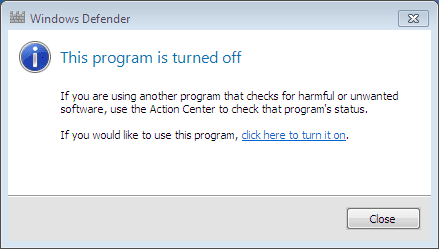
Not sure what is causing all this, but it did seem to appear after the last restart.
performed:
Rkill
Adwcleaner
Ccleaner
MSSE
Registry clean
Found nothing but some invalid registry entries.
problem still persists.
4) Also:
Restore points I had created were gone with no mention made.
Q: will restore points drop off the list if the allocated space for restore points is reached or will I be prompted that this space needs to be increased.
Note:
In WINDOWS > SERVICES Windows Defender is set as Manual and it is not running. If I change that to Automatic and then start the service it stops right after starting.
INSTALLED SOFTWARE
-----------------------
- Adobe Flash Player 25 NPAPI Adobe Systems Incorporated 5/13/2017 19.3 MB 25.0.0.171 All users
- Broadcom 440x 10/100 Integrated Controller Broadcom Corporation 5/12/2017 132 KB 8.03.06 All users
- gpedt.msc 1.0 Richard 5/12/2017 5.24 MB All users
- Microsoft .NET Framework 4.6.2 Microsoft Corporation 5/12/2017 4.6.01590 All users
- Microsoft Security Essentials Microsoft Corporation 5/12/2017 4.10.209.0 All users
- TEAC USB HS Audio Software TEAC 5/13/2017 605 KB 1.1.2 All users
STARTUP
---------
- Yes HKLM:Run MSC Microsoft Corporation All users "C:\Program Files\Microsoft Security Client\msseces.exe" -hide -runkey
- Yes HKLM:Run Windows Defender Microsoft Corporation All users %ProgramFiles%\Windows Defender\MSASCui.exe -hide
Noticing some weird issues after a restart
1) Login user picture does not show up at logon screen, but does show up in the startup dialog.
2) Instead of prompting for just a logon pw it also prompts for user name.
3) A dialog window appears on the desktop regarding Windows Defender:
Not sure what is causing all this, but it did seem to appear after the last restart.
performed:
Rkill
Adwcleaner
Ccleaner
MSSE
Registry clean
Found nothing but some invalid registry entries.
problem still persists.
4) Also:
Restore points I had created were gone with no mention made.
Q: will restore points drop off the list if the allocated space for restore points is reached or will I be prompted that this space needs to be increased.
Note:
In WINDOWS > SERVICES Windows Defender is set as Manual and it is not running. If I change that to Automatic and then start the service it stops right after starting.
Last edited:
My Computer
At a glance
Microsoft Windows 7 Home Premium Build 7601 3...Intel Pentium-M 735 Dothan - 1.7Ghz2GB DDR2-SDRAMIntel 82915GMx Graphics Controller 0 [B-1/C-0...
- Computer type
- Laptop
- Computer Manufacturer/Model Number
- Dell B130
- OS
- Microsoft Windows 7 Home Premium Build 7601 32bit
- CPU
- Intel Pentium-M 735 Dothan - 1.7Ghz
- Motherboard
- DELL 0RJ272 / Intel 915GM (Alviso-GM) + ICH6-M
- Memory
- 2GB DDR2-SDRAM
- Graphics Card(s)
- Intel 82915GMx Graphics Controller 0 [B-1/C-0] [DELL]
- Screen Resolution
- 1280x800
- Hard Drives
- Seagate ST9408114A - 40GB
- Antivirus
- Microsoft Scurity Essentials
- Browser
- Firefox


