Solved Razer Synapse not working, multiple issues or errors

renren

New member
Member
VIP
Local time
7:22 PM
Messages
110
Ive done so much trying to get synapse to work!

1. Wipe of all .netframwork and reinstalled
2. COnstantly Reinstalling synapse with admin rights
3. Uninstalling via device manager
4. Download the latest synapse (v1.16.06)
5.shuffling the USB ports at the back

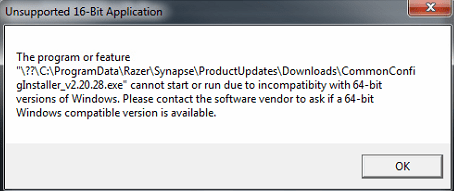
Its very unpredictable, Sometimes it wont launch at all or throw a 16bit error (attached).

It picks up the hardware at times but when i do get synapse to open it says "Please connect a 2.0 device" etc etc.

Hardeware:

Death adder mouse
Death stalker keyboard
 

Attachments
  • jj.png
    jj.png
    17.3 KB · Views: 28

My Computer

Computer type
PC/Desktop
OS
Windws 7 ultimate 64bit
CPU
Q9400 @3.2Ghz
Motherboard
EP45 UD3
Memory
Kingston HyperX 1066
Graphics Card(s)
GTX 295
Monitor(s) Displays
24"
Hard Drives
320GB seagate sata
PSU
750 Watt
Cooling
Air
Antivirus
Vipre
Your system specs show that you have Windws 7 ultimate 32bit.

Maybe the error is wrong, but it seems to be telling us that you are attempting to install a 16bit app onto a 64bit OS. A 64bit OS will not run a 16bit app.

You mentioned that you installed v1.16.06 and yet it seems to be updating to v2.20.28.
 

My Computer

Computer type
Laptop
Computer Manufacturer/Model Number
Employer provided Dell Latitude
OS
W7 Pro SP1 64bit
CPU
i7
Memory
8GB
Graphics Card(s)
Intel HD Graphics
Hard Drives
crappy SSD
Antivirus
Employer mandated Symantec Endpoint Protection
Browser
Pale Moon 64bit, IE11 64bit & Chrome 64bit
Ah sorry, my specs on my signature is out of date.

1.16.06 is the installation file version apparently, v2.20.28 is the program version.
 

My Computer

Computer type
PC/Desktop
OS
Windws 7 ultimate 64bit
CPU
Q9400 @3.2Ghz
Motherboard
EP45 UD3
Memory
Kingston HyperX 1066
Graphics Card(s)
GTX 295
Monitor(s) Displays
24"
Hard Drives
320GB seagate sata
PSU
750 Watt
Cooling
Air
Antivirus
Vipre
You should give up on installing this 16bit app on a 64bit operating system.
 

My Computer

Computer type
Laptop
Computer Manufacturer/Model Number
Employer provided Dell Latitude
OS
W7 Pro SP1 64bit
CPU
i7
Memory
8GB
Graphics Card(s)
Intel HD Graphics
Hard Drives
crappy SSD
Antivirus
Employer mandated Symantec Endpoint Protection
Browser
Pale Moon 64bit, IE11 64bit & Chrome 64bit

My Computer

Computer type
PC/Desktop
OS
Windws 7 ultimate 64bit
CPU
Q9400 @3.2Ghz
Motherboard
EP45 UD3
Memory
Kingston HyperX 1066
Graphics Card(s)
GTX 295
Monitor(s) Displays
24"
Hard Drives
320GB seagate sata
PSU
750 Watt
Cooling
Air
Antivirus
Vipre
I had this software at one point and could never get it to work correctly. I think the issue is with Synapse itself.
 

My Computer

Computer type
PC/Desktop
Computer Manufacturer/Model Number
custom build
OS
Windows 7 Professional 64bit
CPU
Intel i7-5960X
Motherboard
EVGA X99 Classified
Memory
64GB Corsair Dominator 2400MHz
Graphics Card(s)
3 EVGA GTX980's
Sound Card
on board
Monitor(s) Displays
3 Dell E2715H 27"
Screen Resolution
1920x1080 (5760x1080)
Hard Drives
Samsung 950 Pro 1TB M.2 SSD,
Western Digital Black 2TB HDD's x5
Western Digital Black 1TB HDD's x3
PSU
Corsair AX1200i
Case
Corsair 750D
Cooling
Corsair H110i GT
Keyboard
Corsair K70
Mouse
Corsair M45
Internet Speed
250 down/10 up
Antivirus
Microsoft Security Essentials
Browser
IE 11, Google Chrome
I see...

So how can i reduce the DPI/sensitivity of the razer mouse? its very unusable at the momment...
 

My Computer

Computer type
PC/Desktop
OS
Windws 7 ultimate 64bit
CPU
Q9400 @3.2Ghz
Motherboard
EP45 UD3
Memory
Kingston HyperX 1066
Graphics Card(s)
GTX 295
Monitor(s) Displays
24"
Hard Drives
320GB seagate sata
PSU
750 Watt
Cooling
Air
Antivirus
Vipre
I assure you it isnt a 16bit app! View it on this link...

Razer Synapse 2.0 (PC) - Cloud-based configurator and manager for Razer devices


Its working on a different pc which uses razer peripherals..
Yep - you are correct. I don't know how you are getting that 16bit error.

I was able to install it inside a 64bit virtual machine without issue. I never saw a folder named Downloads as shown in the path in that 16bit error. Did you tell the app to update? Maybe the update file is 16bit.
 

My Computer

Computer type
Laptop
Computer Manufacturer/Model Number
Employer provided Dell Latitude
OS
W7 Pro SP1 64bit
CPU
i7
Memory
8GB
Graphics Card(s)
Intel HD Graphics
Hard Drives
crappy SSD
Antivirus
Employer mandated Symantec Endpoint Protection
Browser
Pale Moon 64bit, IE11 64bit & Chrome 64bit
Thanks, ill work it out with razer support!

for now i found mouse in CP to edit sensitivty
 

My Computer

Computer type
PC/Desktop
OS
Windws 7 ultimate 64bit
CPU
Q9400 @3.2Ghz
Motherboard
EP45 UD3
Memory
Kingston HyperX 1066
Graphics Card(s)
GTX 295
Monitor(s) Displays
24"
Hard Drives
320GB seagate sata
PSU
750 Watt
Cooling
Air
Antivirus
Vipre
You are welcome.

I don't think that I was of much help :-(
... but I learned stuff :-)

If you find a solution and you have the time...
...please consider posting the solution here.
 

My Computer

Computer type
Laptop
Computer Manufacturer/Model Number
Employer provided Dell Latitude
OS
W7 Pro SP1 64bit
CPU
i7
Memory
8GB
Graphics Card(s)
Intel HD Graphics
Hard Drives
crappy SSD
Antivirus
Employer mandated Symantec Endpoint Protection
Browser
Pale Moon 64bit, IE11 64bit & Chrome 64bit
Roger that!
 

My Computer

Computer type
PC/Desktop
OS
Windws 7 ultimate 64bit
CPU
Q9400 @3.2Ghz
Motherboard
EP45 UD3
Memory
Kingston HyperX 1066
Graphics Card(s)
GTX 295
Monitor(s) Displays
24"
Hard Drives
320GB seagate sata
PSU
750 Watt
Cooling
Air
Antivirus
Vipre
Hello everyone,

Ive been through with techsupport with razer, find the emails as an attached pdf.

Apparently nothing wrong is with razer but with the pc itself,

Ive done a sfc /scannow and reinstalling of .net framework. However ive ran out of ideas. Any suggestions?

Thank you for your help!
 

Attachments

My Computer

Computer type
PC/Desktop
OS
Windws 7 ultimate 64bit
CPU
Q9400 @3.2Ghz
Motherboard
EP45 UD3
Memory
Kingston HyperX 1066
Graphics Card(s)
GTX 295
Monitor(s) Displays
24"
Hard Drives
320GB seagate sata
PSU
750 Watt
Cooling
Air
Antivirus
Vipre
Do you still get the same error shown in your original post? If so, maybe you could use Process Explorer to find the app that creates it. See this post for more info.
 

My Computer

Computer type
Laptop
Computer Manufacturer/Model Number
Employer provided Dell Latitude
OS
W7 Pro SP1 64bit
CPU
i7
Memory
8GB
Graphics Card(s)
Intel HD Graphics
Hard Drives
crappy SSD
Antivirus
Employer mandated Symantec Endpoint Protection
Browser
Pale Moon 64bit, IE11 64bit & Chrome 64bit
Do you still get the same error shown in your original post? If so, maybe you could use Process Explorer to find the app that creates it. See this post for more info.


Hello again!

What am i meant to be looking for/doing with this program?
 

My Computer

Computer type
PC/Desktop
OS
Windws 7 ultimate 64bit
CPU
Q9400 @3.2Ghz
Motherboard
EP45 UD3
Memory
Kingston HyperX 1066
Graphics Card(s)
GTX 295
Monitor(s) Displays
24"
Hard Drives
320GB seagate sata
PSU
750 Watt
Cooling
Air
Antivirus
Vipre
Judging from the name of the folders shown in the error message in your original post, some part of the installation process downloads a product update. According to the tittle of the error message, the installer that is downloaded seems to be a 16bit app. I'm curious which application is generating that error message that you captured and attached to post #1. Maybe Windows (file) Explorer presents that error message. Or maybe some other part of W7 - like the Windows installer. Or maybe some app that is not native to W7 is responsible for showing you that info.

If/when you get the error message, drag/drop the little target icon from Process Explorer onto the error message and it should let us know what app is giving us that error message. you could post a screenshot of the what Process Explorer shows you after you do the drag/drop thing.

Also, leave the error message in place
...using the Windows (file) Explorer
...navigate to the file mentioned the error message
...copy the file to your desktop
...dismiss the error message
...right click on the file on your desktop
...select Send to > Compressed (zipped) folder
...upload to your next post.
 

My Computer

Computer type
Laptop
Computer Manufacturer/Model Number
Employer provided Dell Latitude
OS
W7 Pro SP1 64bit
CPU
i7
Memory
8GB
Graphics Card(s)
Intel HD Graphics
Hard Drives
crappy SSD
Antivirus
Employer mandated Symantec Endpoint Protection
Browser
Pale Moon 64bit, IE11 64bit & Chrome 64bit
Here are the files as requested
 

Attachments

My Computer

Computer type
PC/Desktop
OS
Windws 7 ultimate 64bit
CPU
Q9400 @3.2Ghz
Motherboard
EP45 UD3
Memory
Kingston HyperX 1066
Graphics Card(s)
GTX 295
Monitor(s) Displays
24"
Hard Drives
320GB seagate sata
PSU
750 Watt
Cooling
Air
Antivirus
Vipre
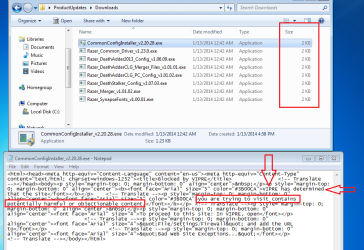
VIPRE is preventing the installer from downloading each update file:

Take a look at the small size of each "EXE".

Open one of them in notepad:

av.png
 

My Computer

Computer type
Laptop
Computer Manufacturer/Model Number
Employer provided Dell Latitude
OS
W7 Pro SP1 64bit
CPU
i7
Memory
8GB
Graphics Card(s)
Intel HD Graphics
Hard Drives
crappy SSD
Antivirus
Employer mandated Symantec Endpoint Protection
Browser
Pale Moon 64bit, IE11 64bit & Chrome 64bit
Ok ill try disbaling vipre

I durno why its happening, i got it working on 2 others with vipre on.
 

My Computer

Computer type
PC/Desktop
OS
Windws 7 ultimate 64bit
CPU
Q9400 @3.2Ghz
Motherboard
EP45 UD3
Memory
Kingston HyperX 1066
Graphics Card(s)
GTX 295
Monitor(s) Displays
24"
Hard Drives
320GB seagate sata
PSU
750 Watt
Cooling
Air
Antivirus
Vipre
Hello!

You were right about vipre putting its fingers into this installation. Weird 2 other PCs had no trouble with razer but has vipre too.

Thanks man so much for your help!
 

My Computer

Computer type
PC/Desktop
OS
Windws 7 ultimate 64bit
CPU
Q9400 @3.2Ghz
Motherboard
EP45 UD3
Memory
Kingston HyperX 1066
Graphics Card(s)
GTX 295
Monitor(s) Displays
24"
Hard Drives
320GB seagate sata
PSU
750 Watt
Cooling
Air
Antivirus
Vipre
You are welcome.

In hindsight, that should have been one of my first suggestions.

You can list VIPRE as you antivirus tool in your system spec - if you want.
 

My Computer

Computer type
Laptop
Computer Manufacturer/Model Number
Employer provided Dell Latitude
OS
W7 Pro SP1 64bit
CPU
i7
Memory
8GB
Graphics Card(s)
Intel HD Graphics
Hard Drives
crappy SSD
Antivirus
Employer mandated Symantec Endpoint Protection
Browser
Pale Moon 64bit, IE11 64bit & Chrome 64bit
Back
Top