Multiple network cards

risingflight

New member
Hello i have one windows 7 computer with 3 network cards connected.

I have assigned ip addresses to 3 network cards but i am able to ping to only one ip.
I am not able to ping to other 2 network cards ip addresses. how do i achieve it.
 

My Computer

Computer type
PC/Desktop
Computer Manufacturer/Model Number
Dell
OS
Windows 7 x64
CPU
Core2 Duo
What are the 3 IP addresses? Are they connected to the same switch/IP subnet? An ipconfig would be good to see. It sounds like the addresses might be incorrectly configured and the client accidently sending the traffic to its default gateway.

Many Thanks,
Josh :)
 

My Computer

Computer type
PC/Desktop
Computer Manufacturer/Model Number
Custom Built
OS
Windows 7 Professional x64 SP1 ; Windows Server 2012 R2 Standard
CPU
Intel Core i5 2400 @ 3.10GHz
Motherboard
Foxconn H67MP-S/-V/H67MP
Memory
8.0GB DDR3 @ 665MHz (2GBx4)
Graphics Card(s)
AMD Radeon HD 6870
Sound Card
Realtek High Definition Audio
Monitor(s) Displays
AOC 2243W & SMB1930NW
Screen Resolution
1440x900 & 1920x1080
Hard Drives
977GB Seagate ST31000524AS ATA Drive (SATA)
250GB WD iSCSI attached Drive
PSU
750W Gaming PSU
Case
Novatech Night
Cooling
Fan
Keyboard
Dell Standard PS/2 Keyboard
Mouse
R.A.T 07 Gaming Mouse
Internet Speed
Download: 10 Mbps Ping: 30ms Upload: 0.81 Mbps
Browser
Google Chrome
Other Info
Optiarc DVD RW AD-5260S ATA Device
Three Network Cards are on the same subnet with Same IP Address Scheme
 

My Computer

Computer type
PC/Desktop
Computer Manufacturer/Model Number
Dell
OS
Windows 7 x64
CPU
Core2 Duo
I need more information in order to better assist you. Are you saying that each NIC his the same IP address? Or that they have 3 separate addresses?

Also, firewalls can sometimes block ICMP (Ping) traffic if the NIC is seen as public. Try to temporarily disable the firewall and try again

Many thanks,
Josh
 

My Computer

Computer type
PC/Desktop
Computer Manufacturer/Model Number
Custom Built
OS
Windows 7 Professional x64 SP1 ; Windows Server 2012 R2 Standard
CPU
Intel Core i5 2400 @ 3.10GHz
Motherboard
Foxconn H67MP-S/-V/H67MP
Memory
8.0GB DDR3 @ 665MHz (2GBx4)
Graphics Card(s)
AMD Radeon HD 6870
Sound Card
Realtek High Definition Audio
Monitor(s) Displays
AOC 2243W & SMB1930NW
Screen Resolution
1440x900 & 1920x1080
Hard Drives
977GB Seagate ST31000524AS ATA Drive (SATA)
250GB WD iSCSI attached Drive
PSU
750W Gaming PSU
Case
Novatech Night
Cooling
Fan
Keyboard
Dell Standard PS/2 Keyboard
Mouse
R.A.T 07 Gaming Mouse
Internet Speed
Download: 10 Mbps Ping: 30ms Upload: 0.81 Mbps
Browser
Google Chrome
Other Info
Optiarc DVD RW AD-5260S ATA Device
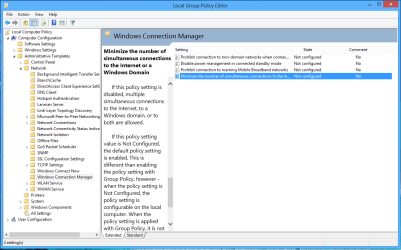
This certainly works for me but in my case it's two different IP's and both are active connections, wired/wireless are both connected to the internet, of course Windows is only using one of those connections at a time but I'm able to ping both of them without problems.

I use a group policy that allow Windows to connect to both at start up.
 

Attachments

  • Group Policy for using two connections at once.PNG
    Group Policy for using two connections at once.PNG
    102.1 KB · Views: 3

My Computer

Computer type
PC/Desktop
Computer Manufacturer/Model Number
Home built
OS
Windows 7 Ult, Windows 8.1 Pro,
CPU
Q9650-4.275GHz, E8600 4.5GHz, E6750-3.8GHz
Motherboard
Evga 780i FTW
Memory
G.Skill PC2 9600 1200Mhz 5 5 5 15 2T
Graphics Card(s)
GTX480
Sound Card
Asus Xonar D2
Monitor(s) Displays
HannsG
Screen Resolution
1680X1050
Hard Drives
GSkill Phoenix Pro 120GB SSD
PSU
ThermalTake Toughpower 1000Watt modular
Case
ThermalTake XaserV
Cooling
Xigmatek S1283
Keyboard
Logitech G15
Mouse
Logitech G9
Internet Speed
T1
This certainly works for me but in my case it's two different IP's and both are active connections, wired/wireless are both connected to the internet, of course Windows is only using one of those connections at a time but I'm able to ping both of them without problems.

I use a group policy that allow Windows to connect to both at start up.

Have you changed the metrics in the local routing table for any of the interfaces? From a routing perspective the issue may be where the return traffic is sent out a different interface (And Source IP address) than what it was received on due to Windows picking the better interface. This would cause the reply traffic to fail on the client end since source IP addresses would not match.

On routers this can be an issue and is mitigated with certain security measures however considering that this is a Windows machine I am not entirely sure if the same concept applies. I would still be convinced with the firewall being the issue since the other NICs are most likely seen as "Public Interfaces".

Josh :)
 

My Computer

Computer type
PC/Desktop
Computer Manufacturer/Model Number
Custom Built
OS
Windows 7 Professional x64 SP1 ; Windows Server 2012 R2 Standard
CPU
Intel Core i5 2400 @ 3.10GHz
Motherboard
Foxconn H67MP-S/-V/H67MP
Memory
8.0GB DDR3 @ 665MHz (2GBx4)
Graphics Card(s)
AMD Radeon HD 6870
Sound Card
Realtek High Definition Audio
Monitor(s) Displays
AOC 2243W & SMB1930NW
Screen Resolution
1440x900 & 1920x1080
Hard Drives
977GB Seagate ST31000524AS ATA Drive (SATA)
250GB WD iSCSI attached Drive
PSU
750W Gaming PSU
Case
Novatech Night
Cooling
Fan
Keyboard
Dell Standard PS/2 Keyboard
Mouse
R.A.T 07 Gaming Mouse
Internet Speed
Download: 10 Mbps Ping: 30ms Upload: 0.81 Mbps
Browser
Google Chrome
Other Info
Optiarc DVD RW AD-5260S ATA Device
This certainly works for me but in my case it's two different IP's and both are active connections, wired/wireless are both connected to the internet, of course Windows is only using one of those connections at a time but I'm able to ping both of them without problems.

I use a group policy that allow Windows to connect to both at start up.

Have you changed the metrics in the local routing table for any of the interfaces? From a routing perspective the issue may be where the return traffic is sent out a different interface (And Source IP address) than what it was received on due to Windows picking the better interface. This would cause the reply traffic to fail on the client end since source IP addresses would not match.

On routers this can be an issue and is mitigated with certain security measures however considering that this is a Windows machine I am not entirely sure if the same concept applies. I would still be convinced with the firewall being the issue since the other NICs are most likely seen as "Public Interfaces".

Josh :)

My firewall doesn't block any ping requests on either of my network interfaces despite having them both working with different IP's at the same time. No need to change the metric in my case, the entire metric thing is overrated and inconsistent at best.

I can only guess that the Op may be trying to ping those IP's outside of the gateway's subnet which won't work without some type of routing set up.

In case you were wondering about the GPO setting, Windows will not consistently connect to both interfaces at start up like it does now, unless that setting is disabled. I just use the wireless for testing.

Both of my connected interfaces with different IP's showed no delay or dropped packets with the ping, that was the only point I was trying to make. :geek:
 

My Computer

Computer type
PC/Desktop
Computer Manufacturer/Model Number
Home built
OS
Windows 7 Ult, Windows 8.1 Pro,
CPU
Q9650-4.275GHz, E8600 4.5GHz, E6750-3.8GHz
Motherboard
Evga 780i FTW
Memory
G.Skill PC2 9600 1200Mhz 5 5 5 15 2T
Graphics Card(s)
GTX480
Sound Card
Asus Xonar D2
Monitor(s) Displays
HannsG
Screen Resolution
1680X1050
Hard Drives
GSkill Phoenix Pro 120GB SSD
PSU
ThermalTake Toughpower 1000Watt modular
Case
ThermalTake XaserV
Cooling
Xigmatek S1283
Keyboard
Logitech G15
Mouse
Logitech G9
Internet Speed
T1
This certainly works for me but in my case it's two different IP's and both are active connections, wired/wireless are both connected to the internet, of course Windows is only using one of those connections at a time but I'm able to ping both of them without problems.

I use a group policy that allow Windows to connect to both at start up.

Have you changed the metrics in the local routing table for any of the interfaces? From a routing perspective the issue may be where the return traffic is sent out a different interface (And Source IP address) than what it was received on due to Windows picking the better interface. This would cause the reply traffic to fail on the client end since source IP addresses would not match.

On routers this can be an issue and is mitigated with certain security measures however considering that this is a Windows machine I am not entirely sure if the same concept applies. I would still be convinced with the firewall being the issue since the other NICs are most likely seen as "Public Interfaces".

Josh :)

My firewall doesn't block any ping requests on either of my network interfaces despite having them both working with different IP's at the same time. No need to change the metric in my case, the entire metric thing is overrated and inconsistent at best.

I can only guess that the Op may be trying to ping those IP's outside of the gateway's subnet which won't work without some type of routing set up.

In case you were wondering about the GPO setting, Windows will not consistently connect to both interfaces at start up like it does now, unless that setting is disabled. I just use the wireless for testing.

Both of my connected interfaces with different IP's showed no delay or dropped packets with the ping, that was the only point I was trying to make. :geek:

Hmmm... Fair enough

The OP didn't say where they were pinging from so I just assumed from the same subnet :o. You might have discovered something there but only time can tell.

From a server perspective I find multiple layer 3 interfaces rarely used productively due to their inability to fail over and non bandwidth increasing nature. It is typical to have the NICs bundled to increase bandwidth and assign one IP address to aggregated link.

Josh :)
 

My Computer

Computer type
PC/Desktop
Computer Manufacturer/Model Number
Custom Built
OS
Windows 7 Professional x64 SP1 ; Windows Server 2012 R2 Standard
CPU
Intel Core i5 2400 @ 3.10GHz
Motherboard
Foxconn H67MP-S/-V/H67MP
Memory
8.0GB DDR3 @ 665MHz (2GBx4)
Graphics Card(s)
AMD Radeon HD 6870
Sound Card
Realtek High Definition Audio
Monitor(s) Displays
AOC 2243W & SMB1930NW
Screen Resolution
1440x900 & 1920x1080
Hard Drives
977GB Seagate ST31000524AS ATA Drive (SATA)
250GB WD iSCSI attached Drive
PSU
750W Gaming PSU
Case
Novatech Night
Cooling
Fan
Keyboard
Dell Standard PS/2 Keyboard
Mouse
R.A.T 07 Gaming Mouse
Internet Speed
Download: 10 Mbps Ping: 30ms Upload: 0.81 Mbps
Browser
Google Chrome
Other Info
Optiarc DVD RW AD-5260S ATA Device
Have you changed the metrics in the local routing table for any of the interfaces? From a routing perspective the issue may be where the return traffic is sent out a different interface (And Source IP address) than what it was received on due to Windows picking the better interface. This would cause the reply traffic to fail on the client end since source IP addresses would not match.

On routers this can be an issue and is mitigated with certain security measures however considering that this is a Windows machine I am not entirely sure if the same concept applies. I would still be convinced with the firewall being the issue since the other NICs are most likely seen as "Public Interfaces".

Josh :)

My firewall doesn't block any ping requests on either of my network interfaces despite having them both working with different IP's at the same time. No need to change the metric in my case, the entire metric thing is overrated and inconsistent at best.

I can only guess that the Op may be trying to ping those IP's outside of the gateway's subnet which won't work without some type of routing set up.

In case you were wondering about the GPO setting, Windows will not consistently connect to both interfaces at start up like it does now, unless that setting is disabled. I just use the wireless for testing.

Both of my connected interfaces with different IP's showed no delay or dropped packets with the ping, that was the only point I was trying to make. :geek:

Hmmm... Fair enough

The OP didn't say where they were pinging from so I just assumed from the same subnet :o. You might have discovered something there but only time can tell.

From a server perspective I find multiple layer 3 interfaces rarely used productively due to their inability to fail over and non bandwidth increasing nature. It is typical to have the NICs bundled to increase bandwidth and assign one IP address to aggregated link.

Josh :)

Yes those servers also have Network Teaming software built into them that allow this NIC bundling. Someone made a post not long ago showing the results.

Back in the Vista days they had Network Teaming software built into the drivers for my NVidia board but it never really worked as advertised.

It seems to work much better with the new server software where you can aggregate a few Gb NIC's and actually increase bandwidth. Some more info about this in the link.

Of course the Op never said anything about teaming but it's an interesting subject just the same.

http://www.sevenforums.com/network-...tion-bandwidth-doubling-2pcs-2-nics-each.html
 

My Computer

Computer type
PC/Desktop
Computer Manufacturer/Model Number
Home built
OS
Windows 7 Ult, Windows 8.1 Pro,
CPU
Q9650-4.275GHz, E8600 4.5GHz, E6750-3.8GHz
Motherboard
Evga 780i FTW
Memory
G.Skill PC2 9600 1200Mhz 5 5 5 15 2T
Graphics Card(s)
GTX480
Sound Card
Asus Xonar D2
Monitor(s) Displays
HannsG
Screen Resolution
1680X1050
Hard Drives
GSkill Phoenix Pro 120GB SSD
PSU
ThermalTake Toughpower 1000Watt modular
Case
ThermalTake XaserV
Cooling
Xigmatek S1283
Keyboard
Logitech G15
Mouse
Logitech G9
Internet Speed
T1
Aye, I found it a cool topic when using my college's lab! :cool: Plus I can configure LACP or PAgP on the switch to get the maximum benefits which isn't something I can do at home without emulation software. Then it just becomes a matter of knowing the configuration rather than using the benefits :(

Josh :)
 

My Computer

Computer type
PC/Desktop
Computer Manufacturer/Model Number
Custom Built
OS
Windows 7 Professional x64 SP1 ; Windows Server 2012 R2 Standard
CPU
Intel Core i5 2400 @ 3.10GHz
Motherboard
Foxconn H67MP-S/-V/H67MP
Memory
8.0GB DDR3 @ 665MHz (2GBx4)
Graphics Card(s)
AMD Radeon HD 6870
Sound Card
Realtek High Definition Audio
Monitor(s) Displays
AOC 2243W & SMB1930NW
Screen Resolution
1440x900 & 1920x1080
Hard Drives
977GB Seagate ST31000524AS ATA Drive (SATA)
250GB WD iSCSI attached Drive
PSU
750W Gaming PSU
Case
Novatech Night
Cooling
Fan
Keyboard
Dell Standard PS/2 Keyboard
Mouse
R.A.T 07 Gaming Mouse
Internet Speed
Download: 10 Mbps Ping: 30ms Upload: 0.81 Mbps
Browser
Google Chrome
Other Info
Optiarc DVD RW AD-5260S ATA Device
Aye, I found it a cool topic when using my college's lab! :cool: Plus I can configure LACP or PAgP on the switch to get the maximum benefits which isn't something I can do at home without emulation software. Then it just becomes a matter of knowing the configuration rather than using the benefits :(

Josh :)

NIC teaming, great subject for college lab experiments.

You can see at the link it actually works to increase bandwidth which is kind of cool. I guess the tricky part is setting up the switch so you can enable LACP mode on the teaming interface.

Server 720 - Server 2012 R2 Blog: SMB 3.0 Multipath over Nic Team in Windows Server 2012
 

My Computer

Computer type
PC/Desktop
Computer Manufacturer/Model Number
Home built
OS
Windows 7 Ult, Windows 8.1 Pro,
CPU
Q9650-4.275GHz, E8600 4.5GHz, E6750-3.8GHz
Motherboard
Evga 780i FTW
Memory
G.Skill PC2 9600 1200Mhz 5 5 5 15 2T
Graphics Card(s)
GTX480
Sound Card
Asus Xonar D2
Monitor(s) Displays
HannsG
Screen Resolution
1680X1050
Hard Drives
GSkill Phoenix Pro 120GB SSD
PSU
ThermalTake Toughpower 1000Watt modular
Case
ThermalTake XaserV
Cooling
Xigmatek S1283
Keyboard
Logitech G15
Mouse
Logitech G9
Internet Speed
T1
The hashing algorithms end up being the headache to get the full results :( Still, a good read! Cheers :)

Josh
 

My Computer

Computer type
PC/Desktop
Computer Manufacturer/Model Number
Custom Built
OS
Windows 7 Professional x64 SP1 ; Windows Server 2012 R2 Standard
CPU
Intel Core i5 2400 @ 3.10GHz
Motherboard
Foxconn H67MP-S/-V/H67MP
Memory
8.0GB DDR3 @ 665MHz (2GBx4)
Graphics Card(s)
AMD Radeon HD 6870
Sound Card
Realtek High Definition Audio
Monitor(s) Displays
AOC 2243W & SMB1930NW
Screen Resolution
1440x900 & 1920x1080
Hard Drives
977GB Seagate ST31000524AS ATA Drive (SATA)
250GB WD iSCSI attached Drive
PSU
750W Gaming PSU
Case
Novatech Night
Cooling
Fan
Keyboard
Dell Standard PS/2 Keyboard
Mouse
R.A.T 07 Gaming Mouse
Internet Speed
Download: 10 Mbps Ping: 30ms Upload: 0.81 Mbps
Browser
Google Chrome
Other Info
Optiarc DVD RW AD-5260S ATA Device
Back
Top