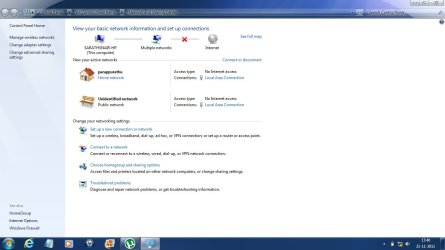
multiple networks in network and sharing center but no internet

sarathsnair

New member
Local time
8:30 AM
Messages
9
Location
Kerala, India
I have windows 7 home premium 64bit. i recently faced a problem regarding internet connection. I can see my broadband connection and an extra unidentified network connection in the network and sharing center. sometimes both shows Internet and Sometimes both shows no internet access. But the problem is that if both shows internet access still i cant open any webpage or anything which need internet. I cant access the internet. but while surfing the net i see a solution which says that all disable and enable the LAN adapter. it solve my problem for some time, but after that it still persists when restarting my computer. Please help me . i am attaching a screenshot of this
ee.jpg
 

My Computer My Computer

At a glance

Windows 7 Home Premium 64bitIntel Core i7 2630QM4GB DDR3 1366MHzIntel HD Graphics & ATI Radeon 6770m
Computer Manufacturer/Model Number
HP Pavilion DV6-6121tx
OS
Windows 7 Home Premium 64bit
CPU
Intel Core i7 2630QM
Motherboard
HP
Memory
4GB DDR3 1366MHz
Graphics Card(s)
Intel HD Graphics & ATI Radeon 6770m
Sound Card
Beats audio
Monitor(s) Displays
HP
Screen Resolution
1366X768,60Hz
Hard Drives
640GB HDD, 5200RPM
Internet Speed
256 to 512kbps
Alright, I'll see if I can help you out. That screenshot doesn't tell me anything. Do you use a wireless connection or only a lan connection?

what you probably need to do is find the right driver for your computer (lan). You'll need to fill this out: Fill out your system specs (this tool may help you out a great deal). That way I can let you know which one, and further help you out.

:note:If ever you need to download something, try using another computer to download the program onto say a USB stick from the internet, and then load it on the other computer (because you say internet wont work).

Waiting for your response.
 

My Computer My Computer

At a glance

Microsoft Windows 8.1 Pro 64-bitIntel(R) Core(TM) i3-4130 CPU @ 3.40GHz8.00 GBNone
Computer type
PC/Desktop
Computer Manufacturer/Model Number
Custom Asus Build
OS
Microsoft Windows 8.1 Pro 64-bit
CPU
Intel(R) Core(TM) i3-4130 CPU @ 3.40GHz
Motherboard
B85M-E
Memory
8.00 GB
Graphics Card(s)
None
Sound Card
Realtek High Definition Audio
Monitor(s) Displays
Asus 23.6" Monitor
Screen Resolution
1920 x 1080 x 32 bits (4294967296 colors) @ 60 Hz
Hard Drives
INTEL SSDSC2BW180A4
Samsung SSD 840 PRO Series
PSU
Seasonic S12II-380Bronze
Case
Lian Li
Cooling
Fan, Passive
Keyboard
Logitech K120
Mouse
Microsoft Touch Mouse
Internet Speed
4ms Ping, 19.0 Mbps Download, 19.0 Mbps Upload
Antivirus
Eset Endpoint
Browser
Internet Explorer, Chrome
Ya i also have a wifi connection. but most times i am using lan connection. My drivers are updated
 

My Computer My Computer

At a glance

Windows 7 Home Premium 64bitIntel Core i7 2630QM4GB DDR3 1366MHzIntel HD Graphics & ATI Radeon 6770m
Computer Manufacturer/Model Number
HP Pavilion DV6-6121tx
OS
Windows 7 Home Premium 64bit
CPU
Intel Core i7 2630QM
Motherboard
HP
Memory
4GB DDR3 1366MHz
Graphics Card(s)
Intel HD Graphics & ATI Radeon 6770m
Sound Card
Beats audio
Monitor(s) Displays
HP
Screen Resolution
1366X768,60Hz
Hard Drives
640GB HDD, 5200RPM
Internet Speed
256 to 512kbps
Hello again Sarathsnair,

If you will, I am giving you a link to another thread that is similar to this one. Please follow the directions I have listed in that thread and see if it helps you any. I do know that your drivers are updated, but perhaps if you try everything I list in the thread, you might find to your surprise it may help solve your problem.

Here is that link: http://www.sevenforums.com/network-sharing/196784-internet-speed-suddenly-slow.html
 

My Computer My Computer

At a glance

Microsoft Windows 8.1 Pro 64-bitIntel(R) Core(TM) i3-4130 CPU @ 3.40GHz8.00 GBNone
Computer type
PC/Desktop
Computer Manufacturer/Model Number
Custom Asus Build
OS
Microsoft Windows 8.1 Pro 64-bit
CPU
Intel(R) Core(TM) i3-4130 CPU @ 3.40GHz
Motherboard
B85M-E
Memory
8.00 GB
Graphics Card(s)
None
Sound Card
Realtek High Definition Audio
Monitor(s) Displays
Asus 23.6" Monitor
Screen Resolution
1920 x 1080 x 32 bits (4294967296 colors) @ 60 Hz
Hard Drives
INTEL SSDSC2BW180A4
Samsung SSD 840 PRO Series
PSU
Seasonic S12II-380Bronze
Case
Lian Li
Cooling
Fan, Passive
Keyboard
Logitech K120
Mouse
Microsoft Touch Mouse
Internet Speed
4ms Ping, 19.0 Mbps Download, 19.0 Mbps Upload
Antivirus
Eset Endpoint
Browser
Internet Explorer, Chrome
it does not work for me. it is only about the less speed. my problem is not like this
 

My Computer My Computer

At a glance

Windows 7 Home Premium 64bitIntel Core i7 2630QM4GB DDR3 1366MHzIntel HD Graphics & ATI Radeon 6770m
Computer Manufacturer/Model Number
HP Pavilion DV6-6121tx
OS
Windows 7 Home Premium 64bit
CPU
Intel Core i7 2630QM
Motherboard
HP
Memory
4GB DDR3 1366MHz
Graphics Card(s)
Intel HD Graphics & ATI Radeon 6770m
Sound Card
Beats audio
Monitor(s) Displays
HP
Screen Resolution
1366X768,60Hz
Hard Drives
640GB HDD, 5200RPM
Internet Speed
256 to 512kbps
Sarathsnair,

I thought you said that if both network connections are on at the same time, that you cannot browse the web? Did you do any of the things I had listed there for you in that link? If you follow my tutorial, you might be surprised, it could only help you.

Do you have all important updates from windows installed?

What do you mean when you say "it is only about less speed"?
 

My Computer My Computer

At a glance

Microsoft Windows 8.1 Pro 64-bitIntel(R) Core(TM) i3-4130 CPU @ 3.40GHz8.00 GBNone
Computer type
PC/Desktop
Computer Manufacturer/Model Number
Custom Asus Build
OS
Microsoft Windows 8.1 Pro 64-bit
CPU
Intel(R) Core(TM) i3-4130 CPU @ 3.40GHz
Motherboard
B85M-E
Memory
8.00 GB
Graphics Card(s)
None
Sound Card
Realtek High Definition Audio
Monitor(s) Displays
Asus 23.6" Monitor
Screen Resolution
1920 x 1080 x 32 bits (4294967296 colors) @ 60 Hz
Hard Drives
INTEL SSDSC2BW180A4
Samsung SSD 840 PRO Series
PSU
Seasonic S12II-380Bronze
Case
Lian Li
Cooling
Fan, Passive
Keyboard
Logitech K120
Mouse
Microsoft Touch Mouse
Internet Speed
4ms Ping, 19.0 Mbps Download, 19.0 Mbps Upload
Antivirus
Eset Endpoint
Browser
Internet Explorer, Chrome
Have you tried turning off any firewalls or AV to see what effect that has on your issue?
 

My Computer My Computer

At a glance

Windows 7 Ultimate 64 bit Steve Ballmer Signa...Intel Core 2 Quad - Q9550 - 2.83GHz stock - O...4GB DDR2 800MHz (PC6400) OCZ ReaperNvidia GE Force 8800 GTS
Computer Manufacturer/Model Number
Homebrew PC - "Alpha_Dawg"
OS
Windows 7 Ultimate 64 bit Steve Ballmer Signature Edition
CPU
Intel Core 2 Quad - Q9550 - 2.83GHz stock - OC'd to 3.6GHz
Motherboard
Gigabyte EP45-UD3P
Memory
4GB DDR2 800MHz (PC6400) OCZ Reaper
Graphics Card(s)
Nvidia GE Force 8800 GTS
Sound Card
Asus Xonar DX
Monitor(s) Displays
Samsung SyncMaster 2333HD
Screen Resolution
1920 x 1080
Hard Drives
WD Caviar Black 750GB - 7200RPM - 32MB cache
WD Caviar Green 1.5TB - 5400RPM - 64MB cache
WD Caviar Green 2.0TB - 5400RPM - 64MB cache
PSU
PC Power & Cooling Silencer 750
Case
Gigabyte 3D Aurora
Cooling
Case is Air - 5ea. 120mm fans (mix of Arctic and Xigmatec)
Keyboard
MS Natural Wireless KB
Mouse
MS Wireless Mouse
Internet Speed
50 mbps down/5 mbps up
Other Info
AVerMedia - AVerTVHD G2 Dual Tuner Card
Sarathsnair,

Have you tried turning off any firewalls or AV to see what effect that has on your issue?
Yes, sometimes an antivirus will mess with a computer's network. What antivirus do you have?

:warn: Be sure that if you disable your antivirus, it is only for testing purposes, and only to be turned off when browsing trusted websites. Please reenable it before browsing the internet, and after you've discovered if the antivirus is the problem or not
 

My Computer My Computer

At a glance

Microsoft Windows 8.1 Pro 64-bitIntel(R) Core(TM) i3-4130 CPU @ 3.40GHz8.00 GBNone
Computer type
PC/Desktop
Computer Manufacturer/Model Number
Custom Asus Build
OS
Microsoft Windows 8.1 Pro 64-bit
CPU
Intel(R) Core(TM) i3-4130 CPU @ 3.40GHz
Motherboard
B85M-E
Memory
8.00 GB
Graphics Card(s)
None
Sound Card
Realtek High Definition Audio
Monitor(s) Displays
Asus 23.6" Monitor
Screen Resolution
1920 x 1080 x 32 bits (4294967296 colors) @ 60 Hz
Hard Drives
INTEL SSDSC2BW180A4
Samsung SSD 840 PRO Series
PSU
Seasonic S12II-380Bronze
Case
Lian Li
Cooling
Fan, Passive
Keyboard
Logitech K120
Mouse
Microsoft Touch Mouse
Internet Speed
4ms Ping, 19.0 Mbps Download, 19.0 Mbps Upload
Antivirus
Eset Endpoint
Browser
Internet Explorer, Chrome
i have Microsoft Security Essentials.
The problem will cause only when i am connected using LAN.
my problem is..
When i ON my lap with LAN connected(internet is also ON in the modem) i cant access the internet.
then i look to the network and sharing center, i am surprised that it shows another connection named "Unidentified Network". Then totally i have got 2 connection namely "parappurath"(my actual connection name using for access internet) then that "unidentified network". Both are showing no internet access. So i cant acess internet. At this time when i switch on my WIFI it shows my wireless access point name namely "my home wifi" this connection also does not have an internet access, Also the image above the network and sharing center shows Multiple Networks but no internet access. I can access my internet if i am disabling and re enabling the LAN adapter. But always doing this is very annoying. THAT'S my problem. Hope this would clarify your doubts. Thanks in advance. My screenshot is..
sd.jpg
 

My Computer My Computer

At a glance

Windows 7 Home Premium 64bitIntel Core i7 2630QM4GB DDR3 1366MHzIntel HD Graphics & ATI Radeon 6770m
Computer Manufacturer/Model Number
HP Pavilion DV6-6121tx
OS
Windows 7 Home Premium 64bit
CPU
Intel Core i7 2630QM
Motherboard
HP
Memory
4GB DDR3 1366MHz
Graphics Card(s)
Intel HD Graphics & ATI Radeon 6770m
Sound Card
Beats audio
Monitor(s) Displays
HP
Screen Resolution
1366X768,60Hz
Hard Drives
640GB HDD, 5200RPM
Internet Speed
256 to 512kbps
Have you tried rebooting your modem and or router? If not, power cycle both (unplug for 30-60 seconds, then plug back in).

Please report your results.
 

My Computer My Computer

At a glance

Windows 7 Ultimate 64 bit Steve Ballmer Signa...Intel Core 2 Quad - Q9550 - 2.83GHz stock - O...4GB DDR2 800MHz (PC6400) OCZ ReaperNvidia GE Force 8800 GTS
Computer Manufacturer/Model Number
Homebrew PC - "Alpha_Dawg"
OS
Windows 7 Ultimate 64 bit Steve Ballmer Signature Edition
CPU
Intel Core 2 Quad - Q9550 - 2.83GHz stock - OC'd to 3.6GHz
Motherboard
Gigabyte EP45-UD3P
Memory
4GB DDR2 800MHz (PC6400) OCZ Reaper
Graphics Card(s)
Nvidia GE Force 8800 GTS
Sound Card
Asus Xonar DX
Monitor(s) Displays
Samsung SyncMaster 2333HD
Screen Resolution
1920 x 1080
Hard Drives
WD Caviar Black 750GB - 7200RPM - 32MB cache
WD Caviar Green 1.5TB - 5400RPM - 64MB cache
WD Caviar Green 2.0TB - 5400RPM - 64MB cache
PSU
PC Power & Cooling Silencer 750
Case
Gigabyte 3D Aurora
Cooling
Case is Air - 5ea. 120mm fans (mix of Arctic and Xigmatec)
Keyboard
MS Natural Wireless KB
Mouse
MS Wireless Mouse
Internet Speed
50 mbps down/5 mbps up
Other Info
AVerMedia - AVerTVHD G2 Dual Tuner Card
Have you tried rebooting your modem and or router? If not, power cycle both (unplug for 30-60 seconds, then plug back in).

Please report your results.
Darryl,

The link I provided in my second post has a lot of this already in it.
----------------------------------------------------------------------------

Sarathsnair,

Have you gone through that tutorial and followed all those instructions? They can only help you, and though your problem isn't like it, it still may pertain to it.
 

My Computer My Computer

At a glance

Microsoft Windows 8.1 Pro 64-bitIntel(R) Core(TM) i3-4130 CPU @ 3.40GHz8.00 GBNone
Computer type
PC/Desktop
Computer Manufacturer/Model Number
Custom Asus Build
OS
Microsoft Windows 8.1 Pro 64-bit
CPU
Intel(R) Core(TM) i3-4130 CPU @ 3.40GHz
Motherboard
B85M-E
Memory
8.00 GB
Graphics Card(s)
None
Sound Card
Realtek High Definition Audio
Monitor(s) Displays
Asus 23.6" Monitor
Screen Resolution
1920 x 1080 x 32 bits (4294967296 colors) @ 60 Hz
Hard Drives
INTEL SSDSC2BW180A4
Samsung SSD 840 PRO Series
PSU
Seasonic S12II-380Bronze
Case
Lian Li
Cooling
Fan, Passive
Keyboard
Logitech K120
Mouse
Microsoft Touch Mouse
Internet Speed
4ms Ping, 19.0 Mbps Download, 19.0 Mbps Upload
Antivirus
Eset Endpoint
Browser
Internet Explorer, Chrome
I have found that many new users here arent good with links to instructions, so I just posted those as suggestions to try if OP hasnt already!
 

My Computer My Computer

At a glance

Windows 7 Ultimate 64 bit Steve Ballmer Signa...Intel Core 2 Quad - Q9550 - 2.83GHz stock - O...4GB DDR2 800MHz (PC6400) OCZ ReaperNvidia GE Force 8800 GTS
Computer Manufacturer/Model Number
Homebrew PC - "Alpha_Dawg"
OS
Windows 7 Ultimate 64 bit Steve Ballmer Signature Edition
CPU
Intel Core 2 Quad - Q9550 - 2.83GHz stock - OC'd to 3.6GHz
Motherboard
Gigabyte EP45-UD3P
Memory
4GB DDR2 800MHz (PC6400) OCZ Reaper
Graphics Card(s)
Nvidia GE Force 8800 GTS
Sound Card
Asus Xonar DX
Monitor(s) Displays
Samsung SyncMaster 2333HD
Screen Resolution
1920 x 1080
Hard Drives
WD Caviar Black 750GB - 7200RPM - 32MB cache
WD Caviar Green 1.5TB - 5400RPM - 64MB cache
WD Caviar Green 2.0TB - 5400RPM - 64MB cache
PSU
PC Power & Cooling Silencer 750
Case
Gigabyte 3D Aurora
Cooling
Case is Air - 5ea. 120mm fans (mix of Arctic and Xigmatec)
Keyboard
MS Natural Wireless KB
Mouse
MS Wireless Mouse
Internet Speed
50 mbps down/5 mbps up
Other Info
AVerMedia - AVerTVHD G2 Dual Tuner Card

My Computer My Computer

At a glance

Win7 & Win8 64bitIntel i5
Computer Manufacturer/Model Number
Lenovo Desktop/Samsung Laptop
OS
Win7 & Win8 64bit
CPU
Intel i5
Internet Speed
Charter-20 Mbps
Antivirus
Avast
Browser
FF, IE9 and Chrome
Have you tried rebooting your modem and or router? If not, power cycle both (unplug for 30-60 seconds, then plug back in).

Please report your results.

i also tried dude. but no use
 

My Computer My Computer

At a glance

Windows 7 Home Premium 64bitIntel Core i7 2630QM4GB DDR3 1366MHzIntel HD Graphics & ATI Radeon 6770m
Computer Manufacturer/Model Number
HP Pavilion DV6-6121tx
OS
Windows 7 Home Premium 64bit
CPU
Intel Core i7 2630QM
Motherboard
HP
Memory
4GB DDR3 1366MHz
Graphics Card(s)
Intel HD Graphics & ATI Radeon 6770m
Sound Card
Beats audio
Monitor(s) Displays
HP
Screen Resolution
1366X768,60Hz
Hard Drives
640GB HDD, 5200RPM
Internet Speed
256 to 512kbps
Hello sarathsnair,

If you have not done this yet, try assigning Static IP to your LAN setting.
Setting a Static IP Address in Windows 7 - PortForward.com

Test your connection after and give us an update of your current status.

I tried this and WORKS FINE...!!! But another problem is that i have to set up the ipv4 settings as mentioned in the above link. How can i use it by "obtain ip address automatically" ?
When i set to obtain address automatically my problem again persists.... :(
 

My Computer My Computer

At a glance

Windows 7 Home Premium 64bitIntel Core i7 2630QM4GB DDR3 1366MHzIntel HD Graphics & ATI Radeon 6770m
Computer Manufacturer/Model Number
HP Pavilion DV6-6121tx
OS
Windows 7 Home Premium 64bit
CPU
Intel Core i7 2630QM
Motherboard
HP
Memory
4GB DDR3 1366MHz
Graphics Card(s)
Intel HD Graphics & ATI Radeon 6770m
Sound Card
Beats audio
Monitor(s) Displays
HP
Screen Resolution
1366X768,60Hz
Hard Drives
640GB HDD, 5200RPM
Internet Speed
256 to 512kbps
anyone for helping me...............???
 

My Computer My Computer

At a glance

Windows 7 Home Premium 64bitIntel Core i7 2630QM4GB DDR3 1366MHzIntel HD Graphics & ATI Radeon 6770m
Computer Manufacturer/Model Number
HP Pavilion DV6-6121tx
OS
Windows 7 Home Premium 64bit
CPU
Intel Core i7 2630QM
Motherboard
HP
Memory
4GB DDR3 1366MHz
Graphics Card(s)
Intel HD Graphics & ATI Radeon 6770m
Sound Card
Beats audio
Monitor(s) Displays
HP
Screen Resolution
1366X768,60Hz
Hard Drives
640GB HDD, 5200RPM
Internet Speed
256 to 512kbps
I would stay with Manual IP for now, if it's not giving you any issues.
 

My Computer My Computer

At a glance

Win7 & Win8 64bitIntel i5
Computer Manufacturer/Model Number
Lenovo Desktop/Samsung Laptop
OS
Win7 & Win8 64bit
CPU
Intel i5
Internet Speed
Charter-20 Mbps
Antivirus
Avast
Browser
FF, IE9 and Chrome
I agree with 2xg. Static IPs are the better way to go here... especially if they work!!! Just make sure that you stay in the same subnet: 192.168.1.xxx with a 255.255.255.0 subnet mask and all is good!
 

My Computer My Computer

At a glance

Windows 7 Ultimate 64 bit Steve Ballmer Signa...Intel Core 2 Quad - Q9550 - 2.83GHz stock - O...4GB DDR2 800MHz (PC6400) OCZ ReaperNvidia GE Force 8800 GTS
Computer Manufacturer/Model Number
Homebrew PC - "Alpha_Dawg"
OS
Windows 7 Ultimate 64 bit Steve Ballmer Signature Edition
CPU
Intel Core 2 Quad - Q9550 - 2.83GHz stock - OC'd to 3.6GHz
Motherboard
Gigabyte EP45-UD3P
Memory
4GB DDR2 800MHz (PC6400) OCZ Reaper
Graphics Card(s)
Nvidia GE Force 8800 GTS
Sound Card
Asus Xonar DX
Monitor(s) Displays
Samsung SyncMaster 2333HD
Screen Resolution
1920 x 1080
Hard Drives
WD Caviar Black 750GB - 7200RPM - 32MB cache
WD Caviar Green 1.5TB - 5400RPM - 64MB cache
WD Caviar Green 2.0TB - 5400RPM - 64MB cache
PSU
PC Power & Cooling Silencer 750
Case
Gigabyte 3D Aurora
Cooling
Case is Air - 5ea. 120mm fans (mix of Arctic and Xigmatec)
Keyboard
MS Natural Wireless KB
Mouse
MS Wireless Mouse
Internet Speed
50 mbps down/5 mbps up
Other Info
AVerMedia - AVerTVHD G2 Dual Tuner Card
what may be the real problem with me ?
 

My Computer My Computer

At a glance

Windows 7 Home Premium 64bitIntel Core i7 2630QM4GB DDR3 1366MHzIntel HD Graphics & ATI Radeon 6770m
Computer Manufacturer/Model Number
HP Pavilion DV6-6121tx
OS
Windows 7 Home Premium 64bit
CPU
Intel Core i7 2630QM
Motherboard
HP
Memory
4GB DDR3 1366MHz
Graphics Card(s)
Intel HD Graphics & ATI Radeon 6770m
Sound Card
Beats audio
Monitor(s) Displays
HP
Screen Resolution
1366X768,60Hz
Hard Drives
640GB HDD, 5200RPM
Internet Speed
256 to 512kbps
We have given you our input and what would work best for you. Of course, it's your call to follow our instructions. :)
 

My Computer My Computer

At a glance

Win7 & Win8 64bitIntel i5
Computer Manufacturer/Model Number
Lenovo Desktop/Samsung Laptop
OS
Win7 & Win8 64bit
CPU
Intel i5
Internet Speed
Charter-20 Mbps
Antivirus
Avast
Browser
FF, IE9 and Chrome
Back
Top