InterMedDude15
New member
- Local time
- 3:05 AM
- Messages
- 16
Hi there:
I have an HP EliteDesk 800 G1 PC with dual boot, Win7 x64 and Linux Mint 20.3 x64, installed. There are 3 internal HDDs, one of which is a ca. 2 yr. old 500Gb SSD with Win7 and Linux Mint 20.3 on it. There are also 2 external hard drives and 2 internal ones I'm using as external ones (each with its own power supply and mounted on Phanteks HDD brackets with PC fans for cooling). Several of the external hard drives have lots of movies on them and i use qBittorrent for downloading. I recently added a USB3 card with 4 ports, to which all 4 external HDDs are connected. I also had an 3rd internal 2Gb HDD connected to the USB3 card (i.e. 3 internal and 1 external hard drive instead of 2 of each type). Two days ago I removed this 2Gb HDD, because it seemed to cause a lot of problems (please see HDDScan Test Drive Report). Most of these problems still continue, though. However, so far I haven't encountered any of these issues with Linux.
Here's a list of the problems I've encountered in Win7 (after I recently reinstalled Win7, which went without a hitch):
- Over the past few days the computer froze a total of 14 times, in one instance I was copying a movie from one HDD to another but in at least some of these instances this happened without me doing anything.
- On 2 occasions copying a movie from one HDD to another would not proceed when the copying was about 2/3rds completed.
- Repeatedly all the 4 HDDs connected to the USB3 card suddenly weren't visible in the Explorer anymore (but clicking on Properties showed that all the files were still there) only to reappear after a few minutes. Particularly the "Movies 8" partition kept disappearing and reappearing.
- For a while the PC took more than 2 minutes for the "Starting Windows" screen to get to the login screen (this even with 3 or 4 of the 5 external HDDs unplugged) and on occasion wouldn't shut down for several minutes. Now, though, the time for "Starting Windows" to get to the login screen is a little longer than a minute, even with all hard drives connected.
- Within the past 5 or 6 days I've encountered 2 BSODs, the first time when I tried to 'Force resume' or 'Force recheck' torrents that displayed I/O errors, the 2nd time when I was checking my emails (I think).
- I'm also getting repeated "Error: can't write to disc" messages even when the Torrent partition is visible in the Explorer. After a reboot, though, these errors are always gone, at least for a while.
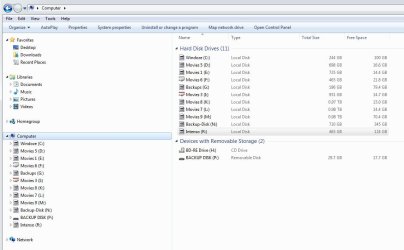
- I can't change the icons of all the HDDs (and partitions) in Explorer (please see screen shoot attached).
- I also noticed that while watching movies with the MPC (Media Player Classic) so far four times only the background music, etc. was audible but NOT the dialogues of the actors.
- Several times I checked the "Torrents" partition, which is on one of these 4 HDDs (hooked up to the USB3 card) with Disc Check set to "Thorough", which didn't find any errors.
- As mentioned further up I ran ScanHDD on one of the 2 Hitachi hard drives, the one which contains the "Movies 2" and the "Torrent" partitions (again, see screenshot).
I want to apologize for this long post and the extensive list of issues but would be really grateful if you could help me fix them. Thanks so much.
John aka InterMedDude
I have an HP EliteDesk 800 G1 PC with dual boot, Win7 x64 and Linux Mint 20.3 x64, installed. There are 3 internal HDDs, one of which is a ca. 2 yr. old 500Gb SSD with Win7 and Linux Mint 20.3 on it. There are also 2 external hard drives and 2 internal ones I'm using as external ones (each with its own power supply and mounted on Phanteks HDD brackets with PC fans for cooling). Several of the external hard drives have lots of movies on them and i use qBittorrent for downloading. I recently added a USB3 card with 4 ports, to which all 4 external HDDs are connected. I also had an 3rd internal 2Gb HDD connected to the USB3 card (i.e. 3 internal and 1 external hard drive instead of 2 of each type). Two days ago I removed this 2Gb HDD, because it seemed to cause a lot of problems (please see HDDScan Test Drive Report). Most of these problems still continue, though. However, so far I haven't encountered any of these issues with Linux.
Here's a list of the problems I've encountered in Win7 (after I recently reinstalled Win7, which went without a hitch):
- Over the past few days the computer froze a total of 14 times, in one instance I was copying a movie from one HDD to another but in at least some of these instances this happened without me doing anything.
- On 2 occasions copying a movie from one HDD to another would not proceed when the copying was about 2/3rds completed.
- Repeatedly all the 4 HDDs connected to the USB3 card suddenly weren't visible in the Explorer anymore (but clicking on Properties showed that all the files were still there) only to reappear after a few minutes. Particularly the "Movies 8" partition kept disappearing and reappearing.
- For a while the PC took more than 2 minutes for the "Starting Windows" screen to get to the login screen (this even with 3 or 4 of the 5 external HDDs unplugged) and on occasion wouldn't shut down for several minutes. Now, though, the time for "Starting Windows" to get to the login screen is a little longer than a minute, even with all hard drives connected.
- Within the past 5 or 6 days I've encountered 2 BSODs, the first time when I tried to 'Force resume' or 'Force recheck' torrents that displayed I/O errors, the 2nd time when I was checking my emails (I think).
- I'm also getting repeated "Error: can't write to disc" messages even when the Torrent partition is visible in the Explorer. After a reboot, though, these errors are always gone, at least for a while.
- I can't change the icons of all the HDDs (and partitions) in Explorer (please see screen shoot attached).
- I also noticed that while watching movies with the MPC (Media Player Classic) so far four times only the background music, etc. was audible but NOT the dialogues of the actors.
- Several times I checked the "Torrents" partition, which is on one of these 4 HDDs (hooked up to the USB3 card) with Disc Check set to "Thorough", which didn't find any errors.
- As mentioned further up I ran ScanHDD on one of the 2 Hitachi hard drives, the one which contains the "Movies 2" and the "Torrent" partitions (again, see screenshot).
I want to apologize for this long post and the extensive list of issues but would be really grateful if you could help me fix them. Thanks so much.
John aka InterMedDude
Attachments

My Computer
At a glance
Win7 x64Intel Pentium E8400 3.0GHz Dual Coreca. 1TBGigabyte NVIDIA GT630
- Computer type
- PC/Desktop
- Computer Manufacturer/Model Number
- HP Compaq 8000 Elite CMT
- OS
- Win7 x64
- CPU
- Intel Pentium E8400 3.0GHz Dual Core
- Motherboard
- HP 536883-001
- Memory
- ca. 1TB
- Graphics Card(s)
- Gigabyte NVIDIA GT630
- Antivirus
- Avast Free Antivirus
- Browser
- Firefox, Google Chrome, IE10 (?)

 . I also hope it's OK to attach it to this post instead of uploading it to Dropbox. If not, please let me know.
 , maybe trying one of these options might be the fastest way to fix this problem: