Multiple reboots required before AHCI auto detection of HDD

captainhowie

New member
Member
Local time
7:45 PM
Messages
11
Ever since I upgraded to an SSD drive (a while ago now) my computer does not boot correctly.

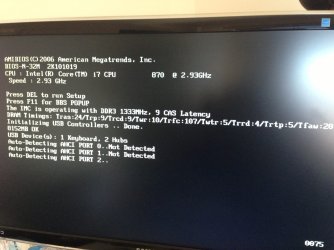
It initially goes through the auto detect AHCI process, but does not detect any HDD and fails to boot. If I reset the computer, at some point between the 2nd and say 4th reboot it automatically detects the HDD and boots as normal, however it always seems to take at least 1 or 2 failed attempts before it boots normally.

A screen shot of the detection process is attached. After if fails on all ports a message "Reboot and Select proper Boot device or Insert Boot Media in selected Boot device and press a key.."

I have 3 HDD and one SSD connected (SSD has Windows 7 installed).

I have not been able to identify the error, and it seem if I let it fail once or twice, it boots perfectly the next time.

Any help on where I could start to fix this error would be greatly appreciated.

Regards
 

Attachments
  • photo.JPG
    photo.JPG
    162.8 KB · Views: 1

My Computer My Computer

At a glance

Windows 7 Home Premium 64bitintel core i7-870*gb Transcend1gb Geforce ENGTS250
Computer Manufacturer/Model Number
ASUS V Series
OS
Windows 7 Home Premium 64bit
CPU
intel core i7-870
Motherboard
V7-P7H55E
Memory
*gb Transcend
Graphics Card(s)
1gb Geforce ENGTS250
Sound Card
onboard
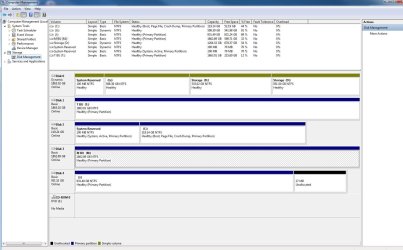
Attached as requested. Note J: is simply a portable USB drive which is not plugged in when booting.

Thanks
 

Attachments

  • Capture.JPG
    Capture.JPG
    164 KB · Views: 10

My Computer My Computer

At a glance

Windows 7 Home Premium 64bitintel core i7-870*gb Transcend1gb Geforce ENGTS250
Computer Manufacturer/Model Number
ASUS V Series
OS
Windows 7 Home Premium 64bit
CPU
intel core i7-870
Motherboard
V7-P7H55E
Memory
*gb Transcend
Graphics Card(s)
1gb Geforce ENGTS250
Sound Card
onboard
The problem is that DISK0 has been converted to Dynamic which is only meant to be used to span a partition across multiple HD's. Apparently you didn't see the warning message which normally appears when trying to add a fourth Primary partition.

To convert it back to Basic non-destructively use Option 1 or 2 from Convert a Dynamic Disk to a Basic Disk. If no OS is onboard I would move the data off to wipe the HD using Option 4 then repartition in Disk Mgmt.

If Win7 is on DISK0 and will not start after it's been converted successfully confirm that the 100mb System Reserved partition is Partition Marked Active , then run Startup Repair - Run up to 3 Separate Times with all other HD's unplugged.

After conversion you should be able to change the drive letter on the second D partition. If not move its data off and delete it to recreate it. To add any new partitions, create or convert to a Logical partition for the fourth partition, then you can add as many adjacent Logicals as you want. Partition / Extended : Logical Drives - Windows 7 Forums

I would swap the WIn7 HD into Disk0 position making sure it remains set first HD to boot in BIOS setup, to avoid numerous potential problems we see here.
 
Just to be sure. Disk 0 (the one labelled dynamic) does have some of my windows 7 user folders on it so as to keep space on the SSD drive (Disk 2). I assume changing it back to basic will not impact on the connection of these user folders. ie mydocs, mydownloads, my music etc?
 

My Computer My Computer

At a glance

Windows 7 Home Premium 64bitintel core i7-870*gb Transcend1gb Geforce ENGTS250
Computer Manufacturer/Model Number
ASUS V Series
OS
Windows 7 Home Premium 64bit
CPU
intel core i7-870
Motherboard
V7-P7H55E
Memory
*gb Transcend
Graphics Card(s)
1gb Geforce ENGTS250
Sound Card
onboard
Thanks for your help. I'll back up the files and work through the steps and let you know how it goes.
 

My Computer My Computer

At a glance

Windows 7 Home Premium 64bitintel core i7-870*gb Transcend1gb Geforce ENGTS250
Computer Manufacturer/Model Number
ASUS V Series
OS
Windows 7 Home Premium 64bit
CPU
intel core i7-870
Motherboard
V7-P7H55E
Memory
*gb Transcend
Graphics Card(s)
1gb Geforce ENGTS250
Sound Card
onboard
The Drive shown as Disk 0 above was an old Win 7 HDD, so after copying any important files I have now formatted the entire drive and it is now a Basic Drive (In setting this up I did click an incorrect option which gave me the warning about dynamic drives - I definitely saw it this time!).

As a result, the Win7 SSD shown as Disk 2 above is now showing as Disk 0 by default.

Unfortunately this has not resolved my issue. When rebooting after the computer has been on for a while it boots fine. However when it is booted from being cold (like today) it fails to auto detect again.

It is almost like it needs to be warmed up before it will work. Or could it be something like the battery going flat and being turned on for a bit is enough to give it a boost next time around. All very random thoughts which have no basis!

Any help on next steps are gratefully appreciated (At the very least I have a nice clean drive!)
 

My Computer My Computer

At a glance

Windows 7 Home Premium 64bitintel core i7-870*gb Transcend1gb Geforce ENGTS250
Computer Manufacturer/Model Number
ASUS V Series
OS
Windows 7 Home Premium 64bit
CPU
intel core i7-870
Motherboard
V7-P7H55E
Memory
*gb Transcend
Graphics Card(s)
1gb Geforce ENGTS250
Sound Card
onboard
Try unplugging all but the Win7 SSD to see if the issue persists.

If not then add back each drive after reboot to see which drive causes the problem.

A drive which is interfering may need to have its data moved off, wiped with Diskpart Clean Command of interfering boot code, then repartitioned in Disk Mgmt Logical to avoid issues: Partition / Extended : Logical Drives - Windows 7 Forums

If the issues persists with only SSD plugged in then try another port, check for firmware update, BIOS update.
 
Back
Top