Multiple windows update Errors sfc /scannow shows corrupt

Universal extractor is NOT a good way to extract the required files - it fails to extract a lot of the contained data in msu files properly.
Please post new CheckSUR and SFC scan results.
 

My Computer

Computer type
Laptop
Computer Manufacturer/Model Number
Asus K52F or Lenovo B51-80
OS
Win 7 x64 Home Premium (and x86 VirtualBox VM)/Win10
CPU
i3 370M/i7 6500U
Motherboard
Asus/Lenovo
Memory
8GB - finally :)/8GB
Graphics Card(s)
it's an i3, dude!/dual Intel&nVidia
Sound Card
onboard
Monitor(s) Displays
15.6" built-in
Screen Resolution
1366x768/1920x1080
Hard Drives
750GB Seagate internal
Sundry external drives attached to other computers on the local network
1TB SSD on the Lenovo
PSU
n/a
Internet Speed
as much as I can get - usually on a dongle/phone, so <1MB/s
Antivirus
MSE/Defender
Browser
IE11/12/Edge/Chrome/FF(if I must)
I apologize for trying to fix the problem on my own. I was getting desperate and trying all avenues. I cannot work on this computer as much as I would like during the week but that might be better so I don't continue making mistakes! I'll follow your exact instructions moving forward...

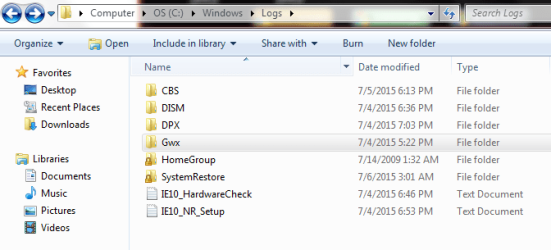
I still cannot get the SURT to install so I don't know how to supply you with the checkSUR log file. Can the SURT be run without being installed? I attached the screen shot of my attempt to install SURT a second time. I attached a snip of my files inside the windows log folder. To see if maybe I'm overlooking something or doing something wrong.
 

Attachments

  • Capture 9.PNG
    Capture 9.PNG
    54.9 KB · Views: 6
  • Capture 10.PNG
    Capture 10.PNG
    12.5 KB · Views: 6

My Computer

Computer type
Laptop
Computer Manufacturer/Model Number
Dell Vostro 2520
OS
Windows 7 Professional Service pack 1 64 bit
CPU
Intel(R) Core(TM) i3-2348M CPU @ 2.3GHz 2.3 GHz
Motherboard
Not sure
Memory
4 GB
Graphics Card(s)
Not sure
Hard Drives
Computer screen says 279 GB
Antivirus
Symantec Endpoint Protection
Browser
I use IE11, Firefox, and Chrome
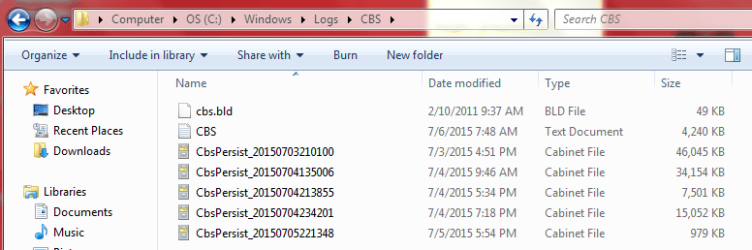
What other files are present in the C:\Windows\Logs\CBS folder?

There are no errors at all showing in the CBS.log uploaded.
 

My Computer

Computer type
Laptop
Computer Manufacturer/Model Number
Asus K52F or Lenovo B51-80
OS
Win 7 x64 Home Premium (and x86 VirtualBox VM)/Win10
CPU
i3 370M/i7 6500U
Motherboard
Asus/Lenovo
Memory
8GB - finally :)/8GB
Graphics Card(s)
it's an i3, dude!/dual Intel&nVidia
Sound Card
onboard
Monitor(s) Displays
15.6" built-in
Screen Resolution
1366x768/1920x1080
Hard Drives
750GB Seagate internal
Sundry external drives attached to other computers on the local network
1TB SSD on the Lenovo
PSU
n/a
Internet Speed
as much as I can get - usually on a dongle/phone, so <1MB/s
Antivirus
MSE/Defender
Browser
IE11/12/Edge/Chrome/FF(if I must)
Here is a snip of the CBS folder and I zipped the newest persist and attached.
 

Attachments

  • Capture 11.PNG
    Capture 11.PNG
    57 KB · Views: 0

My Computer

Computer type
Laptop
Computer Manufacturer/Model Number
Dell Vostro 2520
OS
Windows 7 Professional Service pack 1 64 bit
CPU
Intel(R) Core(TM) i3-2348M CPU @ 2.3GHz 2.3 GHz
Motherboard
Not sure
Memory
4 GB
Graphics Card(s)
Not sure
Hard Drives
Computer screen says 279 GB
Antivirus
Symantec Endpoint Protection
Browser
I use IE11, Firefox, and Chrome
Thanks.

Open Event Viewer

click on theWindows logs entry in the left pane to expand it.

Now click on theApplication entry - wait while it loads.

Click on 'File'in the menu bar and select Save...

Save the file asAppevt.evtx

Repeat for theSystem log

then zip both,and upload them.


My Computer

Computer type
Laptop
Computer Manufacturer/Model Number
Asus K52F or Lenovo B51-80
OS
Win 7 x64 Home Premium (and x86 VirtualBox VM)/Win10
CPU
i3 370M/i7 6500U
Motherboard
Asus/Lenovo
Memory
8GB - finally :)/8GB
Graphics Card(s)
it's an i3, dude!/dual Intel&nVidia
Sound Card
onboard
Monitor(s) Displays
15.6" built-in
Screen Resolution
1366x768/1920x1080
Hard Drives
750GB Seagate internal
Sundry external drives attached to other computers on the local network
1TB SSD on the Lenovo
PSU
n/a
Internet Speed
as much as I can get - usually on a dongle/phone, so <1MB/s
Antivirus
MSE/Defender
Browser
IE11/12/Edge/Chrome/FF(if I must)
When I saved the app data it created a folder. I zipped all 3 documents and they are attached.
 

My Computer

Computer type
Laptop
Computer Manufacturer/Model Number
Dell Vostro 2520
OS
Windows 7 Professional Service pack 1 64 bit
CPU
Intel(R) Core(TM) i3-2348M CPU @ 2.3GHz 2.3 GHz
Motherboard
Not sure
Memory
4 GB
Graphics Card(s)
Not sure
Hard Drives
Computer screen says 279 GB
Antivirus
Symantec Endpoint Protection
Browser
I use IE11, Firefox, and Chrome
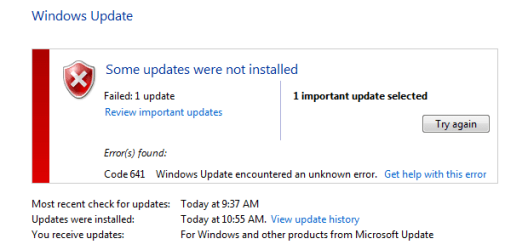
When I ran windows update earlier I hadn't sent you the new error code yet so do I wanted to update you. I will not take any more action till I hear back from you.
 

Attachments

  • Capture.PNG
    Capture.PNG
    26.4 KB · Views: 6
  • Capture 2.PNG
    Capture 2.PNG
    18.4 KB · Views: 6

My Computer

Computer type
Laptop
Computer Manufacturer/Model Number
Dell Vostro 2520
OS
Windows 7 Professional Service pack 1 64 bit
CPU
Intel(R) Core(TM) i3-2348M CPU @ 2.3GHz 2.3 GHz
Motherboard
Not sure
Memory
4 GB
Graphics Card(s)
Not sure
Hard Drives
Computer screen says 279 GB
Antivirus
Symantec Endpoint Protection
Browser
I use IE11, Firefox, and Chrome
I meant to ask if I should install Symantec again or at least pout some freeware antivirus on the computer while we are trying to fix the problem. I don't want to leave the computer unprotected, but I also don't want to impede our troubleshooting either. Please let me know. We uninstalled it yesterday.
 

My Computer

Computer type
Laptop
Computer Manufacturer/Model Number
Dell Vostro 2520
OS
Windows 7 Professional Service pack 1 64 bit
CPU
Intel(R) Core(TM) i3-2348M CPU @ 2.3GHz 2.3 GHz
Motherboard
Not sure
Memory
4 GB
Graphics Card(s)
Not sure
Hard Drives
Computer screen says 279 GB
Antivirus
Symantec Endpoint Protection
Browser
I use IE11, Firefox, and Chrome
So long as the system is showing genuine, you can install MSE, which will at least tide you over, and is pretty much guaranteed not to interfere with Windows Update.
....still analysing the event logs ;)
 

My Computer

Computer type
Laptop
Computer Manufacturer/Model Number
Asus K52F or Lenovo B51-80
OS
Win 7 x64 Home Premium (and x86 VirtualBox VM)/Win10
CPU
i3 370M/i7 6500U
Motherboard
Asus/Lenovo
Memory
8GB - finally :)/8GB
Graphics Card(s)
it's an i3, dude!/dual Intel&nVidia
Sound Card
onboard
Monitor(s) Displays
15.6" built-in
Screen Resolution
1366x768/1920x1080
Hard Drives
750GB Seagate internal
Sundry external drives attached to other computers on the local network
1TB SSD on the Lenovo
PSU
n/a
Internet Speed
as much as I can get - usually on a dongle/phone, so <1MB/s
Antivirus
MSE/Defender
Browser
IE11/12/Edge/Chrome/FF(if I must)
Is it my imagination - or has the MSRT stopped installing? (did you Hide it - or is it finally installed/complete?)

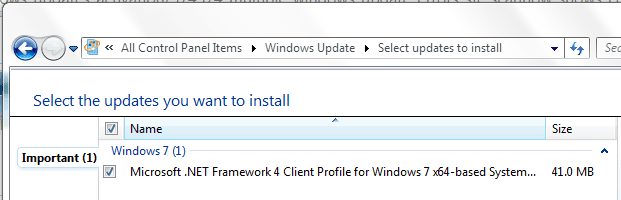
The only remaining update is the .NET Framework 4 Client Profile for Windows 7 x64-based Systems (KB982670).
I'm not sure why this is actually being offered at all, since it's been superseded by .NET 4.5 which I thought contained the Client Profile anyway.
This may be the cause of the problem.

I would suggest using Aaron Stebner's tools to check out the .NET installation, and if necessary repair and/or uninstall/reinstall it.
First, go to Microsoft .NET Framework Repair Tool is available and use that - with luck it'll correct what I suspect is a detection error and the demand to install the update will disappear.

If that fails, then the next thing is to rip out .NET 4.x by its roots, and reinstall (be warned - I have known this to fail with the result that it was impossible to reinstall the .NET 4.x, and we had to do a repair install, so it's a bit of a last resort!). You can use this tool for that job...
.NET Framework Cleanup Tool User's Guide - Aaron Stebner's WebLog - Site Home - MSDN Blogs
 

My Computer

Computer type
Laptop
Computer Manufacturer/Model Number
Asus K52F or Lenovo B51-80
OS
Win 7 x64 Home Premium (and x86 VirtualBox VM)/Win10
CPU
i3 370M/i7 6500U
Motherboard
Asus/Lenovo
Memory
8GB - finally :)/8GB
Graphics Card(s)
it's an i3, dude!/dual Intel&nVidia
Sound Card
onboard
Monitor(s) Displays
15.6" built-in
Screen Resolution
1366x768/1920x1080
Hard Drives
750GB Seagate internal
Sundry external drives attached to other computers on the local network
1TB SSD on the Lenovo
PSU
n/a
Internet Speed
as much as I can get - usually on a dongle/phone, so <1MB/s
Antivirus
MSE/Defender
Browser
IE11/12/Edge/Chrome/FF(if I must)
Ok I'll install MSE. I had two MSE updates available in optional updates yesterday. But they disappeared from windows update sometime yesterday not sure why they did. I'll manually download and install to tide me over. Might as well run a scan when its installed.

Sorry to keep bugging you I'm a rookie when it comes to these forums and it is hard for me to sit still. I want to keep researching solutions but I've definitely hit a brick wall on my own. I hope I haven't F***ed this up too bad!! Also sorry about the time difference didn't notice your location yesterday.
 

My Computer

Computer type
Laptop
Computer Manufacturer/Model Number
Dell Vostro 2520
OS
Windows 7 Professional Service pack 1 64 bit
CPU
Intel(R) Core(TM) i3-2348M CPU @ 2.3GHz 2.3 GHz
Motherboard
Not sure
Memory
4 GB
Graphics Card(s)
Not sure
Hard Drives
Computer screen says 279 GB
Antivirus
Symantec Endpoint Protection
Browser
I use IE11, Firefox, and Chrome
I'll run through all the steps above again, however this is the exact path I went down before I decided to run system restore Sunday. I restored the computer to the state before 4.5.2 was removed and I thought that resolved my .net framework issue from the OP.

Is it my imagination - or has the MSRT stopped installing? (did you Hide it - or is it finally installed/complete?)

Not your imagination I used the universal Extractor (before you told me it was a bad idea) on the installation file and afterwards I was able to run MSRT manually. After the scan completed presto the update went away, I have not idea why but apparently it was satisfied.

Over the past couple days I have used Aaron Stebner's tools with the following results:
1.) verification tool only recognized .net framework up to 3.5 all versions previous to 3.5 were verified as ok
2.) Before the OP I did already run the cleanup tool, however I ran a system restore afterwards thinking this reversed it.

If I run Microsoft .NET Framework Repair Tool it goes to a screen that says click next if I still have problems or finish if it is repaired. If I click next it runs about 1 inch of progress across the screen and never makes it any further. I let this program run for a couple hours and it never moved so I cancelled it.

My version of windows came pre-loaded on this computer and I don't have a disk. Will I need to reach out to Microsoft in the event that I need to do a system repair?

Its as if .net framework has already been uninstalled but it sill shows up in the windows uninstall list. However when I click uninstall/change it tells me it cannot find it. I'll try the steps listed above one more time.
 

My Computer

Computer type
Laptop
Computer Manufacturer/Model Number
Dell Vostro 2520
OS
Windows 7 Professional Service pack 1 64 bit
CPU
Intel(R) Core(TM) i3-2348M CPU @ 2.3GHz 2.3 GHz
Motherboard
Not sure
Memory
4 GB
Graphics Card(s)
Not sure
Hard Drives
Computer screen says 279 GB
Antivirus
Symantec Endpoint Protection
Browser
I use IE11, Firefox, and Chrome
MS won't provide Win7 to OEM users :( - and the official downloads are no longer public.
You'd either have to risk a Torrent or similar download, or see if you can borrow a disk from a friend. If you do go the download route, you should check the downloaded ISO against the published Hash values. See this thread for instructions...
http://www.sevenforums.com/tutorials/3413-repair-install.html?ltr=R
 

My Computer

Computer type
Laptop
Computer Manufacturer/Model Number
Asus K52F or Lenovo B51-80
OS
Win 7 x64 Home Premium (and x86 VirtualBox VM)/Win10
CPU
i3 370M/i7 6500U
Motherboard
Asus/Lenovo
Memory
8GB - finally :)/8GB
Graphics Card(s)
it's an i3, dude!/dual Intel&nVidia
Sound Card
onboard
Monitor(s) Displays
15.6" built-in
Screen Resolution
1366x768/1920x1080
Hard Drives
750GB Seagate internal
Sundry external drives attached to other computers on the local network
1TB SSD on the Lenovo
PSU
n/a
Internet Speed
as much as I can get - usually on a dongle/phone, so <1MB/s
Antivirus
MSE/Defender
Browser
IE11/12/Edge/Chrome/FF(if I must)
I have other installation disks for other machines in the office. Not to ask all the rookie questions but is there any reason I cannot use a desktop disk to try and repair the Laptop? The windows 7 sticker is on the back of the Laptop so I'm covered there. Honestly I'm more worried about Microsoft office than I am about windows. This computer was purchased for work so the place we purchased from should be able to help if I have to go that route. How bad would it be to leave the computer alone and not repair the .net framework? The computer seems to be working fine just annoying that I cannot get .net framework to install. What applications require framework in order to run properly? Am I about to find a whole bunch of programs that cease to work normally or something like that.

I also assume I need to find an x64 version of windows for the repair install? I am worried I only have the 32 bit variety laying around the office, but I'll cross my fingers and take a look for one.

If I run the repair will I lose any data? Is the repair the same as a re-format? I'll need to backup the data if so...
 

My Computer

Computer type
Laptop
Computer Manufacturer/Model Number
Dell Vostro 2520
OS
Windows 7 Professional Service pack 1 64 bit
CPU
Intel(R) Core(TM) i3-2348M CPU @ 2.3GHz 2.3 GHz
Motherboard
Not sure
Memory
4 GB
Graphics Card(s)
Not sure
Hard Drives
Computer screen says 279 GB
Antivirus
Symantec Endpoint Protection
Browser
I use IE11, Firefox, and Chrome
You can retrieve all your license Keys using Belarc Advisor - with one proviso.
If the Office Product ID shows as being -OEM- it may be a pre-installed one. You MUST check that the Office Product Key is legible on the Office (NOT Windows!) COA sticker.
If there's no Office COA sticker, then hopefully the Key will be OK.

Note that you can use ANY genuine ex-MS disk for Windows 7 to create a disk suitable for repair installs (if you first create an ISO file, then rename the ei.cfg file in the ISO then burn the resulting ISO using a slow speed).

For a Repair install, yes, you MUST use the same bitness of media as the installed OS - you'll get told in no uncertain terms if you get it wrong ;)

I think you'll find that you're more likely to have problems finding a 32-bit Windows 7 disk, than a 64-bit one!

With the usual provisos, a repair install is pretty safe - and you're unlikely to lose data. Some settings (and all updates) will be lost. ALWAYS make an external media backup before attempting such drastic surgery on a system!!
There are very few programs that actually require .NET 4+ in Windows 7 - but the number has been increasing. One obvious one is AutoCAD.

Repairing Windows shouldn't (cough, cough) affect Office at all.
 

My Computer

Computer type
Laptop
Computer Manufacturer/Model Number
Asus K52F or Lenovo B51-80
OS
Win 7 x64 Home Premium (and x86 VirtualBox VM)/Win10
CPU
i3 370M/i7 6500U
Motherboard
Asus/Lenovo
Memory
8GB - finally :)/8GB
Graphics Card(s)
it's an i3, dude!/dual Intel&nVidia
Sound Card
onboard
Monitor(s) Displays
15.6" built-in
Screen Resolution
1366x768/1920x1080
Hard Drives
750GB Seagate internal
Sundry external drives attached to other computers on the local network
1TB SSD on the Lenovo
PSU
n/a
Internet Speed
as much as I can get - usually on a dongle/phone, so <1MB/s
Antivirus
MSE/Defender
Browser
IE11/12/Edge/Chrome/FF(if I must)
Back
Top