Solved Muose how to disable the click and drag selection area

fronterio

New member
Local time
9:26 PM
Messages
3
Hi to everyone
when you left click and drag the mouse on desktop you can see a blu area (see attached)
Is there a way to disable this on windows 7?

Thanks in advance
 

Attachments

  • click_drag_area.jpg
    click_drag_area.jpg
    69.2 KB · Views: 5

My Computer My Computer

At a glance

Windows 7 Embedded Standard x64
Computer type
PC/Desktop
OS
Windows 7 Embedded Standard x64
Welcome to the Seven Forums

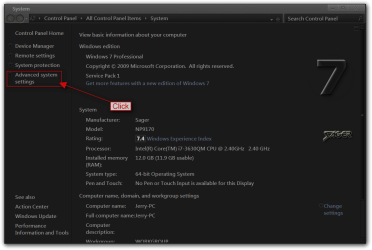
Click on the Start button:orb: and on the right side of the Start menu right-click on Computer and click on properties.

After the window opens up click on Advanced system settings.
System.png

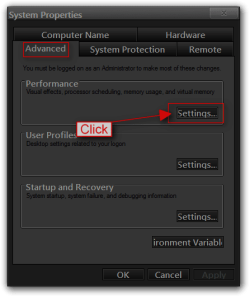
Make sure you are on Advanced tab and click on the Settings button for Performance.
2.png

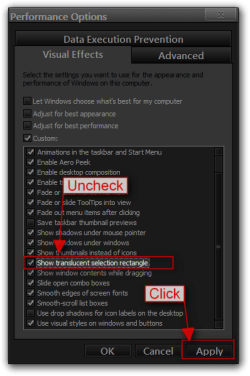
Uncheck Show translucent selection rectangle then Apply and OK your way out.
3.png

Jerry
 

My Computer My Computer

At a glance

Win 7 Pro x64 / Win 10 ProIntel(R) Core(TM) i7-3630QM CPU @ 2.40GHz12 GB(1) Intel(R) HD Graphics 4000 (2) NVIDIA GeFo...
Computer type
Laptop
Computer Manufacturer/Model Number
Sager NP9170
OS
Win 7 Pro x64 / Win 10 Pro
CPU
Intel(R) Core(TM) i7-3630QM CPU @ 2.40GHz
Motherboard
CLEVO P170EM
Memory
12 GB
Graphics Card(s)
(1) Intel(R) HD Graphics 4000 (2) NVIDIA GeForce GTX 675M
Sound Card
(1) Realtek High Definition Audio (2) Intel(R) Display Aud
Monitor(s) Displays
17.3
Screen Resolution
1920x1080
Hard Drives
(1) Samsung 860 EVO 500GB(OS) (1) Samsung 860 EVO 500GB(Data)
Keyboard
Backlite
Antivirus
MSE, Malwarebytes Pro
Browser
Firefox
Other Info
DESKTOP: Custom-built.
OS: Win 10 Pro x64.
CASE: Rosewill R5.
CPU: Intel I5 4670K CPU @ 3.40GHz.
CPU COOLER: Cool Master Hyper 212 EVO.
MOTHERBOARD: Asus Z87-A.
MEMORY: Kingston HyperX 2x4 GB.
GPU: Nvidia Geforce 650 TI.
PSU: Corsair TX750.
DRIVES: (1) Samsung 840 120 GB SSD (2) Western Digital blue 500 GB 7200 RPM.
Hi Jerry thanks very much for your help,
i tried what you say and in this way i only disable the blue area but i still have the selection of the dektop objects when i click and drag the pointer. Is there a way to completely disable this function?
Thanks a lot

 

My Computer My Computer

At a glance

Windows 7 Embedded Standard x64
Computer type
PC/Desktop
OS
Windows 7 Embedded Standard x64
ok I found a way to fix it
in the registry HKEY_CURRENT_USER\Control Panel\Desktop
there are 2 keys:
Drag Heith
Drag Width
If you put 2 values higher then the screen resolution the drag area wil not appear.
Hope this will be helpfull for other users.
Bye :)
 

My Computer My Computer

At a glance

Windows 7 Embedded Standard x64
Computer type
PC/Desktop
OS
Windows 7 Embedded Standard x64
You're welcome, and thank you for explaining what you did.

Jerry
 

My Computer My Computer

At a glance

Win 7 Pro x64 / Win 10 ProIntel(R) Core(TM) i7-3630QM CPU @ 2.40GHz12 GB(1) Intel(R) HD Graphics 4000 (2) NVIDIA GeFo...
Computer type
Laptop
Computer Manufacturer/Model Number
Sager NP9170
OS
Win 7 Pro x64 / Win 10 Pro
CPU
Intel(R) Core(TM) i7-3630QM CPU @ 2.40GHz
Motherboard
CLEVO P170EM
Memory
12 GB
Graphics Card(s)
(1) Intel(R) HD Graphics 4000 (2) NVIDIA GeForce GTX 675M
Sound Card
(1) Realtek High Definition Audio (2) Intel(R) Display Aud
Monitor(s) Displays
17.3
Screen Resolution
1920x1080
Hard Drives
(1) Samsung 860 EVO 500GB(OS) (1) Samsung 860 EVO 500GB(Data)
Keyboard
Backlite
Antivirus
MSE, Malwarebytes Pro
Browser
Firefox
Other Info
DESKTOP: Custom-built.
OS: Win 10 Pro x64.
CASE: Rosewill R5.
CPU: Intel I5 4670K CPU @ 3.40GHz.
CPU COOLER: Cool Master Hyper 212 EVO.
MOTHERBOARD: Asus Z87-A.
MEMORY: Kingston HyperX 2x4 GB.
GPU: Nvidia Geforce 650 TI.
PSU: Corsair TX750.
DRIVES: (1) Samsung 840 120 GB SSD (2) Western Digital blue 500 GB 7200 RPM.
Back
Top