Solved How to disable the enhanced icons notification bar

JefeRyback

New member
Local time
7:28 PM
Messages
6
Hello all

I'm new on this forum, I hope i'm posting this question in the right place and if my writting kills the Oxford dictionary please forgime me, my english isn't so good. :(

I'm having trouble with the infamous yellow notification bar that appears on the "Devices and Printers" section of "Control Pannel" on Windows 7. I want it to NOT SHOW anymore, if possible via GPO (on a domain environement). All the tutorials/tips that I've found on internet only allow me to configure the "I don't want to search those icons" option (the same it can be done via configuration windows). For example, the explanation on this link: Q. How can I disable the information bar shown in Drives and Printers that prompts to use enhanced device icons and information? | Systems Management content from Windows IT Pro

But in this case, EVERY TIME that somebody opens the "Devices and Printers" window, this annoying yellow bar appears again asking another time if I want to download those icons. I really don't want it, I don't give a F about this icons and I don't want lusers on my company (some of them even fall in panic when wallpaper changes :rolleyes:) calling me about this "cryptic and frightening message". I just want to find how to say Windows: NO, i don't want you to download this and DO NOT ASK ME AGAIN NEVER EVER.

All help would be very apreciated. Thanks for your attention.
 

My Computer My Computer

At a glance

Windows 7 Pro x64
Computer type
PC/Desktop
OS
Windows 7 Pro x64

My Computer My Computer

At a glance

64-bit Windows 11 Pro for WorkstationsIntel i7-8700K OC'd to 5 GHz64 GB (4x16GB) G.SKILL TridentZ RGB DDR4 3600...ASUS ROG-STRIX-GTX1080TI-O11G-GAMING
Computer type
PC/Desktop
Computer Manufacturer/Model Number
Self built custom
OS
64-bit Windows 11 Pro for Workstations
CPU
Intel i7-8700K OC'd to 5 GHz
Motherboard
ASUS ROG Maximus XI Formula Z390
Memory
64 GB (4x16GB) G.SKILL TridentZ RGB DDR4 3600 MHz
Graphics Card(s)
ASUS ROG-STRIX-GTX1080TI-O11G-GAMING
Sound Card
Integrated
Monitor(s) Displays
2 x Samsung Odyssey G7 27"
Screen Resolution
2560x1440
Hard Drives
1TB Samsung 990 PRO M.2,
4TB Samsung 990 PRO PRO M.2,
TerraMaster F8 SSD Plus NAS
PSU
Seasonic Prime Titanium 850W
Case
Thermaltake Core P3
Cooling
Corsair Hydro H115i
Keyboard
Logitech wireless K800
Mouse
Logitech MX Master 4
Internet Speed
2 Gb/s Download and 100 Mb/s Upload
Antivirus
Malwarebyte Anti-Malware Premium
Browser
Google Chrome
Other Info
Logitech Z625 speaker system,
Logitech BRIO 4K Pro webcam,
HP Color LaserJet Pro MFP M477fdn,
APC SMART-UPS RT 1000 XL - SURT1000XLI,
Galaxy S23 Plus phone
Hello Brink

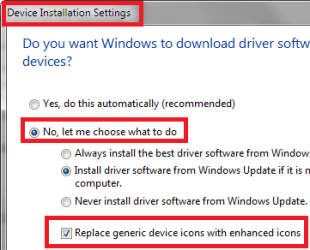
Thanks for the tip but unfortunately it didn't work it when i tried before I've posted the message. :( The problem is that if I uncheck the "Replace generic device icons with enhanced icons", every time I return to the devices & drivers windows the bar appears again asking if i wank those damm icons. I said it that NO before, but it asks again and again...

I understand why M$ wants this bar to be so annoying; the more PC activate it, the more information about our hardware and peripherals they will gather to do their data analytics and market statistics. So I supose that if the option to disable it forever exists (I hope so, but still no luck founding it); for sure it will be tricky, hidden and from regedit directly.
 

My Computer My Computer

At a glance

Windows 7 Pro x64
Computer type
PC/Desktop
OS
Windows 7 Pro x64
Yeah, unfortunately the only way that I know to remove that yellow bar is to "check" the "Replace generic device icons with enhanced icons" box to allow it to download icons. :(
 

My Computer My Computer

At a glance

64-bit Windows 11 Pro for WorkstationsIntel i7-8700K OC'd to 5 GHz64 GB (4x16GB) G.SKILL TridentZ RGB DDR4 3600...ASUS ROG-STRIX-GTX1080TI-O11G-GAMING
Computer type
PC/Desktop
Computer Manufacturer/Model Number
Self built custom
OS
64-bit Windows 11 Pro for Workstations
CPU
Intel i7-8700K OC'd to 5 GHz
Motherboard
ASUS ROG Maximus XI Formula Z390
Memory
64 GB (4x16GB) G.SKILL TridentZ RGB DDR4 3600 MHz
Graphics Card(s)
ASUS ROG-STRIX-GTX1080TI-O11G-GAMING
Sound Card
Integrated
Monitor(s) Displays
2 x Samsung Odyssey G7 27"
Screen Resolution
2560x1440
Hard Drives
1TB Samsung 990 PRO M.2,
4TB Samsung 990 PRO PRO M.2,
TerraMaster F8 SSD Plus NAS
PSU
Seasonic Prime Titanium 850W
Case
Thermaltake Core P3
Cooling
Corsair Hydro H115i
Keyboard
Logitech wireless K800
Mouse
Logitech MX Master 4
Internet Speed
2 Gb/s Download and 100 Mb/s Upload
Antivirus
Malwarebyte Anti-Malware Premium
Browser
Google Chrome
Other Info
Logitech Z625 speaker system,
Logitech BRIO 4K Pro webcam,
HP Color LaserJet Pro MFP M477fdn,
APC SMART-UPS RT 1000 XL - SURT1000XLI,
Galaxy S23 Plus phone

My Computer My Computer

At a glance

Windows 10 Home x64INTEL Core i5-750 Quad-Core 3.37GHzHyperX Fury Black Series 8GB (2 x 4GB) 1866MhzEVGA GeForce GTX 750 Superclocked 1GB 128-Bit...
Computer type
PC/Desktop
OS
Windows 10 Home x64
CPU
INTEL Core i5-750 Quad-Core 3.37GHz
Motherboard
ASUS P7P55D
Memory
HyperX Fury Black Series 8GB (2 x 4GB) 1866Mhz
Graphics Card(s)
EVGA GeForce GTX 750 Superclocked 1GB 128-Bit GDDR5
Monitor(s) Displays
LG 32MA68HY 32" IPS
Screen Resolution
1920 x 1080
Hard Drives
Samsung 840 Evo 120GB, SEAGATE 500GB Barracuda® 7200.12, SATA 3 Gb/s, 7200 RPM, 16MB cache
PSU
ANTEC TruePower New TP-550, 80 PLUS, 550W
Case
ANTEC Three Hundred Illusion
Cooling
COOLER MASTER Hyper 212 Plus, 4 x 120mm 1 x 140mm Noctua's
Internet Speed
85 + Mbps
Antivirus
Avast
Browser
Vivaldi
Unfortunately yes, it's the same method (the GPO modify the same registry key). And they are activating the icon update to prevent the bar to show again. What I want is to deactivate this feature and make the bar don't appear asking again to activate it.

I'm beggining to think that's impossible without change .DLL code (something I really don't wanna do cause it's far beyond my capabilities). :cry:

Thanks for the help anyway
 

My Computer My Computer

At a glance

Windows 7 Pro x64
Computer type
PC/Desktop
OS
Windows 7 Pro x64
Try this: right click on the bar and tell it to never show the bar again!
 

My Computer My Computer

At a glance

x64 (6.3.9600) Win8.1 Pro & soon dual boot x6...AMD A6-3420M APU with Radeon(tm) HD Graphics6.00 GBAMD Radeon(TM) HD 6520G
Computer type
Laptop
Computer Manufacturer/Model Number
HP Pavilion dv6-6c10us
OS
x64 (6.3.9600) Win8.1 Pro & soon dual boot x64 (6.1.7601) Win7_SP1 HomePrem
CPU
AMD A6-3420M APU with Radeon(tm) HD Graphics
Motherboard
Hewlett-Packard 1805
Memory
6.00 GB
Graphics Card(s)
AMD Radeon(TM) HD 6520G
Sound Card
(1) AMD High Definition Audio Device (2) IDT High Definiti
Monitor(s) Displays
HP W2072a 20" LCD (1600 x 900) @ 60 Hz
Screen Resolution
1366 x 768 x 32 bits (4294967296 colors) @ 60 Hz
Hard Drives
ST640LM0 00 HM641JI SATA Disk Device
Keyboard
Logitech k520 wireless KB
Mouse
Logitech m320 wireless mouse (bundled with KB)
Internet Speed
15/5 | 54 MB Wireless 'n'
Antivirus
Realtime: Defender or Avast | On-demand: Malwarebytes, ESET
Browser
IE 11 on Win8, IE 10 on win 7
Other Info
Media: [Gimp, Audacity, VLC] || Comm: [WEmail 2012, Skype] || Productivity: [OpenOffice,| Textpad] || Utils: [Sysinternals, cCleaner, Speccy, Defraggler]
Jurmmmm... This is an option that never appeared to me on any win 7 I've used (and tried to deactivate this bar)

It's something you have see or just guessing?
 

My Computer My Computer

At a glance

Windows 7 Pro x64
Computer type
PC/Desktop
OS
Windows 7 Pro x64
Try this: right click on the bar and tell it to never show the bar again!

Jurmmmm... This is an option that never appeared to me on any win 7 I've used (and tried to deactivate this bar)

It's something you have see or just guessing?

It's something I've seen and have done - that msg always bothered me too., so one day I right clicked it and the alternate menu gave me a choice to never see the msg again.

Have you tried right clicking the notification bar? What are the alternate menu choices given to you?

edit: Just thought of something. How do you have Device Installation Settings configured?
Right click on your computer in Devices and Printers,
select Device Installation Settings from the alt menu

See attached to compare to mine.
 

Attachments

  • DevStage.png
    DevStage.png
    7 KB · Views: 28
Last edited:

My Computer My Computer

At a glance

x64 (6.3.9600) Win8.1 Pro & soon dual boot x6...AMD A6-3420M APU with Radeon(tm) HD Graphics6.00 GBAMD Radeon(TM) HD 6520G
Computer type
Laptop
Computer Manufacturer/Model Number
HP Pavilion dv6-6c10us
OS
x64 (6.3.9600) Win8.1 Pro & soon dual boot x64 (6.1.7601) Win7_SP1 HomePrem
CPU
AMD A6-3420M APU with Radeon(tm) HD Graphics
Motherboard
Hewlett-Packard 1805
Memory
6.00 GB
Graphics Card(s)
AMD Radeon(TM) HD 6520G
Sound Card
(1) AMD High Definition Audio Device (2) IDT High Definiti
Monitor(s) Displays
HP W2072a 20" LCD (1600 x 900) @ 60 Hz
Screen Resolution
1366 x 768 x 32 bits (4294967296 colors) @ 60 Hz
Hard Drives
ST640LM0 00 HM641JI SATA Disk Device
Keyboard
Logitech k520 wireless KB
Mouse
Logitech m320 wireless mouse (bundled with KB)
Internet Speed
15/5 | 54 MB Wireless 'n'
Antivirus
Realtime: Defender or Avast | On-demand: Malwarebytes, ESET
Browser
IE 11 on Win8, IE 10 on win 7
Other Info
Media: [Gimp, Audacity, VLC] || Comm: [WEmail 2012, Skype] || Productivity: [OpenOffice,| Textpad] || Utils: [Sysinternals, cCleaner, Speccy, Defraggler]
It's something I've seen and have done - that msg always bothered me too., so one day I right clicked it and the alternate menu gave me a choice to never see the msg again.
Right-click or left-click the bar always showed me the same options: one that opens the help to explain what the bar means, one that opens the Device Installation Settings window and another (marked with UAC symbol) that ACTIVATES the searching of enhanced icons (thus, making the bar don't appear again because the option has been activated yet).

But as I said on the first post, I don't want to activate this search. I don't want M$ list the hardware on my company (and made profit with this info), i don't want that trafic on the net (even if it's ridiculous), i don't want those icons changing at random (and usually showing images that don't match) and then I don't want that crapy bar remembering to activate something I don't want to and making some users asking from time to time about "what is that 'error' that appear on my computer".

I don't care a sh** about this crappy windows feature and want to get rid of it but it seems that M$ made it to keep bothering people unless it's activated. :mad: I really like Windows 7 a lot (and Windows 8 makes me like 7 a lot more :rolleyes:). But there are a few features that really bother me because they are very dumb and make me lose time, patience or both.

Anyway, thanks all for the help, don't doubt I apreciate it. ;)

Edit: Just thought of something. How do you have Device Installation Settings configured? ... See attached to compare to mine.
Mine is the same unless the last option that i don't check (is that I want, deactivate this option). As you have activated it yet, this crappy bar don't show again on your computer asking to activate it, of course.
 
Last edited:

My Computer My Computer

At a glance

Windows 7 Pro x64
Computer type
PC/Desktop
OS
Windows 7 Pro x64
Yeah, I'm not certain of the order. You might have to turn on "replace generic icons..." to turn off the msg bar.

Since the msg bar is already off on my machine, I can't really test turning off the msg bar anymore (another annoying "feature"). I recall finding that once, but the goal was to turn it off, so I forget what I did to make it display again (not important).

Wish I could give you the 1, 2, 3 steps but I didn't write them down 2 years ago. All I can suggest is that you try configuring Device Installation Settings (automatic or include "replace generic icons...") and see how that affects the msg bar alternate menu (right click).

That's all I have, so I'll back out of this thread.

Good Luck... I agree, it is an annoying constant nag.

Bill
.
 

My Computer My Computer

At a glance

x64 (6.3.9600) Win8.1 Pro & soon dual boot x6...AMD A6-3420M APU with Radeon(tm) HD Graphics6.00 GBAMD Radeon(TM) HD 6520G
Computer type
Laptop
Computer Manufacturer/Model Number
HP Pavilion dv6-6c10us
OS
x64 (6.3.9600) Win8.1 Pro & soon dual boot x64 (6.1.7601) Win7_SP1 HomePrem
CPU
AMD A6-3420M APU with Radeon(tm) HD Graphics
Motherboard
Hewlett-Packard 1805
Memory
6.00 GB
Graphics Card(s)
AMD Radeon(TM) HD 6520G
Sound Card
(1) AMD High Definition Audio Device (2) IDT High Definiti
Monitor(s) Displays
HP W2072a 20" LCD (1600 x 900) @ 60 Hz
Screen Resolution
1366 x 768 x 32 bits (4294967296 colors) @ 60 Hz
Hard Drives
ST640LM0 00 HM641JI SATA Disk Device
Keyboard
Logitech k520 wireless KB
Mouse
Logitech m320 wireless mouse (bundled with KB)
Internet Speed
15/5 | 54 MB Wireless 'n'
Antivirus
Realtime: Defender or Avast | On-demand: Malwarebytes, ESET
Browser
IE 11 on Win8, IE 10 on win 7
Other Info
Media: [Gimp, Audacity, VLC] || Comm: [WEmail 2012, Skype] || Productivity: [OpenOffice,| Textpad] || Utils: [Sysinternals, cCleaner, Speccy, Defraggler]
I stopped mine (Win7 Ultimate X64) using gpedit Computer Configurations, System, Device Installations, and enabled Prevent Device Metadata Retrieval from Internet. It might be slightly different in your gpedit but give it a go
Regards
Simon
 

My Computer My Computer

At a glance

Windows 7 Ultimate x64Q6600 3.1ghzKingston DDR2 6400 8GBGigabyte Radeon HD 6850 1GB 256-Bit
Computer type
PC/Desktop
Computer Manufacturer/Model Number
Home Made
OS
Windows 7 Ultimate x64
CPU
Q6600 3.1ghz
Motherboard
Gigabyte GA-P35-DS3L
Memory
Kingston DDR2 6400 8GB
Graphics Card(s)
Gigabyte Radeon HD 6850 1GB 256-Bit
Sound Card
On board
Monitor(s) Displays
Acer X243H
Screen Resolution
1920x1080
Hard Drives
Intel 330 120GB SSD
WD 2TB 7200
PSU
Thermaltake Toughpower 750W Semi Modular
Case
Modified Alienware
Keyboard
A4Tech
Mouse
Gigabyte ECO600
Antivirus
Comodo
Browser
Cyberfox
First things first, I'm sorry to re-animate such an older thread I made so much time ago.

I used to check this thread for some months until I lost any hope somebody had the solution. Now that I face again the same problem I remembered that thread and come here to found that Shimshon answered it perfectly so much time ago. :shock:

I felt that I must to thank him/her help even after all that time. I just hope this nigromantic arise of this rotten-dead thread doesn't break the forum's rules neither upsets nobody. :o

After check the Shimshon info I searched the internet for more details and found (here: https://www.stigviewer.com/stig/windows_server_2012_2012_r2_member_server/2014-04-02/finding/V-21964) that, for those who don't wanna use GPO, the register key associated to the policy is:

HKLM\Software\Policies\Microsoft\Windows\Device Metadata\PreventDeviceMetadataFromNetwork (DWORD that must have 1 as value)

Cheers
 

My Computer My Computer

At a glance

Windows 7 Pro x64
Computer type
PC/Desktop
OS
Windows 7 Pro x64

My Computer My Computer

At a glance

64-bit Windows 11 Pro for WorkstationsIntel i7-8700K OC'd to 5 GHz64 GB (4x16GB) G.SKILL TridentZ RGB DDR4 3600...ASUS ROG-STRIX-GTX1080TI-O11G-GAMING
Computer type
PC/Desktop
Computer Manufacturer/Model Number
Self built custom
OS
64-bit Windows 11 Pro for Workstations
CPU
Intel i7-8700K OC'd to 5 GHz
Motherboard
ASUS ROG Maximus XI Formula Z390
Memory
64 GB (4x16GB) G.SKILL TridentZ RGB DDR4 3600 MHz
Graphics Card(s)
ASUS ROG-STRIX-GTX1080TI-O11G-GAMING
Sound Card
Integrated
Monitor(s) Displays
2 x Samsung Odyssey G7 27"
Screen Resolution
2560x1440
Hard Drives
1TB Samsung 990 PRO M.2,
4TB Samsung 990 PRO PRO M.2,
TerraMaster F8 SSD Plus NAS
PSU
Seasonic Prime Titanium 850W
Case
Thermaltake Core P3
Cooling
Corsair Hydro H115i
Keyboard
Logitech wireless K800
Mouse
Logitech MX Master 4
Internet Speed
2 Gb/s Download and 100 Mb/s Upload
Antivirus
Malwarebyte Anti-Malware Premium
Browser
Google Chrome
Other Info
Logitech Z625 speaker system,
Logitech BRIO 4K Pro webcam,
HP Color LaserJet Pro MFP M477fdn,
APC SMART-UPS RT 1000 XL - SURT1000XLI,
Galaxy S23 Plus phone
Back
Top