my baby doesn't sleep properly

metoo

New member
Local time
5:17 PM
Messages
20
Location
SE Qld
I used to dual boot vista with xp and for the last couple of weeks I installed win7 and dual boot it with xp. I think win7 is a huge improvement on vista. One of the bugs I have noticed is that my machine won't stay in sleep mode. It has nothing to do with my Asus P5GD1 Pro mobo because it has never failed on xp or vista. I hope it gets fixed in the next release.
 

My Computer My Computer

OS
Win7/XP
CPU
Intel Pentium 4 530, 3000 MHz (15 x 200)
Motherboard
Asus P5GD1 Pro
Memory
2GB
Graphics Card(s)
NVIDIA GeForce 7300 SE/7200 GS (512 MB)
Monitor(s) Displays
BenQ FP222W 22"
Screen Resolution
1680 x 1050
Hard Drives
SAMSUNG HD753LJ (750 GB, 7200 RPM, SATA-II)
lol jfar
metoo - what do you mean it won't stay in sleep mode, does it stay in for an amount of time or does it automatically wake up as soon as its gone into sleep mode?
 

My Computer My Computer

Computer Manufacturer/Model Number
EEE PC 701SD
OS
Windows 7 Ultimate x86 7600 RTM
CPU
Intel Celeron M 353 630-960mhz
Memory
512mb
Hard Drives
8GB SSD
Well that's one of the risk you take when you install a OS that still is just a build:) I have the same problem on my HP laptop :(. But Windows7 is worth it :D
 

My Computer My Computer

OS
Windows 7 Build 7100
Hello Metoo, Termana and Beil,

Welcome to the Seven Forums.

Have you checked in Device Manager. Select properties for devices such as mice and network/wireless cards. On the Power Management tab (if it has one) make sure 'allow this device to wake the computer' is unchecked. I leave only the keyboard to wake.

Hope this helps. Please keep us posted.

Hope you all enjoy your stay.
Gary
 

My Computer My Computer

Computer Manufacturer/Model Number
Dell XPS420
OS
Vista Ult 64 bit Seven Ult RTM x64
CPU
Intel Core2 Quad Q6600 2.40 gigahertz
Memory
Crucial Ballistix 4x2GB PC2 6400
Graphics Card(s)
NVIDIA GeForce 8600 GTS 256 MB
Sound Card
Creative SB X-Fi audio
Monitor(s) Displays
HP w2207 + HPvs15
Screen Resolution
1680x1050 + 1024x768
Hard Drives
2-WD5000AAKS-500 GB
WD5000AAV-500 GB external
Keyboard
Microsoft Comfort Curve
Mouse
MX Revolution
Other Info
Wacom Intuos 2 Graphics Tablet
Experience Index=5.5
garysgold, your the man. It looks like the power setting on the NIC may be the culprit causing it to wake. I have unticked the 'allow to wake up computer' box and it stayed asleep for a 15 mins test. Preveously it was waking in 5 to 10 mins. Looks promising, I will know for sure tomorrow if it solved it for sure. Thanks mate.
 

My Computer My Computer

OS
Win7/XP
CPU
Intel Pentium 4 530, 3000 MHz (15 x 200)
Motherboard
Asus P5GD1 Pro
Memory
2GB
Graphics Card(s)
NVIDIA GeForce 7300 SE/7200 GS (512 MB)
Monitor(s) Displays
BenQ FP222W 22"
Screen Resolution
1680 x 1050
Hard Drives
SAMSUNG HD753LJ (750 GB, 7200 RPM, SATA-II)
Glad it helped. It did the trick for me here. One of the first things I do after a new install.

Gary
 

My Computer My Computer

Computer Manufacturer/Model Number
Dell XPS420
OS
Vista Ult 64 bit Seven Ult RTM x64
CPU
Intel Core2 Quad Q6600 2.40 gigahertz
Memory
Crucial Ballistix 4x2GB PC2 6400
Graphics Card(s)
NVIDIA GeForce 8600 GTS 256 MB
Sound Card
Creative SB X-Fi audio
Monitor(s) Displays
HP w2207 + HPvs15
Screen Resolution
1680x1050 + 1024x768
Hard Drives
2-WD5000AAKS-500 GB
WD5000AAV-500 GB external
Keyboard
Microsoft Comfort Curve
Mouse
MX Revolution
Other Info
Wacom Intuos 2 Graphics Tablet
Experience Index=5.5
I battled to get my machine to stay asleep too. It was the LAN that kept waking mine up. After finally getting it to stay asleep and then wake when I wanted it to, I discovered that it disabled my crossfire upon resuming, so I can't use it.... :rolleyes: :p
 

My Computer My Computer

Computer type
PC/Desktop
Computer Manufacturer/Model Number
Systems by SmartEyeball
OS
8 Pro x64
CPU
i7 3770K 4.6GHz
Motherboard
ASUS P8Z77 WS
Memory
16GB G.Skill Trident X 2666mhz
Graphics Card(s)
x2 EVGA 780 Ti Superclocked SLI
Sound Card
SB X-FI Surround 5.1 PRO USB / ATH-AD900 Headphones
Monitor(s) Displays
x3 Dell U2410 / 58" Samsung
Screen Resolution
5760*1200/ 1920*1200
Hard Drives
2x Intel 520 240GB (RAID 0) * 2x WD Caviar Blacks 2TB (RAID 0) * 2TB WD Caviar Black * Sony Optirac DVD
PSU
Silverstone Strider Evolution 1200W
Case
Thermaltake Level 10 GT Snow Edition
Cooling
Noctua NH-D14
Keyboard
Topre Realforce // Ducky Shine MX Black // Filco Ninja TKL
Mouse
Thermaltake Theron (Highly Recommended) + Razer Imperator
Antivirus
MSE
Browser
IE, FF, WaterFox
Other Info
GT Extreme V2 Sim Racing Cockpit + 40" LCD and K/B Mouse stand ▼
Fanatec CSR Elite Wheel + Clubsport V1 Pedals + CSR shifter/7G-H ▼Saitek X52 Pro ▼ TrackIR 5 Pro
Buttkicker v2 Seat Rumbler with Dedicated 5.1 and Sub Woofer attached to frame ▼
=
Bloody Big Grin
Well my problem isn't like that ;) it sleeps fine:D , but when i tried to wake it up, the screen simple stays black, but all of processes continue. for an example my music player kicks in etc.
 

My Computer My Computer

OS
Windows 7 Build 7100
Well my problem isn't like that ;) it sleeps fine:D , but when i tried to wake it up, the screen simple stays black, but all of processes continue. for an example my music player kicks in etc.

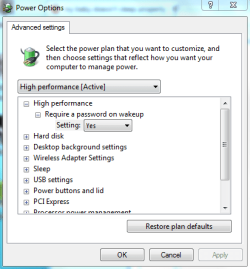
Check your 'advanced power settings', and make sure nothing is set wrong there ;)
 

Attachments

  • power.PNG
    power.PNG
    14.7 KB · Views: 32

My Computer My Computer

OS
XP
After some testing and changing settings the issue is not resolved. It would appear to have been the LAN which woke it up but now that I have disabled that it will go to sleep but then after a time it dies, the binking power led stops and and the PC needs to be booted and because of the bad shutdown it boots up into the boot menu offering safe mode etc.
 

My Computer My Computer

OS
Win7/XP
CPU
Intel Pentium 4 530, 3000 MHz (15 x 200)
Motherboard
Asus P5GD1 Pro
Memory
2GB
Graphics Card(s)
NVIDIA GeForce 7300 SE/7200 GS (512 MB)
Monitor(s) Displays
BenQ FP222W 22"
Screen Resolution
1680 x 1050
Hard Drives
SAMSUNG HD753LJ (750 GB, 7200 RPM, SATA-II)
Back
Top