
You are using an out of date browser. It may not display this or other websites correctly.
You should upgrade or use an alternative browser.
You should upgrade or use an alternative browser.
My browser doesn't support .edu domen.
- Thread starter AUBIH
- Start date

How can it doesn't support. What browser you are using? You are getting some error or? Give us more details so we can help you.
StalkeR
StalkeR
My Computer
- Computer type
- PC/Desktop
- Computer Manufacturer/Model Number
- Custom Build
- OS
- Windows 10 Pro x64
- CPU
- Intel Core i5 4440 @Stock
- Motherboard
- Gigabyte Z97 D3H
- Memory
- 4 x 4GB HyperX Fury DDR3
- Graphics Card(s)
- Gigabyte GTX 1050Ti O4G
- Sound Card
- Integrated
- Monitor(s) Displays
- Dell P2417H
- Screen Resolution
- 1920 x 1080
- Hard Drives
- Samsung EVO 850 120GB / Toshiba DT01ACA050 1TB 7200prm 32MB
- PSU
- Riotoro Onyx 750W
- Case
- NZXT H500 Black-Red
- Cooling
- Stock CPU + NZXT 120mm + 2x120mm red fans
- Keyboard
- Modecom Volcano Lanparty
- Mouse
- Asus ROG Gladius / DeepCool E-Pad Plus
- Internet Speed
- DOCSIS 50/3 Mbit
- Browser
- Google Chrome
- Other Info
- Asus K55VJ(i5 3210M, GT635M / 2GB, 8GB DDR3, 500GB HDD)

- Local time
- 10:35 AM
- Messages
- 197
I have problem with my connection. My browser doesn't support edu domen, I can open all other domens but I have trouble with .edu. Can someone help me to solve this problem
Never heard of such a thing before.. if anything it is some type of software or hardware based firewall.
My Computer
- Computer type
- PC/Desktop
- Computer Manufacturer/Model Number
- Custom Built
- OS
- Windows 7 Enterprise x64
- CPU
- i7-5820K
- Motherboard
- Asus X99 A
- Memory
- 16GB DDR4
- Graphics Card(s)
- ASUS 2GB Nvidia 960GTX OC'd
- Monitor(s) Displays
- 24"
- Screen Resolution
- 1920x1080
- Hard Drives
- Samsung 1TB 840 SSD
Western Digital 1TB Black Drive
Seagate 2TB NAS Drive
- PSU
- Antec Earthwatts 650w
- Case
- Antec DF-85

How can it doesn't support. What browser you are using? You are getting some error or? Give us more details so we can help you.
StalkeR
I tried with Internet explorer, opera, mozilla and chrome and it doesn't work. It doesn't give any error, it says server not found on mozilla or Internet explorer cannot dispay the webpage, like the webpage doesnt exist. i tried with several pages that have domain .edu, and it doesnt work. I need to access to "www.canton.edu" page. This is first time that happened to me. I tried also over my self-phone, because i have wireless internet, and it doesnt work. Can it be something related to router or ... ???
My Computer
- OS
- windows 7 32bit
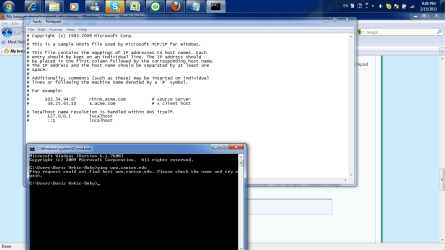
Hm..trats strange. Give a try this:
Go to \Windows\System32\drivers\etc and there you'll see a file named hosts. Open it with Notepad or Notepad ++. It should look like this

Give us a print of that
http://www.sevenforums.com/tutorials/9717-screenshot-paint.html
http://www.sevenforums.com/tutorials/9733-screenshots-files-upload-post-seven-forums.html
Also try to ping that site. Click on Start and wrote cmd and Enter. That will open Command Prompt
there write
.
Go to \Windows\System32\drivers\etc and there you'll see a file named hosts. Open it with Notepad or Notepad ++. It should look like this
Give us a print of that
http://www.sevenforums.com/tutorials/9717-screenshot-paint.html
http://www.sevenforums.com/tutorials/9733-screenshots-files-upload-post-seven-forums.html
Also try to ping that site. Click on Start and wrote cmd and Enter. That will open Command Prompt
there write
Code:
ping www.canton.eduMy Computer
- Computer type
- PC/Desktop
- Computer Manufacturer/Model Number
- Custom Build
- OS
- Windows 10 Pro x64
- CPU
- Intel Core i5 4440 @Stock
- Motherboard
- Gigabyte Z97 D3H
- Memory
- 4 x 4GB HyperX Fury DDR3
- Graphics Card(s)
- Gigabyte GTX 1050Ti O4G
- Sound Card
- Integrated
- Monitor(s) Displays
- Dell P2417H
- Screen Resolution
- 1920 x 1080
- Hard Drives
- Samsung EVO 850 120GB / Toshiba DT01ACA050 1TB 7200prm 32MB
- PSU
- Riotoro Onyx 750W
- Case
- NZXT H500 Black-Red
- Cooling
- Stock CPU + NZXT 120mm + 2x120mm red fans
- Keyboard
- Modecom Volcano Lanparty
- Mouse
- Asus ROG Gladius / DeepCool E-Pad Plus
- Internet Speed
- DOCSIS 50/3 Mbit
- Browser
- Google Chrome
- Other Info
- Asus K55VJ(i5 3210M, GT635M / 2GB, 8GB DDR3, 500GB HDD)
Hm..trats strange. Give a try this:
Go to \Windows\System32\drivers\etc and there you'll see a file named hosts. Open it with Notepad or Notepad ++. It should look like this
View attachment 138607
Give us a print of that
http://www.sevenforums.com/tutorials/9717-screenshot-paint.html
http://www.sevenforums.com/tutorials/9733-screenshots-files-upload-post-seven-forums.html
Also try to ping that site. Click on Start and wrote cmd and Enter. That will open Command Prompt
there write.Code:ping www.canton.edu

I tried and nothing happened, it still doesn't work. I attached shot of those thing you told me to do.
I tried to access over the proxy, Hide My Ass! Free Proxy and Privacy Tools - Surf The Web Anonymously , that is free proxy and privacy tools, to surf the web anonymously , and it works, but i want to make it to use without proxy. Do you know how I can fix this?
Thanks http://hidemyass.com/
Attachments
My Computer
- OS
- windows 7 32bit

Is your network configured to use a proxy server? If it works fine from a free proxy-less site, but not directly from your browser....it is being blocked somewhere along the chain. If you don't have anything running on your computer or your network that is blocking it, contact your ISP.
My Computer
- OS
- Windows 7 Ultimate x64 SP1
- CPU
- Intel Core i7-2600
- Motherboard
- Gigabyte GA-P67A-UD3P-B3
- Memory
- 12 GB Patriot Extreme DDR3-1333
- Graphics Card(s)
- Nvidia GTX 470
- Monitor(s) Displays
- Dell UltraSharp 2209WA
- Hard Drives
- OCZ Agility3 240 GB, WD5001AALS, WD7501AALS
- PSU
- OCZ ModStream 700W
- Case
- CoolerMaster HAF 912 Advanced
- Cooling
- CoolerMaster Hyper 212 Plus
Well,I don't know what else to tell you. I think it will be good co contact your ISP,as Deacon says.
My Computer
- Computer type
- PC/Desktop
- Computer Manufacturer/Model Number
- Custom Build
- OS
- Windows 10 Pro x64
- CPU
- Intel Core i5 4440 @Stock
- Motherboard
- Gigabyte Z97 D3H
- Memory
- 4 x 4GB HyperX Fury DDR3
- Graphics Card(s)
- Gigabyte GTX 1050Ti O4G
- Sound Card
- Integrated
- Monitor(s) Displays
- Dell P2417H
- Screen Resolution
- 1920 x 1080
- Hard Drives
- Samsung EVO 850 120GB / Toshiba DT01ACA050 1TB 7200prm 32MB
- PSU
- Riotoro Onyx 750W
- Case
- NZXT H500 Black-Red
- Cooling
- Stock CPU + NZXT 120mm + 2x120mm red fans
- Keyboard
- Modecom Volcano Lanparty
- Mouse
- Asus ROG Gladius / DeepCool E-Pad Plus
- Internet Speed
- DOCSIS 50/3 Mbit
- Browser
- Google Chrome
- Other Info
- Asus K55VJ(i5 3210M, GT635M / 2GB, 8GB DDR3, 500GB HDD)

Sounds like an ISP problem to me. Where are you located? Contact your service provider and see what they say.
My Computer
- Computer type
- PC/Desktop
- Computer Manufacturer/Model Number
- Lenovo IdeaCenter 450
- OS
- Windows 10 Pro X64
- CPU
- Intel Quad Core i7-4770 @ 3.4Ghz
- Memory
- 16.0GB PC3-12800 DDR3 SDRAM 1600 MHz
- Graphics Card(s)
- Intel Integrated HD Graphics
- Sound Card
- Realtek HD Audio
- Monitor(s) Displays
- HP 22" LCD
- Screen Resolution
- 1680 x 1050
- Hard Drives
- 250GB Samsung EVO SATA-3 SSD
2TB Seagate ST2000DM001 SATA-2
1.5TB Seagate ST3150041AS SATA
- Keyboard
- Dell USB
- Mouse
- Lenovo USB
- Internet Speed
- Cable via Road Runner 3MB Upload, 30MB Download
- Antivirus
- Windows Defender, MBAM Pro, MBAE
- Browser
- Seamonkey
- Other Info
- UEFI/GPT
PLDS DVD-RW DH16AERSH
Similar threads
- Replies
- 22
- Views
- 96K


- Replies
- 6
- Views
- 885
- Replies
- 5
- Views
- 1K
