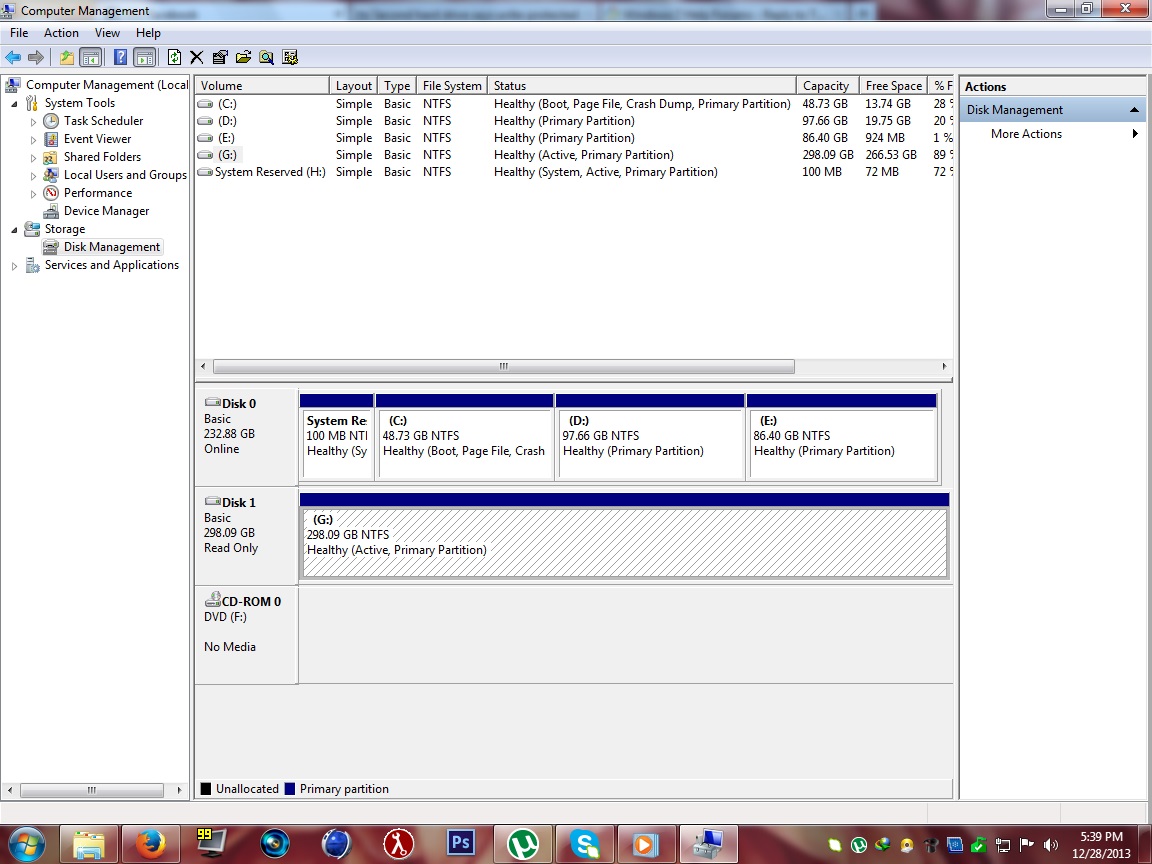
My Computer hangs when i click Local Disk G:/ ST3320418AS ATA Device

phenompak

New member
Local time
7:21 PM
Messages
7
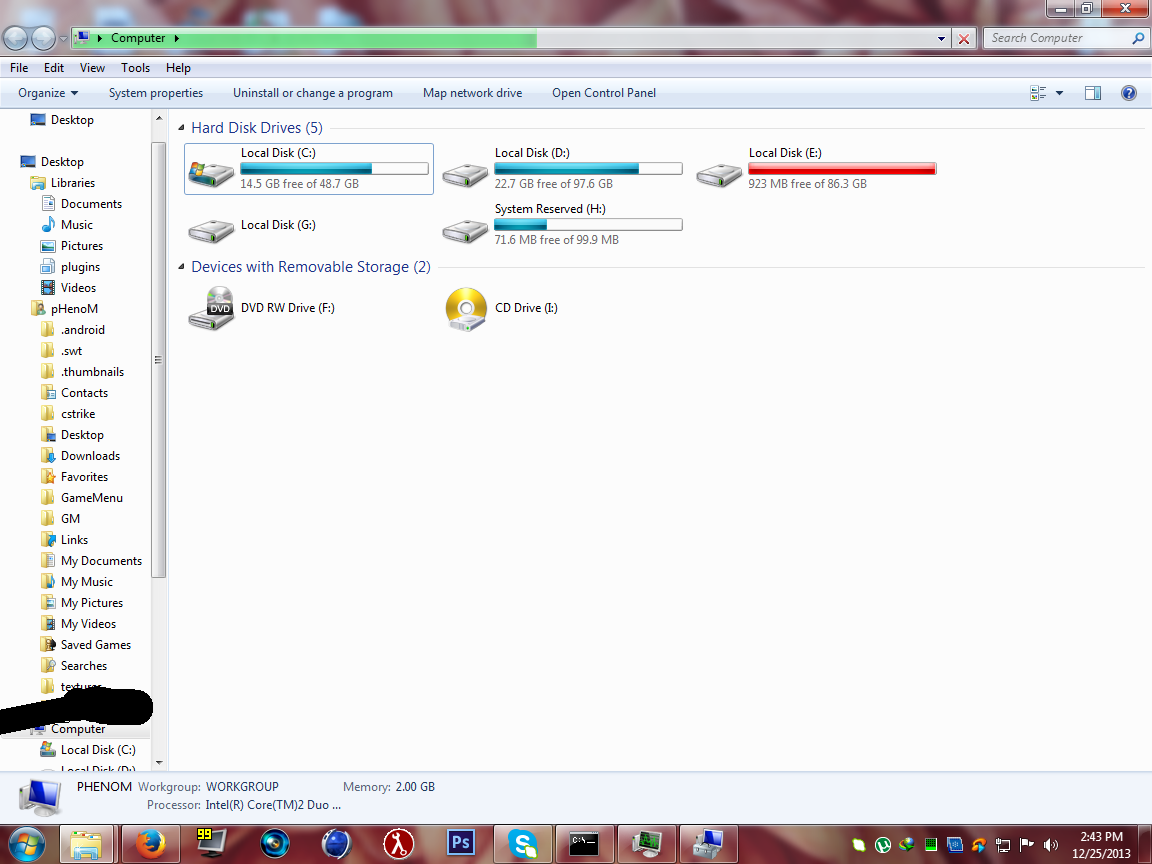
Hello, its been 2 days since i am having this problem, i tried to format it but in disk management it says the disk is unallocated. so i could not format it from there. and not even from cmd. what should i do, there are very important things in this drive. i know i cant get them back. but atleast i want my disk :(. help me please. the name of my hardisk is ST3320418AS ATA Device
And here is the screenshot.


BLPeCvN.png
 

My Computer My Computer

At a glance

Windows 7 Ultimate 32bit Service Pack 12.66 ghz2 gbintell express q35 chipset
Computer type
PC/Desktop
Computer Manufacturer/Model Number
Dell
OS
Windows 7 Ultimate 32bit Service Pack 1
CPU
2.66 ghz
Motherboard
idk
Memory
2 gb
Graphics Card(s)
intell express q35 chipset
Antivirus
Microsoft Security Essentials
Browser
Firefox

My Computer My Computer

At a glance

Multi-Boot W7_Pro_x64 W8.1_Pro_x64 W10_Pro_x6...AMD Athlon II x4 6206GB GSkill DDR2 800AMD 4670 GPU + AMD 4200 IGP
Computer type
PC/Desktop
Computer Manufacturer/Model Number
home built
OS
Multi-Boot W7_Pro_x64 W8.1_Pro_x64 W10_Pro_x64 +Linux_VMs +Chromium_VM
CPU
AMD Athlon II x4 620
Motherboard
Gigabyte GA-MA785G-UD3H
Memory
6GB GSkill DDR2 800
Graphics Card(s)
AMD 4670 GPU + AMD 4200 IGP
Sound Card
on board Realtek ALC889A
Monitor(s) Displays
RCA 40" LCD TV, Insignia 32" LCD TV, HP 15" LCD monitor
Screen Resolution
1680 x 1050
Hard Drives
OCZ Vertex 3 120GB,
Samsung F3 1TB (3),
Several others - WD, Seagate, Hitachi, ...
PSU
Corsair 500 W
Case
Rosewill mid tower
Cooling
CM 90mm rifle
Keyboard
Gyration wireless, Logitech wireless, Dell USB wired
Mouse
Gyration wireless, Logitech wireless, V7 USB wired
Internet Speed
Spectrum - 100Mbps D / 10Mbps U
Antivirus
Avast, MBAM3, EMET, WinPatrol
Browser
Pale Moon, Firefox, IE
Other Info
2 multi-boot PC's
Mainly HTPC/Office/Gen purpose (no gaming).
Trendnet USB KVM.
LG DVD burner/Blue Ray Player.
Tray system for removable SATA backup drives.

Not currently OCd, under-volted.
I use Hybrid sleep, rarely re-boot or shutdown.

Hauppauge HD-PVR, Avermedia PCIe TV Tuner, Hauppauge PCI TV Tuner.
i dont get you.
btw
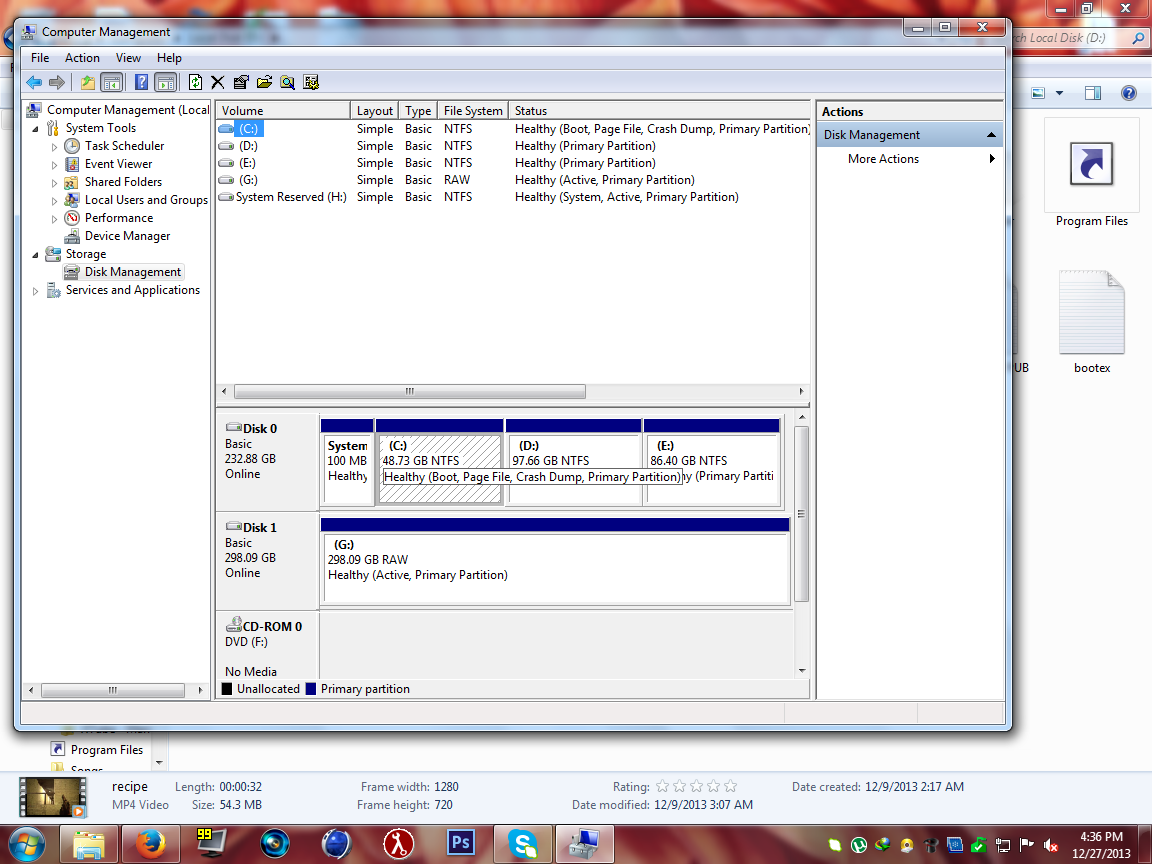
now somehow after i restarted my pc and i went to disk management and i saw that my Local Disk G was not Unallocated. i tried to format it, but suddenly it gives me the error The Format could not be complete succesfully or something like that.
 

My Computer My Computer

At a glance

Windows 7 Ultimate 32bit Service Pack 12.66 ghz2 gbintell express q35 chipset
Computer type
PC/Desktop
Computer Manufacturer/Model Number
Dell
OS
Windows 7 Ultimate 32bit Service Pack 1
CPU
2.66 ghz
Motherboard
idk
Memory
2 gb
Graphics Card(s)
intell express q35 chipset
Antivirus
Microsoft Security Essentials
Browser
Firefox
This is what would be nice to see.

Disk Management.PNG
 

My Computer My Computer

At a glance

Windows 10 Pro. 64/ version 1709 Windows 7 Pr...Intel i7-6800K @ 4.3Corsair Platinum 16 gig @2400EVGA GTX 1070 OC
Computer type
PC/Desktop
Computer Manufacturer/Model Number
Home made Desktop
OS
Windows 10 Pro. 64/ version 1709 Windows 7 Pro/64
CPU
Intel i7-6800K @ 4.3
Motherboard
ASUS X-99 Deluxe II
Memory
Corsair Platinum 16 gig @2400
Graphics Card(s)
EVGA GTX 1070 OC
Monitor(s) Displays
Asus 27" LED LCD/VE278Q
Screen Resolution
1920-1080 or 1280-720 HDMI
Hard Drives
INTEL SSD 730-240 Gb Sata 3.0/
PSU
EVGA Platium 1200W
Case
Phanteks Luxe Tempered Glass 8 fans/ one radiator
Cooling
XSPC/ Water Cooled CPU
Keyboard
Das 4 Professional
Mouse
Logitech M705/MX Anywhere 2-S
Internet Speed
100 mbits
Antivirus
Microsoft Security Essentials/ Malwarebytes Premium 3.0/ SAS
Browser
I.E. 11 default/Firefox/ ISP Time Warner Cable/Spectrum
Other Info
LG BluRay Burner/
Sound system-KLipsch-THX/
Icy Dock ssd Hot Swap bays.
i dont get you.
You have been given an explanation of how to produce a screen shot of Disk Management.

Please supply a screen shot of Disk Management, which will give FAR MORE relevant information than your screen shot of Windows Explorer.

N.B. I have never seen a Disk described as Unallocated
I have however seen a Disk with Unallocated Space.

there are very important things in this drive. i know i cant get them back.
You are almost certainly WRONG.

If they WERE on the drive they can probably be recovered.

You can either pay someone to do the recovery for you and you may be lucky in your choice of who to use,
or you may be unlucky and he might cause more damage that would it far more expensive to recover.

You can also get software to recover your files free of charge.
Again you may be lucky - or you might make a mistake and ruin any future possibility of recovery,

You can totally protect an entire DISK by putting it OFFLINE,
and whilst offline you can still recover files and data from all its partitions and unallocated space and RAW DATA.
You cannot put a Partition OFFLINE by itself.

A Disk Management screenshot will indicate if OFFLINE protection is feasible.

If you wish I have freeware recovery software to recommend when I see your screenshot.

Regards
Alan
 

My Computer My Computer

At a glance

Windows 7 Ultimate 64 bit SP1 x64AMD Phenom X4 95008 GBATI Radeon HD 4600 Series
Computer Manufacturer/Model Number
ASUSTeK Computer INC. M3A32-MVP DELUXE (CPU 1)
OS
Windows 7 Ultimate 64 bit SP1 x64
CPU
AMD Phenom X4 9500
Motherboard
ASUSTeK M3A32-MVP Deluxe (CPU 1)
Memory
8 GB
Graphics Card(s)
ATI Radeon HD 4600 Series
Sound Card
AMD High Definition Audio Device
Monitor(s) Displays
SyncMaster (1680x1050@60Hz)
Hard Drives
59GB OCZ-VERTEX2 ATA Device
+
977GB SAMSUNG HD103SJ ATA Device
+
625GB WDC WD6401AALS-00L3B2 ATA Device
Ok, here is the image.


arw36fs.png
 

My Computer My Computer

At a glance

Windows 7 Ultimate 32bit Service Pack 12.66 ghz2 gbintell express q35 chipset
Computer type
PC/Desktop
Computer Manufacturer/Model Number
Dell
OS
Windows 7 Ultimate 32bit Service Pack 1
CPU
2.66 ghz
Motherboard
idk
Memory
2 gb
Graphics Card(s)
intell express q35 chipset
Antivirus
Microsoft Security Essentials
Browser
Firefox
It should be easy to recovery your data with this freeware - it has worked well for me.
Lazesoft Recovery Suite Home Free Download

If you wish to do this I suggest you start a new topic with a relevant "Partition Recovery" title in whatever sub-forum a moderator may advise,
then others who also suffer data loss may get the benefit.

If you wish to do this the first thing to do now is, using Disk Management,
select Disk 1 and then near the top right corner under Actions click
More Actions > All Tasks > Offline
That should effectively write protect the Disk so that you cannot accidentally over-write your data.

Regards
Alan
 

My Computer My Computer

At a glance

Windows 7 Ultimate 64 bit SP1 x64AMD Phenom X4 95008 GBATI Radeon HD 4600 Series
Computer Manufacturer/Model Number
ASUSTeK Computer INC. M3A32-MVP DELUXE (CPU 1)
OS
Windows 7 Ultimate 64 bit SP1 x64
CPU
AMD Phenom X4 9500
Motherboard
ASUSTeK M3A32-MVP Deluxe (CPU 1)
Memory
8 GB
Graphics Card(s)
ATI Radeon HD 4600 Series
Sound Card
AMD High Definition Audio Device
Monitor(s) Displays
SyncMaster (1680x1050@60Hz)
Hard Drives
59GB OCZ-VERTEX2 ATA Device
+
977GB SAMSUNG HD103SJ ATA Device
+
625GB WDC WD6401AALS-00L3B2 ATA Device
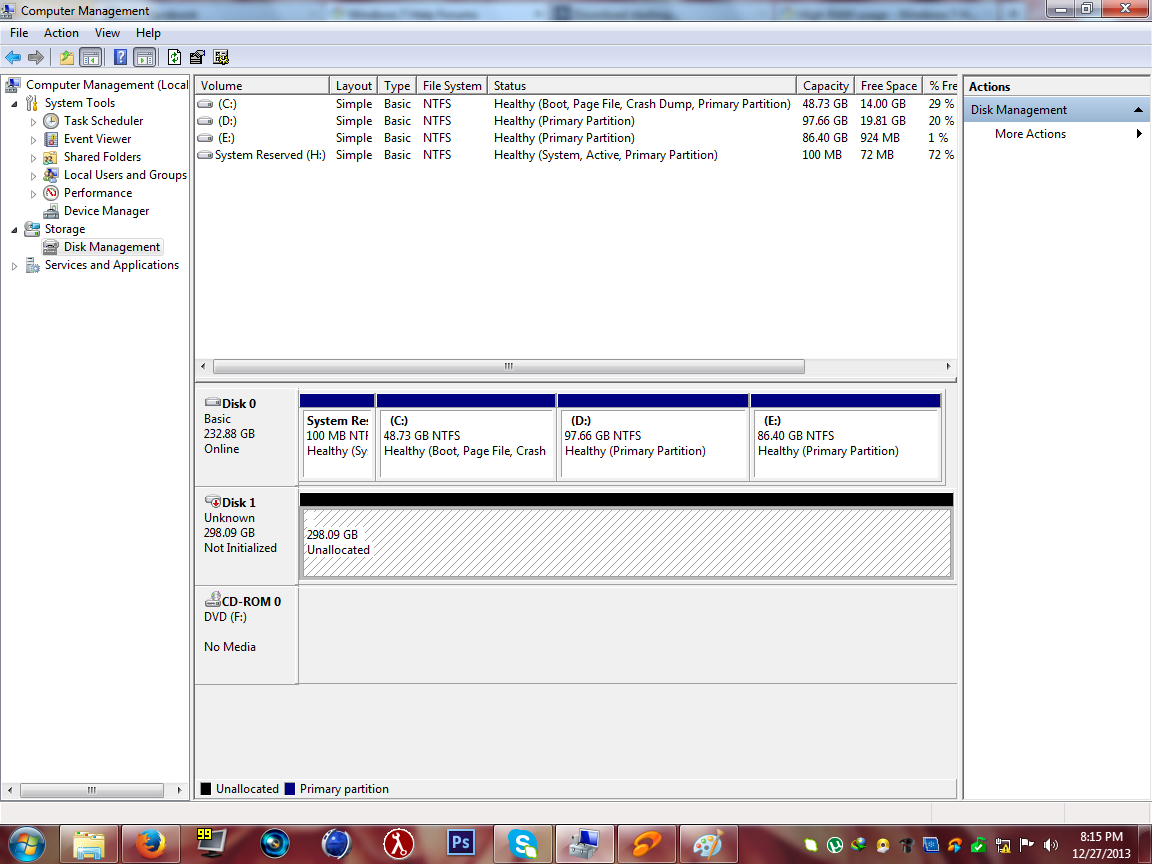
Ok. so after i restarted my PC again, and went to disk management. There i saw that my Hard disk is again Unallocated. so i could not do what alan10 said to me . help me please. i need this hard disk. Below is the screenshot of disk management


SwJjhKv.png
 

My Computer My Computer

At a glance

Windows 7 Ultimate 32bit Service Pack 12.66 ghz2 gbintell express q35 chipset
Computer type
PC/Desktop
Computer Manufacturer/Model Number
Dell
OS
Windows 7 Ultimate 32bit Service Pack 1
CPU
2.66 ghz
Motherboard
idk
Memory
2 gb
Graphics Card(s)
intell express q35 chipset
Antivirus
Microsoft Security Essentials
Browser
Firefox
On my computer Lazesoft recovered all the files from a 531 GB partition which Windows called "Unallocated Space".
You do NOT have to put the drive offline for Lazesoft to recover files.
I only suggest offline to protect you from making your own mistakes that could damage what you said was precious.
Lazesoft in fact makes it almost impossible to damage the content of the drive you recover from,
but other recovery software from elsewhere does allow you to damage your prospects.

I will back-out now and allow others to advise how to salvage your disk,
I do however wonder about its reliability if its status is changed by restarting the computer.
 

My Computer My Computer

At a glance

Windows 7 Ultimate 64 bit SP1 x64AMD Phenom X4 95008 GBATI Radeon HD 4600 Series
Computer Manufacturer/Model Number
ASUSTeK Computer INC. M3A32-MVP DELUXE (CPU 1)
OS
Windows 7 Ultimate 64 bit SP1 x64
CPU
AMD Phenom X4 9500
Motherboard
ASUSTeK M3A32-MVP Deluxe (CPU 1)
Memory
8 GB
Graphics Card(s)
ATI Radeon HD 4600 Series
Sound Card
AMD High Definition Audio Device
Monitor(s) Displays
SyncMaster (1680x1050@60Hz)
Hard Drives
59GB OCZ-VERTEX2 ATA Device
+
977GB SAMSUNG HD103SJ ATA Device
+
625GB WDC WD6401AALS-00L3B2 ATA Device
And you are not going to believe that after a restart my hard disk is working fine, but its lagging.
 

My Computer My Computer

At a glance

Windows 7 Ultimate 32bit Service Pack 12.66 ghz2 gbintell express q35 chipset
Computer type
PC/Desktop
Computer Manufacturer/Model Number
Dell
OS
Windows 7 Ultimate 32bit Service Pack 1
CPU
2.66 ghz
Motherboard
idk
Memory
2 gb
Graphics Card(s)
intell express q35 chipset
Antivirus
Microsoft Security Essentials
Browser
Firefox
Now could be your last chance to copying to what you considered to be
You said you had "very important things in this drive."
It is possible you will never see them again after you reboot or restart,
and I would not trust sleep mode either,
and I cannot help thinking that if either Windows defaults to power saving mode, or if the Disk is a "green" type,
then if the disk spins down it may lose the plot when it is supposed to spin up.

Now could be your last chance for copying "important things" to free space on C:\ and/or D:\ and/or an external drive.
 

My Computer My Computer

At a glance

Windows 7 Ultimate 64 bit SP1 x64AMD Phenom X4 95008 GBATI Radeon HD 4600 Series
Computer Manufacturer/Model Number
ASUSTeK Computer INC. M3A32-MVP DELUXE (CPU 1)
OS
Windows 7 Ultimate 64 bit SP1 x64
CPU
AMD Phenom X4 9500
Motherboard
ASUSTeK M3A32-MVP Deluxe (CPU 1)
Memory
8 GB
Graphics Card(s)
ATI Radeon HD 4600 Series
Sound Card
AMD High Definition Audio Device
Monitor(s) Displays
SyncMaster (1680x1050@60Hz)
Hard Drives
59GB OCZ-VERTEX2 ATA Device
+
977GB SAMSUNG HD103SJ ATA Device
+
625GB WDC WD6401AALS-00L3B2 ATA Device
And you are not going to believe that after a restart my hard disk is working fine, but its lagging.

Well, its possible that even though its working it may need need to be checked for errors. I would run a chkdsk /f to have the check disk program within windows scan for and hopefully fix what errors there are left which is probably the reason its lagging or running slowly. I would also suggest doing a defrag of the hard disk if that has not been done in a long time which will re organize the files on the hard disk and will help to speed up the operation of windows. Also, you might want to download and run ccleaner to clean out left behind and excess registry entries which also can slow down the hard disk and windows.

Go to this link to download ccleaner:

https://www.piriform.com/ccleaner
 

My Computer My Computer

At a glance

Windows 7 ultimate 64-bitIntel I7 2600K 3.4ghzCorsair 16gb ddr3 1600mhzNvidia Geforce gt 430
Computer type
PC/Desktop
Computer Manufacturer/Model Number
custom built
OS
Windows 7 ultimate 64-bit
CPU
Intel I7 2600K 3.4ghz
Motherboard
Asus Evo P8P67
Memory
Corsair 16gb ddr3 1600mhz
Graphics Card(s)
Nvidia Geforce gt 430
Sound Card
Sound Blaster Titanium x-fi pci express
Monitor(s) Displays
Dell E198WFP
Hard Drives
1 western digital 2TB drive.
PSU
Antec 1200 watt
Case
Inwin Dragon Rider
Cooling
6 case supplied cooling fans
Keyboard
logitech mk700
Mouse
logitech m705
Internet Speed
25-50mbps download; 10mbps upload(i think)
Antivirus
avg free 2014
Browser
mozilla firefox
Other Info
Also have a pretty bad speaker setup which is a klipsch promedia 5.1 surround speaker setup with huge subwoofer and lg blu ray player/writer. Also a hp officejet pro 8600 plus wireless all in one and a logitech s7500 webcam.
Well, its possible that even though its working it may need need to be checked for errors. I would run a chkdsk /f to have the check disk program within windows scan for and hopefully fix what errors there are left which is probably the reason its lagging or running slowly. I would also suggest doing a defrag of the hard disk if that has not been done in a long time which will re organize the files on the hard disk and will help to speed up the operation of windows. Also, you might want to download and run ccleaner to clean out left behind and excess registry entries which also can slow down the hard disk and windows.

Go to this link to download ccleaner:

https://www.piriform.com/ccleaner
Absolutely NONE OF THAT should be attempted before you copy to a reliable device all that is important to you.
You might permanently kill the Disk before you rescue your files.

It is possible for defragging to spend over a day whilst it copies al the files from one region of a partition to another, and then back again, and again repeatedly.
Only if the drive survives that hard work is there a chance for you to make that all important copy of what is important,
and the only benefit of spending a day defragging is that you can save a few seconds copying your important files to an ultra super speed drive for safe keeping,
BUT the chances are that the best thing available to you is a USB3 external drive and USB3 will probably prevent you getting ANY benefit from a very slightly faster internal secondary HDD.

After rescuing anything of value,
and before trusting that Disk to ever again hold anything important,
I would want to fix it and prove that it is fixed and reliable.

If I was in your position I would seek advice upon relevant tools to perform stress tests on the Disk,
though whilst awaiting replies I might consider running chkdsk and defragging as a matter of interest.

If I thought the Disk was worthy of using again I would probably get advice on the merits of :-
a Quick or FULL format;
and also "chkdsk /f" or "chkdsk /r".

Regards
Alan

 

My Computer My Computer

At a glance

Windows 7 Ultimate 64 bit SP1 x64AMD Phenom X4 95008 GBATI Radeon HD 4600 Series
Computer Manufacturer/Model Number
ASUSTeK Computer INC. M3A32-MVP DELUXE (CPU 1)
OS
Windows 7 Ultimate 64 bit SP1 x64
CPU
AMD Phenom X4 9500
Motherboard
ASUSTeK M3A32-MVP Deluxe (CPU 1)
Memory
8 GB
Graphics Card(s)
ATI Radeon HD 4600 Series
Sound Card
AMD High Definition Audio Device
Monitor(s) Displays
SyncMaster (1680x1050@60Hz)
Hard Drives
59GB OCZ-VERTEX2 ATA Device
+
977GB SAMSUNG HD103SJ ATA Device
+
625GB WDC WD6401AALS-00L3B2 ATA Device
Now for no reason, I can't write to the drive and my apps can't either as they all crash as soon as they need to.

I get this exact error when simply trying to create a directory in the root of the drive:

"The disk is write-protected.

Remove the write-protection or use another disk."

Now what to do? its the same drive Local Disk G:/

This is my disk management


WydQhvP.jpg


AND this is the screenshot of error


wtsJJiX.jpg
 

My Computer My Computer

At a glance

Windows 7 Ultimate 32bit Service Pack 12.66 ghz2 gbintell express q35 chipset
Computer type
PC/Desktop
Computer Manufacturer/Model Number
Dell
OS
Windows 7 Ultimate 32bit Service Pack 1
CPU
2.66 ghz
Motherboard
idk
Memory
2 gb
Graphics Card(s)
intell express q35 chipset
Antivirus
Microsoft Security Essentials
Browser
Firefox

My Computer My Computer

At a glance

Windows 10 Pro. 64/ version 1709 Windows 7 Pr...Intel i7-6800K @ 4.3Corsair Platinum 16 gig @2400EVGA GTX 1070 OC
Computer type
PC/Desktop
Computer Manufacturer/Model Number
Home made Desktop
OS
Windows 10 Pro. 64/ version 1709 Windows 7 Pro/64
CPU
Intel i7-6800K @ 4.3
Motherboard
ASUS X-99 Deluxe II
Memory
Corsair Platinum 16 gig @2400
Graphics Card(s)
EVGA GTX 1070 OC
Monitor(s) Displays
Asus 27" LED LCD/VE278Q
Screen Resolution
1920-1080 or 1280-720 HDMI
Hard Drives
INTEL SSD 730-240 Gb Sata 3.0/
PSU
EVGA Platium 1200W
Case
Phanteks Luxe Tempered Glass 8 fans/ one radiator
Cooling
XSPC/ Water Cooled CPU
Keyboard
Das 4 Professional
Mouse
Logitech M705/MX Anywhere 2-S
Internet Speed
100 mbits
Antivirus
Microsoft Security Essentials/ Malwarebytes Premium 3.0/ SAS
Browser
I.E. 11 default/Firefox/ ISP Time Warner Cable/Spectrum
Other Info
LG BluRay Burner/
Sound system-KLipsch-THX/
Icy Dock ssd Hot Swap bays.
If the wright protection WARNING is for Disk G.
How long have you had Disk G?
How long has it been wright protected?
Where did you get the Hard Drive?

Your BVH file is confusing.

List of motion and gesture file formats - Wikipedia, the free encyclopedia

I bought this disk like 2 weeks ago. its creating problems from 1 week. and now its again healthy in my disk management, but when i click on it , my computer stucks the BVH file doesnt have any problem, i am really tired of this. please give me a serious answer.
 
Last edited:

My Computer My Computer

At a glance

Windows 7 Ultimate 32bit Service Pack 12.66 ghz2 gbintell express q35 chipset
Computer type
PC/Desktop
Computer Manufacturer/Model Number
Dell
OS
Windows 7 Ultimate 32bit Service Pack 1
CPU
2.66 ghz
Motherboard
idk
Memory
2 gb
Graphics Card(s)
intell express q35 chipset
Antivirus
Microsoft Security Essentials
Browser
Firefox
If it's a new HD with these problems it's probably defective.
Can you return it for a warranty replacement?
 

My Computer My Computer

At a glance

Multi-Boot W7_Pro_x64 W8.1_Pro_x64 W10_Pro_x6...AMD Athlon II x4 6206GB GSkill DDR2 800AMD 4670 GPU + AMD 4200 IGP
Computer type
PC/Desktop
Computer Manufacturer/Model Number
home built
OS
Multi-Boot W7_Pro_x64 W8.1_Pro_x64 W10_Pro_x64 +Linux_VMs +Chromium_VM
CPU
AMD Athlon II x4 620
Motherboard
Gigabyte GA-MA785G-UD3H
Memory
6GB GSkill DDR2 800
Graphics Card(s)
AMD 4670 GPU + AMD 4200 IGP
Sound Card
on board Realtek ALC889A
Monitor(s) Displays
RCA 40" LCD TV, Insignia 32" LCD TV, HP 15" LCD monitor
Screen Resolution
1680 x 1050
Hard Drives
OCZ Vertex 3 120GB,
Samsung F3 1TB (3),
Several others - WD, Seagate, Hitachi, ...
PSU
Corsair 500 W
Case
Rosewill mid tower
Cooling
CM 90mm rifle
Keyboard
Gyration wireless, Logitech wireless, Dell USB wired
Mouse
Gyration wireless, Logitech wireless, V7 USB wired
Internet Speed
Spectrum - 100Mbps D / 10Mbps U
Antivirus
Avast, MBAM3, EMET, WinPatrol
Browser
Pale Moon, Firefox, IE
Other Info
2 multi-boot PC's
Mainly HTPC/Office/Gen purpose (no gaming).
Trendnet USB KVM.
LG DVD burner/Blue Ray Player.
Tray system for removable SATA backup drives.

Not currently OCd, under-volted.
I use Hybrid sleep, rarely re-boot or shutdown.

Hauppauge HD-PVR, Avermedia PCIe TV Tuner, Hauppauge PCI TV Tuner.
From you post # 14


It states a disk is wright protected. I don't understand that.
----------------------
From you post # 16

i am really tired of this. please give me a serious answer.

Yes it is a serious question.
When you post something like that I'm presuming that you would like to have help with that matter.

DavidW7ncus post # 17 sounds like a great idea to me.
 

My Computer My Computer

At a glance

Windows 10 Pro. 64/ version 1709 Windows 7 Pr...Intel i7-6800K @ 4.3Corsair Platinum 16 gig @2400EVGA GTX 1070 OC
Computer type
PC/Desktop
Computer Manufacturer/Model Number
Home made Desktop
OS
Windows 10 Pro. 64/ version 1709 Windows 7 Pro/64
CPU
Intel i7-6800K @ 4.3
Motherboard
ASUS X-99 Deluxe II
Memory
Corsair Platinum 16 gig @2400
Graphics Card(s)
EVGA GTX 1070 OC
Monitor(s) Displays
Asus 27" LED LCD/VE278Q
Screen Resolution
1920-1080 or 1280-720 HDMI
Hard Drives
INTEL SSD 730-240 Gb Sata 3.0/
PSU
EVGA Platium 1200W
Case
Phanteks Luxe Tempered Glass 8 fans/ one radiator
Cooling
XSPC/ Water Cooled CPU
Keyboard
Das 4 Professional
Mouse
Logitech M705/MX Anywhere 2-S
Internet Speed
100 mbits
Antivirus
Microsoft Security Essentials/ Malwarebytes Premium 3.0/ SAS
Browser
I.E. 11 default/Firefox/ ISP Time Warner Cable/Spectrum
Other Info
LG BluRay Burner/
Sound system-KLipsch-THX/
Icy Dock ssd Hot Swap bays.
Back
Top