My computer is possessed!!! HELP!

lmw2184

Banned
Local time
11:33 PM
Messages
33
I just got home and noticed that several applications were opened up on my desktop (7-zip, AutoCAD, MyLockBox, HP update, and some .doc files). I've noticed other random applications opened on my desktop before in the past, but thought maybe I clicked something on accident when I got off the computer... didn't think much of it. I live alone so I'm freaking out man! lol. Either a bum is sneaking in and using my PC after he watches me leave from the bushes or I got a virus or something. I'm not convinced it's a virus cause I religiously update/scan my pc with no findings, it's never showed any symptoms of a virus when I'm using it, and it ONLY happens when I'm not on the computer.

Can anyone explain this?
 

My Computer

OS
Windows 7 Home Premium 64-bit
CPU
i5-650
Memory
6GB
Hard Drives
1TB
Do you have a cat?
 

My Computer

Computer Manufacturer/Model Number
Self
OS
Main - Windows 7 Pro SP1 64-Bit; 2nd - Windows Server 2008 R2
CPU
Main - Core i7 2600K; 2nd - Core i7 920
Motherboard
Main - Asus P8Z68-V Pro/Gen3; 2nd - Gigabyte GA-EX58-UDR3
Memory
Main - 16GB Corsair Vengeance; 2nd - 12GB Corsair Vengeance
Graphics Card(s)
Main - XFX Radeon 6870 1GB; 2nd - XFX Radeon 4870 1GB
Sound Card
Both: Onboard Realtek Azalia
Monitor(s) Displays
Main - Hann 25" + I-INC 25" + Acer 23"; 2nd - Upgrading Soon
Screen Resolution
Main - 1920x1080 (All Three Monitors); 2nd - Upgrading Soon
Hard Drives
Main - (1) Crucial M4 128GB (Boot)
Main - (1) Seagate 2TB 64MB Cache (Data)
Main - (1) Seagate 2TB 64MB Cache (Data Backup)
2nd - (1) Intel X25-M SSD 80GB (Boot)
2nd - (3) Seagate 1TB 32MB Cache (Data Backup)
2nd - (1) Seagate 320GB (Because)
PSU
Main - OCZ 600W Modular; 2nd - OCZ 600W
Case
Main - Thermaltake Element G; 2nd - NZXT something or other
Cooling
Main - Corsair H80; 2nd - Prolimatech Megahalems
Keyboard
Main - Razer Reclusa; 2nd - Old MS Keyboard
Mouse
Main - Logitech MX Revolution; 2nd - Old MS Mouse
Internet Speed
20Mbps Time-Warner Cable
Install and run a Full Scan with Malwarebytes

Uncheck everything in msconfig>Startup except AV: Startup Programs - Change

Do the same in msconfig>Services after Hiding All MS Services.

Type Scheduler in Start Search box, from right column choose Display all Scheduled Tasks, Delete each one.

Password your account in Control Panel>User Accounts and Log Off or Shut Down when you leave computer.

Now nothing can run without you running it.
 

My Computer

Computer type
PC/Desktop
Computer Manufacturer/Model Number
Self Assembled
OS
Microsoft Windows 10 Pro Insider Preview 64-bit
CPU
Intel(R) Core(TM) i3-4130 CPU @ 3.40GHz
Motherboard
Gigabyte Technology Co., Ltd. B85M-D3H
Memory
Corsair Vengence 4GB x2 (8.00GB Dual-Channel DDR3 @ 798MHz)
Graphics Card(s)
2047MB GeForce GTS 450 (ZOTAC International)
Sound Card
Onboard (Realtek High Definition Audio)
Monitor(s) Displays
LG Flatron E2040T
Screen Resolution
1600x900
Hard Drives
Western Digital 1 TB
Seagate 500 GB
PSU
Corsair VS550
Case
Cooler Master K380
Cooling
Cooler Master Seidon 120V Plus
Keyboard
Logitech MK260r
Mouse
Logitech MK260r
Internet Speed
PMPL Broadband
Antivirus
Windows Defender + MBAM
Browser
Firefox
Other Info
Dell Studio 15" Laptop
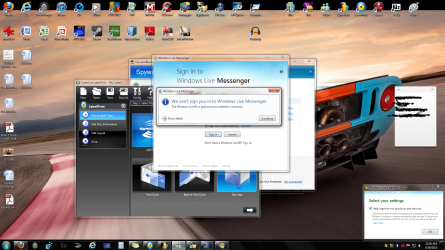
No cat. Okay check this out. Since I've made this post, I watched the ball game came back to my pc when i got some response emails to this thread on my phone and now my computer has 6 new applications on my screen. Here Ill post a pic to show exactly what my desktop looked like when I returned. I've never had it happen this close back to back either. Its like demons read my post on here as I was typing and now they're taunting me.
 

Attachments

  • Untitled.png
    Untitled.png
    540.3 KB · Views: 99

My Computer

OS
Windows 7 Home Premium 64-bit
CPU
i5-650
Memory
6GB
Hard Drives
1TB
Gregrocker... I dont really want to shut everything down like that. I've had problems in the past shutting alot of programs down on startup just to increase boot time and it really wasnt worth it. Id like to find a solution to this problem somehow other than that.
 

My Computer

OS
Windows 7 Home Premium 64-bit
CPU
i5-650
Memory
6GB
Hard Drives
1TB
Also I ran a full scan on AVG and MBAM and it detected nothing. I wanna set up a screen recorder just to see what it does when I'm not near the computer. Anybody recommend a good free one?
 

My Computer

OS
Windows 7 Home Premium 64-bit
CPU
i5-650
Memory
6GB
Hard Drives
1TB
does anyone except yourself use your computer?
 

My Computer

Computer type
PC/Desktop
Computer Manufacturer/Model Number
Self assembled
OS
Windows 10 Home 64Bit
CPU
Intel Core i5 10400 @ 2.90GHz
Motherboard
Intel Corporation DG41WV (PROCESSOR)
Memory
8.00GB Single-Channel Unknown @ 1329MHz (16-20-20-38)
Sound Card
Realtek High Definition Audio
Monitor(s) Displays
DELL E170S
Screen Resolution
1280x1024 pixels
Hard Drives
931GB TOSHIBA DT01ACA100 (SATA)
238GB TEAM TM8PS7256G (SATA SSD)
Case
Nothing Fancy
Cooling
Fans
Keyboard
A4 Tech Co LTD
Mouse
A4 Tech Co Ltd/Logitech
Internet Speed
25 Mbps
do you have your pc users password protected? it would be good idea.. and then set to lock down it after some time when you dont use it.
have someone else used your pc? maybe there is some remote control software installed.. sometimes it can be legit software so antivirus may not report it.
i had many problems with AVG..
please try this What is Windows Defender Offline?
 

My Computer

Computer type
PC/Desktop
Computer Manufacturer/Model Number
Self Built PC
OS
Windows 7 pro 64bit. (SP1)
CPU
Intel core I5 2400
Motherboard
Gigabyte H61
Memory
8GB DDR3 Kingston
Graphics Card(s)
Gigabyte GF GTX650OC
Sound Card
Realtek HD audio
Monitor(s) Displays
LCD 20"
Screen Resolution
1600x900
Hard Drives
INTEL SSD 320 80GB +Seagate 7200.12 1TBx3
PSU
Coolermaster RX450W
Case
Coolermaster atx case
Cooling
stock cooler
Keyboard
logitech
Mouse
logitech
Internet Speed
FTTD 100mbps
Gregrocker... I dont really want to shut everything down like that. I've had problems in the past shutting alot of programs down on startup just to increase boot time and it really wasnt worth it. Id like to find a solution to this problem somehow other than that.
It might be worth it if it helped solve the problem you're having, right? ;)

Some of the things we suggest during the troubleshooting process may not seem to make sense right away, but they are not done just for kicks. I think what Greg is suggesting is to change one of the variables here and see if there is any change. It could well be that something is causing background processes associated with some of your programs (like "7-zip, AutoCAD, MyLockBox, HP update"...etc) to be triggered automatically. If those things are not allowed to start to begin with and the problem disappears then we have a real good lead as to where to check next.

Do the "msconfig", etc and see what happens. You'll probably know very soon if it makes a difference or not. If it doesn't it will only take 30 seconds and a reboot to put things back the way they were. If it does, you might have this problem fixed sooner rather than later. :)
 

My Computer

Computer Manufacturer/Model Number
Self
OS
Main - Windows 7 Pro SP1 64-Bit; 2nd - Windows Server 2008 R2
CPU
Main - Core i7 2600K; 2nd - Core i7 920
Motherboard
Main - Asus P8Z68-V Pro/Gen3; 2nd - Gigabyte GA-EX58-UDR3
Memory
Main - 16GB Corsair Vengeance; 2nd - 12GB Corsair Vengeance
Graphics Card(s)
Main - XFX Radeon 6870 1GB; 2nd - XFX Radeon 4870 1GB
Sound Card
Both: Onboard Realtek Azalia
Monitor(s) Displays
Main - Hann 25" + I-INC 25" + Acer 23"; 2nd - Upgrading Soon
Screen Resolution
Main - 1920x1080 (All Three Monitors); 2nd - Upgrading Soon
Hard Drives
Main - (1) Crucial M4 128GB (Boot)
Main - (1) Seagate 2TB 64MB Cache (Data)
Main - (1) Seagate 2TB 64MB Cache (Data Backup)
2nd - (1) Intel X25-M SSD 80GB (Boot)
2nd - (3) Seagate 1TB 32MB Cache (Data Backup)
2nd - (1) Seagate 320GB (Because)
PSU
Main - OCZ 600W Modular; 2nd - OCZ 600W
Case
Main - Thermaltake Element G; 2nd - NZXT something or other
Cooling
Main - Corsair H80; 2nd - Prolimatech Megahalems
Keyboard
Main - Razer Reclusa; 2nd - Old MS Keyboard
Mouse
Main - Logitech MX Revolution; 2nd - Old MS Mouse
Internet Speed
20Mbps Time-Warner Cable
Gregrocker... I dont really want to shut everything down like that. I've had problems in the past shutting alot of programs down on startup just to increase boot time and it really wasnt worth it. Id like to find a solution to this problem somehow other than that.

What kind of problems have you ever encountered from "shutting alot of programs down on startup", which I take to mean "not allowing programs to automatically start".

I've never heard of anything like that. Am I totally misunderstanding the statement? :confused:

One way or the other, it seems you're going to have to determine what the heck is running in the backgound via task manager, resource monitor, services, event logs, startup options, etc.

Wish I knew of a free screen recorder...

When you step away from the computer, put the cat out, lock the door to prvent bums, and perform the demon ridding ritual.

I would also say, one or two scans for malware do not guarantee a clean, cat/bum resistant, unpossessed machine. Try a free online scan via ESET :: Get a FREE Online Virus Scan
 

My Computer

OS
Windows 7 Ultimate x64
does anyone except yourself use your computer?

No. I live alone. People use my PC when they come over to my house but today or yesterday nobody has been here.

do you have your pc users password protected? it would be good idea.. and then set to lock down it after some time when you dont use it.
have someone else used your pc? maybe there is some remote control software installed.. sometimes it can be legit software so antivirus may not report it.
i had many problems with AVG..
please try this What is Windows Defender Offline?

no. i dont like password protection. it slows stuff down and im the only one who uses my pc 99.9% of the time.

Gregrocker... I dont really want to shut everything down like that. I've had problems in the past shutting alot of programs down on startup just to increase boot time and it really wasnt worth it. Id like to find a solution to this problem somehow other than that.
It might be worth it if it helped solve the problem you're having, right? ;)

Some of the things we suggest during the troubleshooting process may not seem to make sense right away, but they are not done just for kicks. I think what Greg is suggesting is to change one of the variables here and see if there is any change. It could well be that something is causing background processes associated with some of your programs (like "7-zip, AutoCAD, MyLockBox, HP update"...etc) to be triggered automatically. If those things are not allowed to start to begin with and the problem disappears then we have a real good lead as to where to check next.

Do the "msconfig", etc and see what happens. You'll probably know very soon if it makes a difference or not. If it doesn't it will only take 30 seconds and a reboot to put things back the way they were. If it does, you might have this problem fixed sooner rather than later. :)

No it wouldnt be worth it if it causes other problems on top of my existing problems. But what if I try it? Then how do I put things back the exact same way before if I have problems or the problem were trying to find by using this method doesnt work? System Restore wont do it. I hate computers. Did I mention that? Theyre not as smart as they think they are.

Gregrocker... I dont really want to shut everything down like that. I've had problems in the past shutting alot of programs down on startup just to increase boot time and it really wasnt worth it. Id like to find a solution to this problem somehow other than that.

What kind of problems have you ever encountered from "shutting alot of programs down on startup", which I take to mean "not allowing programs to automatically start".

I've never heard of anything like that. Am I totally misunderstanding the statement? :confused:

One way or the other, it seems you're going to have to determine what the heck is running in the backgound via task manager, resource monitor, services, event logs, startup options, etc.

Wish I knew of a free screen recorder...

When you step away from the computer, put the cat out, lock the door to prvent bums, and perform the demon ridding ritual.

I would also say, one or two scans for malware do not guarantee a clean, cat/bum resistant, unpossessed machine. Try a free online scan via ESET :: Get a FREE Online Virus Scan

lol. Ill try the scan. Ill also try shutting down all startup programs. But then how can you tell whats running? If a scan wont show everything, following that logic what makes you think shutting down all startup programs a running background process might not be hidden? Little confused on what you guys are looking for here and what I need to report back... dig?
 

My Computer

OS
Windows 7 Home Premium 64-bit
CPU
i5-650
Memory
6GB
Hard Drives
1TB
Dig...

no. i dont like password protection. it slows stuff down and im the only one who uses my pc 99.9% of the time.

Not that you should have to do this, but password protection should not be slowing anything down, other than the time it takes to type in the password. Which for your case, could be a simple one character password (or whatever the minimum is that it'll accept). Two problems: not secure (although an ittybit more than none) and it could just mask your real problem.

Then how do I put things back the exact same way before if I have problems or the problem were trying to find by using this method doesnt work?

Just go back in there, undo what you did, reboot...

lol. Ill try the scan. Ill also try shutting down all startup programs. But then how can you tell whats running? If a scan wont show everything, following that logic what makes you think shutting down all startup programs a running background process might be hidden? Little confused on what you guys are looking for here and what I need to report back... dig?

Well, that's gonna be the hard one to answer. Especially if you have no idea as to what should be running. But you've got to start somewhere... keep posting! And welcome!
 

My Computer

OS
Windows 7 Ultimate x64
...how do I put things back the exact same way before if I have problems or the problem were trying to find by using this method doesnt work?...
Boxes which you uncheck can be checked again. It is not difficult.

You have a problem which most here would take quite seriously were it happening to them. I would recommend that you be a little more willing to at least try the advice that you have requested. If you were sure that you knew better than the rest of us then I doubt that you would have asked to begin with. :)
 

My Computer

Computer Manufacturer/Model Number
Self
OS
Main - Windows 7 Pro SP1 64-Bit; 2nd - Windows Server 2008 R2
CPU
Main - Core i7 2600K; 2nd - Core i7 920
Motherboard
Main - Asus P8Z68-V Pro/Gen3; 2nd - Gigabyte GA-EX58-UDR3
Memory
Main - 16GB Corsair Vengeance; 2nd - 12GB Corsair Vengeance
Graphics Card(s)
Main - XFX Radeon 6870 1GB; 2nd - XFX Radeon 4870 1GB
Sound Card
Both: Onboard Realtek Azalia
Monitor(s) Displays
Main - Hann 25" + I-INC 25" + Acer 23"; 2nd - Upgrading Soon
Screen Resolution
Main - 1920x1080 (All Three Monitors); 2nd - Upgrading Soon
Hard Drives
Main - (1) Crucial M4 128GB (Boot)
Main - (1) Seagate 2TB 64MB Cache (Data)
Main - (1) Seagate 2TB 64MB Cache (Data Backup)
2nd - (1) Intel X25-M SSD 80GB (Boot)
2nd - (3) Seagate 1TB 32MB Cache (Data Backup)
2nd - (1) Seagate 320GB (Because)
PSU
Main - OCZ 600W Modular; 2nd - OCZ 600W
Case
Main - Thermaltake Element G; 2nd - NZXT something or other
Cooling
Main - Corsair H80; 2nd - Prolimatech Megahalems
Keyboard
Main - Razer Reclusa; 2nd - Old MS Keyboard
Mouse
Main - Logitech MX Revolution; 2nd - Old MS Mouse
Internet Speed
20Mbps Time-Warner Cable
satan_med.jpg
 

My Computer

Computer Manufacturer/Model Number
Hewlett packard/p6512uk
OS
Microsoft Windows 7 Home Premium 64-bit 7600
CPU
IIx4 amd athelon 635 processor
Motherboard
FOXCONN 2AA9
Memory
2x2gb
Graphics Card(s)
ati radeon HD 5450
Sound Card
(1) Realtek High Definition Audio (2) AMD High Definition
Monitor(s) Displays
samsung lcd tv 32"
Screen Resolution
1360x 768
Hard Drives
(1) WDC WD10 01FAES-60Z2A0 SATA Disk Device (2) Maxtor OneTouch USB Device (3) ST310003 33AS USB Device (4) WD My Book 1111 USB Device
PSU
?
Cooling
air!
Keyboard
wireless hp
Mouse
wireless Hp,optical
Internet Speed
1.10mb/s
Antivirus
MSE
Browser
Firefox
No. I live alone. People use my PC when they come over to my house but today or yesterday nobody has been here.

you hope you can trust those people. it doesnt matter if they werent here today or yesterday.. they may have installed something that was activated only today.
no. i dont like password protection. it slows stuff down and im the only one who uses my pc 99.9% of the time.
password protection doesnt slow down stuff.. it only takes few seconds to enter password and you dont do it often enough to feel the differernce. I think admin should be always password protected no matter how many people uses pc.. you can have simple user not password protected.
but IMHO its worth doing for that 0.1%.. i think it will take you only 0.1% longer than not having a password. well its your pc you choose i only suggest it. i work at comany where password protection is mandatory and got used to it so i use it at home and dont feel like work is slowing down because of it.
password may not solve your problem because.. its still not clear what is causing it. the best way to find out is to try suggestions from other members in this forum. by eliminating things you will get to the cause.
by the way does it happens with internet dissconnected? you can try to dissconnect from internet when you dont use pc and see if it happens again.
 

My Computer

Computer type
PC/Desktop
Computer Manufacturer/Model Number
Self Built PC
OS
Windows 7 pro 64bit. (SP1)
CPU
Intel core I5 2400
Motherboard
Gigabyte H61
Memory
8GB DDR3 Kingston
Graphics Card(s)
Gigabyte GF GTX650OC
Sound Card
Realtek HD audio
Monitor(s) Displays
LCD 20"
Screen Resolution
1600x900
Hard Drives
INTEL SSD 320 80GB +Seagate 7200.12 1TBx3
PSU
Coolermaster RX450W
Case
Coolermaster atx case
Cooling
stock cooler
Keyboard
logitech
Mouse
logitech
Internet Speed
FTTD 100mbps
You may install CCTV near your PC
 

My Computer

Computer Manufacturer/Model Number
ASUS Ul80a
OS
Windows 7 Ultimate x64bit
CPU
Intel Core 2 Duo
Motherboard
ASUS
Memory
4 gig DDR3
Graphics Card(s)
Intel gma 4500mhd
Sound Card
Realtek HD
Monitor(s) Displays
LED
Hard Drives
seagate 320 gig
i think its a keyboard malfunction.
 

My Computer

Computer type
PC/Desktop
Computer Manufacturer/Model Number
Self assembled
OS
Windows 10 Home 64Bit
CPU
Intel Core i5 10400 @ 2.90GHz
Motherboard
Intel Corporation DG41WV (PROCESSOR)
Memory
8.00GB Single-Channel Unknown @ 1329MHz (16-20-20-38)
Sound Card
Realtek High Definition Audio
Monitor(s) Displays
DELL E170S
Screen Resolution
1280x1024 pixels
Hard Drives
931GB TOSHIBA DT01ACA100 (SATA)
238GB TEAM TM8PS7256G (SATA SSD)
Case
Nothing Fancy
Cooling
Fans
Keyboard
A4 Tech Co LTD
Mouse
A4 Tech Co Ltd/Logitech
Internet Speed
25 Mbps

My Computer

Computer Manufacturer/Model Number
Self built
OS
Windows 7 Ultimate x64
CPU
Intel Pentium Dual Core E5200 2.5GHz (3.77GHz OC)
Motherboard
Asus P5Q-E
Memory
Corsair 4GB DDR2 (4x1GB CM2X1024-6400C4)
Graphics Card(s)
Palit GeForce GTS 250 (1024MB)
Sound Card
On Board (ADI AD2000B 8ch HD)
Monitor(s) Displays
Samsung 32in LCD TV
Screen Resolution
1360x768
Hard Drives
2 x 1TB Samsung 103SJ (Raid0)
2 x External 500GB Samsung 502IJ (NexStar 3 HD Enclosures)
PSU
550W Antec Neo HE 550
Case
Antec P180
Cooling
Xigmatex Red Scorpion CPU Cooler. 3x120mm Fans
Keyboard
Logitech MX5000 Laser (Combo)
Mouse
Logitech MX5000 Laser (Combo)
Internet Speed
ADSL2+ (avg 10 Mbps Down, 0.80 Mbps up)
Other Info
Gigabyte GN-WP01GS 54g Wireless Lan Card
Back
Top