My computer is possessed!!! HELP!

Gregrocker... I dont really want to shut everything down like that. I've had problems in the past shutting alot of programs down on startup just to increase boot time and it really wasnt worth it. Id like to find a solution to this problem somehow other than that.

Why do you want programs starting up wholesale with Windows, freeloading on your RAM, CPU, Startup time and spying on you? For best performance you want a clean boot with nothing except AV riding on the back of Win7 that isn't needed at the time.

If you have all of the factory bloatware starting up with Win7 then you're running a crippled machine. Any tech enthusiast will clean this up and/or reinstall:
Clean Up Factory Bloatware - Windows 7 Forums
Clean Reinstall - Factory OEM Windows 7

What scheduled tasks did you find?

I would also uninstall AVG which is no longer recommended by anyone here, install free lightweight Microsoft Security Essentials and keep the Win7 Firewall updated at all times via Windows Updates.
 
Last edited:
Here Ill post a pic to show exactly what my desktop looked like when I returned.
I would consider getting rid of AVG and scanning with something better, although Malwarebytes should have detected anything.
Gregrocker... I dont really want to shut everything down like that. I've had problems in the past shutting alot of programs down on startup just to increase boot time and it really wasnt worth it. Id like to find a solution to this problem somehow other than that.
I don't even know where to begin with these comments. What kind of problems could you possible be having by shutting off unecessary apps? How is slowing your computer's boot time down a better alternative?

I'm scratching my head on that one, but to eliminate any kind of remote viewing app, next time you walk away from your computer, shut off it's network access.
 

My Computer

OS
Windows 7 Ultimate x64 SP1
CPU
Intel Core i7-2600
Motherboard
Gigabyte GA-P67A-UD3P-B3
Memory
12 GB Patriot Extreme DDR3-1333
Graphics Card(s)
Nvidia GTX 470
Monitor(s) Displays
Dell UltraSharp 2209WA
Hard Drives
OCZ Agility3 240 GB, WD5001AALS, WD7501AALS
PSU
OCZ ModStream 700W
Case
CoolerMaster HAF 912 Advanced
Cooling
CoolerMaster Hyper 212 Plus
Possessed eyh?? Have you considered exorcism? lol. I think you're computer has been set to launch certain applications by a timer when your computer is in idle. I'm not even sure if that's possible, but still a theory. Or maybe you got hacked through your internet by some software you probably download that you probably don't know of.
 

My Computer

Computer Manufacturer/Model Number
ASUSTeK Computer Inc.
OS
Windows 7 Home Premium 64-bit
CPU
Intel Pentium B950, 2.1Ghz
Motherboard
Asus K43SJ
Memory
2GB
Graphics Card(s)
Nvidia Geforce GT520M 1GB
Screen Resolution
1366x768
Hard Drives
500GB
-Does this happen even when the pc is not connected to internet?
-You said some people come by and use your pc. There is a possibility that someone might have installed a remote administration tool by which they can do many stuffs like opening apps, taking screenshots, opening cd tray etc. Can you trust those people?
- Check your task scheduler if there's any task listed corresponding to your problems.
 

My Computer

Computer Manufacturer/Model Number
HCL
OS
Winbdows 7 ultimate x64 | Ubuntu 12.04 x64 LTS
CPU
Core 2 Duo e7400 @ 2.90GHz
Motherboard
Gigabyte G31M-ES2L
Memory
3GB DDR2
Graphics Card(s)
Asus Nvidia GTX 560Ti 1GB
Sound Card
On-board
Monitor(s) Displays
HCL eZeeBee 18.5" LCD
Screen Resolution
1366x768 @ 60Hz
Hard Drives
Western Digital 320GB
PSU
Corsair CX500 V2 500W
Cooling
Stock
Keyboard
Stock
Mouse
Stock
Internet Speed
15-25kBps D/L | 10kBps U/L | Hey Don't laugh
satan_med.jpg

:roflmao:
 

My Computer

Computer Manufacturer/Model Number
HCL
OS
Winbdows 7 ultimate x64 | Ubuntu 12.04 x64 LTS
CPU
Core 2 Duo e7400 @ 2.90GHz
Motherboard
Gigabyte G31M-ES2L
Memory
3GB DDR2
Graphics Card(s)
Asus Nvidia GTX 560Ti 1GB
Sound Card
On-board
Monitor(s) Displays
HCL eZeeBee 18.5" LCD
Screen Resolution
1366x768 @ 60Hz
Hard Drives
Western Digital 320GB
PSU
Corsair CX500 V2 500W
Cooling
Stock
Keyboard
Stock
Mouse
Stock
Internet Speed
15-25kBps D/L | 10kBps U/L | Hey Don't laugh
Hi,

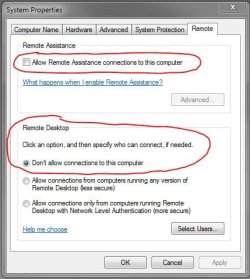
Since other people have used your PC, please ensure that Remote Connection is disabled, as shown below.

Regards,
Golden
 

Attachments

  • Capture.JPG
    Capture.JPG
    41.8 KB · Views: 5

My Computer

Computer type
PC/Desktop
Computer Manufacturer/Model Number
Golden Mk. I.4
OS
Windows 10 Pro x64 ; Xubuntu x64
CPU
Intel i7 860 @ 2.80 GHz O/C'ed to 4.0GHz
Motherboard
Gigabyte P55A-UD3R Rev.1. Award BIOS F13
Memory
16GB Corsair Vengance DDR3 @ 661 MHz Dual Channel (9-9-9-24)
Graphics Card(s)
EVGA NVidia GTX 560 1024MB
Sound Card
Realtek Integrated
Monitor(s) Displays
Dual Samsung SyncMaster 2494HS
Screen Resolution
1920*1080 and 1920*1080
Hard Drives
1*Samsung 840 EVO 120GB SSD;
1*OCZ Vertex 2 60GB SSD;
2*Samsung F3 SpinPoint 1TB in RAID0;
1*Samsung F1 SpinPoint 1TB;
2*Western Digital 1TB External USB 3.0
1*Western Digital 500GB External USB 3.0
1*Seagate 500GB External USB 2.0
PSU
Thermaltake ToughPower QFan 750W
Case
Thermaltake Element S VK60001W2Z
Cooling
Corsair H60 Water Cooling, 2*230mm and 2*80mm case fans
Keyboard
Logitech G110
Mouse
Logitech MX518
:devil:
Have you considered exorcism?
:roflmao::roflmao::roflmao::roflmao:


-Does this happen even when the pc is not connected to internet?
-You said some people come by and use your pc. There is a possibility that someone might have installed a remote administration tool by which they can do many stuffs like opening apps, taking screenshots, opening cd tray etc. Can you trust those people?
- Check your task scheduler if there's any task listed corresponding to your problems.

could be right.
 

My Computer

Computer type
PC/Desktop
Computer Manufacturer/Model Number
Self assembled
OS
Windows 10 Home 64Bit
CPU
Intel Core i5 10400 @ 2.90GHz
Motherboard
Intel Corporation DG41WV (PROCESSOR)
Memory
8.00GB Single-Channel Unknown @ 1329MHz (16-20-20-38)
Sound Card
Realtek High Definition Audio
Monitor(s) Displays
DELL E170S
Screen Resolution
1280x1024 pixels
Hard Drives
931GB TOSHIBA DT01ACA100 (SATA)
238GB TEAM TM8PS7256G (SATA SSD)
Case
Nothing Fancy
Cooling
Fans
Keyboard
A4 Tech Co LTD
Mouse
A4 Tech Co Ltd/Logitech
Internet Speed
25 Mbps
Gregrocker... I dont really want to shut everything down like that. I've had problems in the past shutting alot of programs down on startup just to increase boot time and it really wasnt worth it. Id like to find a solution to this problem somehow other than that.

Why do you want programs starting up wholesale with Windows, freeloading on your RAM, CPU, Startup time and spying on you? For best performance you want a clean boot with nothing except AV riding on the back of Win7 that isn't needed at the time.

If you have all of the factory bloatware starting up with Win7 then you're running a crippled machine. Any tech enthusiast will clean this up and/or reinstall:
Clean Up Factory Bloatware - Windows 7 Forums
Clean Reinstall - Factory OEM Windows 7

What scheduled tasks did you find?

I would also uninstall AVG which is no longer recommended by anyone here, install free lightweight Microsoft Security Essentials and keep the Win7 Firewall updated at all times via Windows Updates.


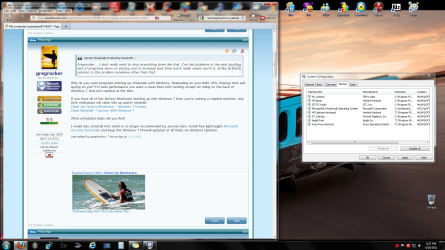
I don't really have a lot of bloatware. I do a pretty good job up keeping things bare minimum on startup as you can see in the image below. And if i shut off all that besides my antivirus theyre not available to me. sound isnt available until i launch it after startup, keyboard etc. Apple can be removed. I just noticed that. But I have tried this method on an older, slower XP machine to make things faster and it caused nothing but problems and hoops to jump through to turn everything on once it booted up. If you can prove me wrong, by all means Ill attempt it.

What do you want me to look for on scheduled tasks and how do I know if its normal to be starting up or not?

How is slowing your computer's boot time down a better alternative?

I said shutting down programs isn't worth it to increase boot time, as making boot time faster. I guess if you want it technical it would be decreasing boot time to eliminate more time it takes to boot from startup, but you knew what I meant.
 

Attachments

  • Untitled.png
    Untitled.png
    328.7 KB · Views: 23

My Computer

OS
Windows 7 Home Premium 64-bit
CPU
i5-650
Memory
6GB
Hard Drives
1TB
Uncheck everything in that list except Avira to see how running a Clean Boot helps.

You are the master of your computer, not random programs angling to run at Startup so they can gather marketing information on you. If you need one then you'll know it because some functionality you desire will be missing. Then you can enable it again in the Program preferences or in msconfig.

XP was a different situation where System functions were thrown into msconfig requiring Googling each until you became familiar with if it was absolutely needed. Gradually after SP3 critical System services disappeared from msconfig>Startup.

I would do the same in the msconfig>Services tab after Hiding All MS services.

Rather than just ignoring the step to turn off Scheduled tasks, why not ask back before I had to ask you again. It's ridiculous to ask for help and then ignore some of the top experts in the field.

Take a screenshot of your Scheduled Tasks window and we'll advise you. You can also google them to see what they're for. But why would you let anyone except yourself be in charge of what your computer is running and when?
 
-Does this happen even when the pc is not connected to internet?
-You said some people come by and use your pc. There is a possibility that someone might have installed a remote administration tool by which they can do many stuffs like opening apps, taking screenshots, opening cd tray etc. Can you trust those people?
- Check your task scheduler if there's any task listed corresponding to your problems.

My pc is always connected to the internet, so I wouldn't know. It seems to only happen when I'm not sitting on it though. I'm never just here typing and a program pops up on the screen.

HA! And yes I can trust my friends. I've known them for 28 years and checking email is about as tech savvy as they get. Even though I came off with a paranoid vibe about this whole mystery, I was sorta joking and just curious whats causing this to happen or if its ever happened to anyone else. Can't believe some of you guys even thought of that. What kind of friends do you guys have? How paranoid are YOU guys? lol
 

My Computer

OS
Windows 7 Home Premium 64-bit
CPU
i5-650
Memory
6GB
Hard Drives
1TB
Uncheck everything in that list except Avira to see how running a Clean Boot helps.

You are the master of your computer, not random programs angling to run at Startup so they can gather marketing information on you. If you need one then you'll know it because some functionality you desire will be missing. Then you can enable it again in the Program preferences or in msconfig.

XP was a different situation where System functions were thrown into msconfig requiring Googling each until you became familiar with if it was absolutely needed. Gradually after SP3 critical System services disappeared from msconfig>Startup.

I would do the same in the msconfig>Services tab after Hiding All MS services.

Rather than just ignoring the step to turn off Scheduled tasks, why not ask back before I had to ask you again. It's ridiculous to ask for help and then ignore some of the top experts in the field.

Take a screenshot of your Scheduled Tasks window and we'll advise you. You can also google them to see what they're for. But why would you let anyone except yourself be in charge of what your computer is running and when?

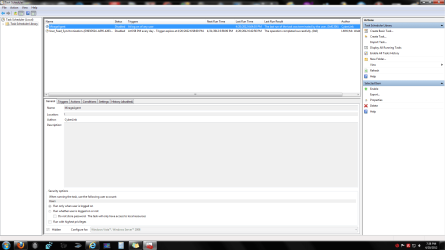
I didnt ignore anything. I asked you what you wanted me to do. Cause when I looked there wasnt much there. Is this it?
 

Attachments

  • Untitled.png
    Untitled.png
    52.5 KB · Views: 29

My Computer

OS
Windows 7 Home Premium 64-bit
CPU
i5-650
Memory
6GB
Hard Drives
1TB
Yeah it's not the problem. So get a clean boot and let us know what happens - or doesn't! :eek:
 
Spooks

Sounds to me a lot like one of your infrequent visitors is yanking your chain. I would start (just my opinion) with Deacon Frost's suggestion. Every time you walk off from your rig do this to see if the problems go away.

Open network and sharing center. You will see --- Connections: Local Area connection--- that is a link --- left click on it ---- in the window that comes up you will see a "disaable button". Click disable and you have shut off a possibility of someone remotely connecting to your computer. Do this each time you walk away and see if the weird stuff stops. When you are ready to use your rig again just retrace these steps and click enable.
 

My Computer

Computer Manufacturer/Model Number
BGC (Bob's Garage Crew)
OS
win 7 X64 Ultimate SP1
CPU
I3770K
Motherboard
Asus P8Z77-V Deluxe
Memory
G Skill F3-14900CL9-4GBXL x 4
Graphics Card(s)
NVIDIA GeForce GTX670 + Intel 4000
Sound Card
Realtek HD 5.1 (MOB)
Monitor(s) Displays
Asus VW224T (1)
Screen Resolution
1920 x 1080
Hard Drives
SATA Corsair Force GT 2.5" 180GB (System) Sata 3
OCZ Vertex3 120GB
OCZ Vertex 2 120GB 2.5" SATA II
ST31000524AS 1000.2GB
WD15EARS (External)
PSU
CoolerMaster 1000 Watt
Case
CoolerMaster HAF X
Cooling
CPU -- CoolerMaster 520N
Keyboard
MS Wireless 3000 V2
Mouse
MS Wireless 3000 V2
Internet Speed
Cable
Antivirus
Norton Internet Security
Browser
IE9
Other Info
AMI Bios 1805
OC'd 3%
-Does this happen even when the pc is not connected to internet?
-You said some people come by and use your pc. There is a possibility that someone might have installed a remote administration tool by which they can do many stuffs like opening apps, taking screenshots, opening cd tray etc. Can you trust those people?
- Check your task scheduler if there's any task listed corresponding to your problems.

My pc is always connected to the internet, so I wouldn't know. It seems to only happen when I'm not sitting on it though. I'm never just here typing and a program pops up on the screen.

HA! And yes I can trust my friends. I've known them for 28 years and checking email is about as tech savvy as they get. Even though I came off with a paranoid vibe about this whole mystery, I was sorta joking and just curious whats causing this to happen or if its ever happened to anyone else. Can't believe some of you guys even thought of that. What kind of friends do you guys have? How paranoid are YOU guys? lol

When it comes to security, being paranoid is good. :p
It could be that someone might have did that as part of a practical joke
Put your system to 'offline mode' (not connected to net) and see if the issue surfaces during this period or not.
 

My Computer

Computer Manufacturer/Model Number
HCL
OS
Winbdows 7 ultimate x64 | Ubuntu 12.04 x64 LTS
CPU
Core 2 Duo e7400 @ 2.90GHz
Motherboard
Gigabyte G31M-ES2L
Memory
3GB DDR2
Graphics Card(s)
Asus Nvidia GTX 560Ti 1GB
Sound Card
On-board
Monitor(s) Displays
HCL eZeeBee 18.5" LCD
Screen Resolution
1366x768 @ 60Hz
Hard Drives
Western Digital 320GB
PSU
Corsair CX500 V2 500W
Cooling
Stock
Keyboard
Stock
Mouse
Stock
Internet Speed
15-25kBps D/L | 10kBps U/L | Hey Don't laugh
Alright. I followed all your advice. Ill wait a few days and see if it happens again.
 

My Computer

OS
Windows 7 Home Premium 64-bit
CPU
i5-650
Memory
6GB
Hard Drives
1TB
Nope. Still doing it guys. Noticed last night about 8-9 different applications were open on my desktop. Ive been shutting my modem off too.
 

My Computer

OS
Windows 7 Home Premium 64-bit
CPU
i5-650
Memory
6GB
Hard Drives
1TB
I'd want a Clean Reinstall - Factory OEM Windows 7 with nothing more than the tools and methods given used to install and maintain Win7.

Resist adding a lot of crapware - nothing except your most important programs, using only the tools built into Win7 and recommended in tutorial.

Run a clean boot at all times.

Tech enthusiasts NEVER run the factory preinstall but always clean reinstall just the OS. Until you do this you don't even have a clean install.
 
Nope. Still doing it guys. Noticed last night about 8-9 different applications were open on my desktop. Ive been shutting my modem off too.

Did you run the Malwarebytes scan? What was the result?
 

My Computer

Computer Manufacturer/Model Number
HCL
OS
Winbdows 7 ultimate x64 | Ubuntu 12.04 x64 LTS
CPU
Core 2 Duo e7400 @ 2.90GHz
Motherboard
Gigabyte G31M-ES2L
Memory
3GB DDR2
Graphics Card(s)
Asus Nvidia GTX 560Ti 1GB
Sound Card
On-board
Monitor(s) Displays
HCL eZeeBee 18.5" LCD
Screen Resolution
1366x768 @ 60Hz
Hard Drives
Western Digital 320GB
PSU
Corsair CX500 V2 500W
Cooling
Stock
Keyboard
Stock
Mouse
Stock
Internet Speed
15-25kBps D/L | 10kBps U/L | Hey Don't laugh
Back
Top