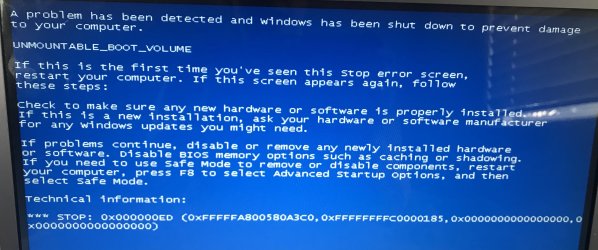
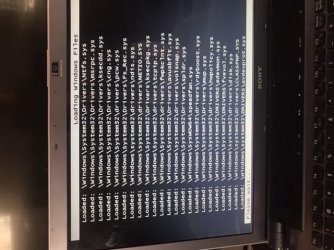
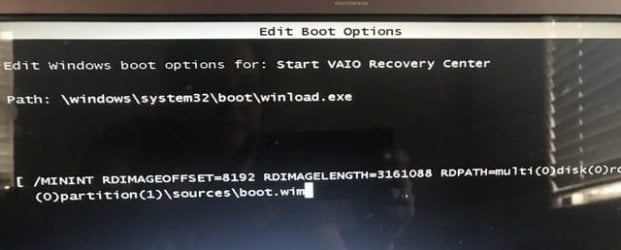
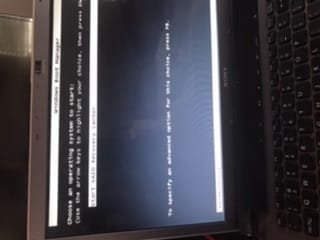
my computer wont boot its trying to use d drive and should use c drive

ANICERACK

New member
Local time
3:53 PM
Messages
8
Can not boot
system repair just goes to windows screen that is blank.
USB repair tooltool will not let me use any of the other options like diagnostics, safe mode, SM command prompt, it goes back to windows repair or start normal.

Windows 7 original disc (from another PC) Work to open safe only, windows comes up to repair or install windows 7. The repair option shows Windows 7 but has no size. it wont let me search for other parts to repair, it goes through about an hour of fixing then says to restart for the changes to work. After restart its still the repair or start windows normally.

- it thinks d drive is my windows 7, its trying to repair that,
- windows was in the c drive
- the other pc im borrowing windows 7 from was upgraded to 10, then they didn't like it and went back to 7. That computer wont boot 7 unless the disc is in the computer. Windows 7 is on c and windows 10 is on d.

Could I download windows 10 to d on my pc that is trying to use d? then from windows 10 in d drive go and fix windows 7 in the c drive? It seems like that's how people are able to use 7 & 10, can I use it to recover 7 on c?

before this happened I was deleting tons of duplicate photo and document files, then did CC cleaner, & repair registry. its such an old computer I just used it to apply for jobs but it had some pics on it I hope I can recover.
 

My Computer My Computer

At a glance

WINDOWS 7
Computer type
Laptop
Computer Manufacturer/Model Number
SONY VAIO VGN AW450F
OS
WINDOWS 7
ANICERACK

- it thinks d drive is my windows 7, its trying to repair that,
- windows was in the c drive


Drive letters are different from booted media.

Most likely, the first partition on your hard disk is a small 100 mb system partition, which does not have a letter when you boot into your regular windows installation. The second partition would be your windows partition.

When you boot recovery\installation media, it would allocate letter C to the first partition it enumerates ( the 100mb system partition) and letter D to the second partition ( your windows partition).

That is normal.

before this happened I was deleting tons of duplicate photo and document files, then did CC cleaner, & repair registry.

Do you have a restore point or a system image you could use ?
 

My Computers My Computers

  • At a glance

    7 X64i5 84002x8gb 3200mhz
    Computer type
    PC/Desktop
    OS
    7 X64
    CPU
    i5 8400
    Motherboard
    gigabyte b365m ds3h
    Memory
    2x8gb 3200mhz
    Hard Drives
    various
    PSU
    pure power 11 400w cm
    Case
    Coolermaster
    Cooling
    cryorig m9i
  • At a glance

    7x64g54008gb ddr4 2400
    Computer type
    PC/Desktop
    OS
    7x64
    CPU
    g5400
    Motherboard
    ga b365m ds3h
    Memory
    8gb ddr4 2400
    PSU
    xfx pro 450w
Its likely an old install disk wont work as it will be way out of date with no SP or updates so it cant repair it you need a new disk at the same SP etc as the system
 

My Computer My Computer

At a glance

win 8 32 bit
Computer type
PC/Desktop
OS
win 8 32 bit
Thanks for your help, my computer experience comes from self help or you tube videos. It might sound dumb but a few weeks ago I repaired a new Lenovo that died a week after the warranty ended. Geek squad said it was a mother board but a few months later you tube had a fix.
I’ll post pics in the next reply

- when I ran CC cleaner and did the registry I think I backed up or saved my settings? I know it suggests you do.
- partitions in my PC I’m assuming is a wall. In my pc that would be where my drives are correct? C is the one I defragment ?
 

Attachments

  • 3650FD2B-914B-449D-BD08-65B5F5C73FE3.jpeg
    3650FD2B-914B-449D-BD08-65B5F5C73FE3.jpeg
    551 KB · Views: 0

My Computer My Computer

At a glance

WINDOWS 7
Computer type
Laptop
Computer Manufacturer/Model Number
SONY VAIO VGN AW450F
OS
WINDOWS 7
Hoping the screen shot is here it’s not on my Mobile screen. Sorry it’s sideways.
 

Attachments

  • 5B06A845-1140-4313-B754-A423E52EB452.jpeg
    5B06A845-1140-4313-B754-A423E52EB452.jpeg
    53.7 KB · Views: 18
Last edited:

My Computer My Computer

At a glance

WINDOWS 7
Computer type
Laptop
Computer Manufacturer/Model Number
SONY VAIO VGN AW450F
OS
WINDOWS 7
Please boot your computer with Windows Setup Media and from Windows Recovery Environment start the Command Prompt.

Please type below commands into Command Prompt and press Enter key.

Following commands will repair Master Boot Record (MBR), Boot Sector and BCD Store.


Code:
Bootrec /FixMbr

Bootrec  /FixBoot

Bootrec /scanos

Bootrec  /RebuildBcd
 

My Computer My Computer

At a glance

Windows 10 Pro x64Intel Core i5 6600Corsair Vengeance LPX 16GB 2666MHz DDR4AMD Radeon R9 380 Series
Computer type
PC/Desktop
Computer Manufacturer/Model Number
Custom Build
OS
Windows 10 Pro x64
CPU
Intel Core i5 6600
Motherboard
Gigabyte Technology Z170M-D3H-CF (U3E1)
Memory
Corsair Vengeance LPX 16GB 2666MHz DDR4
Graphics Card(s)
AMD Radeon R9 380 Series
Hard Drives
SSD
HDD
Antivirus
Eset Smart Security
Browser
Mozila Firefox
FE56668D-6368-48F7-ABC4-EDAB19BF82DD.jpeg

69F156E8-7DFB-47BA-8AFE-6BCE0EE93DE6.jpeg

CD5F9EC1-A7B4-4DBA-B784-BFC5481FF605.jpegSet up media? My windows disc or google search indicates I can create a set up media but it needs the key code.

Windows recovery environment

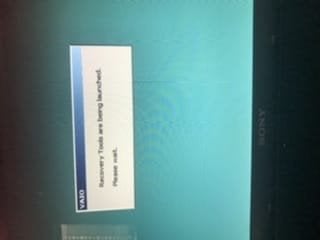
If I start up hitting F 10 I get the following screens but the final color screen is it nothing happens after that screen
Sorry sideways again and use lower quality image to upload pics that are just dead ends.
 

My Computer My Computer

At a glance

WINDOWS 7
Computer type
Laptop
Computer Manufacturer/Model Number
SONY VAIO VGN AW450F
OS
WINDOWS 7
Using a windows 7 install disc I can f8 and open safe mode but not safe mode with command prompt.
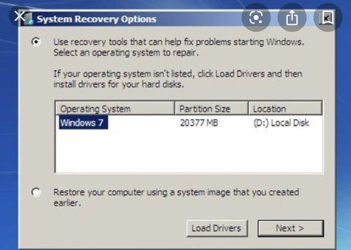
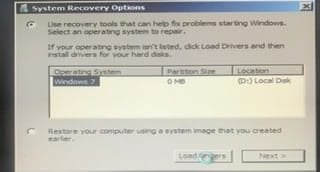
In normal safe mode I can select to install or repair 7. Selecting repair opens a window like this ( mine is running and not to this screen yet) when this opens on my PC is says partition size is 0 mb. It won't let me select search for other drivers 820A7CD5-FCCA-4D9C-B7A1-7953076EF973.jpeg
 
Last edited:

My Computer My Computer

At a glance

WINDOWS 7
Computer type
Laptop
Computer Manufacturer/Model Number
SONY VAIO VGN AW450F
OS
WINDOWS 7
Can I enter the command prompt using any of the screens I can have screenshots posted?
 

My Computer My Computer

At a glance

WINDOWS 7
Computer type
Laptop
Computer Manufacturer/Model Number
SONY VAIO VGN AW450F
OS
WINDOWS 7
You can only use commands i have given you from Windows Recovery Environment.


Can you boot Windows 7 into Safe Mode.


Do you have Windows 7 installation media?
 

My Computer My Computer

At a glance

Windows 10 Pro x64Intel Core i5 6600Corsair Vengeance LPX 16GB 2666MHz DDR4AMD Radeon R9 380 Series
Computer type
PC/Desktop
Computer Manufacturer/Model Number
Custom Build
OS
Windows 10 Pro x64
CPU
Intel Core i5 6600
Motherboard
Gigabyte Technology Z170M-D3H-CF (U3E1)
Memory
Corsair Vengeance LPX 16GB 2666MHz DDR4
Graphics Card(s)
AMD Radeon R9 380 Series
Hard Drives
SSD
HDD
Antivirus
Eset Smart Security
Browser
Mozila Firefox
You need to boot from install media not from the hard disk.

Put your installation media in the dvd drive.

Boot from the dvd drive.
 

My Computers My Computers

  • At a glance

    7 X64i5 84002x8gb 3200mhz
    Computer type
    PC/Desktop
    OS
    7 X64
    CPU
    i5 8400
    Motherboard
    gigabyte b365m ds3h
    Memory
    2x8gb 3200mhz
    Hard Drives
    various
    PSU
    pure power 11 400w cm
    Case
    Coolermaster
    Cooling
    cryorig m9i
  • At a glance

    7x64g54008gb ddr4 2400
    Computer type
    PC/Desktop
    OS
    7x64
    CPU
    g5400
    Motherboard
    ga b365m ds3h
    Memory
    8gb ddr4 2400
    PSU
    xfx pro 450w
Hi
Based on post #7, you can get into your bios
for the recovery to work you need to reset boot order

First D (your recovery Disc)

NOT C

you should then be able to access the command prompt.


Roy
 

My Computer My Computer

At a glance

W7 home premium 32bit/W7HP 64bit/w10 tp insid...E5300 dual core3gbNvidia Geforce 7100 Nforce 630i
Computer type
PC/Desktop
Computer Manufacturer/Model Number
medionl/Aspire 6930G/acer x55a
OS
W7 home premium 32bit/W7HP 64bit/w10 tp insider ring
CPU
E5300 dual core
Motherboard
medion MS7366
Memory
3gb
Graphics Card(s)
Nvidia Geforce 7100 Nforce 630i
Monitor(s) Displays
avixc
Internet Speed
n (isp resticted to 72)
Antivirus
mse/pands
Browser
palemoon
Other Info
Belkin Fd7050 n USB using Railink RT2870 drivers, more upto date
you spotted it to


:-):-):-):-):-)
 

My Computer My Computer

At a glance

W7 home premium 32bit/W7HP 64bit/w10 tp insid...E5300 dual core3gbNvidia Geforce 7100 Nforce 630i
Computer type
PC/Desktop
Computer Manufacturer/Model Number
medionl/Aspire 6930G/acer x55a
OS
W7 home premium 32bit/W7HP 64bit/w10 tp insider ring
CPU
E5300 dual core
Motherboard
medion MS7366
Memory
3gb
Graphics Card(s)
Nvidia Geforce 7100 Nforce 630i
Monitor(s) Displays
avixc
Internet Speed
n (isp resticted to 72)
Antivirus
mse/pands
Browser
palemoon
Other Info
Belkin Fd7050 n USB using Railink RT2870 drivers, more upto date
I think that machine might have shipped with vista.

Looks like the options are:

1. boot from installation\repair media
try
a) system restore
or
b) image restore
or
c) replace hives with those from windows\system32\config\regbak
or
d) reinstall - if you have the windows 7 license key
 

My Computers My Computers

  • At a glance

    7 X64i5 84002x8gb 3200mhz
    Computer type
    PC/Desktop
    OS
    7 X64
    CPU
    i5 8400
    Motherboard
    gigabyte b365m ds3h
    Memory
    2x8gb 3200mhz
    Hard Drives
    various
    PSU
    pure power 11 400w cm
    Case
    Coolermaster
    Cooling
    cryorig m9i
  • At a glance

    7x64g54008gb ddr4 2400
    Computer type
    PC/Desktop
    OS
    7x64
    CPU
    g5400
    Motherboard
    ga b365m ds3h
    Memory
    8gb ddr4 2400
    PSU
    xfx pro 450w
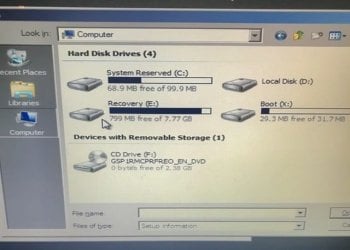
I somehow got to this screen , I am 100% sure this is windows 7
 

Attachments

  • 6048012D-760D-41F9-9870-CF12159125CD.jpeg
    6048012D-760D-41F9-9870-CF12159125CD.jpeg
    8.5 KB · Views: 10
  • 3C975B16-47EB-4B12-8F1B-03B39599A1DB.jpeg
    3C975B16-47EB-4B12-8F1B-03B39599A1DB.jpeg
    30.7 KB · Views: 10

My Computer My Computer

At a glance

WINDOWS 7
Computer type
Laptop
Computer Manufacturer/Model Number
SONY VAIO VGN AW450F
OS
WINDOWS 7
Looks like your windows partition is the second partition on the disk. Shown as D in your pic.

Showing as 0 size might be due to partition table corruption.

You could see what diskpart says

at cmd prompt type:

diskpart
(then press enter)
lis vol
(then press enter)

I would boot a 3rd party partition manager that has partition recovery module.

For example, aomei partition assist pro version ( on giveaway ). But you would need a working machine to get it to create its boot media.
giveaway


download link
 

My Computers My Computers

  • At a glance

    7 X64i5 84002x8gb 3200mhz
    Computer type
    PC/Desktop
    OS
    7 X64
    CPU
    i5 8400
    Motherboard
    gigabyte b365m ds3h
    Memory
    2x8gb 3200mhz
    Hard Drives
    various
    PSU
    pure power 11 400w cm
    Case
    Coolermaster
    Cooling
    cryorig m9i
  • At a glance

    7x64g54008gb ddr4 2400
    Computer type
    PC/Desktop
    OS
    7x64
    CPU
    g5400
    Motherboard
    ga b365m ds3h
    Memory
    8gb ddr4 2400
    PSU
    xfx pro 450w
Jumanji is the one to help OP

I would say the disk is dead.
 

My Computers My Computers

  • At a glance

    Windows 7 HP 64i5 6600K - 800MHz to 4200MHz4+4G GSkill DDR4 3000IG - Intel 530
    Computer type
    PC/Desktop
    Computer Manufacturer/Model Number
    custom build
    OS
    Windows 7 HP 64
    CPU
    i5 6600K - 800MHz to 4200MHz
    Motherboard
    GA-Z170-HD3P
    Memory
    4+4G GSkill DDR4 3000
    Graphics Card(s)
    IG - Intel 530
    Monitor(s) Displays
    Samsung 226BW
    Screen Resolution
    1680x1050
    Hard Drives
    (1) -1 SM951 – 128GB M.2 AHCI PCIe SSD drive for Windows 7 and Lubuntu
    (2) -1 WD SATA 3 - 1T for Data
    (3) -1 WD SATA 3 - 1T for backup
    PSU
    Thermaltake 450W TR2 gold
    Keyboard
    Old and good Chicony mechanical keyboard
    Mouse
    Logitech mX performance - 9 buttons (had to disable some)
    Internet Speed
    500Mb/s
    Browser
    Firefox 64
    Other Info
    TinyWall firewall
  • At a glance

    Windows 7 Proi7-4500U 800MHz to 3.0GHz(4+4)G DDR3 1600IG intel 4400 + NVIDIA GeForce GT 745M
    Computer type
    Laptop
    System Manufacturer/Model Number
    Asus Q550LF
    OS
    Windows 7 Pro
    CPU
    i7-4500U 800MHz to 3.0GHz
    Motherboard
    Asus Q550LF
    Memory
    (4+4)G DDR3 1600
    Graphics Card(s)
    IG intel 4400 + NVIDIA GeForce GT 745M
    Sound Card
    Realtek
    Monitor(s) Displays
    LG Display LP156WF4-SPH1
    Screen Resolution
    1920 x 1080
    Hard Drives
    BX500 120G SSD for Windows and programs +
    1T HDD for data
    Internet Speed
    500 Mb/s
    Browser
    Firefox
    Other Info
    TinyWall firewall
Could I install 7 again?
 

My Computer My Computer

At a glance

WINDOWS 7
Computer type
Laptop
Computer Manufacturer/Model Number
SONY VAIO VGN AW450F
OS
WINDOWS 7
1) If you have data on the drive that you can't loose (have no backup) your priority is to try to recover the data to an external disk. The more you use it the worst it can get.
2) If you don't have anything you need to save from the disk, you should hard test it. Seagate and WD has tools to diagnose HDDs.

If the drive is good, then you can reinstall Win 7 and the programs. The Recovery partition has an partition image. You can lunch Factory Recover from BIOS. It will end the way the laptop came from factory.
For the updates, use Simplix.
 

My Computers My Computers

  • At a glance

    Windows 7 HP 64i5 6600K - 800MHz to 4200MHz4+4G GSkill DDR4 3000IG - Intel 530
    Computer type
    PC/Desktop
    Computer Manufacturer/Model Number
    custom build
    OS
    Windows 7 HP 64
    CPU
    i5 6600K - 800MHz to 4200MHz
    Motherboard
    GA-Z170-HD3P
    Memory
    4+4G GSkill DDR4 3000
    Graphics Card(s)
    IG - Intel 530
    Monitor(s) Displays
    Samsung 226BW
    Screen Resolution
    1680x1050
    Hard Drives
    (1) -1 SM951 – 128GB M.2 AHCI PCIe SSD drive for Windows 7 and Lubuntu
    (2) -1 WD SATA 3 - 1T for Data
    (3) -1 WD SATA 3 - 1T for backup
    PSU
    Thermaltake 450W TR2 gold
    Keyboard
    Old and good Chicony mechanical keyboard
    Mouse
    Logitech mX performance - 9 buttons (had to disable some)
    Internet Speed
    500Mb/s
    Browser
    Firefox 64
    Other Info
    TinyWall firewall
  • At a glance

    Windows 7 Proi7-4500U 800MHz to 3.0GHz(4+4)G DDR3 1600IG intel 4400 + NVIDIA GeForce GT 745M
    Computer type
    Laptop
    System Manufacturer/Model Number
    Asus Q550LF
    OS
    Windows 7 Pro
    CPU
    i7-4500U 800MHz to 3.0GHz
    Motherboard
    Asus Q550LF
    Memory
    (4+4)G DDR3 1600
    Graphics Card(s)
    IG intel 4400 + NVIDIA GeForce GT 745M
    Sound Card
    Realtek
    Monitor(s) Displays
    LG Display LP156WF4-SPH1
    Screen Resolution
    1920 x 1080
    Hard Drives
    BX500 120G SSD for Windows and programs +
    1T HDD for data
    Internet Speed
    500 Mb/s
    Browser
    Firefox
    Other Info
    TinyWall firewall
Back
Top