My Destop Gadget Clock Doesn't Display Properly

JASN73KS

New member
Local time
7:49 AM
Messages
8
Hi,

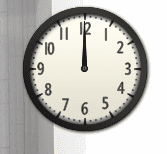
I have this prob for quite sometime now the desktop clock gadget does not display properly ..need help
 

Attachments

  • Capture.PNG
    Capture.PNG
    5.9 KB · Views: 415

My Computer My Computer

Computer Manufacturer/Model Number
compaq
OS
windows 7 ultimate sp1 32 bit
CPU
intel 2.53 ghz
Motherboard
msi boston
Memory
1 gb
Graphics Card(s)
integrated
In what way does it not display properly?

Is it in the wrong place?

Is it configured correctly?

We need more information please.
 

My Computer My Computer

Computer Manufacturer/Model Number
HP Pavilion Elite 495UK
OS
Windows 7 Ultimate SP1 64-Bit
CPU
Intel Core i7 870 @ 2.93GHz
Motherboard
MSI 2A9C (CPU1)
Memory
8Gb Dual-Channel DDR3 @ 664MHz
Graphics Card(s)
nVidia GeForce GTX 460 1024MB dedicated RAM
Sound Card
Realtek HD Audio
Monitor(s) Displays
HP2310i
Screen Resolution
1920 x 1080
Hard Drives
1x1954GB Hitachi HDS22020ALA 330 (RAID), 1x1954GB Hitachi External for backup and storage
PSU
460W
Case
HP Elite
Cooling
Air cooled
Keyboard
Logitech K750 solar-powered keyboard
Mouse
Logitech Wireless M180 mouse
Internet Speed
2Mb
Other Info
Pure Avanti Flow Internet Radio with iPod Dock, 64Gb iPod, HP USB Speakers, Sony MDR-V500 Headphones, Sony Vaio F-Series Laptop

it does not show the setting option it is stuck at 12 oclock ...all the other gadgets are working fine
 

My Computer My Computer

Computer Manufacturer/Model Number
compaq
OS
windows 7 ultimate sp1 32 bit
CPU
intel 2.53 ghz
Motherboard
msi boston
Memory
1 gb
Graphics Card(s)
integrated
All I can suggest is you right-click the clock and choose Properties then see if you can reconfigure it from there.

Failing that, uninstall or remove the clock gadget and download another one.
 

My Computer My Computer

Computer Manufacturer/Model Number
HP Pavilion Elite 495UK
OS
Windows 7 Ultimate SP1 64-Bit
CPU
Intel Core i7 870 @ 2.93GHz
Motherboard
MSI 2A9C (CPU1)
Memory
8Gb Dual-Channel DDR3 @ 664MHz
Graphics Card(s)
nVidia GeForce GTX 460 1024MB dedicated RAM
Sound Card
Realtek HD Audio
Monitor(s) Displays
HP2310i
Screen Resolution
1920 x 1080
Hard Drives
1x1954GB Hitachi HDS22020ALA 330 (RAID), 1x1954GB Hitachi External for backup and storage
PSU
460W
Case
HP Elite
Cooling
Air cooled
Keyboard
Logitech K750 solar-powered keyboard
Mouse
Logitech Wireless M180 mouse
Internet Speed
2Mb
Other Info
Pure Avanti Flow Internet Radio with iPod Dock, 64Gb iPod, HP USB Speakers, Sony MDR-V500 Headphones, Sony Vaio F-Series Laptop
i did that but it didn't help at all don't understand what happened and how
 

My Computer My Computer

Computer Manufacturer/Model Number
compaq
OS
windows 7 ultimate sp1 32 bit
CPU
intel 2.53 ghz
Motherboard
msi boston
Memory
1 gb
Graphics Card(s)
integrated
I can only assume it must be a problem with the gadget itself. Have you tried a different gadget in the form of a clock? There must be several out there.
 

My Computer My Computer

Computer Manufacturer/Model Number
HP Pavilion Elite 495UK
OS
Windows 7 Ultimate SP1 64-Bit
CPU
Intel Core i7 870 @ 2.93GHz
Motherboard
MSI 2A9C (CPU1)
Memory
8Gb Dual-Channel DDR3 @ 664MHz
Graphics Card(s)
nVidia GeForce GTX 460 1024MB dedicated RAM
Sound Card
Realtek HD Audio
Monitor(s) Displays
HP2310i
Screen Resolution
1920 x 1080
Hard Drives
1x1954GB Hitachi HDS22020ALA 330 (RAID), 1x1954GB Hitachi External for backup and storage
PSU
460W
Case
HP Elite
Cooling
Air cooled
Keyboard
Logitech K750 solar-powered keyboard
Mouse
Logitech Wireless M180 mouse
Internet Speed
2Mb
Other Info
Pure Avanti Flow Internet Radio with iPod Dock, 64Gb iPod, HP USB Speakers, Sony MDR-V500 Headphones, Sony Vaio F-Series Laptop
Back
Top