My Docs subfolders exist, but don't display in Explorer

shutchin

New member
Local time
8:48 PM
Messages
4
I am running a dual boot with 7 and XP, 32-bit. I used Windows Easy Transfer to transfer all of my files over to the 7 partition.

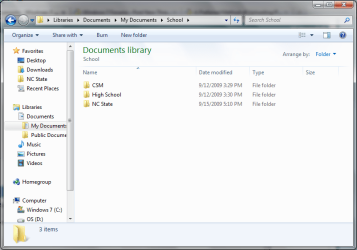
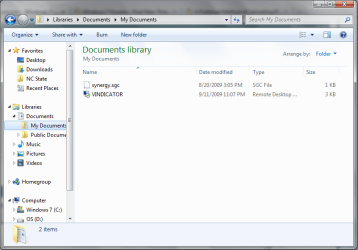
I have about 10 subfolders in "C:\Users\*USER*\Documents\" When I view the folder in Explorer, however, no folders are displayed. I can access them if I directly type in the address, but cannot navigate to them.

Two screen shots that explain it are attached to this thread. Notice the paths at the top of the windows.

Any ideas?

Thanks
Shane
 

Attachments
  • Docs.PNG
    Docs.PNG
    35.2 KB · Views: 44
  • School.PNG
    School.PNG
    34.4 KB · Views: 41

My Computer My Computer

At a glance

Windows XP, Windows 7
OS
Windows XP, Windows 7

My Computer My Computer

At a glance

Vista Ult64, Win7600Intel Core 2 Quad Q6600 @ 2400 MHz 64bit OS4096 MB DDR3-SDRAMATI Radeon HD 3870 Series x2 Crossfired
Computer Manufacturer/Model Number
Self Build 64bit
OS
Vista Ult64, Win7600
CPU
Intel Core 2 Quad Q6600 @ 2400 MHz 64bit OS
Motherboard
Asus P5E3 Deluxe WiFi @p 64 bit OS
Memory
4096 MB DDR3-SDRAM
Graphics Card(s)
ATI Radeon HD 3870 Series x2 Crossfired
Sound Card
Realtek on board
Monitor(s) Displays
Samsung SyncMaster - 23 inches
Screen Resolution
1680x1050 pixels at 60 Hz in True Colors
Hard Drives
Hitachi (250 GB)/Samsung 750 GB. /Barracuda 160 GB.
My Book 1 TB external..
PSU
Cooler Master 1000w
Case
Cooler Master Cosmos 1000.
Cooling
Fans and fresh air,
Keyboard
Wireless
Mouse
Wireless
Internet Speed
Never fast enough
Other Info
I use a Magnum.
jfar,

Thanks for the reply. I tried resetting the view on the My Documents folder, but to no avail. Still no folder listing.

Appreciated,
Shane
 

My Computer My Computer

At a glance

Windows XP, Windows 7
OS
Windows XP, Windows 7
Update:

Solved. Oversight on my part. I am not sure why, but I guess Windows defaulted all of the folders to "Hidden" when it brought them over.

Shane
 

My Computer My Computer

At a glance

Windows XP, Windows 7
OS
Windows XP, Windows 7
Folder Listing Corrupt?

I have a Tb external disk with over 20 folders, plus some files, in the root directory.
When I attach it to my so-called "Windows 7" (aka Vista 6.1) RC machine, all folders view OK.
If I attach it to an XP machine on my network and share the root folder of the external disk, it views OK from other XP machines on the network, but I can only see the first 4 folders when viewing from my "Windows 7" machine. The remaining folders appear as "hidden" folders and when I try to open any of these, "Win 7" does not know which app to use to open the folders.
Some files also in the root directory (at the bottom end of the listing) are viewable and can be opened OK.
I get a similar problem with a second disk on one of my XP machines when viewed by the "Win7" machine.

Any ideas, anyone?
 

My Computer My Computer

At a glance

Windows 7Pentium 43Gb
Computer Manufacturer/Model Number
Dell Optiplex GX620
OS
Windows 7
CPU
Pentium 4
Memory
3Gb
Sound Card
yes
Back
Top