My Flash Drive doesn't show on My Computer

jen24

New member
Local time
4:12 PM
Messages
11
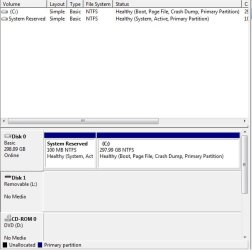
It shows in Disk Management but... look at how it looks like right now :(

How did i start?
Answer: It started when I plugged it in to another person's computer which I was supposed to reformat. I found out that computer has a virus. When I plugged it back to my own computer, it suddenly can not be detected and/or it was shown in my computer but it was faded.
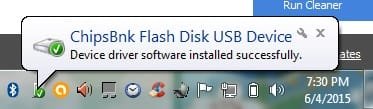
By the way, my flash drive's name is not Chipsbank just like in the picture. I don't know how it was renamed like that.

PLEASE HELP ME.
 

Attachments
  • usb.jpg
    usb.jpg
    10.5 KB · Views: 32
  • usb2.jpg
    usb2.jpg
    30.1 KB · Views: 32

My Computer My Computer

Computer type
Laptop
Computer Manufacturer/Model Number
neo
OS
windows 7
Memory
hitahi
Antivirus
avast
Browser
chrome

My Computer My Computer

Computer type
PC/Desktop
Computer Manufacturer/Model Number
Custom Build
OS
Windows 7 Ultimate x64 SP1
CPU
AMD Phenom 2 1090T
Motherboard
Gigabyte GA-890FXA-UD5
Memory
2x8GB Kingston HyperX Fury Black 1600Mhz Unganged
Graphics Card(s)
MSI GTX 970 Gaming 4G
Sound Card
Realtek On-Board HD 7.1 Audio / Logitech G35
Monitor(s) Displays
3xAcer GD245HQ
Screen Resolution
1920x1080
Hard Drives
Samsung 850 Pro 512GB SSD - OS /
WD Caviar Black SATA 3 - 1 TBx2 - Dynamic RAID 0 /
WD Caviar Green SATA 2 - 640GBx2 - Dynamic RAID 0 /
WD Caviar Green SATA 2 - 640GB - Internal Backup /
Seagate Barracude SATA 3 - 3TB - External Backup/ Sync
PSU
HighPower 1000W
Case
Cooler Master HAF 932
Cooling
Noctua NH-D14
Keyboard
Logitech G19
Mouse
Logitech G500
Internet Speed
100/4 Mbit Cable (100GB quota)
Antivirus
ZoneAlarm Extreme Security / MBAM Pro / MBAE Free / SAS Free
Browser
IE 11 - Firefox - Chrome
Other Info
Logitech F710/ G27/ G940/ Z5500 // TrackIR 5 // Nvidia 3D Surround Vision
Here is where Puppy Linux occasionally comes in quite handily for me:
https://www.google.com/search?q=linux+puppy
Download latest Puppy Linux release
Long-Term-Supported WaryPuppy (LTS)

Various versions are available, and some have PAE versions for newer machines as well as non-PAE for older ones. In any case, gParted in Puppy can sometimes see and read things Windows cannot see and read...and then vice-versa also. The very simplest way to make use of Puppy is to burn a copy of a selected .iso to a CD and then boot into it without anything whatsoever being changed on your local machine. At the beginning of your first session, various options are displayed and then an option for saving your session and options will appear upon exit. At that point, if you wish, you can save a file anywhere you might wish to have those settings again appear the next time you boot from the CD into Puppy.
note: I typically select "No" at the last option during a save when it asks about copying Puppy files as part of your "Save" to allegedly make Puppy run faster then next time. In my own experience, that is not necessary.
 

My Computer My Computer

OS
Win7 Ultimate x64

Attachments

  • 20121028mo-windows-8-to-go-imation-ironkey-usb-flash-drive-black.jpg
    20121028mo-windows-8-to-go-imation-ironkey-usb-flash-drive-black.jpg
    52.8 KB · Views: 1

My Computer My Computer

Computer type
Laptop
Computer Manufacturer/Model Number
neo
OS
windows 7
Memory
hitahi
Antivirus
avast
Browser
chrome
Does it show if you hit refresh?

-------------
Try uninstall in Device Manager, and scan for hardware changes later.

Seems it is reading L, but can't understand it is USB.
 

My Computer My Computer

Computer type
PC/Desktop
Computer Manufacturer/Model Number
Custom Build
OS
Windows 7 Ultimate x64 SP1
CPU
AMD Phenom 2 1090T
Motherboard
Gigabyte GA-890FXA-UD5
Memory
2x8GB Kingston HyperX Fury Black 1600Mhz Unganged
Graphics Card(s)
MSI GTX 970 Gaming 4G
Sound Card
Realtek On-Board HD 7.1 Audio / Logitech G35
Monitor(s) Displays
3xAcer GD245HQ
Screen Resolution
1920x1080
Hard Drives
Samsung 850 Pro 512GB SSD - OS /
WD Caviar Black SATA 3 - 1 TBx2 - Dynamic RAID 0 /
WD Caviar Green SATA 2 - 640GBx2 - Dynamic RAID 0 /
WD Caviar Green SATA 2 - 640GB - Internal Backup /
Seagate Barracude SATA 3 - 3TB - External Backup/ Sync
PSU
HighPower 1000W
Case
Cooler Master HAF 932
Cooling
Noctua NH-D14
Keyboard
Logitech G19
Mouse
Logitech G500
Internet Speed
100/4 Mbit Cable (100GB quota)
Antivirus
ZoneAlarm Extreme Security / MBAM Pro / MBAE Free / SAS Free
Browser
IE 11 - Firefox - Chrome
Other Info
Logitech F710/ G27/ G940/ Z5500 // TrackIR 5 // Nvidia 3D Surround Vision
Does it show if you hit refresh?

-------------
Try uninstall in Device Manager, and scan for hardware changes later.

Seems it is reading L, but can't understand it is USB.

Still nothing.
 

My Computer My Computer

Computer type
Laptop
Computer Manufacturer/Model Number
neo
OS
windows 7
Memory
hitahi
Antivirus
avast
Browser
chrome
try the flash drive on other computers, if it still can't be recognized, then it is damaged. you need to buy a new one
 

My Computer My Computer

Computer type
PC/Desktop
Computer Manufacturer/Model Number
unknown
OS
window 7 64bit
CPU
i3
I can't believe this. My flash drive is almost new :(
 

My Computer My Computer

Computer type
Laptop
Computer Manufacturer/Model Number
neo
OS
windows 7
Memory
hitahi
Antivirus
avast
Browser
chrome
I can't believe this. My flash drive is almost new :(
Funny things that are not funny can happen, and there might be a way to get it straightened out. For example, try using one or more of the many formatting utilities that can make a flash drive bootable and then use yet another utility of one kind or another to remove its "active" flag set for booting. I have a variety of flash drives with some of them being nothing more than inexpensive readers with memory cards inserted, and one of them has recently stopped working -- nothing shows anywhere at all -- in the machine where I had first set it up and added the files I wanted to be able to carry around.
 

My Computer My Computer

OS
Win7 Ultimate x64
I can't believe this. My flash drive is almost new :(
Funny things that are not funny can happen, and there might be a way to get it straightened out. For example, try using one or more of the many formatting utilities that can make a flash drive bootable and then use yet another utility of one kind or another to remove its "active" flag set for booting. I have a variety of flash drives with some of them being nothing more than inexpensive readers with memory cards inserted, and one of them has recently stopped working -- nothing shows anywhere at all -- in the machine where I had first set it up and added the files I wanted to be able to carry around.
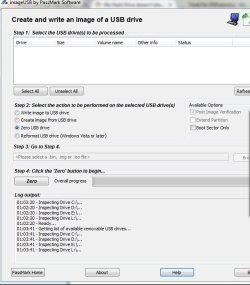
you have no idea how many softwares i have tried. still nothing
 

My Computer My Computer

Computer type
Laptop
Computer Manufacturer/Model Number
neo
OS
windows 7
Memory
hitahi
Antivirus
avast
Browser
chrome
Did you try another PC yet?
 

My Computer My Computer

Computer type
PC/Desktop
Computer Manufacturer/Model Number
Custom Build
OS
Windows 7 Ultimate x64 SP1
CPU
AMD Phenom 2 1090T
Motherboard
Gigabyte GA-890FXA-UD5
Memory
2x8GB Kingston HyperX Fury Black 1600Mhz Unganged
Graphics Card(s)
MSI GTX 970 Gaming 4G
Sound Card
Realtek On-Board HD 7.1 Audio / Logitech G35
Monitor(s) Displays
3xAcer GD245HQ
Screen Resolution
1920x1080
Hard Drives
Samsung 850 Pro 512GB SSD - OS /
WD Caviar Black SATA 3 - 1 TBx2 - Dynamic RAID 0 /
WD Caviar Green SATA 2 - 640GBx2 - Dynamic RAID 0 /
WD Caviar Green SATA 2 - 640GB - Internal Backup /
Seagate Barracude SATA 3 - 3TB - External Backup/ Sync
PSU
HighPower 1000W
Case
Cooler Master HAF 932
Cooling
Noctua NH-D14
Keyboard
Logitech G19
Mouse
Logitech G500
Internet Speed
100/4 Mbit Cable (100GB quota)
Antivirus
ZoneAlarm Extreme Security / MBAM Pro / MBAE Free / SAS Free
Browser
IE 11 - Firefox - Chrome
Other Info
Logitech F710/ G27/ G940/ Z5500 // TrackIR 5 // Nvidia 3D Surround Vision
Back
Top