
My Google chrome doesn't work like before

khoshtipi

New member
VIP
Local time
11:51 PM
Messages
238
Location
Kurdistan
Hello guys,

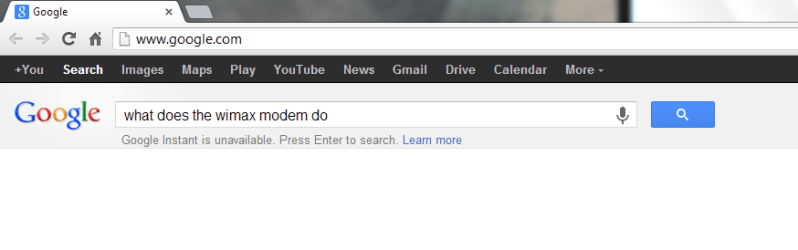
Nowadays when I type something on the search box of Google chrome, first it says the "Google instant is unavailable" (image 1). Then when I press enter to see the result I see some strange page (image 2) which is unusual and don't see the result again.

What is wrong with my chrome please?

Thanks.
 

Attachments
  • 1.PNG
    1.PNG
    13.4 KB · Views: 13
  • 2.PNG
    2.PNG
    71.2 KB · Views: 15

My Computer

OS
windows 7 Ultimate X86
Hi there ... Try this


1 Click on the tab in the upper right hand corner that lets you go to your Chrome settings.
Click on “Settings”.

Scroll down to the bottom and click on “Show advanced settings…”.
Under “Privacy”, click on “Clear browsing data…”.

The following four items should have checkmarks:

Clear browsing history
Clear downloaded history
Delete cookies and other site and plug-in data
Empty the cache
The following four items should not have a checkmark in them (unless you want to clear this information too):

Clear saved passwords
Clear saved Autofill form data
Clear data from hosted apps
Deauthorize content licenses

The default setting will be to delete the browsing data for the past hour, but if you have had this problem of not being able to use Google Search in Chrome for longer than an hour, you can change the setting of “Obliterate the following items from…” to a longer period. If you are not sure, leave this as “the past hour” for now. If this solution doesn’t work, try increasing this and doing it again.
Click on “Clear browsing data”.
 

My Computer

Computer Manufacturer/Model Number
W530-3630QM1
OS
windows 7 home 64bit
CPU
INTEL-CORE I7
Memory
16GB
Hard Drives
750GB
Browser
Chrome
What the "clear data" has to do with my problem?!
I did that work and deleted the data but nothing changed.!
 

My Computer

OS
windows 7 Ultimate X86
Hi there ... The problem is in Settings it is either an Extension or to do with an URL ... Read the Link below you might find a solution there

Google Groups
 

My Computer

Computer Manufacturer/Model Number
W530-3630QM1
OS
windows 7 home 64bit
CPU
INTEL-CORE I7
Memory
16GB
Hard Drives
750GB
Browser
Chrome
Neither the settings nor the URL is source of problem (settings are just like before and the URL has no problem). That link doesn't load (come up) for me.

Anyway thanks for your effort to help.
 

My Computer

OS
windows 7 Ultimate X86
Have you tried reinstalling Chrome?
 

My Computer

Computer type
PC/Desktop
Computer Manufacturer/Model Number
Golden Mk. I.4
OS
Windows 10 Pro x64 ; Xubuntu x64
CPU
Intel i7 860 @ 2.80 GHz O/C'ed to 4.0GHz
Motherboard
Gigabyte P55A-UD3R Rev.1. Award BIOS F13
Memory
16GB Corsair Vengance DDR3 @ 661 MHz Dual Channel (9-9-9-24)
Graphics Card(s)
EVGA NVidia GTX 560 1024MB
Sound Card
Realtek Integrated
Monitor(s) Displays
Dual Samsung SyncMaster 2494HS
Screen Resolution
1920*1080 and 1920*1080
Hard Drives
1*Samsung 840 EVO 120GB SSD;
1*OCZ Vertex 2 60GB SSD;
2*Samsung F3 SpinPoint 1TB in RAID0;
1*Samsung F1 SpinPoint 1TB;
2*Western Digital 1TB External USB 3.0
1*Western Digital 500GB External USB 3.0
1*Seagate 500GB External USB 2.0
PSU
Thermaltake ToughPower QFan 750W
Case
Thermaltake Element S VK60001W2Z
Cooling
Corsair H60 Water Cooling, 2*230mm and 2*80mm case fans
Keyboard
Logitech G110
Mouse
Logitech MX518

My Computer

Computer type
PC/Desktop
OS
Windows 10 Home x64
CPU
INTEL Core i5-750 Quad-Core 3.37GHz
Motherboard
ASUS P7P55D
Memory
HyperX Fury Black Series 8GB (2 x 4GB) 1866Mhz
Graphics Card(s)
EVGA GeForce GTX 750 Superclocked 1GB 128-Bit GDDR5
Monitor(s) Displays
LG 32MA68HY 32" IPS
Screen Resolution
1920 x 1080
Hard Drives
Samsung 840 Evo 120GB, SEAGATE 500GB Barracuda® 7200.12, SATA 3 Gb/s, 7200 RPM, 16MB cache
PSU
ANTEC TruePower New TP-550, 80 PLUS, 550W
Case
ANTEC Three Hundred Illusion
Cooling
COOLER MASTER Hyper 212 Plus, 4 x 120mm 1 x 140mm Noctua's
Internet Speed
85 + Mbps
Antivirus
Avast
Browser
Vivaldi
Yes, the first thing I checked was that. I have Enabled Instant for faster searching.
:confused:
 

My Computer

OS
windows 7 Ultimate X86
There are several reasons why you might not see dynamic results, even if Instant is enabled:

Connection speed: If you’re on a particularly slow Internet connection or network, you won't see dynamic results since we want to make sure that your browsing and search experience is as fast as possible.

Certain searches: Certain types of searches that may be inappropriate will not trigger results to appear automatically.

Incognito windows: Instant is not available in this mode.

How is your connection speed? Are you signed in to Gootgle, or just using the search?

A Guy
 

My Computer

Computer type
PC/Desktop
OS
Windows 10 Home x64
CPU
INTEL Core i5-750 Quad-Core 3.37GHz
Motherboard
ASUS P7P55D
Memory
HyperX Fury Black Series 8GB (2 x 4GB) 1866Mhz
Graphics Card(s)
EVGA GeForce GTX 750 Superclocked 1GB 128-Bit GDDR5
Monitor(s) Displays
LG 32MA68HY 32" IPS
Screen Resolution
1920 x 1080
Hard Drives
Samsung 840 Evo 120GB, SEAGATE 500GB Barracuda® 7200.12, SATA 3 Gb/s, 7200 RPM, 16MB cache
PSU
ANTEC TruePower New TP-550, 80 PLUS, 550W
Case
ANTEC Three Hundred Illusion
Cooling
COOLER MASTER Hyper 212 Plus, 4 x 120mm 1 x 140mm Noctua's
Internet Speed
85 + Mbps
Antivirus
Avast
Browser
Vivaldi
My Internet speed is not slow but we assume it is slow and instant can't work for me. But at this state when I type the keywords for search in search box of Google and then press the enter key the result should be shown even if My speed is slow, not? Image no.2 comes up when I press enter for showing the result of search!!!!
 

My Computer

OS
windows 7 Ultimate X86
Ahhh, sorry, got hung up on the instant part :o

Try this, close Chrome

Navigate to C:\Users\(Your user name)\AppData\Local\Google\Chrome\User Data\Default

Delete the web data file

Open Chrome and it will restore the default Google search engine.

A Guy
 

My Computer

Computer type
PC/Desktop
OS
Windows 10 Home x64
CPU
INTEL Core i5-750 Quad-Core 3.37GHz
Motherboard
ASUS P7P55D
Memory
HyperX Fury Black Series 8GB (2 x 4GB) 1866Mhz
Graphics Card(s)
EVGA GeForce GTX 750 Superclocked 1GB 128-Bit GDDR5
Monitor(s) Displays
LG 32MA68HY 32" IPS
Screen Resolution
1920 x 1080
Hard Drives
Samsung 840 Evo 120GB, SEAGATE 500GB Barracuda® 7200.12, SATA 3 Gb/s, 7200 RPM, 16MB cache
PSU
ANTEC TruePower New TP-550, 80 PLUS, 550W
Case
ANTEC Three Hundred Illusion
Cooling
COOLER MASTER Hyper 212 Plus, 4 x 120mm 1 x 140mm Noctua's
Internet Speed
85 + Mbps
Antivirus
Avast
Browser
Vivaldi
I take it that worked for you? A Guy
 

My Computer

Computer type
PC/Desktop
OS
Windows 10 Home x64
CPU
INTEL Core i5-750 Quad-Core 3.37GHz
Motherboard
ASUS P7P55D
Memory
HyperX Fury Black Series 8GB (2 x 4GB) 1866Mhz
Graphics Card(s)
EVGA GeForce GTX 750 Superclocked 1GB 128-Bit GDDR5
Monitor(s) Displays
LG 32MA68HY 32" IPS
Screen Resolution
1920 x 1080
Hard Drives
Samsung 840 Evo 120GB, SEAGATE 500GB Barracuda® 7200.12, SATA 3 Gb/s, 7200 RPM, 16MB cache
PSU
ANTEC TruePower New TP-550, 80 PLUS, 550W
Case
ANTEC Three Hundred Illusion
Cooling
COOLER MASTER Hyper 212 Plus, 4 x 120mm 1 x 140mm Noctua's
Internet Speed
85 + Mbps
Antivirus
Avast
Browser
Vivaldi
open an incognito tab and see if the same thing happens?
would strongly encourage you to clear your history, cookies, and reset browsing settings, clear browsing data. please try this and let us know, like everything, there's more solutions but lets start with that.
 

My Computer

Computer type
PC/Desktop
Computer Manufacturer/Model Number
custom build
OS
windows 7 home premium 64-bit
CPU
3.40
Motherboard
AMD 780
I take it that worked for you? A Guy

Google chrome was working fine exactly before doing that work. I did that without knowing that it might be the reason of problem or not. Anyway, I deleted that file and now chrome is fine just like before.
 

My Computer

OS
windows 7 Ultimate X86
open an incognito tab and see if the same thing happens?
would strongly encourage you to clear your history, cookies, and reset browsing settings, clear browsing data. please try this and let us know, like everything, there's more solutions but lets start with that.

Considering Image no.2, I think chrome was a crazy tool these days for me. It showed me it's not such great that I was thinking about it before. Anyway, everything can be ill some day!:)
 

My Computer

OS
windows 7 Ultimate X86
open an incognito tab and see if the same thing happens?
would strongly encourage you to clear your history, cookies, and reset browsing settings, clear browsing data. please try this and let us know, like everything, there's more solutions but lets start with that.

Considering Image no.2, I think chrome was a crazy tool these days for me. It showed me it's not such great that I was thinking about it before. Anyway, everything can be ill some day!:)

yes chrome has gotten out of its own system to try to impress their competitors, and forgot about the user friendly stuff,.
 

My Computer

Computer type
PC/Desktop
Computer Manufacturer/Model Number
custom build
OS
windows 7 home premium 64-bit
CPU
3.40
Motherboard
AMD 780
I take it that worked for you? A Guy

Google chrome was working fine exactly before doing that work. I did that without knowing that it might be the reason of problem or not. Anyway, I deleted that file and now chrome is fine just like before.

Hmmm, you said your search wasn't working? That's what we were trying to fix. A Guy
 

My Computer

Computer type
PC/Desktop
OS
Windows 10 Home x64
CPU
INTEL Core i5-750 Quad-Core 3.37GHz
Motherboard
ASUS P7P55D
Memory
HyperX Fury Black Series 8GB (2 x 4GB) 1866Mhz
Graphics Card(s)
EVGA GeForce GTX 750 Superclocked 1GB 128-Bit GDDR5
Monitor(s) Displays
LG 32MA68HY 32" IPS
Screen Resolution
1920 x 1080
Hard Drives
Samsung 840 Evo 120GB, SEAGATE 500GB Barracuda® 7200.12, SATA 3 Gb/s, 7200 RPM, 16MB cache
PSU
ANTEC TruePower New TP-550, 80 PLUS, 550W
Case
ANTEC Three Hundred Illusion
Cooling
COOLER MASTER Hyper 212 Plus, 4 x 120mm 1 x 140mm Noctua's
Internet Speed
85 + Mbps
Antivirus
Avast
Browser
Vivaldi
Back
Top