My hard disk Asus N61JQ Badsector and Slow...

moh3en

New member
Member
VIP
Local time
10:21 PM
Messages
133
Hello,

I have a ASUS N61JQ and Fell on the table... then when i turn on goto windows it was very very very slow!! :cry:

I tried for install a new windows but about 6-7 hours just 50% and no more!
I stop windows installer and exsect Harddisk 640gb from laptop.

I tired connect to PC with SATA but when goto windows my PCsystem just know harddisk and my system is very very very slow.

i just have a question how i can access to my info?
can i check it for error and fix it?

Please help me. i love this forum and always help me :)

Also again connect Harddisk to laptop but just wait in ASUS Logo when turn on it!
I tried without harddisk and it's start and find harddisk

I hope know my problem for bad english!

Thank you
 

My Computer My Computer

At a glance

Windows 7 Home Premium 64bit
OS
Windows 7 Home Premium 64bit
If the HD is physically damaged then it's probably not reparable.

But you can put it back in the laptop, boot the maker's HD Diagnostic extended CD scan to get a definite diagnosis.
 
If the HD is physically damaged then it's probably not reparable.

But you can put it back in the laptop, boot the maker's HD Diagnostic extended CD scan to get a definite diagnosis.

but when plug HD to laptop just laptop stop ASUS logo and don't happened. how test with PC?
 

My Computer My Computer

At a glance

Windows 7 Home Premium 64bit
OS
Windows 7 Home Premium 64bit
The hard drive manufacturer should have a diagnostic program ISO that you can download and burn to a CD (on another computer, of course). You can then boot from the CD to run the diagnostic - by-passing the hard drive.

On an Asus laptop you can press the ESC key when booting to get a boot device menu that you can choose the CD-ROM to boot from.
 

My Computer My Computer

At a glance

Windows 7 64 Bit Home Premium SP1i7-3820GSkill F3-14900CL9Q - 16GBEVGA GeForce GTX660 - Driver 352.86
Computer type
PC/Desktop
Computer Manufacturer/Model Number
Home Built - Jan 2013
OS
Windows 7 64 Bit Home Premium SP1
CPU
i7-3820
Motherboard
Asus P9X79-PRO - Bios 4608
Memory
GSkill F3-14900CL9Q - 16GB
Graphics Card(s)
EVGA GeForce GTX660 - Driver 352.86
Sound Card
On board Realtek ALC898
Monitor(s) Displays
Acer S271HL
Screen Resolution
1920 x 1080
Hard Drives
#1- Samsung 840 Pro Series
#2- Western Digital WD1002FAEX Sata3 Black
#3- Western Digital WD1002FAEX Sata3 Black
PSU
Corsair CMPSU-850TX-V2 - 850 watt (by Seasonic)
Case
Corsair Obsidian 550D
Cooling
Standard 3 120mm case fans, Cooler Master Hyper 212 EVO
Keyboard
MS KC-0405
Mouse
Intellimouse 5-button
Internet Speed
56 Mbits/Sec (on a good day)
Antivirus
Avast & Malwarebytes
Browser
Firefox
Other Info
Asus DVD - DRW-24B1ST 24X
Check also to see that the HD appears in BIOS setup under storage drives. If not then replace it.

If so run the HD diagnostics to see what damage it has.
 
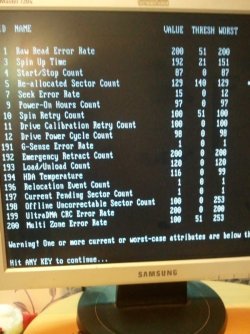
I tried with iso western digital for diagnostic and but cd and then quite test and said me take 5 minute but done in 10 second.

FxCam-errorhdd.jpg

Also why before unplug hdd i can work with it very slow but now not working. And dont wait in asus logo?
 
Last edited:

My Computer My Computer

At a glance

Windows 7 Home Premium 64bit
OS
Windows 7 Home Premium 64bit
When your VALUES number exceed the THRESHOLD number then you have got problems. ALL of your VALUES exceed the limit.

I'm afraid your hard drive is damaged.

The next test you could perform is to remove the hard drive from the laptop. Then start and go into the BIOS settings. See if the PC operates normally while you look around in there for a while (don't change any settings).

Then boot to the WD ISO on the DVD drive. It will not be able to test anything (because there is no hard drive), but just run it and see if you can navigate and everything operates normally.

An advanced test would be to download a copy of Ubuntu onto a USB stick and boot from the USB stick. Then run Ubuntu for a while.

What you are trying to determine is if it is only the hard drive that was damaged, and that damaged hard drive is causing your odd symptoms, or if you have a larger problem and something else is damaged from the drop.

Good luck!
 

My Computer My Computer

At a glance

Windows 7 64 Bit Home Premium SP1i7-3820GSkill F3-14900CL9Q - 16GBEVGA GeForce GTX660 - Driver 352.86
Computer type
PC/Desktop
Computer Manufacturer/Model Number
Home Built - Jan 2013
OS
Windows 7 64 Bit Home Premium SP1
CPU
i7-3820
Motherboard
Asus P9X79-PRO - Bios 4608
Memory
GSkill F3-14900CL9Q - 16GB
Graphics Card(s)
EVGA GeForce GTX660 - Driver 352.86
Sound Card
On board Realtek ALC898
Monitor(s) Displays
Acer S271HL
Screen Resolution
1920 x 1080
Hard Drives
#1- Samsung 840 Pro Series
#2- Western Digital WD1002FAEX Sata3 Black
#3- Western Digital WD1002FAEX Sata3 Black
PSU
Corsair CMPSU-850TX-V2 - 850 watt (by Seasonic)
Case
Corsair Obsidian 550D
Cooling
Standard 3 120mm case fans, Cooler Master Hyper 212 EVO
Keyboard
MS KC-0405
Mouse
Intellimouse 5-button
Internet Speed
56 Mbits/Sec (on a good day)
Antivirus
Avast & Malwarebytes
Browser
Firefox
Other Info
Asus DVD - DRW-24B1ST 24X
Back
Top