Hard Disk asks to initialize, shows no partitions and "Bad Disk" in PW

Bad Wolf

New member
Local time
10:08 PM
Messages
16
Hard Disk asks to initialize, shows no partitions and "Bad Disk" in PW

Hello,

This is my first post on this forum. I've used it many times before, reading about subjects I needed to know at that time, since it has very useful information! So thanks for this forum and everybody who contributes! :D

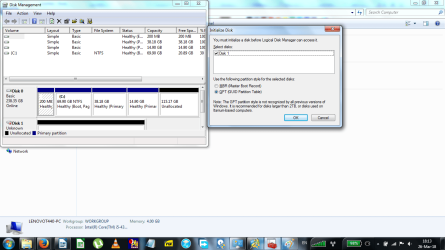
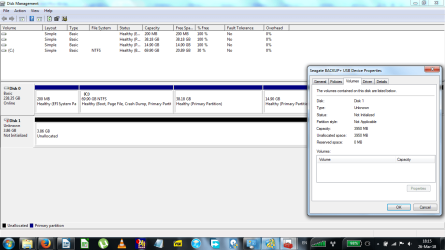
My hard disk stopped showing up in windows explorer. It does show up in BIOS and disk management as Seagate Backup Plus. In disk management it tells me to initialize the disk.
This happened after I was copying a lot of files from my hard disk to another 2 TB Seagate hard disk. Mine is 4TB. It got stuck, hanged while busy. I kind of forgot what I did exactly afterwards, any of the following, maybe a combination:
1. I terminated the process in task manager
2. I unplugged the device(s)
3. I restarted the laptop
4. (If the whole laptop was hanging, don’t really remember if that was the case) I turned it off by holding the power button.

After that the above situation happened.

Before I did any of the above things, when the process was still hanging, I could hear my HDD making some strange noises. It was not very loud, but some repeated strange soft noises. This worried me a little. I hope the hardware is not damaged, but I suppose that would still be good, since it does show up.

My HDD is also very full, and I mean very, very full. I have 4 partitions. Some partition are like full with only a few MB’s left. The one I was copying from had a few GB’s left.

Ok, so then I spend hours reading about this to try to find a solution. There were quite some things, but also a lot of things contradictory or not fully satisfactory to my opinion. I also read some threads and posts on this forum, mainly from Jumanji, which all had good info. So thanks again for this!
Since there was no definite satisfactory solution in my opinion I did not want to try things out in case I would mess it up even worse. So that’s why the thread.

From what I’ve read I think the partition table is damaged. I’ve downloaded MiniTool Partition Wizard Free v10.2. I wanted to try the “Partition Recover”, but then I read on their website that if you had a GPT disk and it now shows as MBR, which is my case, you should first change it to GPT. But my disk is not showing anything, it just says “Bad Disk”. Right mouse click is not possible and on the left side nothing is showing up, so I’m not able to change it to GPT. So I also didn’t try to Recover Partition, because I thought I might mess it up.
By the way, Disk Management says at “Partition Syle: Not applicable”

I also read Jumanji say in some posts that if PW says Bad Disk it usually is not retrievable. But then why is it showing up? Well I hope it’s not so bad.


Sorry for the longwinded question (without even a real question posted :P). But I always tend to write extensively to make the other really understand what I mean.

So the question: Can somebody help me with this? What should I do?

I am currently travelling, so I might respond a little late. Actually I usually respond a little late even when not travelling :P

I appreciate are your help, time and effort. Thanks a lot in advance!
 

Attachments
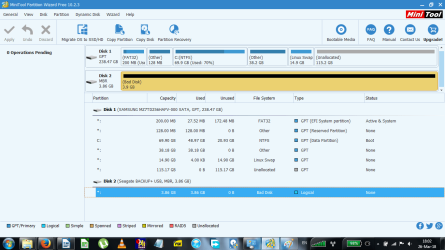
  • Bad Disk Seagate BACKUP+ in MiniTool Partition Wizard Free.png
    Bad Disk Seagate BACKUP+ in MiniTool Partition Wizard Free.png
    45.4 KB · Views: 4
  • Initialize Seagate BACKUP+ in Disk Management.png
    Initialize Seagate BACKUP+ in Disk Management.png
    66.4 KB · Views: 6
  • Unallocated Seagate BACKUP+ in Disk Management without partition style.png
    Unallocated Seagate BACKUP+ in Disk Management without partition style.png
    52.9 KB · Views: 2

My Computer My Computer

At a glance

Windows 7 Professional x64
OS
Windows 7 Professional x64
I suggest you boot into Linux Live and then try to read the hard drive from within Linux. Sometimes Linux does a better job of reading a disk than Windows does.

Although I don't think the error resulted from the drive being totally full, still, it would be good to free up some space on it. Who knows, you might get lucky from freeing up some space - the drive may start working again.

If reading the drive in Linux fixes it, great. But it may not. Your only solution might be to copy everything off of the drive, delete all of the partitions currently on it, create new partitions, and format them. (Choose "NTFS" for these two operations.) You can do the formatting and partitioning in Linux using GPARTED. Just be careful that you don't repartition your Windows drive!

Once you have fixed the drive, boot back into Windows and check it out.
 

My Computer My Computer

At a glance

Linux Mint 18.2 xfce 64-bit (VMWare host) / W...Haswell4 GB
Computer type
PC/Desktop
Computer Manufacturer/Model Number
Dell
OS
Linux Mint 18.2 xfce 64-bit (VMWare host) / Windows 8.1 Pro 32-bit (VMWare guest)
CPU
Haswell
Memory
4 GB
Monitor(s) Displays
Acer 23"
Screen Resolution
1920 x 1080
Hard Drives
Two hard drives, 1TB each: One for Linux, one for my data.
Keyboard
IBM Model M
Antivirus
Sophos (Linux), Trend Micro (Windows)
Browser
Firefox, Opera
Other Info
I use Samba to share my data drive with the other computers at my house and with my guest session in VMWare Workstation Player.
The first step is go to the makers site they normmaly have a bootable test for their drives which is specific to their drives and will tell you if the disk is faulty. Its the best tool as its made for their drive
 

My Computer My Computer

At a glance

win 8 32 bit
Computer type
PC/Desktop
OS
win 8 32 bit
Thanks for your quick replies and the info.
@mrjimphelps

I forgot to mention. I had already tried it on Ubuntu Studio, since I knew Linux sometimes handle these things better. But to no avail. I can feel it spinning, but it doesn't show up..
If there is any Ubuntu solution to this problem I would be happy to know. Any way I can fix this is highly appreciated.
You say to copy everything of the drive. But that would only be possible if it is readable right?
I have read somewhere a while ago about making a whole image of the disk so you are able to do several trials of data recovery without loosing/corrupting your data in the process. Are you talking about this?
This could be an option if nothing else works. But preferably I would like to have this disk working again, preferably in the folder structure it was. For now I also don't have money to buy a new hard disk to make a system image. Also I'm travelling at the moment. And all the other hard disks I have at home are smaller than 4TB and as far as I know you need at least the same size to do a disk image.

Another thing I forgot to mention. It is a external hard disk and I use it mainly to store data and some system images.
@samuria
Good point. I downloaded Seatools for Windows and am scanning through their manual now and read a piece on Lifewire. It seems nice :)
One thing though, not sure about it, but I think read somewhere that if you subject a (maybe) faulty drive to a diagnostic test it might overburden the drive and cause more havoc. Is this true?
Anybody any experience with Seatools? Which test should I use if I do, since it has a lot of them?
 
Last edited:

My Computer My Computer

At a glance

Windows 7 Professional x64
OS
Windows 7 Professional x64
THe makers make the tool for their drive so its perfectly safe you may also need that report if the drive is under warrenty. Its no good trying anything else until you know the results of their scan
 

My Computer My Computer

At a glance

win 8 32 bit
Computer type
PC/Desktop
OS
win 8 32 bit
It is very difficult to say what exactly happened in your case. ( It is also true in most cases and so we work mostly on presumptions and assumptions but all the while taking precautions that whatever we do we do not cause any further damage to the data. It is almost a tight ropewalking. At times we may fail to complete it too :D)

1. In this case you have been rightly advised to run Seatools and check the health of the drive. Go through the documentation on how to use it. Run the short Test and if it fails run the long test and post the results. disk 1 is unknown, not initialized, unallocated - Page 14 - Windows 7 Help Forums

2. Depending upon when your 4TB external HDD was bought, it could be an MBR drive. PW shows it as an MBR drive. So do not initialise it as a GPT drive.

3. Read the label on your 4TB Seagate External drive and post the exact model number to determine whether it is a 2.5" HDD inside or a 3.5 HDD inside. Date of Purchase? After purchasing it did you format it anytime? Is it still under warranty?
 

My Computer My Computer

At a glance

Windows 7 Home Premium 32 bit
OS
Windows 7 Home Premium 32 bit
samuria
Yes, it makes sense :)
And true about the test results needed for warranty.
jumanji
Thanks for your input :)

1. I did both tests:

Short Generic Test

--------------- SeaTools for Windows v1.4.0.6 ---------------
31-Mar-18 04:27:23
Model: BACKUP+
Serial: 07CA5434BF97
Firmware: 0304
Identify - Started 31-Mar-18 04:27:23
Identify - Started 31-Mar-18 04:31:31
Model: BACKUP+
Serial: 07CA5434BF97
Firmware: 0304
Model Number: ST4000LM016-1N2170
Serial Number: W800AZ1F
Firmware Revision: 0003
Drive Capacity: 4.14 GB / 3.86 GiB
Max LBA: 8089949
Cache Size: ----
Power-On Hours: 0
Drive Temperature (C/F): 0 / 32
WWN: 5000C5008BACA3B4
Sector size (Logical/Physical/Allignment): 512 / 512 / 0
Rotation rate: 7200 RPM
Form factor: ----
Specification Supported: ATA8-ACS
Encryption Support: Not Supported
Security Mode: Supported
SMART: Enabled
Host Protected Area features: Enabled
Advanced Power Management: Not Supported
Download Microcode: Segmented
Short DST - Started 31-Mar-18 04:34:52
Short DST - Pass 31-Mar-18 04:35:52
Short Generic - Started 31-Mar-18 04:37:39
Short Generic - FAIL 31-Mar-18 04:38:37
SeaTools Test Code: 6C9AC2A4


Seatools Long Generic Test fail code

--------------- SeaTools for Windows v1.4.0.6 ---------------
31-Mar-18 04:27:23
Model: BACKUP+
Serial: 07CA5434BF97
Firmware: 0304
Identify - Started 31-Mar-18 04:27:23
Identify - Started 31-Mar-18 04:31:31
Model: BACKUP+
Serial: 07CA5434BF97
Firmware: 0304
Model Number: ST4000LM016-1N2170
Serial Number: W800AZ1F
Firmware Revision: 0003
Drive Capacity: 4.14 GB / 3.86 GiB
Max LBA: 8089949
Cache Size: ----
Power-On Hours: 0
Drive Temperature (C/F): 0 / 32
WWN: 5000C5008BACA3B4
Sector size (Logical/Physical/Allignment): 512 / 512 / 0
Rotation rate: 7200 RPM
Form factor: ----
Specification Supported: ATA8-ACS
Encryption Support: Not Supported
Security Mode: Supported
SMART: Enabled
Host Protected Area features: Enabled
Advanced Power Management: Not Supported
Download Microcode: Segmented
Short DST - Started 31-Mar-18 04:34:52
Short DST - Pass 31-Mar-18 04:35:52
Short Generic - Started 31-Mar-18 04:37:39
Short Generic - FAIL 31-Mar-18 04:38:37
SeaTools Test Code: 6C9AC2A4
Long Generic - Started 31-Mar-18 04:58:36
Long Generic - FAIL 31-Mar-18 04:59:35
SeaTools Test Code: 6C9AC2A4


2. Bought around Jan 2015. As far as I can remember it has always been GPT. (I might be wrong though).

3. Bought around Jan 2015.
External Hard Disk info:

Seagate 4TB Backup Plus


S/N: NA7P5B0L
P/N: 1K9APV-500
Model no: SRD00F1

I think it is a 2.5". I might have formatted it, I don't remember that well. I did have 4 partitions and I think it always asks to do a format after making a partition.
Seagate's website says it has no more warranty.
 

My Computer My Computer

At a glance

Windows 7 Professional x64
OS
Windows 7 Professional x64
If it is not under warranty any longer, you can try to pullout the HDD from the enclosure, connect it directly to the motherboard SATA connector in a desktop or place it inside a working external case and check whether your HDD is OK. You may rerun Seatools and check the health of the HDD.

If it is only the SATA to USB adapter fault, the HDD may still be alright.

Seagate backup plus portable Drive SRD00F1 ST1000LM035 100809471 repair data recovery - YouTube

Seagate Expansion Portable Drive SRD00F1 Opening Uncasing - YouTube

How to open a Seagate Backup Plus Drive - YouTube

Note: If your external HDD was originally initialised as a GPT drive, you may be able to read the drive straight away. If on the other hand if your original HDD came formatted as an MBR drive, You may not be able to retrieve the data even if the HDD passed the seatools test. We may have to run TestDisk, change the sector size and then copy the data to another drive. Either way data can be recovered if the HDD (outside its enclosure) passes the Seatool test.
 
Last edited:

My Computer My Computer

At a glance

Windows 7 Home Premium 32 bit
OS
Windows 7 Home Premium 32 bit
Do you think it is a SATA to USB adapter fault? If so, on what basis?
I would prefer not to mess around with the hardware too much, e.g. opening the case. One reason being that if I do need to send it to a data recovery centre (which I hope I don't have to) they charge insanely more if the media is tampered with. I'm not sure if only opening the case is also considered tampered or not. But still they will be able to see it is messed with.

Are they any other options or possibilities?

At the moment I don't have access to a desktop. I only have a laptop with me.


I had another look at the SeaTool test results and noticed that the data is incorrect, e.g. my serial number and model are wrong. But then again, the test code also indicates that it is not able to recognize the serial number.

Shouldn't I be doing some other tests, like SMART? Or will that only damage it more/have no benefits?

And how come my laptop is able to recognize the disk if there is a hardware problem, e.g. SATA to USB adapter?
 
Last edited:

My Computer My Computer

At a glance

Windows 7 Professional x64
OS
Windows 7 Professional x64
I have in my post # 8 referenced this youtube video which lists the three possible causes Seagate backup plus portable Drive SRD00F1 ST1000LM035 100809471 repair data recovery - YouTube

Most of the time it is the SATA to USB bridge that fails - from our experience.

I do understand your reluctance to break open the case and take out the HDD for testing ( I won't do it if I consider my data so important that I wouldn't mind paying for a professional data recovery agency who are well equipped to do it). In that case it is best you entrust the work to Seagate Data Recovery partners.

( They are going to do the same thing. Unseal the case perhaps using a hot air chamber ( if it is a glue-sealed unit), try with another SATA to USB module first, if that doesn't resolve the problem, try changing the PCB which they may readily have in hand ( difficult/ near impossible to procure by the user), and if that fails, resort to data recovery procedures on the HDD itself.)

In an on-line forum like this, we can do data recovery procedures only if the bare HDD is available for running the data recovery software and if it sees it.. Any other mechanical and electronics work, one would need physical possession of the external drive and more importantly necessary jigs/tools/spares for testing.

"And how come my laptop is able to recognize the disk if there is a hardware problem, e.g. SATA to USB adapter?"

A car that you couldn't start and run --- you still recognise it as a car, don't you? Reason out :)

OK, I shall take you off any brain work. The SATA to USB bridge has many functions carried out by many chips either seperate or integrated. One part/function may fail.
 
Last edited:

My Computer My Computer

At a glance

Windows 7 Home Premium 32 bit
OS
Windows 7 Home Premium 32 bit
Thanks for your quick replies and the info.
@mrjimphelps

I forgot to mention. I had already tried it on Ubuntu Studio, since I knew Linux sometimes handle these things better. But to no avail. I can feel it spinning, but it doesn't show up..
If there is any Ubuntu solution to this problem I would be happy to know. Any way I can fix this is highly appreciated.
You say to copy everything of the drive. But that would only be possible if it is readable right?

That is correct. If you can't read it, you can't get the data off of it.

I have read somewhere a while ago about making a whole image of the disk so you are able to do several trials of data recovery without loosing/corrupting your data in the process. Are you talking about this?
This could be an option if nothing else works. But preferably I would like to have this disk working again, preferably in the folder structure it was. For now I also don't have money to buy a new hard disk to make a system image. Also I'm travelling at the moment. And all the other hard disks I have at home are smaller than 4TB and as far as I know you need at least the same size to do a disk image.

That is a smart idea - do a backup of the drive, then try various data recovery techniques on the drive. But if the drive doesn't show up, your backup software won't be able to get a backup of it. Perhaps there is some backup software that could see the drive and do a backup of it; if so, then that would be your best shot for getting the data off of the drive, that is, unless you want to pay a professional data recovery company to get the data off of the drive.

I have heard of people who use GPARTED (a Linux partitioning tool) and Partition Magic as backup tools -- they save a copy of the partition while in GPARTED or Partition Magic. If you are very careful, and you can avoid hosing or deleting the partition while in GPARTED or Partition Magic, that might be something to try...IF GPARTED or Partition Magic can see the drive.

A "bare-metal" backup program I have heard about is called "Redo Backup and Recovery" (http://redobackup.org). A bare-metal backup might be just the thing that is needed for your drive.

I have heard good things about the Terabyte imaging program (TeraByte Unlimited :: Boot Manager :: Partition Manager :: Drive Image :: Disk Copy :: Drive Wipe :: Hard Drive Utilities). They offer a 30-day free trial.

My suggestion is that you start with Redo Backup and Recovery. I've never used it, but my thought is that a bare-metal backup, independent of the OS, might be just what you need in this case in order to get the data off of the drive.
 

My Computer My Computer

At a glance

Linux Mint 18.2 xfce 64-bit (VMWare host) / W...Haswell4 GB
Computer type
PC/Desktop
Computer Manufacturer/Model Number
Dell
OS
Linux Mint 18.2 xfce 64-bit (VMWare host) / Windows 8.1 Pro 32-bit (VMWare guest)
CPU
Haswell
Memory
4 GB
Monitor(s) Displays
Acer 23"
Screen Resolution
1920 x 1080
Hard Drives
Two hard drives, 1TB each: One for Linux, one for my data.
Keyboard
IBM Model M
Antivirus
Sophos (Linux), Trend Micro (Windows)
Browser
Firefox, Opera
Other Info
I use Samba to share my data drive with the other computers at my house and with my guest session in VMWare Workstation Player.
Was this resolved? I'm having the same issue.. Jumanji please help..
 

My Computer My Computer

At a glance

Wins 8.1
Computer type
Laptop
OS
Wins 8.1
All right, thanks a lot all of you! I really, really appreciate all you time and effort! I've watched the videos. As soon as I will be back home from travelling then I will try the given options. At that time I will let you know how things are you going ;)

@yoongcy421
No this has not been resolved yet. Read the whole post and go have a try if you dare :)
 

My Computer My Computer

At a glance

Windows 7 Professional x64
OS
Windows 7 Professional x64
Allright. I'm finally home from travelling and finally had time to work on this. Again thanks for all you guys' help!

I called Seagate. They were very nice and have extended my warranty with a month, but they will only replace it with a refurbished one and not recover the data (which is normal). But my data is more important to me.

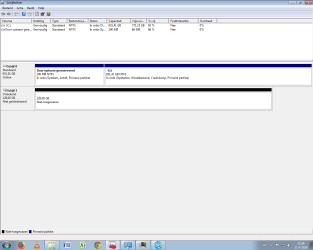
I opened my case removed the Sata to USB connector and connected it directly via Sata to the motherboard of my home desktop. But again it didn't show properly. I'm attaching the screenshots. In disk management it as unallocated. But this time as 128GB instead of 3,86GB as with casing on my laptop.
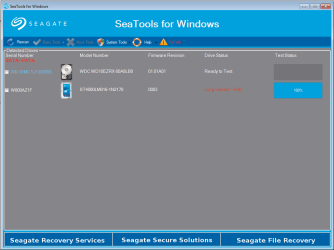
I tried both short and long generic tests of SeaTool, but both failed soon after starting them.

What does this mean and what are the next steps?
Is the PCB maybe defected? The first video Jumanji sent had a website which is selling PCBs with international free shipping. Anybody any experience with it? Is it trustworthy? Or do you recommend any other places to buy?
I live in the Netherlands (Europe).

Thanks!

Seagate in desktop via sata - diskmanagement.png

Seagate in desktop via sata - Short generic test - FAIL.png

Seagate in desktop via sata - Long generic test - FAIL.png

Seagate in desktop via sata - SeaTools Log File.png
 

My Computer My Computer

At a glance

Windows 7 Professional x64
OS
Windows 7 Professional x64
@mrjimphelps

I forgot to mention. I had already tried it on Ubuntu Studio, since I knew Linux sometimes handle these things better. But to no avail. I can feel it spinning, but it doesn't show up..
If there is any Ubuntu solution to this problem I would be happy to know. Any way I can fix this is highly appreciated.

You can log into the drive as "root", and make sure you have the permissions set to read/write. I did this just yesterday to one of my hard drives and one of my flash drives, because although I could see the drives in Linux Mint, I couldn't access them. (Mint is a derivative of Ubuntu, so whatever works in Mint should also work in Ubuntu.) Doing so made both drives accessible. I'm not at my Mint computer right now, but here's what I remember:
  • Open File Explorer.
  • In the left panel, click once on the drive to make it the current drive.
  • At the top of the window, click File then Properties.
  • You should see an option to access the drive as "root" - this gives you absolute power to do whatever you need to on the drive.
  • Enter your admin ("SUDO") password when prompted.
  • In the right panel, right click on any folder, then click on "drive permissions" (or something like that). Give the folder read/write permissions for each user listed. Click OK. Repeat for all top-level folders on the drive.
 

My Computer My Computer

At a glance

Linux Mint 18.2 xfce 64-bit (VMWare host) / W...Haswell4 GB
Computer type
PC/Desktop
Computer Manufacturer/Model Number
Dell
OS
Linux Mint 18.2 xfce 64-bit (VMWare host) / Windows 8.1 Pro 32-bit (VMWare guest)
CPU
Haswell
Memory
4 GB
Monitor(s) Displays
Acer 23"
Screen Resolution
1920 x 1080
Hard Drives
Two hard drives, 1TB each: One for Linux, one for my data.
Keyboard
IBM Model M
Antivirus
Sophos (Linux), Trend Micro (Windows)
Browser
Firefox, Opera
Other Info
I use Samba to share my data drive with the other computers at my house and with my guest session in VMWare Workstation Player.
Hello everyone again,

I'm sorry I keep bringing this thread up, but the thing is I'm quite busy and I don't always have time to try your solutions. So I appreciate the patience and your input. Thanks!

I tried it with Ubuntu to see if I could use mrjimphelps method, but the same thing as before happened: I couldn't see the disk at all. It just doesn't show up anywhere. So I am also not able to login as root.

Is there anything else I can try?

Thanks a lot you guys!
 

My Computer My Computer

At a glance

Windows 7 Professional x64
OS
Windows 7 Professional x64
Can somebody please help me with this?
Thanks a lot!
 

My Computer My Computer

At a glance

Windows 7 Professional x64
OS
Windows 7 Professional x64
On Ubuntu you don't log as Root. You launch an application (like file manager) as root.
To do it, open CMD window and type:
sudo nautilus
It will open nautilus file manager as root (highest level under Linux)
Look for the files on the problematic disk. If you can find them, copy to another disk.
 

My Computers My Computers

  • At a glance

    Windows 7 HP 64i5 6600K - 800MHz to 4200MHz4+4G GSkill DDR4 3000IG - Intel 530
    Computer type
    PC/Desktop
    Computer Manufacturer/Model Number
    custom build
    OS
    Windows 7 HP 64
    CPU
    i5 6600K - 800MHz to 4200MHz
    Motherboard
    GA-Z170-HD3P
    Memory
    4+4G GSkill DDR4 3000
    Graphics Card(s)
    IG - Intel 530
    Monitor(s) Displays
    Samsung 226BW
    Screen Resolution
    1680x1050
    Hard Drives
    (1) -1 SM951 – 128GB M.2 AHCI PCIe SSD drive for Windows 7 and Lubuntu
    (2) -1 WD SATA 3 - 1T for Data
    (3) -1 WD SATA 3 - 1T for backup
    PSU
    Thermaltake 450W TR2 gold
    Keyboard
    Old and good Chicony mechanical keyboard
    Mouse
    Logitech mX performance - 9 buttons (had to disable some)
    Internet Speed
    500Mb/s
    Browser
    Firefox 64
    Other Info
    TinyWall firewall
  • At a glance

    Windows 7 Proi7-4500U 800MHz to 3.0GHz(4+4)G DDR3 1600IG intel 4400 + NVIDIA GeForce GT 745M
    Computer type
    Laptop
    System Manufacturer/Model Number
    Asus Q550LF
    OS
    Windows 7 Pro
    CPU
    i7-4500U 800MHz to 3.0GHz
    Motherboard
    Asus Q550LF
    Memory
    (4+4)G DDR3 1600
    Graphics Card(s)
    IG intel 4400 + NVIDIA GeForce GT 745M
    Sound Card
    Realtek
    Monitor(s) Displays
    LG Display LP156WF4-SPH1
    Screen Resolution
    1920 x 1080
    Hard Drives
    BX500 120G SSD for Windows and programs +
    1T HDD for data
    Internet Speed
    500 Mb/s
    Browser
    Firefox
    Other Info
    TinyWall firewall
Bad Wolf, unfortunately everything indicates that your disk is gone.
You should always have a backup for the important files you can't loose.
On external disks, NEVER, EVER, touch or move them when plugged or heads can damage the disk surface.
 

My Computers My Computers

  • At a glance

    Windows 7 HP 64i5 6600K - 800MHz to 4200MHz4+4G GSkill DDR4 3000IG - Intel 530
    Computer type
    PC/Desktop
    Computer Manufacturer/Model Number
    custom build
    OS
    Windows 7 HP 64
    CPU
    i5 6600K - 800MHz to 4200MHz
    Motherboard
    GA-Z170-HD3P
    Memory
    4+4G GSkill DDR4 3000
    Graphics Card(s)
    IG - Intel 530
    Monitor(s) Displays
    Samsung 226BW
    Screen Resolution
    1680x1050
    Hard Drives
    (1) -1 SM951 – 128GB M.2 AHCI PCIe SSD drive for Windows 7 and Lubuntu
    (2) -1 WD SATA 3 - 1T for Data
    (3) -1 WD SATA 3 - 1T for backup
    PSU
    Thermaltake 450W TR2 gold
    Keyboard
    Old and good Chicony mechanical keyboard
    Mouse
    Logitech mX performance - 9 buttons (had to disable some)
    Internet Speed
    500Mb/s
    Browser
    Firefox 64
    Other Info
    TinyWall firewall
  • At a glance

    Windows 7 Proi7-4500U 800MHz to 3.0GHz(4+4)G DDR3 1600IG intel 4400 + NVIDIA GeForce GT 745M
    Computer type
    Laptop
    System Manufacturer/Model Number
    Asus Q550LF
    OS
    Windows 7 Pro
    CPU
    i7-4500U 800MHz to 3.0GHz
    Motherboard
    Asus Q550LF
    Memory
    (4+4)G DDR3 1600
    Graphics Card(s)
    IG intel 4400 + NVIDIA GeForce GT 745M
    Sound Card
    Realtek
    Monitor(s) Displays
    LG Display LP156WF4-SPH1
    Screen Resolution
    1920 x 1080
    Hard Drives
    BX500 120G SSD for Windows and programs +
    1T HDD for data
    Internet Speed
    500 Mb/s
    Browser
    Firefox
    Other Info
    TinyWall firewall
Hello Megahertz07,

Thanks for your reply!
I see, thanks for clearing that up. I will try that.

Yeah, I suppose so.. Yeah, you're right. I do have most of it backed up, but some new material wasn't backed up. While traveling it's sometimes a little more difficult or you have to walk around with a lot of extra weight... Pros and cons :P And this time it turned out bad. It happens.
I didn't move it. It was during a large copy with a lot of files that it hanged (see my first post). And I'm not sure if it the disk is surface is damaged, because it is not making any clicking sounds or whatever and it still shows something in partition manager (see first post).
jumanji previously said it might be the PCB. Any chance I could try that? If so, how.
 

My Computer My Computer

At a glance

Windows 7 Professional x64
OS
Windows 7 Professional x64
Back
Top